当前位置:网站首页>SkiaSharp 之 WPF 自绘 粒子花园(案例版)
SkiaSharp 之 WPF 自绘 粒子花园(案例版)
2022-08-05 03:34:00 【蓝创精英团队】
此案例包含了简单的碰撞检测,圆形碰撞检测方法,也可以说是五环弹球的升级版,具体可以根据例子参考。
粒子花园
这名字是案例的名字,效果更加具有科技感,很是不错,搞搞做成背景特效也是不错的选择。
Wpf 和 SkiaSharp
新建一个 WPF 项目,然后,Nuget 包即可
要添加 Nuget 包
Install-Package SkiaSharp.Views.WPF -Version 2.88.0
其中核心逻辑是这部分,会以我设置的 60FPS 来刷新当前的画板。
skContainer.PaintSurface += SkContainer_PaintSurface;
_ = Task.Run(() =>
{

    while (true)
    {

        try
        {

            Dispatcher.Invoke(() =>
            {

                skContainer.InvalidateVisual();
            });
            _ = SpinWait.SpinUntil(() => false, 1000 / 60);//每秒60帧
        }
        catch
        {

            break;
        }
    }
});
弹球实体代码 (Ball.cs)
public class Ball
{

    public double X {
     get; set; }
    public double Y {
     get; set; }
    public double VX {
     get; set; }
    public double VY {
     get; set; }
    public int Radius {
     get; set; }
    public int Move {
     get; set; }
    public SKColor sKColor {
     get; set; } = SKColors.Blue;
    /// <summary>
    /// 检查球的碰撞
    /// </summary>
    public static void CheckBallHit(Ball b1, Ball b2)
    {

        var dx = b2.X - b1.X;
        var dy = b2.Y - b1.Y;
        var dist = Math.Sqrt(Math.Pow(dx,2) + Math.Pow(dy, 2));
        if (dist < b1.Radius + b2.Radius)
        {

            var angle = Math.Atan2(dy, dx);
            var sin = Math.Sin(angle);
            var cos = Math.Cos(angle);

            // 以b1为参照物,设定b1的中心点为旋转基点
            double x1 = 0;
            double y1 = 0;
            var x2 = dx * cos + dy * sin;
            var y2 = dy * cos - dx * sin;

            // 旋转b1和b2的速度
            var vx1 = b1.VX * cos + b1.VY * sin;
            var vy1 = b1.VY * cos - b1.VX * sin;
            var vx2 = b2.VX * cos + b2.VY * sin;
            var vy2 = b2.VY * cos - b2.VX * sin;

            // 求出b1和b2碰撞之后的速度
            var vx1Final = ((b1.Move - b2.Move) * vx1 + 2 * b2.Move * vx2) / (b1.Move + b2.Move);
            var vx2Final = ((b2.Move - b1.Move) * vx2 + 2 * b1.Move * vx1) / (b1.Move + b2.Move);

            // 处理两个小球碰撞之后,将它们进行归位
            var lep = (b1.Radius + b2.Radius) - Math.Abs(x2 - x1);

            x1 = x1 + (vx1Final < 0 ? -lep / 2 : lep / 2);
            x2 = x2 + (vx2Final < 0 ? -lep / 2 : lep / 2);

            b2.X = b1.X + (x2 * cos - y2 * sin);
            b2.Y = b1.Y + (y2 * cos + x2 * sin);
            b1.X = b1.X + (x1 * cos - y1 * sin);
            b1.Y = b1.Y + (y1 * cos + x1 * sin);

            b1.VX = vx1Final * cos - vy1 * sin;
            b1.VY = vy1 * cos + vx1Final * sin;
            b2.VX = vx2Final * cos - vy2 * sin;
            b2.VY = vy2 * cos + vx2Final * sin;
        }
    }
}
##粒子花园核心类 (ParticleGarden.cs)
/// <summary>
/// 粒子花园
/// </summary>
public class ParticleGarden
{

    public SKPoint centerPoint;
    public double Spring = 0.0001;
    public int ParticelCount = 100;
    public List<Ball> Particles = new List<Ball>();
    public SKCanvas canvas;
    /// <summary>
    /// 渲染
    /// </summary>
    public void Render(SKCanvas canvas, SKTypeface Font, int Width, int Height)
    {

        this.canvas = canvas;
        canvas.Clear(SKColors.Black);
        centerPoint = new SKPoint(Width / 2, Height / 2);
        if (Particles.Any() == false)
        {

            for (int i = 0; i < ParticelCount; i++)
            {

                Random random = new Random((int)DateTime.Now.Ticks);
                var Length = random.Next(3, 10);
                Particles.Add(new Ball()
                {

                    X = random.Next(0, Width),
                    Y = random.Next(0, Height),
                    sKColor = SKColors.White,
                    VX = random.NextInt64(-2, 2),
                    VY = random.NextInt64(-2, 2),
                    Radius = Length,
                    Move = Length
                });
            }
        }

        //画线
        for (int i = 0; i < Particles.Count; i++)
        {

            Move(Particles[i], i, Width, Height);
        }
        //画球
        foreach (var item in Particles)
        {

            DrawCircle(canvas, item);
        }

        using var paint = new SKPaint
        {

            Color = SKColors.Blue,
            IsAntialias = true,
            Typeface = Font,
            TextSize = 24
        };
        string by = $"by 蓝创精英团队";
        canvas.DrawText(by, 600, 400, paint);
    }
    public void Move(Ball p, int i, int width, int height)
    {

        p.X += p.VX;
        p.Y += p.VY;

        for (var j = i + 1; j < Particles.Count; j++)
        {

            var target = Particles[j];
            CheckSpring(p, target, width, height);
            Ball.CheckBallHit(p, target);
        }

        if (p.X - p.Radius > width)
        {

            p.X = -p.Radius;
        }
        else if (p.X + p.Radius < 0)
        {

            p.X = width + p.Radius;
        }
        if (p.Y - p.Radius > height)
        {

            p.Y = -p.Radius;
        }
        else if (p.Y + p.Radius < 0)
        {

            p.Y = height + p.Radius;
        }
    }
    public void CheckSpring(Ball current, Ball target, int width, int height)
    {

        var dx = target.X - current.X;
        var dy = target.Y - current.Y;
        var dist = Math.Sqrt(Math.Pow(dx, 2) + Math.Pow(dy, 2));
        var minDist = width > height ? width / 10 : height / 5;
        if (dist < minDist)
        {

            DrawLine(current, target, dist, minDist);
            var ax = dx * Spring;
            var ay = dy * Spring;
            current.VX += ax / current.Move;
            current.VY += ay / current.Move;
            target.VX -= ax / target.Move;
            target.VY -= ay / target.Move;
        }
    }

    public void DrawLine(Ball current, Ball target, double dist, int minDist)
    {

        var StrokeWidth = (float)(2 * Math.Max(0, (1 - dist / minDist)));
        var Alpha = Math.Max(0, (1 - dist / minDist)) * byte.MaxValue;
        var Color = current.sKColor.WithAlpha((byte)Alpha);

        //划线
        using var LinePaint = new SKPaint
        {

            Color = Color,
            Style = SKPaintStyle.Fill,
            StrokeWidth = StrokeWidth,
            IsStroke = true,
            StrokeCap = SKStrokeCap.Round,
            IsAntialias = true
        };
        var path = new SKPath();
        path.MoveTo((float)current.X, (float)current.Y);
        path.LineTo((float)target.X, (float)target.Y);
        path.Close();
        canvas.DrawPath(path, LinePaint);
    }
    /// <summary>
    /// 画一个圆
    /// </summary>
    public void DrawCircle(SKCanvas canvas, Ball ball)
    {

        using var paint = new SKPaint
        {

            Color = ball.sKColor,
            Style = SKPaintStyle.Fill,
            IsAntialias = true,
            StrokeWidth = 2
        };
        canvas.DrawCircle((float)ball.X, (float)ball.Y, ball.Radius, paint);
    }
}
效果如下:
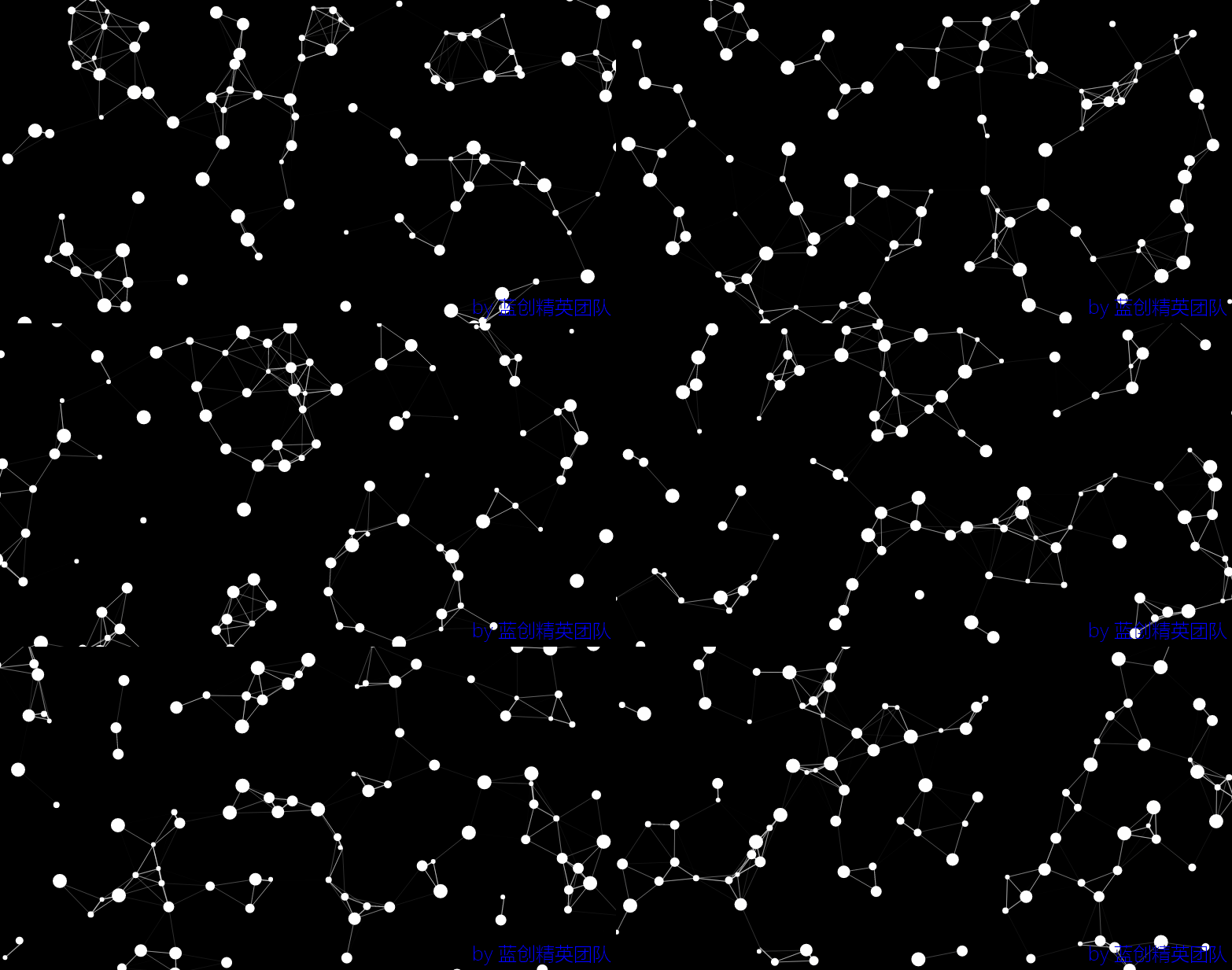
效果放大看,还是很心旷神怡的。
总结
这个特效的案例重点是碰撞检测,同时又产生了奇妙的特效效果,很是不错。
代码地址
https://github.com/kesshei/WPFSkiaParticleGardenDemo.git
https://gitee.com/kesshei/WPFSkiaParticleGardenDemo.git
阅
一键三连呦!,感谢大佬的支持,您的支持就是我的动力!
版权
蓝创精英团队(公众号同名,CSDN 同名,CNBlogs 同名)
边栏推荐
- 毕设-基于SSM房屋租赁管理系统
- ffmpeg pixel format basics
- 大佬们,我注意到mysql cdc connector有参数scan.incremental.sna
- 用CH341A烧录外挂Flash (W25Q16JV)
- 数据库设计的酸(ACID)碱(BASE)原则
- Ice Scorpion V4.0 attack, security dog products can be fully detected
- 思考(八十八):使用 protobuf 自定义选项,做数据多版本管理
- 【七夕节】浪漫七夕,代码传情。将爱意变成绚烂的立体场景,给她(他)一个惊喜!(送代码)
- 运维监控系统之Open-Falcon
- AI + Small Nucleic Acid Drugs | Eleven Completes $22 Million Seed Round Financing
猜你喜欢
冒泡排序与快速排序

UE4 后期处理体积 (角色受到伤害场景颜色变淡案例)
Growth-based checkerboard corner detection method
BI业务分析思维:现金流量风控分析(二)信用、流动和投资风险
UE4 在游戏运行时更改变量 (通过鼠标滑轮来更改第一人称角色的最大行走速度)
Defect detection (image processing part)
Beyond YOLO5-Face | YOLO-FaceV2 officially open source Trick+ academic point full
![[Paper Notes] MapReduce: Simplified Data Processing on Large Clusters](/img/89/8adef42b0cfd154e6fa7205afaeade.png)
[Paper Notes] MapReduce: Simplified Data Processing on Large Clusters
Kubernetes 网络入门

Why did they choose to fall in love with AI?
随机推荐
ASP.NET应用程序--Hello World
调用阿里云oss和sms服务
为什么pca分量没有关联
Slapped in the face: there are so many testers in a certain department of byte
UE4 第一人称角色模板 添加生命值和调试伤害
public static
List asList(T... a) What is the prototype? 2022-08-04T17:50:58.296+0800 ERROR Announcer-3 io.airlift.discovery.client.Announcer appears after successful startup of presto
Redis key basic commands
Static method to get configuration file data
2022.8.4-----leetcode.1403
引领数字医学高地,中山医院探索打造未来医院“新范式”
关于#SQL#的迭代、父子结构查询问题,如何解决?
大佬们,我注意到mysql cdc connector有参数scan.incremental.sna
token、jwt、oauth2、session解析
iMedicalLIS监听程序(2)
新人如何入门和学习软件测试?
Android 面试题——如何徒手写一个非阻塞线程安全队列 ConcurrentLinkedQueue?
High Item 02 Information System Project Management Fundamentals
shell脚本:for循环与while循环
36-Jenkins-Job迁移