当前位置:网站首页>Qt官方示例:Qt Quick Controls - Gallery
Qt官方示例:Qt Quick Controls - Gallery
2022-07-02 16:38:00 【友善啊,朋友】
这个示例演示常用的Qt Quick控件。
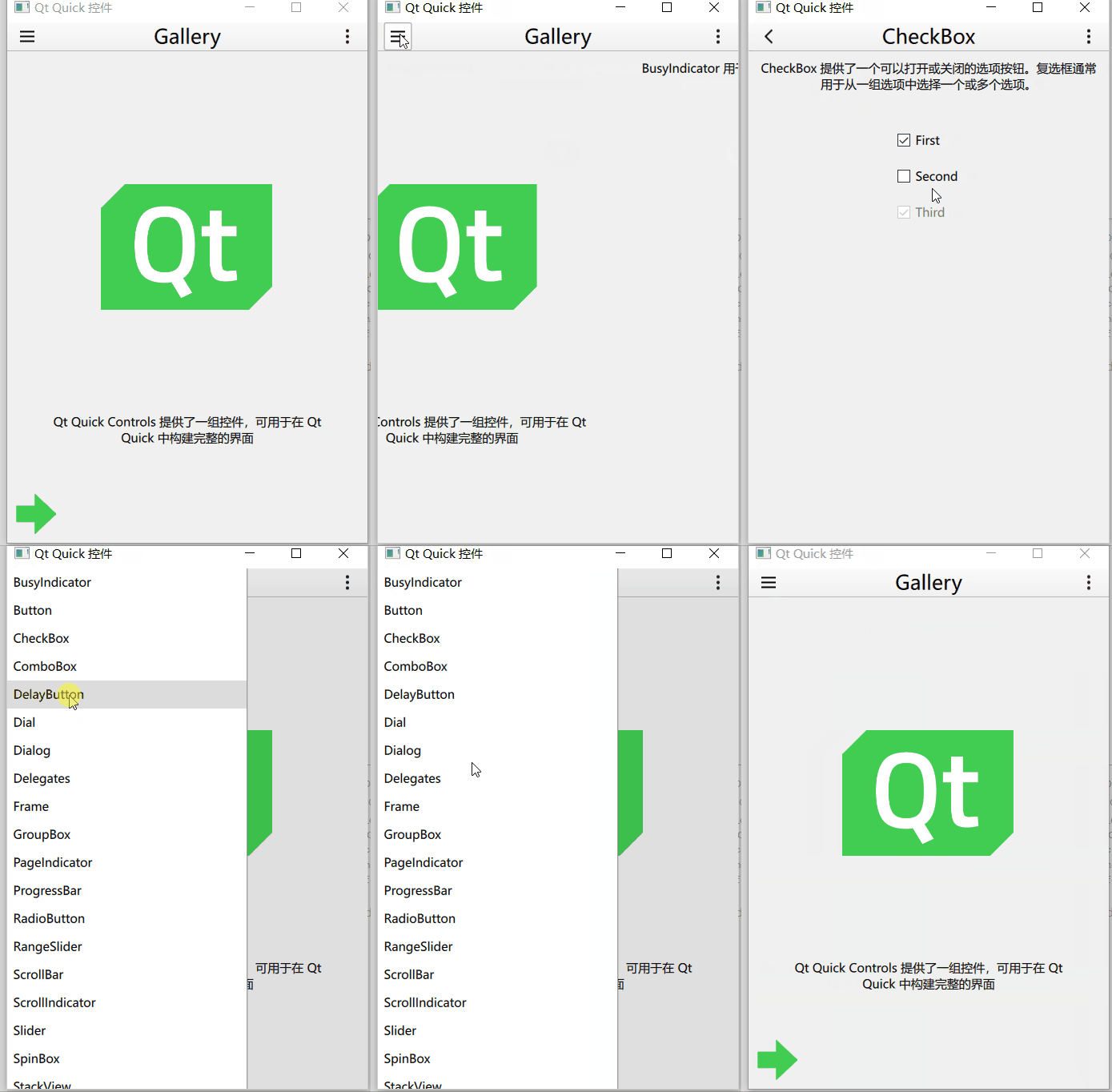
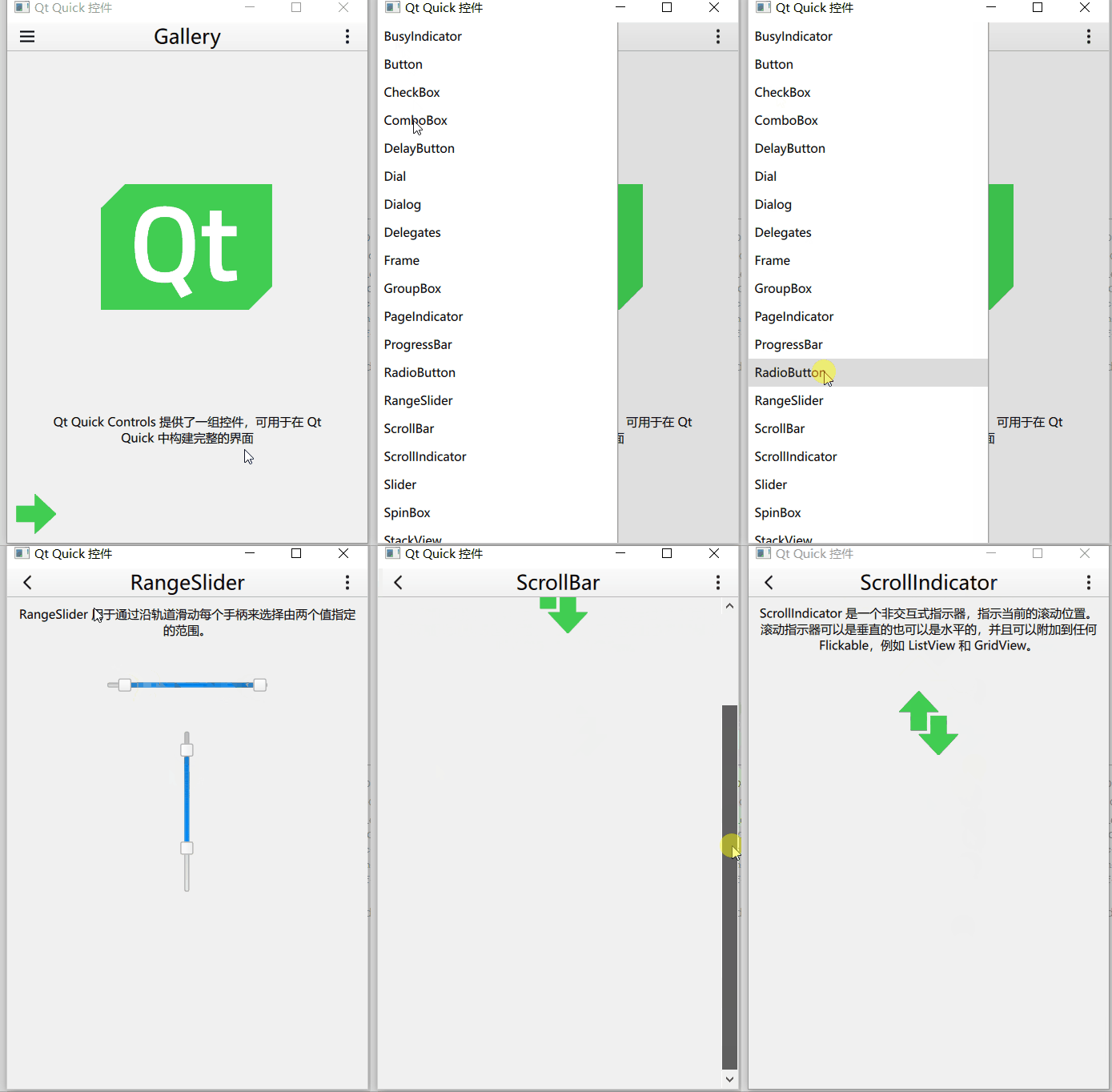
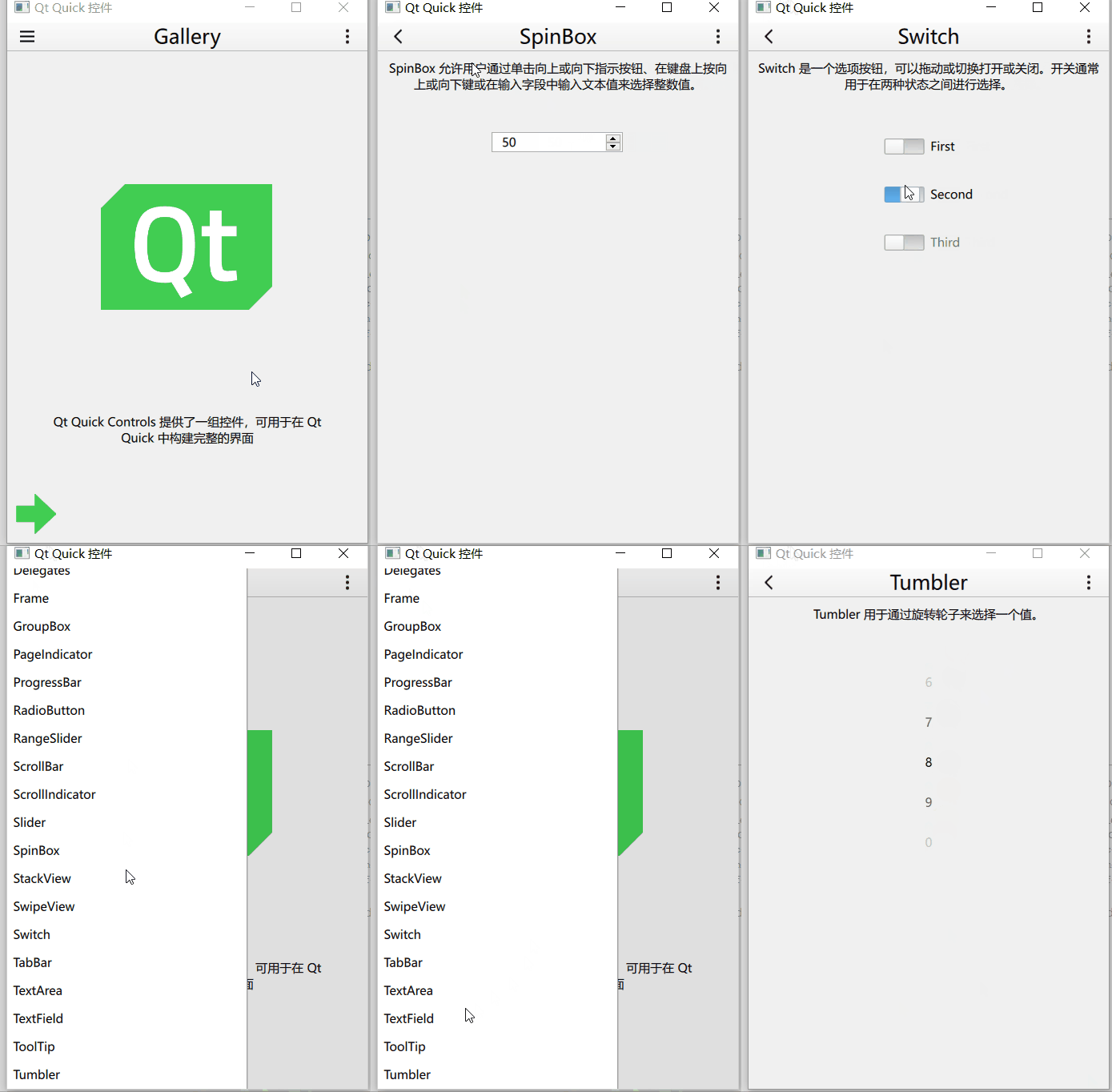
主窗口代码:
import QtQuick
import QtQuick.Layouts
import QtQuick.Controls
import Qt.labs.settings

import "." as App

ApplicationWindow
{
    id: window
    width: 360
    height: 520
    visible: true
    title: "Qt Quick 控件"

    function help()
    {
        let displayingControl = listView.currentIndex !== -1
        let currentControlName = displayingControl
            ? listView.model.get(listView.currentIndex).title.toLowerCase() : ""
        let url = "https://doc.qt.io/qt-5/" + (displayingControl ? "qml-qtquick-controls2-" + currentControlName + ".html"
                                                                 : "qtquick-controls2-qmlmodule.html");
        Qt.openUrlExternally(url)
    }

    required property var builtInStyles

    Settings
    {
        id: settings
        property string style
    }

    Shortcut
    {
        sequences: ["Esc", "Back"]
        enabled: stackView.depth > 1
        onActivated: navigateBackAction.trigger()
    }

    Shortcut
    {
        sequence: StandardKey.HelpContents
        onActivated: help()
    }

    Action
    {
        id: navigateBackAction
        icon.name: stackView.depth > 1 ? "back" : "drawer"
        onTriggered:
        {
            if (stackView.depth > 1)
            {
                stackView.pop()
                listView.currentIndex = -1
            } else {
                drawer.open()
            }
        }
    }

    Shortcut
    {
        sequence: "Menu"
        onActivated: optionsMenuAction.trigger()
    }

    Action
    {
        id: optionsMenuAction
        icon.name: "menu"
        onTriggered: optionsMenu.open()
    }

    header: ToolBar
    {
        RowLayout
        {
            spacing: 20
            anchors.fill: parent

            ToolButton
            {
                action: navigateBackAction
            }

            Label
            {
                id: titleLabel
                text: listView.currentItem ? listView.currentItem.text : "Gallery"
                font.pixelSize: 20
                elide: Label.ElideRight
                horizontalAlignment: Qt.AlignHCenter
                verticalAlignment: Qt.AlignVCenter
                Layout.fillWidth: true
            }

            ToolButton
            {
                action: optionsMenuAction

                Menu
                {
                    id: optionsMenu
                    x: parent.width - width
                    transformOrigin: Menu.TopRight

                    Action
                    {
                        text: "设置"
                        onTriggered: settingsDialog.open()
                    }
                    Action
                    {
                        text: "帮助"
                        onTriggered: help()
                    }
                    Action
                    {
                        text: "关于"
                        onTriggered: aboutDialog.open()
                    }
                }
            }
        }
    }

    Drawer
    {
        id: drawer
        width: Math.min(window.width, window.height) / 3 * 2
        height: window.height
        interactive: stackView.depth === 1

        ListView
        {
            id: listView

            focus: true
            currentIndex: -1
            anchors.fill: parent

            delegate: ItemDelegate
            {
                width: listView.width
                text: model.title
                highlighted: ListView.isCurrentItem
                onClicked:
                {
                    listView.currentIndex = index
                    stackView.push(model.source)
                    drawer.close()
                }
            }

            model: ListModel
            {
                ListElement { title: "BusyIndicator"; source: "qrc:/pages/BusyIndicatorPage.qml" }
                ListElement { title: "Button"; source: "qrc:/pages/ButtonPage.qml" }
                ListElement { title: "CheckBox"; source: "qrc:/pages/CheckBoxPage.qml" }
                ListElement { title: "ComboBox"; source: "qrc:/pages/ComboBoxPage.qml" }
                ListElement { title: "DelayButton"; source: "qrc:/pages/DelayButtonPage.qml" }
                ListElement { title: "Dial"; source: "qrc:/pages/DialPage.qml" }
                ListElement { title: "Dialog"; source: "qrc:/pages/DialogPage.qml" }
                ListElement { title: "Delegates"; source: "qrc:/pages/DelegatePage.qml" }
                ListElement { title: "Frame"; source: "qrc:/pages/FramePage.qml" }
                ListElement { title: "GroupBox"; source: "qrc:/pages/GroupBoxPage.qml" }
                ListElement { title: "PageIndicator"; source: "qrc:/pages/PageIndicatorPage.qml" }
                ListElement { title: "ProgressBar"; source: "qrc:/pages/ProgressBarPage.qml" }
                ListElement { title: "RadioButton"; source: "qrc:/pages/RadioButtonPage.qml" }
                ListElement { title: "RangeSlider"; source: "qrc:/pages/RangeSliderPage.qml" }
                ListElement { title: "ScrollBar"; source: "qrc:/pages/ScrollBarPage.qml" }
                ListElement { title: "ScrollIndicator"; source: "qrc:/pages/ScrollIndicatorPage.qml" }
                ListElement { title: "Slider"; source: "qrc:/pages/SliderPage.qml" }
                ListElement { title: "SpinBox"; source: "qrc:/pages/SpinBoxPage.qml" }
                ListElement { title: "StackView"; source: "qrc:/pages/StackViewPage.qml" }
                ListElement { title: "SwipeView"; source: "qrc:/pages/SwipeViewPage.qml" }
                ListElement { title: "Switch"; source: "qrc:/pages/SwitchPage.qml" }
                ListElement { title: "TabBar"; source: "qrc:/pages/TabBarPage.qml" }
                ListElement { title: "TextArea"; source: "qrc:/pages/TextAreaPage.qml" }
                ListElement { title: "TextField"; source: "qrc:/pages/TextFieldPage.qml" }
                ListElement { title: "ToolTip"; source: "qrc:/pages/ToolTipPage.qml" }
                ListElement { title: "Tumbler"; source: "qrc:/pages/TumblerPage.qml" }
            }

            ScrollIndicator.vertical: ScrollIndicator { }
        }
    }

    StackView
    {
        id: stackView
        anchors.fill: parent

        initialItem: Pane
        {
            id: pane

            Image
            {
                id: logo
                width: pane.availableWidth / 2
                height: pane.availableHeight / 2
                anchors.centerIn: parent
                anchors.verticalCenterOffset: -50
                fillMode: Image.PreserveAspectFit
                source: "images/qt-logo.png"
            }

            Label
            {
                text: "Qt Quick Controls 提供了一组控件,可用于在 Qt Quick 中构建完整的界面"
                anchors.margins: 20
                anchors.top: logo.bottom
                anchors.left: parent.left
                anchors.right: parent.right
                anchors.bottom: arrow.top
                horizontalAlignment: Label.AlignHCenter
                verticalAlignment: Label.AlignVCenter
                wrapMode: Label.Wrap
            }

            Image
            {
                id: arrow
                source: "images/arrow.png"
                anchors.left: parent.left
                anchors.bottom: parent.bottom
            }
        }
    }

    Dialog
    {
        id: settingsDialog
        x: Math.round((window.width - width) / 2)
        y: Math.round(window.height / 6)
        width: Math.round(Math.min(window.width, window.height) / 3 * 2)
        modal: true
        focus: true
        title: "Settings"

        standardButtons: Dialog.Ok | Dialog.Cancel
        onAccepted:
        {
            settings.style = styleBox.displayText
            settingsDialog.close()
        }
        onRejected:
        {
            styleBox.currentIndex = styleBox.styleIndex
            settingsDialog.close()
        }

        contentItem: ColumnLayout
        {
            id: settingsColumn
            spacing: 20

            RowLayout
            {
                spacing: 10

                Label
                {
                    text: "Style:"
                }

                ComboBox
                {
                    id: styleBox
                    property int styleIndex: -1
                    model: window.builtInStyles
                    Component.onCompleted:
                    {
                        styleIndex = find(settings.style, Qt.MatchFixedString)
                        if (styleIndex !== -1)
                            currentIndex = styleIndex
                    }
                    Layout.fillWidth: true
                }
            }

            Label
            {
                text: "Restart required"
                color: "#e41e25"
                opacity: styleBox.currentIndex !== styleBox.styleIndex ? 1.0 : 0.0
                horizontalAlignment: Label.AlignHCenter
                verticalAlignment: Label.AlignVCenter
                Layout.fillWidth: true
                Layout.fillHeight: true
            }
        }
    }

    Dialog
    {
        id: aboutDialog
        modal: true
        focus: true
        title: "About"
        x: (window.width - width) / 2
        y: window.height / 6
        width: Math.min(window.width, window.height) / 3 * 2
        contentHeight: aboutColumn.height

        Column
        {
            id: aboutColumn
            spacing: 20

            Label
            {
                width: aboutDialog.availableWidth
                text: "Qt Quick Controls 模块提供了基于 Qt Quick 的下一代用户界面控件。"
                wrapMode: Label.Wrap
                font.pixelSize: 12
            }

            Label
            {
                width: aboutDialog.availableWidth
                text: "与 Qt Quick Controls 1 相比,Qt Quick Controls 更简单、更轻量级、更快"
                wrapMode: Label.Wrap
                font.pixelSize: 12
            }
        }
    }
}
界面结构:
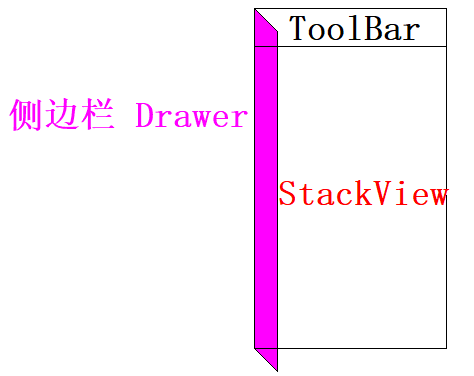
左边的侧面板
    Drawer
    {
        id: drawer
        width: Math.min(window.width, window.height) / 3 * 2
        height: window.height
        interactive: stackView.depth === 1

        ListView
        {
            id: listView

            focus: true
            currentIndex: -1
            anchors.fill: parent

            delegate: ItemDelegate
            {
                width: listView.width
                text: model.title
                highlighted: ListView.isCurrentItem
                onClicked:
                {
                    listView.currentIndex = index
                    stackView.push(model.source)
                    drawer.close()
                }
            }

            model: ListModel
            {
                ListElement { title: "BusyIndicator"; source: "qrc:/pages/BusyIndicatorPage.qml" }
                ListElement { title: "Button"; source: "qrc:/pages/ButtonPage.qml" }
                ListElement { title: "CheckBox"; source: "qrc:/pages/CheckBoxPage.qml" }
                ListElement { title: "ComboBox"; source: "qrc:/pages/ComboBoxPage.qml" }
                ListElement { title: "DelayButton"; source: "qrc:/pages/DelayButtonPage.qml" }
                ListElement { title: "Dial"; source: "qrc:/pages/DialPage.qml" }
                ListElement { title: "Dialog"; source: "qrc:/pages/DialogPage.qml" }
                ListElement { title: "Delegates"; source: "qrc:/pages/DelegatePage.qml" }
                ListElement { title: "Frame"; source: "qrc:/pages/FramePage.qml" }
                ListElement { title: "GroupBox"; source: "qrc:/pages/GroupBoxPage.qml" }
                ListElement { title: "PageIndicator"; source: "qrc:/pages/PageIndicatorPage.qml" }
                ListElement { title: "ProgressBar"; source: "qrc:/pages/ProgressBarPage.qml" }
                ListElement { title: "RadioButton"; source: "qrc:/pages/RadioButtonPage.qml" }
                ListElement { title: "RangeSlider"; source: "qrc:/pages/RangeSliderPage.qml" }
                ListElement { title: "ScrollBar"; source: "qrc:/pages/ScrollBarPage.qml" }
                ListElement { title: "ScrollIndicator"; source: "qrc:/pages/ScrollIndicatorPage.qml" }
                ListElement { title: "Slider"; source: "qrc:/pages/SliderPage.qml" }
                ListElement { title: "SpinBox"; source: "qrc:/pages/SpinBoxPage.qml" }
                ListElement { title: "StackView"; source: "qrc:/pages/StackViewPage.qml" }
                ListElement { title: "SwipeView"; source: "qrc:/pages/SwipeViewPage.qml" }
                ListElement { title: "Switch"; source: "qrc:/pages/SwitchPage.qml" }
                ListElement { title: "TabBar"; source: "qrc:/pages/TabBarPage.qml" }
                ListElement { title: "TextArea"; source: "qrc:/pages/TextAreaPage.qml" }
                ListElement { title: "TextField"; source: "qrc:/pages/TextFieldPage.qml" }
                ListElement { title: "ToolTip"; source: "qrc:/pages/ToolTipPage.qml" }
                ListElement { title: "Tumbler"; source: "qrc:/pages/TumblerPage.qml" }
            }

            ScrollIndicator.vertical: ScrollIndicator { }
        }
    }
中间放置一个列表视图,视图有一个垂直的指示器。
当按下视图中的项目时,对应的页面进入栈视图。
点击工具栏中左边的按钮时,当前页面出栈:
    Action
    {
        id: navigateBackAction
        icon.name: stackView.depth > 1 ? "back" : "drawer"
        onTriggered:
        {
            if (stackView.depth > 1)
            {
                stackView.pop()
                listView.currentIndex = -1
            } else {
                drawer.open()
            }
        }
    }
切换主题功能
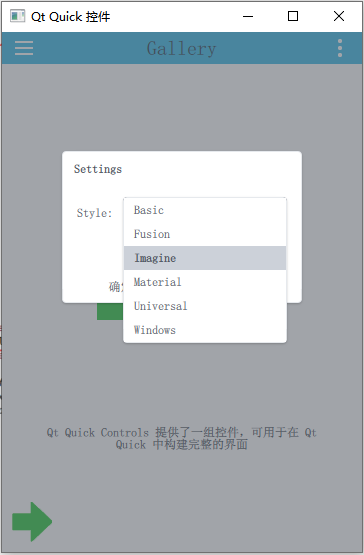

在载入主界面的qml文件时赋予初始化属性。

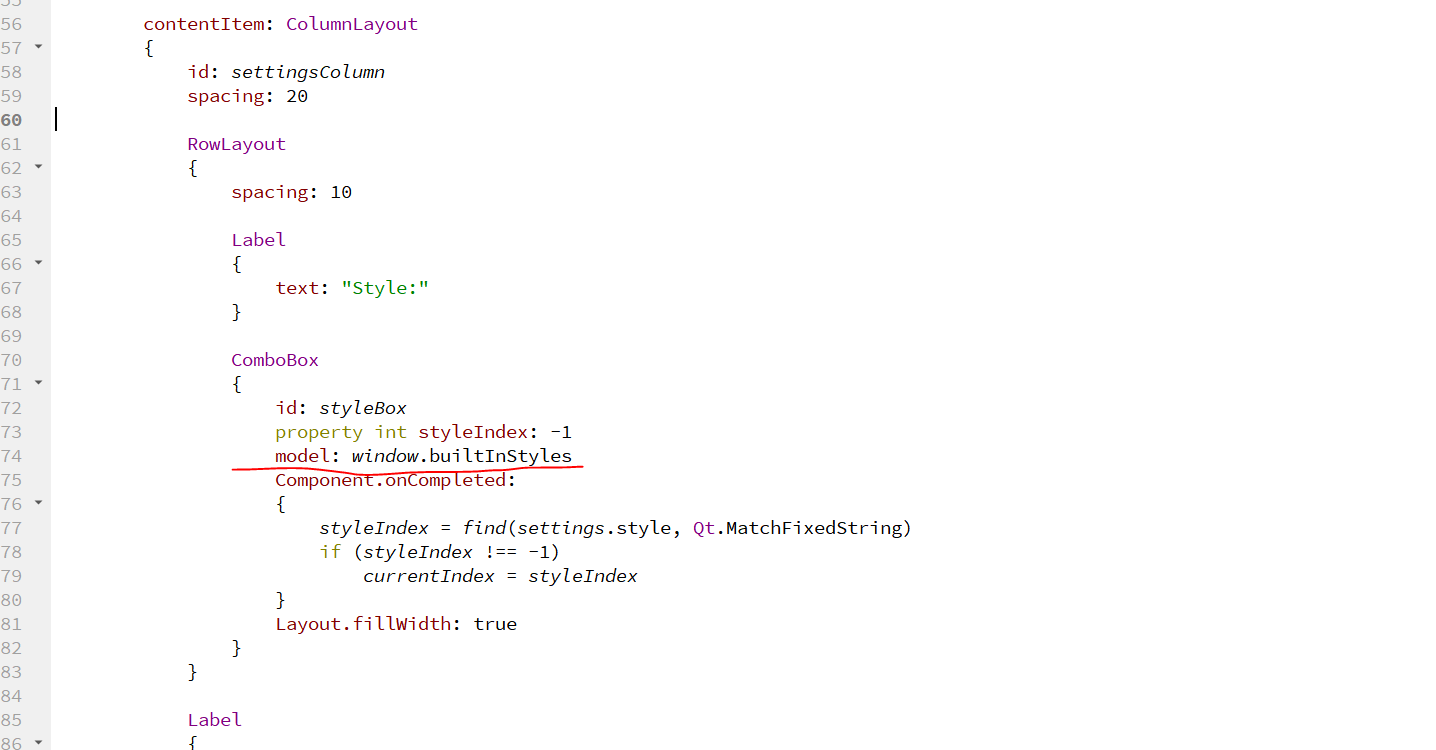
这个示例能值得一说的点就这些。
涉及到的类型和知识点:
- Settings
- Shortcut
- Action
- ToolButton
- Label
- Menu
- Drawer
- ListView
- StackView
- Pane
- Dialog
- ComboBox
- Page
- Flickable
- BusyIndicator
- Button
- CheckBox
- DelayButton
- SwipeDelegate
- CheckDelegate
- ItemDelegate
- RadioDelegate
- SwitchDelegate
- 委托的移除动画
- ButtonGroup
- Frame
- RadioButton
- GroupBox
- PageIndicator
- ProgressBar
- RangeSlider
- ScrollIndicator
- ScrollBar
- Slider
- SpinBox
- SwipeView
- Switch
- TabBar
- TabButton
- TextArea
- TextField
- ToolTip
- Tumbler
边栏推荐
- Vimium mapping key
- MySQL --- 数据库的基本操作
- Turn off the xshell connection server and the running jar package will stop automatically
- 2020互联网行业术语
- Architecture design - ID generator "suggestions collection"
- Explain kubernetes network model in detail
- MySQL -- basic operation of database
- Is Guojin securities a state-owned enterprise? Is it safe to open an account in Guojin securities?
- aloam 代码阅读与总结
- qt的内存映射
猜你喜欢
微信小程序视频分享平台系统毕业设计毕设(6)开题答辩PPT

开发一个禁止删除namespace的控制器

一个优秀程序员可抵五个普通程序员!

【Zuul】com. netflix. zuul. exception. ZuulException: Hystrix Readed time out

Mysql - opérations de base de la base de données
Ora-19838 -- restore control files to the standby database

求求你们,别再刷 Star 了!这跟“爱国”没关系!
微信核酸检测预约小程序系统毕业设计毕设(3)后台功能

Editor Editor Extension add button and logo in scene view
Yingguang single chip microcomputer development specification pmc131 with AD chip to detect battery voltage single chip microcomputer sop8/14
随机推荐
NVIDIA graphics card failed to initialize nvml driver/library version mismatch error solution
利用DOSBox运行汇编超详细步骤「建议收藏」
977. Square of ordered array
A4988与42步进电机
把xshell連接服務器關掉,運行的jar包就自動停止的解决方案
Export Excel files using npoi
Mb10m-asemi rectifier bridge mb10m
Vimium mapping key
Huimang micro IO MCU ft60f011a-rb
Typescript
Memory mapping of QT
Songhan sn8p2511 sop8 single chip microcomputer can be used for burning, providing single chip microcomputer scheme development and single chip microcomputer decryption
Typescript
Experience Alibaba cloud character recognition OCR
Win10 uninstall CUDA
微信小程序视频分享平台系统毕业设计毕设(8)毕业设计论文模板
Aptos教程-参与官方激励测试网(AIT2 激励测试网)
Solution pour arrêter automatiquement les paquets Jar en cours d'exécution en éteignant le serveur de connexion xshell
Use dosbox to run the assembly super detailed step "suggestions collection"
The price is only 40 yuan. Pico development board of raspberry pie is added with WiFi module, and it is out of stock as soon as it comes into the market