当前位置:网站首页>Mycat's master-slave relationship, vertical sub-database, horizontal sub-table, and detailed configuration of mycat fragmented table query (mysql5.7 series)
Mycat's master-slave relationship, vertical sub-database, horizontal sub-table, and detailed configuration of mycat fragmented table query (mysql5.7 series)
2022-07-31 02:46:00 【fascinated*】
主从关系
Prepare three different setsip的虚拟机
(第一批)The configuration of the master-slave relationship
主192.168.47.131 配置/etc/my.cnf,在【mysqld】下配置
log-error=/var/log/mysqld.log
pid-file=/var/run/mysqld/mysqld.pid
Then configure it here
server-id=1
log-bin=/var/lib/mysql/mysqlbin
read-only=0
binlog-ignore-db=mysql
从192.168.47.132 配置/etc/my.cnf,在【mysqld】下配置,master-slave relationshipid不一致(切记)
log-error=/var/log/mysqld.log
pid-file=/var/run/mysqld/mysqld.pid
Then configure it here
server-id=2
log-bin=/var/lib/mysql/mysqlbin
设置读写分离balance=3,Will read the requestwritehost对应的标签readhost上,The data in the database slave table is inconsistent with the master table,springbootwill read the data from the table Because the slave table is a read operation
Check the master node status on the master terminal
mysql> show master status;
+-----------------+----------+--------------+------------------+-------------------+
| File            | Position | Binlog_Do_DB | Binlog_Ignore_DB | Executed_Gtid_Set |
+-----------------+----------+--------------+------------------+-------------------+
| mysqlbin.000003 |     2168 |              | mysql            |                   |
+-----------------+----------+--------------+------------------+-------------------+
Set the master-slave relationship on the slave terminal
mysql> change master to master_host= '192.168.47.131', master_user='root', master_password='123456', master_log_file='mysqlbin.000003', master_log_pos=2168;
Query OK, 0 rows affected, 8 warnings (0.00 sec)
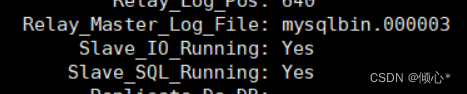
运行show slave status\G;
可看到yes yes Both must be Otherwise, the master and slave are not configured
常用命令
开启主从关系 start slave;
关闭主从关系 stop slave;
重置主节点 reset master;
View the status of the master-slave relationship show slave status\G;
Configuration of vertical sub-libraries
To avoid too many virtual machines Stop the master-slave relationship stop slave;
(第一批)Configuration of vertical sub-libraries
scehma.xml

<?xml version="1.0"?>
<!DOCTYPE mycat:schema SYSTEM "schema.dtd">
<mycat:schema xmlns:mycat="http://io.mycat/">

     <!-- schemaLabels that define the library  name:The name of the library dataNode:Represents the node name associated with the library -->
	<schema name="TESTDB" checkSQLschema="true" sqlMaxLimit="100" dataNode="dn1">
		<table name="customer" dataNode="dn2"></table>
	</schema>
	<!-- dataNode:定义节点 name:The node name must be the same as aboveschema的dataNode值保持一致 dataNode:The associated hostname
	      database:The actual database name associated with it
	 -->
	<dataNode name="dn1" dataHost="host1" database="my_order" />
	<dataNode name="dn2" dataHost="host2" database="my_consumer" />
	<!-- name:数据主机的名称 -->
	<dataHost name="host1" maxCon="1000" minCon="10" balance="0"
			  writeType="0" dbType="mysql" dbDriver="native" switchType="1"  slaveThreshold="100">
		<!-- According to the heartbeat mechanism to determine whether the real database is running normally-->
		<heartbeat>select user()</heartbeat>
		<!-- Configure the information for the master node -->
		<writeHost host="hostM1" url="192.168.47.131:3306" user="root"
				   password="123456">

		</writeHost>
		<!-- <writeHost host="hostM2" url="localhost:3316" user="root" password="123456"/> -->
	</dataHost>

	<dataHost name="host2" maxCon="1000" minCon="10" balance="3"
			  writeType="0" dbType="mysql" dbDriver="native" switchType="1"  slaveThreshold="100">
		<!-- According to the heartbeat mechanism to determine whether the real database is running normally-->
		<heartbeat>select user()</heartbeat>
		<!-- Configure the information for the master node -->
		<writeHost host="hostM1" url="192.168.47.132:3306" user="root"
				   password="123456">

		</writeHost>
	</dataHost>
</mycat:schema>
测试垂直分库
mysql> use TESTDB;
Reading table information for completion of table and column names
You can turn off this feature to get a quicker startup with -A

Database changed
mysql> show databases;
+----------+
| DATABASE |
+----------+
| TESTDB   |
+----------+
1 row in set (0.00 sec)

mysql> CREATE TABLE customer(
    ->  id INT AUTO_INCREMENT,
    ->  NAME VARCHAR(200),
    ->  PRIMARY KEY(id)
    -> );
Query OK, 0 rows affected (0.08 sec)

mysql> CREATE TABLE orders(
    ->  id INT AUTO_INCREMENT,
    ->  order_type INT,
    ->  customer_id INT,
    ->  amount DECIMAL(10,2),
    ->  PRIMARY KEY(id)
    -> );
Query OK, 0 rows affected (0.01 sec)

mysql> CREATE TABLE orders_detail(
    ->  id INT AUTO_INCREMENT,
    ->  detail VARCHAR(2000),
    ->  order_id INT,
    ->  PRIMARY KEY(id)
    -> );
Query OK, 0 rows affected (0.02 sec)

mysql> CREATE TABLE dict_order_type(
    ->  id INT AUTO_INCREMENT,
    ->  order_type VARCHAR(200),
    ->  PRIMARY KEY(id)
    -> );
Query OK, 0 rows affected (0.01 sec)

mysql> select *from customer;
Empty set (0.05 sec)

mysql> select *from orders;
Empty set (0.00 sec)
Sub-table completed 在不同的数据库中
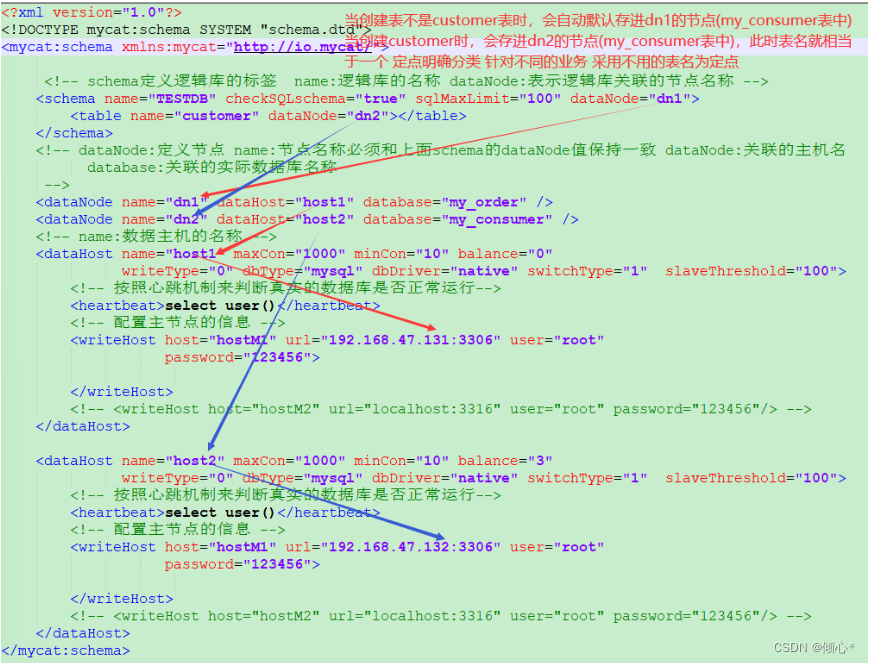
Detailed vertical configuration details
水平分库
mysqlThere is a limit to the number of records stored in a single table 最大达到10000条 那么如何在10000After the bar, continue to continue the data in the table 使用mycat进行水平分表 When the number of entries in a table is limited The number of entries of the same data field table can be continued in other databases Perform horizontal splitting if there is data in the table10000条 Then there is a table in another database when split horizontally5000条 这就是水平拆分
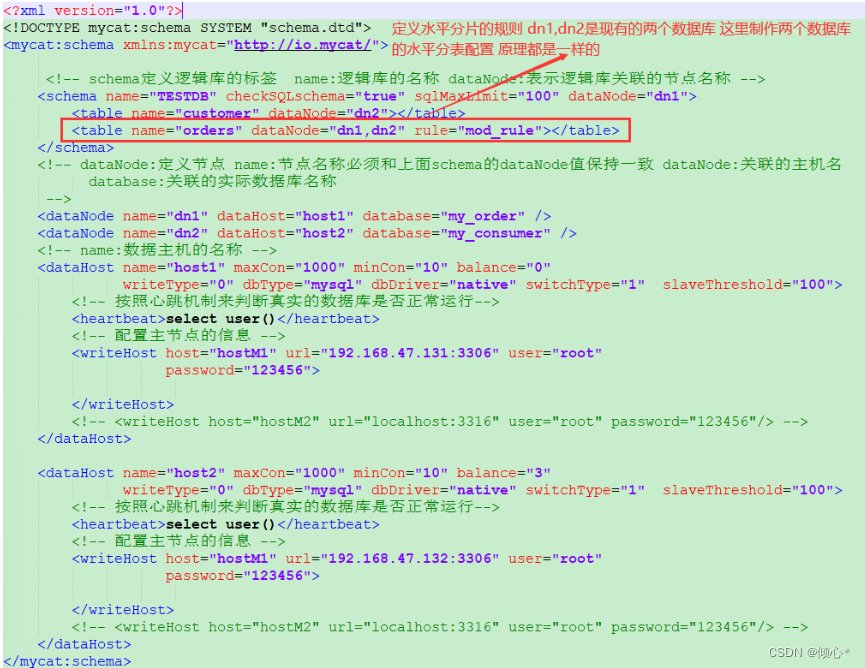
总节点数(有多少个数据库)number of customersid取余 余数为0在一个表 余数为1in another table
在schema.xml中配置
在rule.xml文件中配置
<tableRule name="mod_rule">
		<rule>
            #以customer_idThe most horizontal split table standard
			<columns>customer_id</columns>
			<algorithm>mod-long</algorithm>
		</rule>
	</tableRule>
<function name="mod-long" class="io.mycat.route.function.PartitionByMod">
<!-- how many data nodes -->
<property name="count">2</property>
#此处count=2It can be changed according to the current business volume
</function>You want to split the data in the table horizontally This database will create a table with the same fields as the split table
Insert statements without fields cannot be made,否则会报错
mysql> INSERT INTO orders VALUES (1,101,100,100100);
ERROR 1064 (HY000): partition table, insert must provide ColumnList
正确操作
[[email protected] ~]# mysql -umycat -p123456 -P 8066 -h192.168.47.133
mysql> use TESTDB;
Reading table information for completion of table and column names
You can turn off this feature to get a quicker startup with -A

Database changed
mysql> SHOW TABLES;
+--------------------+
| Tables_in_my_order |
+--------------------+
| customer           |
| orders             |
| dict_order_type    |
| orders_detail      |
+--------------------+
4 rows in set (0.01 sec)

mysql> INSERT INTO orders(id,order_type,customer_id,amount) VALUES (1,101,100,100100);
(id,order_type,customer_id,amount) VALUES(4,101,101,103000);
INSERT INTO orders(id,order_type,customer_id,amount) VALUES(5,102,101,100400);
INSERT INTO orders(id,order_type,customer_id,amount) VALUES(6,102,100,100020);Query OK, 1 row affected (0.08 sec)

mysql> INSERT INTO orders(id,order_type,customer_id,amount) VALUES(2,101,100,100300);
Query OK, 1 row affected (0.02 sec)

mysql> INSERT INTO orders(id,order_type,customer_id,amount) VALUES(3,101,101,120000);
Query OK, 1 row affected (0.01 sec)

mysql> INSERT INTO orders(id,order_type,customer_id,amount) VALUES(4,101,101,103000);
Query OK, 1 row affected (0.01 sec)

mysql> INSERT INTO orders(id,order_type,customer_id,amount) VALUES(5,102,101,100400);
Query OK, 1 row affected (0.01 sec)

mysql> INSERT INTO orders(id,order_type,customer_id,amount) VALUES(6,102,100,100020);
Query OK, 1 row affected (0.01 sec)
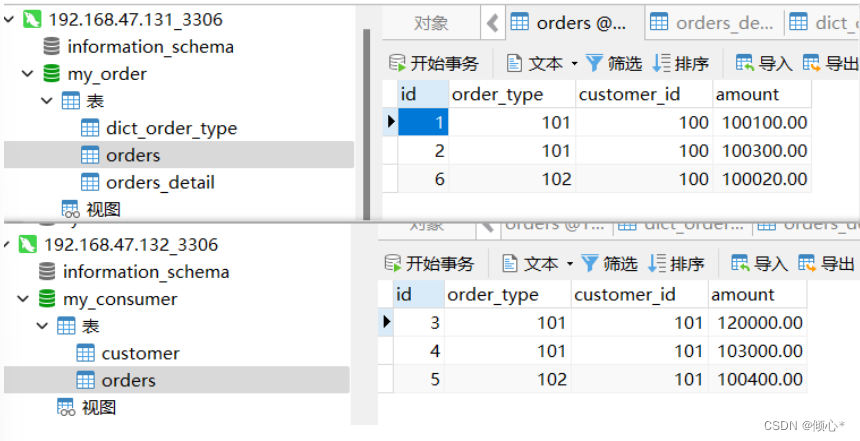
最终结果customer_id 100对2取余为0 in a database table 101对2取余为1in another database table
显然 1 2 6 余数为0 3 4 5 余数为1
The level sub-table is completed
mycat分片join进行联表查询
ordersThe splitting operation has already been performed 那么和它关联的order_detail订单详情表如何进行join查询 Right noworders_detail进行分片操作 Want to correlate queries The one with the foreign key is the child table The primary table has no foreign keys
The records of the child table are placed on the same data shard as the records of the associated parent table
Sharding is the configuration of the associated table
在schema.xml文件中,具体配置如下
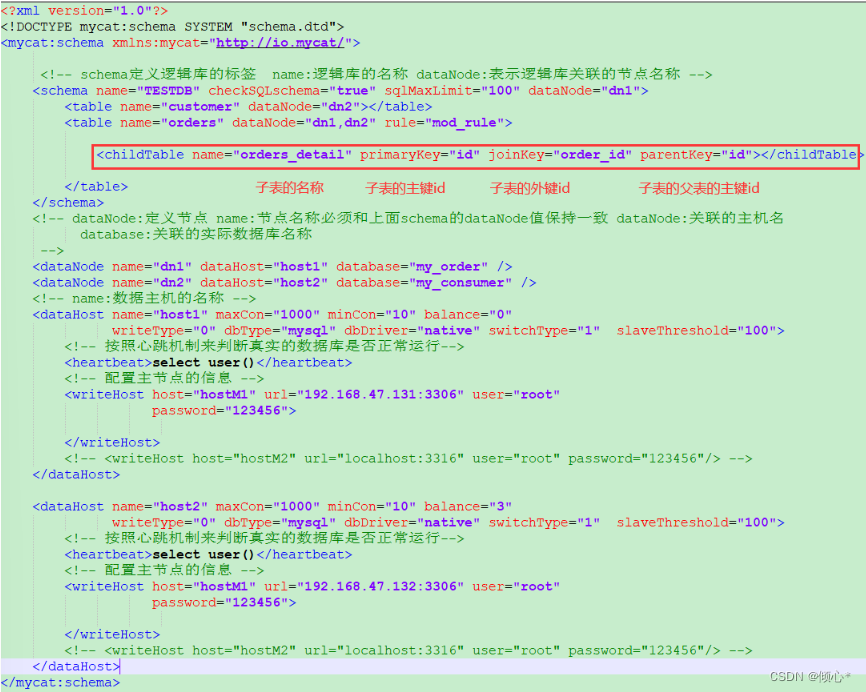
at the time of verificationmy_consumerAdd order details table to database
#订单详细表 rows:600万
CREATE TABLE orders_detail(
 id INT AUTO_INCREMENT,
 detail VARCHAR(2000),
 order_id INT,
 PRIMARY KEY(id)
);
重启mycat 进入mycat终端测试
进入mycat安装目录的bin下 ./mycat console
mysql> use TESTDB;(切记 Don't forget to switch databases 这个非常容易出错 The database is wrong 就连接不上 操作不了)
Reading table information for completion of table and column names
You can turn off this feature to get a quicker startup with -A

Database changed
#进行插入数据(订单详情)
mysql> INSERT INTO orders_detail(id,detail,order_id) values(61,'detail61',1);
Query OK, 1 row affected (0.09 sec)

mysql> INSERT INTO orders_detail(id,detail,order_id) VALUES(62,'detail62',2);
Query OK, 1 row affected (0.06 sec)

mysql> INSERT INTO orders_detail(id,detail,order_id) VALUES(63,'detail63',3);
Query OK, 1 row affected (0.06 sec)

mysql> INSERT INTO orders_detail(id,detail,order_id) VALUES(64,'detail64',4);
Query OK, 1 row affected (0.06 sec)

mysql> INSERT INTO orders_detail(id,detail,order_id) VALUES(65,'detail65',5);
Query OK, 1 row affected (0.05 sec)

mysql> INSERT INTO orders_detail(id,detail,order_id) VALUES(66,'detail66',6);
Query OK, 1 row affected (0.06 sec)

#进行联表查询 You can see that the query is successful Order details can be seen in the order form
mysql> select * from orders as o inner join orders_detail as od on o.id=od.order_id;
;
+----+------------+-------------+-----------+----+----------+----------+
| id | order_type | customer_id | amount    | id | detail   | order_id |
+----+------------+-------------+-----------+----+----------+----------+
|  1 |        101 |         100 | 100100.00 | 61 | detail61 |        1 |
|  2 |        101 |         100 | 100300.00 | 62 | detail62 |        2 |
|  6 |        102 |         100 | 100020.00 | 66 | detail66 |        6 |
|  3 |        101 |         101 | 120000.00 | 63 | detail63 |        3 |
|  4 |        101 |         101 | 103000.00 | 64 | detail64 |        4 |
|  5 |        102 |         101 | 100400.00 | 65 | detail65 |        5 |
+----+------------+-------------+-----------+----+----------+----------+
6 rows in set (0.02 sec)
联表查询结果
mysql> select o.*,od.detail from orders o inner join orders_detail od on o.id=od.order_id;
+----+------------+-------------+-----------+----------+
| id | order_type | customer_id | amount    | detail   |
+----+------------+-------------+-----------+----------+
|  3 |        101 |         101 | 120000.00 | detail63 |
|  4 |        101 |         101 | 103000.00 | detail64 |
|  5 |        102 |         101 | 100400.00 | detail65 |
|  1 |        101 |         100 | 100100.00 | detail61 |
|  2 |        101 |         100 | 100300.00 | detail62 |
|  6 |        102 |         100 | 100020.00 | detail66 |
+----+------------+-------------+-----------+----------+
6 rows in set (0.01 sec)
分片完成 The joint table query is completed 完美 说明一下mycat不支持mysql8.0.28 本人亲自踩坑 Experimentation is recommendedmysql5.7系列版本
Provides a table build statement
#客户表 rows:20万
CREATE TABLE customer(
 id INT AUTO_INCREMENT,
 NAME VARCHAR(200),
 PRIMARY KEY(id)
);
#订单表 rows:600万
CREATE TABLE orders(
 id INT AUTO_INCREMENT,
 order_type INT,
 customer_id INT,
 amount DECIMAL(10,2),
 PRIMARY KEY(id)
);
#订单详细表 rows:600万
CREATE TABLE orders_detail(
 id INT AUTO_INCREMENT,
 detail VARCHAR(2000),
 order_id INT,
 PRIMARY KEY(id)
);
#订单状态字典表 rows:20
CREATE TABLE dict_order_type(
 id INT AUTO_INCREMENT,
 order_type VARCHAR(200),
 PRIMARY KEY(id)
);边栏推荐
- Brute Force/Adjacency List Breadth First Directed Weighted Graph Undirected Weighted Graph
- The simulation application of common mode inductance is here, full of dry goods for everyone
- mmdetection trains a model related command
- 软件积累 -- 截图软件ScreenToGif
- Inter-vlan routing + static routing + NAT (PAT + static NAT) comprehensive experiment
- 8、统一处理异常(控制器通知@ControllerAdvice全局配置类、@ExceptionHandler统一处理异常)
- 11. Redis implements follow, unfollow, and follow and follower lists
- 【CV项目调试】CUDNN_CONVOLUTION_FWD_SPECIFY_WORKSPACE_LIMIT问题
- php 网站的多语言设置(IP地址区分国内国外)
- Software accumulation -- Screenshot software ScreenToGif
猜你喜欢
什么是分布式锁?实现分布式锁的三种方式

7. List of private messages

19. Support Vector Machines - Intuitive Understanding of Optimization Objectives and Large Spacing

Observer mode (1)

php 网站的多语言设置(IP地址区分国内国外)
公司官网建站笔记(六):域名进行公安备案并将备案号显示在网页底部

AI在医疗影像设备全流程应用
C#远程调试
Intel's software and hardware optimization empowers Neusoft to accelerate the arrival of the era of smart medical care

Static routing + PAT + static NAT (explanation + experiment)
随机推荐
f.grid_sample
Manchester City confuses fans with smart scarf that detects emotions
Installation, start and stop of redis7 under Linux
Drools basic introduction, introductory case, basic syntax
LeetCode 每日一题 2022/7/25-2022/7/31
全流程调度——MySQL与Sqoop
User interaction + formatted output
How to build a private yum source
CorelDRAW2022精简亚太新增功能详细介绍
分布式与集群是什么 ? 区别是什么?
Observer mode (1)
Linux下redis7的安装,启动与停止
Multilingual settings of php website (IP address distinguishes domestic and foreign)
Static route analysis (the longest mask matching principle + active and standby routes)
mysql index
经典链表OJ强训题——快慢双指针高效解法
mmdetection trains a model related command
mysql view
医疗影像领域AI软件开发流程
AI中的数学思想