当前位置:网站首页>Mikrotik Routeros Internet access settings
Mikrotik Routeros Internet access settings
2022-07-01 09:26:00 【alfiy】
This article is about MikroTik Routeros Internet configuration example article , There is a certain amount of RouterOS Router configuration foundation students learn .
The network topology is shown in the figure below , household WIFI Configured and online normally , The interface address is shown in the figure ( Let's make do with it , Can't find RouterOS And the light CAT Icon ).
In the network , Keep the following points in mind , Can help you solve many problems : First, the same subnet can communicate directly . The second is the interface on the router, whether it is a real interface or a virtual interface , Must be configured IP To communicate with each other .
1. complete RouterOS The hardware connection of .
take RouterOS Upper Internet The interface is connected to... Through the network cable wifi Router non Wan Mouth connection . Configure the computer to connect through the network cable RouterOS Of eth2 Interface interface , That is to say Internet The first interface on the right .
2. eliminate RouterOS The original configuration information on the .
For the convenience of subsequent configuration , Clear it first RouterOS The original configuration on .
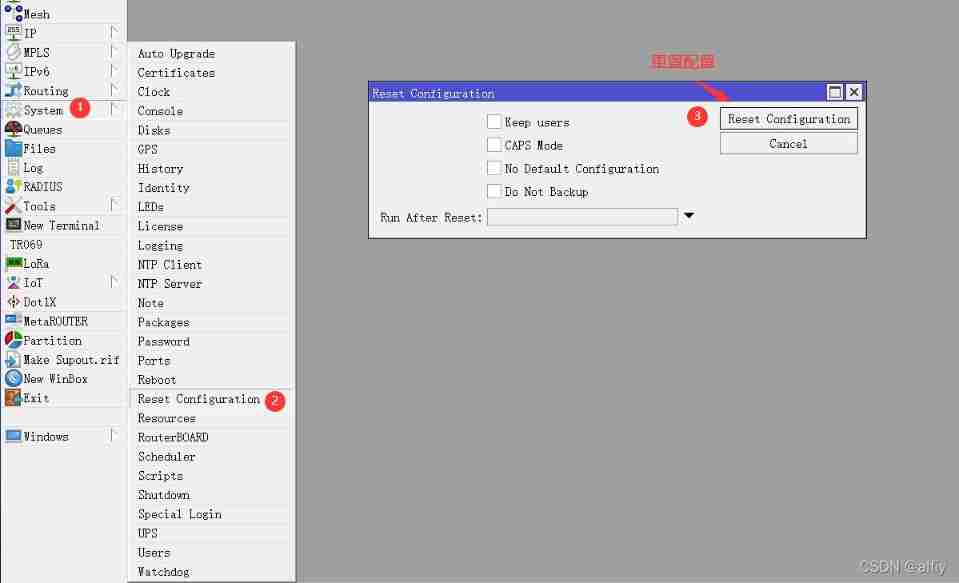

My route has been upgraded to the latest beta version , If you have RouterOS It is different from my version , No problem , Because the basic Internet settings are the same in all versions . Log in again and delete the configuration information .

Set up the router MM, primary MM It's empty .

Log in again , You need input MM 了 , After logging in, the dialog box shown above will not appear .
3. Sign in RouterOS Configure interface IP Address
open Interfaces Options , take ether1 The name is set to ether1-WAN, take ether2 The name of is set to ether2-LAN( This step is not necessary ).

take RouterOS Of eth1 Set to Wan Port and configuration IP 192.168.2.2.


take ether2-lan Of IP Set to 192.168.3.1


4. take ether2-lan Configure to dhcp-server
The first set dhcp pool


Then connect the interface ether2-lan Set to dhcp-server


After completing the above settings , The computer will be configured IP Set to auto get IP, Plug and unplug the network cable again , If your computer gets IP Address (192.168.3.100-192.168.3.254 Address between ) The configuration is successful .
5. Configure the default route

6. Set up DNS
According to your local ISP Supplier DNS IP , It can also be set directly to 8.8.8.8


The above figure shows RouterOS You can already surf the Internet , But our computers are still unable to access the Internet .
7. Configure the intranet source address mask 
Connectivity testing 
The above configuration process can be simplified to :
- Configure the interconnection interface address
- Configure intranet address
- Configure the default route
- To configure DNS
- Configure intranet camouflage
Okay , thus RouterOS An entry-level Internet configuration of the is completed , If you are interested in exploring with the author RouterOS Secret words , Please subscribe to the author's column , I'll keep updating .
边栏推荐
- Day06 branch structure and cycle (III)
- Microcomputer principle - bus and its formation
- 3D printing Arduino four axis aircraft
- JS use toString to distinguish between object and array
- Network counting 01 physical layer
- 【pytorch】transforms.Normalize((0.5, 0.5, 0.5), (0.5, 0.5, 0.5))
- [ESP nanny level tutorial] crazy completion chapter - Case: chemical environment system detection based on Alibaba cloud and Arduino, supporting nail robot alarm
- Click the screen with your finger to simulate F11 and enter the full screen
- JS prototype trap
- tensorrt yolov5_ trt. Py comments
猜你喜欢

队列的实现和应用
![2.3 [pytorch] data preprocessing torchvision datasets. ImageFolder](/img/19/cce8d8a7cdcb1021166c46adf803c1.png)
2.3 [pytorch] data preprocessing torchvision datasets. ImageFolder

【pytorch】nn. Crossentropyloss() and nn NLLLoss()

2.2 【pytorch】torchvision. transforms

【pytorch】softmax函数

An overview of the design of royalties and service fees of mainstream NFT market platforms

JS原型链

Installation and use of NoSQL database
JS prototype chain
![[pytorch] 2.4 convolution function nn conv2d](/img/eb/382a00af5f88d5954f10ea76343d6e.png)
[pytorch] 2.4 convolution function nn conv2d
随机推荐
集成积木报表报错 org.apache.catalina.core.StandardContext.filterStart 启动过滤器异常
3D打印Arduino 四轴飞行器
NiO zero copy
Nacos service configuration and persistence configuration
js valueOf 与 toString 区别
【pytorch】nn.CrossEntropyLoss() 与 nn.NLLLoss()
PR training notes
PHP merges multiple arrays. The same element takes the intersection of different elements to form an array
OSPF - virtual link details (including configuration commands)
[pytorch learning] torch device
Principle and application of single chip microcomputer timer, serial communication and interrupt system
js原型继承仅可继承实例而非构造器
Design and manufacture of simple digital display electronic scale
[ESP nanny level tutorial preview] crazy node JS server - Case: esp8266 + DS18B20 temperature sensor +nodejs local service + MySQL database
JS prototype inheritance can only inherit instances, not constructors
nacos服务配置和持久化配置
Bird recognition app
Preparing for the Blue Bridge Cup -- bit operation
A 419 error occurred in the laravel postman submission form. July 6th, 2020 diary.
Is it safe to dig up money and make new shares