当前位置:网站首页>Unity发布webGL的时候JsonConvert.SerializeObject()转换失败
Unity发布webGL的时候JsonConvert.SerializeObject()转换失败
2022-06-25 08:01:00 【先生沉默先】
错误信息如图
火狐报错


谷歌报错

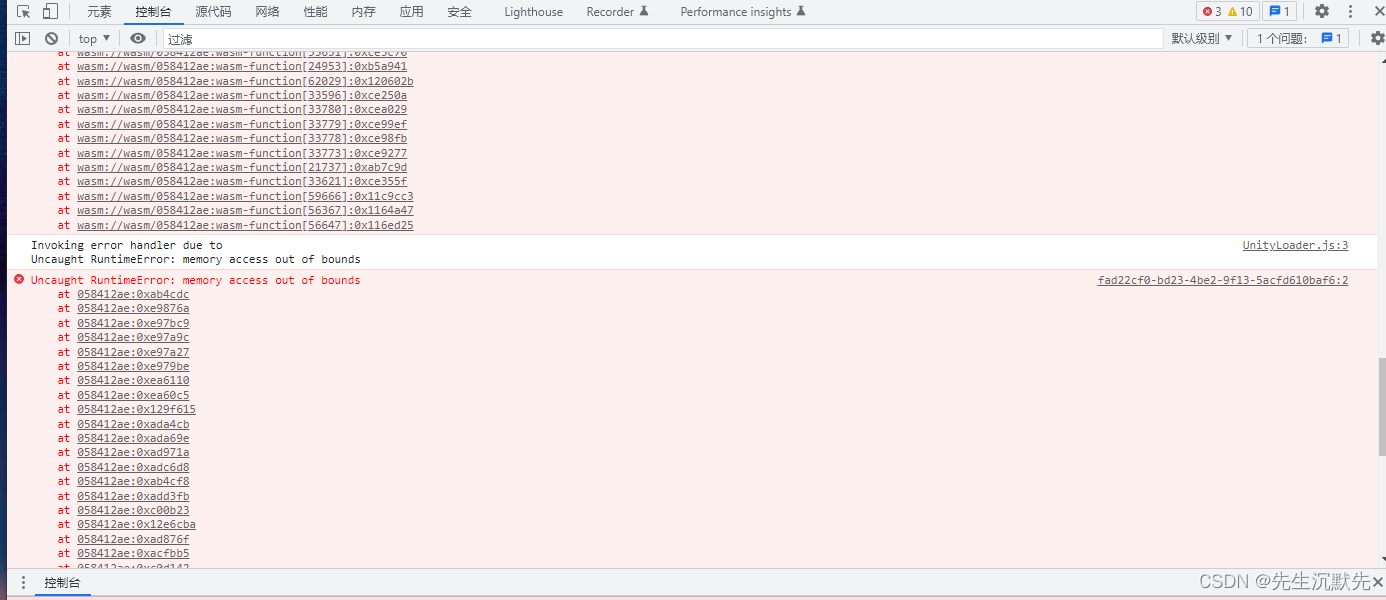
原因:webGL只能使用Unity自带的序列化工具
没有找到文档
修改方式
序列化字典Dictionary<TKey,TValue>
#region Dictionary序列化,

using System;
using System.Collections;
using System.Collections.Generic;

public class SerializeDictionary
{

    public static string Dictionary2Json<TKey, TValue>(Dictionary<TKey, TValue> dic)
    {

        return JsonUtility.ToJson(new SerializeDictionary<TKey, TValue>(dic));
    }

    public static Dictionary<TKey, TValue> Json2Dictionary<TKey, TValue>(string str)
    {

        return JsonUtility.FromJson<SerializeDictionary<TKey, TValue>>(str).ToDictionary();
    }
}

[Serializable]
public class SerializeDictionary<TKey, TValue> : ISerializationCallbackReceiver
{

    [SerializeField]
    List<TKey> keys;
    [SerializeField]
    List<TValue> values;

    Dictionary<TKey, TValue> targetDictionary;
    public Dictionary<TKey, TValue> ToDictionary() {
     return targetDictionary; }

    public SerializeDictionary(Dictionary<TKey, TValue> targetDictionary)
    {

        this.targetDictionary = targetDictionary;
    }

    public void OnBeforeSerialize()
    {

        keys = new List<TKey>(targetDictionary.Keys);
        values = new List<TValue>(targetDictionary.Values);
    }

    public void OnAfterDeserialize()
    {

        var count = Math.Min(keys.Count, values.Count);
        targetDictionary = new Dictionary<TKey, TValue>(count);
        for (var i = 0; i < count; ++i)
        {

            targetDictionary.Add(keys[i], values[i]);
        }
    }
}

#endregion
使用方式
        Dictionary<string, string> dc = new Dictionary<string, string>();
        dc.Add("Helo","Hello");
        dc.Add("Helo1", "Hello");
        dc.Add("Helo2", "Hello");
        var dicStr=  SerializeDictionary.DicToJson(dc);
警告
转出的字符串并不是其他json可以直接反序列化出的字符串需要使用下面的方式重新反序列化
反序列化字典Dictionary
					string requesDataStr="从上面转出来的json字符串";
                     Dictionary<string, List<string>> dicListList =    new Dictionary<string, List<string>>();

                     dicListList = JsonConvert.DeserializeObject<Dictionary<string, List<string>>>(requesDataStr);

                        List<string> dicKeyList = dicListList["keys"];
                        List<string> dicValueList = dicListList["values"];

                        var count = Math.Min(dicKeyList.Count, dicKeyList.Count);
                        var targetdicc = new Dictionary<string, string>(count);
                        for (var i2 = 0; i2 < count; ++i2)
                        {

                            targetdicc.Add(dicKeyList[i2], dicValueList[i2]);
                        }
                       //targetdicc是从上面json转出来的Dictionary
序列化List
		     //是可以反序列化的
            JsonConvert.DeserializeObject<T>(string);
// List<T>
[Serializable]
public class SerializationList<T>
{
    [SerializeField]
    List<T> targetList;
    public List<T> ToList() { return targetList; }

    public SerializationList(List<T> target)
    {
        this.targetList = target;
    }
}


public class SerializeList
{
    public static string List2Json<T>(List<T> l)
    {
        return JsonUtility.ToJson(new SerializationList<T>(l));
    }

    public static List<T> Json2List<T>(string str)
    {
        return JsonUtility.FromJson<SerializationList<T>>(str).ToList();
    }
}
使用
    // Start is called before the first frame update
    void Start()
    {
        List<string> liststr = new List<string>();
        liststr.Add("dsd");
        liststr.Add("ds1d");
        liststr.Add("d1sd");
        string listInfo = SerializeList.List2Json(liststr);//序列化
        Debug.Log(listInfo);

        List<string> list2 = new List<string>();
        List<string>  c = SerializeList.Json2List<string>(listInfo);//反序列化,尖括号里面是那种类型的list就填那种类型就好。

    }
不会可以评论私信Enjoy

。
边栏推荐
- Trendmicro:apex one server tools folder
- 初识生成对抗网络(11)——利用Pytorch搭建WGAN生成手写数字
- 通过客户经理的开户二维码开股票账户安全吗?还是去证券公司开户安全?
- (翻译)采用字母间距提高全大写文本可读性的方式
- Problems caused by Gil problems and Solutions
- Easyplayer streaming media player plays HLS video. Technical optimization of slow starting speed
- Summary of hardfault problem in RTOS multithreading
- WebGL发布之后不可以输入中文解决方案
- To achieve good software testing results, it is a prerequisite to build a good testing environment
- 在二叉树(搜索树)中找到两个节点的最近公共祖先(剑指offer)
猜你喜欢

浏览器查看当前页面所有的监听事件

In Section 5 of bramble pie project practice, Nokia 5110 LCD is used to display Hello World

Analysis of a video website m3u8 non perceptual encryption

Word2vec, phrases, phraser, keyedvectors commonly used in gensim

Meaning of Jieba participle part of speech tagging

What about the exponential smoothing index?

五、项目实战---识别人和马

How to analyze the grey prediction model?
Index analysis of DEMATEL model

软件测试月薪10K如何涨到30K,只有自动化测试能做到
随机推荐
UEFI:修复 EFI/GPT Bootloader
How to calculate the positive and negative ideal solution and the positive and negative ideal distance in TOPSIS method?
华泰证券在上面开股票账户安全吗?
Lvs-dr mode multi segment case
软件测试月薪10K如何涨到30K,只有自动化测试能做到
Sharepoint:sharepoint server 2013 and adrms Integration Guide
声纹技术(一):声纹技术的前世今生
某视频网站m3u8非感知加密分析
SharePoint:SharePoint 2013 with SP1 简易安装
GPU calculation
City Chain technology platform, really Realizing value Internet reconstruction!
Summary of hardfault problem in RTOS multithreading
软件工程复习题
LVS-DR模式单网段案例
Discrimination of configuration, software configuration items and software configuration management items
Meaning of Jieba participle part of speech tagging
ICer必须知道的35个网站
Paper:Generating Hierarchical Explanations on Text Classification via Feature Interaction Detection
Unknown table 'column of MySQL_ STATISTICS‘ in information_ schema (1109)
检测点是否在多边形内