当前位置:网站首页>Hcip --- BGP comprehensive experiment
Hcip --- BGP comprehensive experiment
2022-07-23 08:05:00 【Cyg engaged in it】
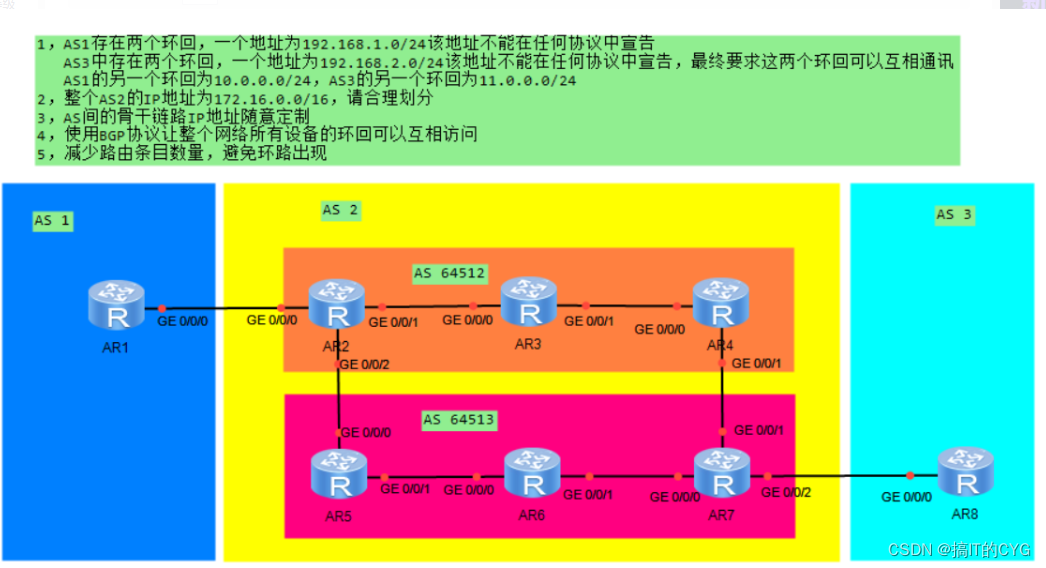
requirement :
1, AS1 There are two loops , One address is 192.168.1.0/24 This address cannot be declared in any agreement , AS3 There are two loops , One address is 192.168.2.0/24 This address cannot be declared in any agreement , Finally, it is required that the two loops can communicate with each other ,
AS1 The other loopback of is 10.0.0.0/24, AS3 The other loopback of is 11.0.0.0/24.
2, Whole AS2 Of IP The address is 172.16.0.0/16, Please divide reasonably
3,AS Backbone link between IP The address can be customized at will
4, Use BGP The protocol allows the loopback of all devices in the whole network to access each other
5, Reduce the number of routing entries , Avoid loop problems
One 、 According to the requirements , To the whole AS2 Of IP Address for subnet Division
take 172.16.0.0/16 The network segment is divided into 172.16.0.0/24 Multiple network segments , Because in the actual project ,24 The network segment is more in line with the user network segment , Therefore, the network segment is divided into 172.16.0.0 /24 The subnet mask of is 24 The network segment , then 172.16.0.0/24 Multiple network segments are divided , take 172.16.0.0/24 The network segment of is used for P2P In the Internet , take 172.16.1.0/24 The network segment of is used for MA In the Internet , The loopback interface of each router uses a subnet mask of 24 The network segment .
172.16.0.0/16
172.16.0.0/24 ---P2P The Internet
172.16.1.0/24 ---MA The Internet
172.16.1.0/29
172.16.1.8/29
172.16.1.16/29
172.16.1.24/29
172.16.1.32/29
172.16.1.40/29
172.16.2.0/24 ---R2 Loopback
172.16.3.0/24 ---R3 Loopback
172.16.4.0/24 ---R4 Loopback
172.16.5.0/24 ---R5 Loopback
172.16.6.0/24 ---R6 Loopback
172.16.7.0/24 ---R7 Loopback
 Two 、 Configure all routers IP Address
R1

[r1]int g 0/0/0
[r1-GigabitEthernet0/0/0]ip a 12.0.0.1 24
[r1-GigabitEthernet0/0/0]int lo0
[r1-LoopBack0]ip a 192.168.1.1 24
[r1-LoopBack0]int lo1
[r1-LoopBack1]ip a 10.0.0.1 24

R2

[r2]int g0/0/0
[r2-GigabitEthernet0/0/0]ip a 12.0.0.2 24
[r2-GigabitEthernet0/0/0]int lo0
[r2-LoopBack0]ip a 172.16.2.1 24
[r2]int g 0/0/1
[r2-GigabitEthernet0/0/1]ip a 172.16.1.1 29
[r2-GigabitEthernet0/0/1]int g0/0/2
[r2-GigabitEthernet0/0/2]ip a 172.16.1.9 29

R3

[r3]int g0/0/0
[r3-GigabitEthernet0/0/0]ip a 172.16.1.2 29
[r3-GigabitEthernet0/0/0]int lo0
[r3-LoopBack0]ip a 172.16.3.1 24
[r3-LoopBack0]int g 0/0/1
[r3-GigabitEthernet0/0/1]ip a 172.16.1.17 29

R4

[r4]int g0/0/0
[r4-GigabitEthernet0/0/0]ip a 172.16.1.18 29
[r4-GigabitEthernet0/0/0]int g 0/0/1
[r4-GigabitEthernet0/0/1]ip a 172.16.1.25 29
[r4-GigabitEthernet0/0/1]int lo0
[r4-LoopBack0]ip a 172.16.4.1 24

R5

[r5]int g 0/0/0
[r5-GigabitEthernet0/0/0]ip a 172.16.1.10 29
[r5-GigabitEthernet0/0/0]int g 0/0/1
[r5-GigabitEthernet0/0/1]ip a 172.16.1.133 29
[r5-GigabitEthernet0/0/1]int lo0
[r5-LoopBack0]ip a 172.16.5.1 24

R6

[r6]int g 0/0/0
[r6-GigabitEthernet0/0/0]ip a 172.16.1.34 29
[r6-GigabitEthernet0/0/0]int lo0
[r6-LoopBack0]ip a 172.16.6.1 24
[r6-LoopBack0]int g0/0/1
[r6-GigabitEthernet0/0/1]ip a 172.16.1.41 29

R7

[r7]int g0/0/0
[r7-GigabitEthernet0/0/0]ip a 172.16.1.42 29
[r7-GigabitEthernet0/0/0]int lo0
[r7-LoopBack0]ip a 172.16.7.1 24
[r7-LoopBack0]int g 0/0/1
[r7-GigabitEthernet0/0/1]ip a 172.16.1.26 29
[r7-GigabitEthernet0/0/1]int g 0/0/2
[r7-GigabitEthernet0/0/2]ip a 78.0.0.1 24

R8

[r8]int g 0/0/0
[r8-GigabitEthernet0/0/0]ip a 78.0.0.2 24
[r8-GigabitEthernet0/0/0]int lo0
[r8-LoopBack0]ip a 192.168.2.1 24
[r8-LoopBack0]int lo1
[r8-LoopBack1]ip a 11.0.0.1 24
R1:
R2: R3:
R3: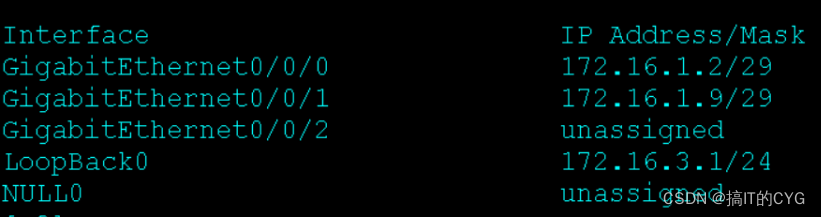
R4;
R5:
R6;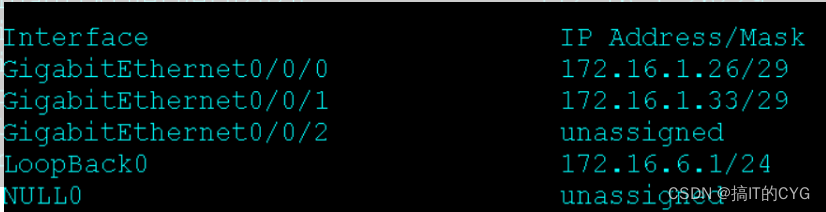
R7: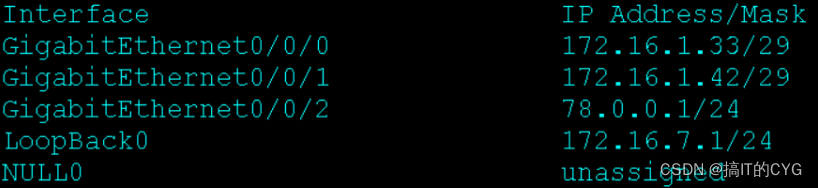 R8:
R8:
3、 ... and 、 stay AS 2 Enable ospf agreement
R2

[r2]ospf 1 router-id 2.2.2.2
[r2-ospf-1]a 0
[r2-ospf-1-area-0.0.0.0]network 172.16.0.0 0.0.255.255

R3

[r3]ospf 1 router-id 3.3.3.3
[r3-ospf-1]a 0
[r3-ospf-1-area-0.0.0.0]network 172.16.0.0 0.0.255.255

R4

[r4]ospf 1 router-id 4.4.4.4
[r4-ospf-1]a 0
[r4-ospf-1-area-0.0.0.0]network 172.16.0.0 0.0.255.255

R5

[r5]ospf 1 router-id 5.5.5.5
[r5-ospf-1]a 0
[r5-ospf-1-area-0.0.0.0]network 172.16.0.0 0.0.255.255

R6

[r6]ospf 1 router-id 6.6.6.6
[r6-ospf-1]a 0
[r6-ospf-1-area-0.0.0.0]network 172.16.0.0 0.0.255.255

R7

[r7]ospf 1 router-id 7.7.7.7
[r7-ospf-1]a 0
[r7-ospf-1-area-0.0.0.0]network 172.16.0.0 0.0.255.255

Four 、 Enable... For all devices BGP agreement , And establish peers
R1

[r1]bgp 1
[r1-bgp]route-select
[r1-bgp]router-id 1.1.1.1
[r1-bgp]peer 12.0.0.2 as 2

R2

[r2]bgp 64512
[r2-bgp]route-select
[r2-bgp]router-id 2.2.2.2
[r2-bgp]confederation id 2
[r2-bgp]confederation peer-as 64513
[r2-bgp]peer 12.0.0.1 as 1
[r2-bgp]peer 172.16.3.1 as 64512
[r2-bgp]peer 172.16.3.1 connect-interface LoopBack 0
[r2-bgp]peer 172.16.5.1 as 64513
[r2-bgp]peer 172.16.5.1 connect-interface LoopBack 0
[r2-bgp]peer 172.16.5.1 ebgp-max-hop 2
[r2-bgp]peer 172.16.3.1 next-hop-local
[r2-bgp]peer 172.16.5.1 next-hop-local

R3

[r3]bgp 64512
[r3-bgp]router-id 3.3.3.3
[r3-bgp]confederation id 2
[r3-bgp]peer 172.16.2.1 as 64512
[r3-bgp]peer 172.16.2.1 connect-interface LoopBack 0
[r3-bgp]peer 172.16.4.1 as 64512
[r3-bgp]peer 172.16.4.1 connect-interface LoopBack 0

R4

[r4]bgp 64512
[r4-bgp]router-id 4.4.4.4
[r4-bgp]confederation id 2
[r4-bgp]confederation peer-as 64513
[r4-bgp]peer 172.16.3.1 as 64512
[r4-bgp]peer 172.16.3.1 connect-interface LoopBack 0
[r4-bgp]peer 172.16.7.1 as 64513
[r4-bgp]peer 172.16.7.1 connect-interface LoopBack 0
[r4-bgp]peer 172.16.7.1 ebgp-max-hop 2

R5

[r5]bgp 64513
[r5-bgp]router-id 5.5.5.5
[r5-bgp]confederation id 2
[r5-bgp]confederation peer-as 64512
[r5-bgp]peer 172.16.2.1 as 64512
[r5-bgp]peer 172.16.2.1 connect-interface LoopBack 0
[r5-bgp]peer 172.16.2.1 ebgp-max-hop 2
[r5-bgp]peer 172.16.6.1 as 64513
[r5-bgp]peer 172.16.6.1 connect-interface LoopBack 0

R6

[r6]bgp 64513
[r6-bgp]router-id 6.6.6.6
[r6-bgp]confederation id 2
[r6-bgp]peer 172.16.5.1 as 64513
[r6-bgp]peer 172.16.5.1 connect-interface LoopBack 0
[r6-bgp]peer 172.16.7.1 as 64513
[r6-bgp]peer 172.16.7.1 connect-interface LoopBack 0

R7

[r7]bgp 64513
[r7-bgp]router-id 7.7.7.7
[r7-bgp]confederation id 2
[r7-bgp]confederation peer-as 64512
[r7-bgp]peer 172.16.6.1 as 64513
[r7-bgp]peer 172.16.6.1 connect-interface LoopBack 0
[r7-bgp]peer 172.16.4.1 as 64512
[r7-bgp]peer 172.16.4.1 connect-interface LoopBack 0
[r7-bgp]peer 172.16.4.1 ebgp-max-hop 2
[r7-bgp]peer 78.0.0.2 as 3
[r7-bgp]peer 172.16.4.1 next-hop-local
[r7-bgp]peer 172.16.6.1 next-hop-local

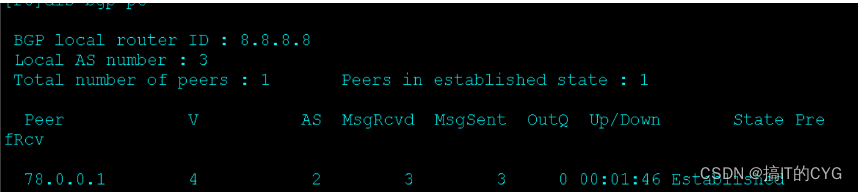
R8

[r8]bgp 3
[r8-bgp]router-id 8.8.8.8
[r8-bgp]peer 78.0.0.1 as 2


 5、 ... and 、 Publish routing information
Declare :
[r1]bgp 1
[r1-bgp]ne
[r1-bgp]network 10.0.0.0 24
[r1-bgp]

[r8]bgp 3
[r8-bgp]ne
[r8-bgp]network 11.0.0.0 24
Modify the next jump :
[r2-bgp]peer 172.16.3.1 next-hop-local
[r2-bgp]peer 172.16.5.1 next-hop-local
[r7-bgp]peer 172.16.4.1 next-hop-local
[r7-bgp]peer 172.16.6.1 next-hop-local
6、 ... and 、 Get rid of IBGP Horizontal segmentation between , Configure the routing reflector
R3

[r3]bgp 64512
[r3-bgp]peer 172.16.2.1 reflect-client

R6

[r6]bgp 64513
[r6-bgp]peer 172.16.7.1 reflect-client
7、 ... and 、 Short interface 、 Summarize and announce
R2

[r2]ip route-static 172.16.0.0 21 NULL 0
[r2]bgp 64512
[r2-bgp]network 172.16.0.0 21

R7

[r7]ip route-static 172.16.0.0 22 NULL 0
[r7]bgp 64513
[r7-bgp]network 172.16.0.0 21
8、 ... and 、 establish GRE Tunnel , To realize the communication of two loops
R1

[r1]int t0/0/0
[r1-Tunnel0/0/0]ip a 192.168.10.1 24
[r1-Tunnel0/0/0]tunnel-protocol gre
[r1-Tunnel0/0/0]source 10.0.0.1
[r1-Tunnel0/0/0]destination 11.0.0.1
[r1]ip route-static 192.168.1.0 24 99.0.0.2

R8

[r8]int t0/0/0
[r8-Tunnel0/0/0]ip a 192.168.10.2 24
[r8-Tunnel0/0/0]tunnel-protocol gre
[r8-Tunnel0/0/0]source 11.0.0.1
[r8-Tunnel0/0/0]destination 10.0.0.1
[r8]ip route-static 192.168.2.0 24 99.0.0.1


边栏推荐
- Talking about performance optimization: analysis and optimization of APP startup process
- 二冲程发动机均值模型仿真
- 2022杭电多校联赛第二场 题解
- 机器学习笔记 - 基于深度学习(HomographyNet)的图像单应性估计
- RN underlying principle -- 1. Component and purecomponent analysis
- text-align:center居中
- [day 31] given an integer n, find the base and exponent of each prime factor | basic theorem of arithmetic
- wps数据拆分
- Matlab保存数据到csv文件的方法分享
- 程序员最想干的三件事 |漫画
猜你喜欢

主题域模型

Fault tolerant processing with hystrix

二冲程发动机均值模型仿真

弥散张量分析开源软件 DSI Studio 简体中文汉化版可以下载了

Worthington溶菌酶技术说明及文献参考

MPLS VPN 跨域-optionB
Dispersion tensor analysis open source software DSI studio simplified Chinese version can be downloaded

自定义flink es source

初出茅庐的小李第109篇博客之如何打开Keil中文件的真是路径

浅谈性能优化:APP的启动流程分析与优化
随机推荐
牛客小白月赛53
scala idea提示函数参数
matlab ode45求解微分方程
用Stanford Parse(智能语言处理)去实现分词器
c语言扫雷
VMware 中搭建 SylixOS 环境
组蛋白研究丨Worthington小牛胸腺组蛋白的特征及文献参考
Mysql A left(right) join B on A.id=B.id and A.age=1与A left(right) join B on A.id=B.id where A.age=1
弥散张量分析开源软件 DSI Studio 简体中文汉化版可以下载了
FastAPI学习(二)——FastAPI+Jinjia2模板渲染网页(跳转返回渲染页面)
Experiment 5 JPEG
VMware虚拟机更改静态IP报错Unit network.service entered failed state解决方案
flink批量读取es
VMware virtual machine changes static IP and reports an error unit network Service entered failed state solution
多商户系统的直播功能用过吗?用过的朋友扣个 666!
主题域模型
Worthington羟基类固醇脱氢酶技术说明及测定方案
etcdv3·watch操作实现及相关重点说明
Experiment III LZW
1.11 ArrayList&学生管理系统