当前位置:网站首页>PyTorch 二维多通道卷积运算方式
PyTorch 二维多通道卷积运算方式
2022-06-29 14:43:00 【荷碧·TongZJ】
全连接卷积
对于单通道卷积的运算,相信大家已经见过不少了
那么在卷积神经网络中,图像的通道数是怎样实现“从 3 到 8” 这样的跳变呢?
接下来以尺寸 5 × 5 的卷积核做一下实验:
import torch

c1, c2, k = 3, 8, 5
# 实例化二维卷积, 不使用 padding
conv = torch.nn.Conv2d(in_channels=c1, out_channels=c2,
                       kernel_size=k, bias=False)
# 二维卷积的 weight: [c2, c1, k, k]
weight = conv.weight.data
print('Weight shape:', weight.shape)
使用 PyTorch 的 Conv2d 可以发现,weight 参数的 shape 是 [8, 3, 5, 5]
[3, 5, 5] 的图像(记为 img)经过该卷积运算后得到 [8, 1, 1],以此为例,提出猜想:
- img[..., r, c] 的 shape 为 [3, ],即代表该像素点 3 个通道的值
- weight[..., r, c] 的 shape 为 [8, 3],代表该卷积核的感受野中,第 r 行第 c 列的参数
- 使用矩阵乘法运算 weight[..., r, c] × img[..., r, c],结果是 shape 为 [8, ] 的张量,代表该像素点 8 个通道的值;如果将所有像素点 8 个通道的值相加,即可得到此次卷积结果

写出验证的函数如下:
# 测试使用的图像, 卷积后: [c1, k, k] -> [c2, 1, 1]
img = torch.rand([1, c1, k, k])


def torch_conv():
    return conv(img).view(-1)


def guess_for_FCconv():
    ''' 全连接卷积 (标准卷积)'''
    result = torch.zeros(c2)
    # 对各个像素点进行运算
    for r in range(k):
        for c in range(k):
            # 对应像素点的各通道值: [c1, ]
            pixel = img[..., r, c].view(-1)
            # 卷积核中对应像素点的参数: [c2, c1]
            linear = weight[..., r, c]
            # 该像素点对各个通道的贡献: [c2, c1] × [c1, ] -> [c2, ]
            result += linear @ pixel
    return result


print('PyTorch:', torch_conv())
print('Guess:', guess_for_FCconv())
可以看到,PyTorch 的运算结果和我的运算结果是一样的,猜想成立
Weight shape: torch.Size([8, 3, 5, 5])
PyTorch: tensor([-0.2874, -0.4310, 0.1660, -0.0021, 0.6042, -0.0716, 0.0821, 0.0322],
grad_fn=<ViewBackward>)
Guess: tensor([-0.2874, -0.4310, 0.1660, -0.0021, 0.6042, -0.0716, 0.0821, 0.0322])
提出这个运算方式,是为了帮助大家更好地理解卷积
在实际的部署中,是不是使用这样的方式运算我就不清楚了
深度可分离卷积
当输入通道数为 4,输出通道数为 8 时,设置卷积核组数为 2
则 weight 参数的 shape 为 [8, 2, 5, 5],亦可表示成 [8, 4/2, 5, 5]
import torch

c1, c2, k, g = 4, 8, 5, 2
# 实例化二维卷积, 不使用 padding
conv = torch.nn.Conv2d(in_channels=c1, out_channels=c2,
                       kernel_size=k, groups=g, bias=False)
# 二维卷积的 weight: [c2, c1/g, k, k]
weight = conv.weight.data
print('Weight shape:', weight.shape)

# 测试使用的图像, 卷积后: [c1, k, k] -> [c2, 1, 1]
img = torch.rand([1, c1, k, k])
输入通道数被进行了分组,那么图像在运算时,在通道上必被分离
而输出通道数没有进行分组,图像在运算中是否被分离呢?
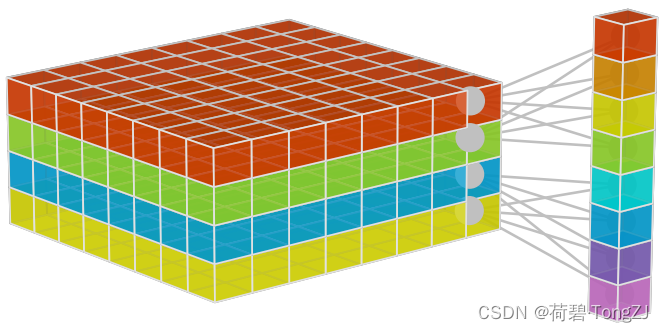
[4, 5, 5] 的图像(记为 img)经过该卷积运算后得到 [8, 1, 1],以此为例,提出猜想:
- 对图像的通道数进行分组:img 可表示成 [2, 2, 5, 5],即 2 张 [2, 5, 5] 的图像
- 对 weight 的输出通道数进行分组:weight 可表示成 [2, 4, 2, 5, 5],即 2 个 weight 为 [4, 2, 5, 5] 的全连接卷积
- 分别使用 [4, 2, 5, 5] 的全连接卷积可得到 2 张 [4, 1, 1],拼接在一起后得到 [8, 1, 1]
写出验证的函数如下:
# 测试使用的图像, 卷积后: [c1, k, k] -> [c2, 1, 1]
img = torch.rand([1, c1, k, k])


def torch_conv():
    return conv(img).view(-1)


def guess_for_DWConv():
    ''' 深度可分离卷积'''
    # 将 c2 个通道表示成 g × c2/g
    result = torch.zeros([g, c2 // g])
    # 对图像的通道进行分组: [1, c1, k, k] -> [g, c1/g, k, k]
    img_ = img.view(g, -1, k, k)
    # 分组取出卷积核权值: [c2, c1/g, k, k] -> [g, c2/g, c1/g, k, k]
    for i, w in enumerate(weight.view(g, -1, c1//g, k, k)):
        # 对各个像素点进行运算
        for r in range(k):
            for c in range(k):
                # 对应像素点的各通道值: [c1/g, ]
                pixel = img_[i, :, r, c].view(-1)
                # 卷积核中对应像素点的参数: [c2/g, c1/g]
                linear = w[..., r, c]
                # 该像素点对各个通道的贡献: [c2/g, c1/g] × [c1/g, ] -> [c2/g, ]
                result[i] += linear @ pixel
    return result.view(-1)


print('PyTorch:', torch_conv())
print('Guess:', guess_for_DWConv())
显而易见,两个函数的运算结果是一样的,猜想成立
Weight shape: torch.Size([8, 2, 5, 5])
PyTorch: tensor([ 0.1674, -0.1527, 0.4059, -0.3422, -0.2362, -0.4508, 0.3286, 0.3232],
grad_fn=<ViewBackward>)
Guess: tensor([ 0.1674, -0.1527, 0.4059, -0.3422, -0.2362, -0.4508, 0.3286, 0.3232])
边栏推荐
- [QT tutorial] QPushButton key and double click effect
- Const usage
- MCS:离散随机变量——Hyper Geometric分布
- 校园跑腿微信小程序跑腿同学带直播新版源码
- QRcode custom QR code middle picture
- EMC surge protection and decoupling design
- Uncover the secret! Pay attention to those machines under the membership system!
- 中国三氧化二砷行业研究与未来预测报告(2022版)
- Redis installation in windows and Linux Environment
- China soft ice cream market forecast and investment prospect research report (2022 Edition)
猜你喜欢




随机推荐
Informatics Olympiad 1001:hello, world!
华曙高科冲刺科创板:拟募资6.6亿 实控人许小曙父子均为美国籍
部署搭建decentraland流程讲解
Deploy redis sentry in k8s
携程季报图解:净营收41亿 与疫情前相比已被“腰斩”
Asynchronous artifact completable future
Chapter 10 of canvas path
openGauss社区成立SIG KnowledgeGraph
URL encoding in Delphi7
Huashu high tech rushes to the scientific innovation board: the actual controller xuxiaoshu and his son, who plan to raise 660million yuan, are both American nationals
[QT tutorial] QPushButton key and double click effect
如果我在佛山,到哪里开户比较好?究竟网上开户是否安全么?
How bad can a programmer be?
模电 2个NPN管组成的恒流源电路分析
Weigao blood purification sprint to Hong Kong: annual revenue of RMB 2.9 billion, net profit decreased by 12.7%
redis在window和Linux环境下的安装
Swagger2的配置教程
Chapter 12 other applications of canvas
知识点:PCB线路板布线都有哪些诀窍?
Chapter 7 deformation operation of canvas