当前位置:网站首页>Vant implements a simple login registration module and a personal user center
Vant implements a simple login registration module and a personal user center
2022-07-03 01:38:00 【Something beside the book】
design sketch :


Code :
Personal center :
<template>
<div>
<div class="top">
<div>
<img class="tar" src="@/assets/lz.jpg" alt="">
<p style="float:left;color:#FFFFFF;margin-left:15px;margin-top:20px"> Up to duck </p>
<div style="float:right;height:25px;background-color:#295F96;margin-top:25px;width: 80PX; border-radius: 15px 0px 0px 15px;color:#FFFFFF"> <a href="#" style="color:#FFFFFF"> To do today </a></div>
</div>
<div> </div>
<div style="clear: both">
<div style="margin-top:10px;color:#FFFFFF;float:left;margin-left:30px;">
<div> dynamic </div>
<div>0</div>
</div>
<div style="margin-top:10px;color:#FFFFFF;float:left;margin-left:110px;">
<div> Focus on </div>
<div>99</div>
</div>
<div style="margin-top:10px;color:#FFFFFF;float:left;margin-left:110px;">
<div> fans </div>
<div>10</div>
</div>
</div>
</div>
<div style="">
<div style="float:left;margin-left:30px;margin-top:10px">
<div ><van-icon size="25" name="star-o" /></div>
<div style="margin-top:3px"> Collection </div>
</div>
<div style="float:left;margin-left:110px;margin-top:10px">
<div ><van-icon size="25" name="clock-o" /></div>
<div style="margin-top:3px"> history </div>
</div>
<div style="float:left;margin-left:110px;margin-top:10px">
<div ><van-icon size="25" name="todo-list-o" /></div>
<div style="margin-top:3px"> works </div>
</div>
<div style="clear: both;;width:100%;height:10px"></div>
</div>
<div style="margin-top:10px; clear: both; border-top: 1px solid #e2e2ee;">
<div> </div>
<div> Content area </div>
</div>
<div style="clear:both;">
<van-tabbar
v-model="active"
active-color="#07c160"
>
<van-tabbar-item icon="home-o"> label </van-tabbar-item>
<van-tabbar-item icon="search"> label </van-tabbar-item>
<van-tabbar-item icon="fire-o"> label </van-tabbar-item>
<van-tabbar-item icon="setting-o"> label </van-tabbar-item>
</van-tabbar>
</div>
<div>
</div>
</div>
</template>
<style scoped>
.top{
height: 150px;
width: 100%;
background-color: #1e87ff;
margin-top:-58px
}
.tar{
margin-top: 20px;
height: 70px;
width: 70px;
border-radius: 50%;
float: left;
margin-left:10px;
}
</style>
<script>
import Tabbar from '@/components/tab/Tabbar.vue'
export default{
data(){
return{
userName:'',
pwd:'',
active: 0
}
},
//axios
//getApi() ---> axios aixos.get('http://localhost:8080/api')
// The back end got the request -- Data processing -- Data back to
// The local browser gets the data
components:{
Tabbar,
},
created(){
var userLogin = localStorage.getItem("userLogin");
userLogin = JSON.parse(userLogin);
console.log(userLogin.name);
console.log(userLogin.pwd);
this.userName = userLogin.name;
this.pwd = userLogin.pwd;
},
methods:{
exit(){
localStorage.removeItem("userLogin"); // Remove saved data
this.$router.replace("/home");
},
onClickLeft() {
Toast(' return ');
},
onClickRight() {
Toast(' Button ');
}
}
}
</script>
<style>
.top{
height: 100px;
width: 100%;
background-color: #1e87ff;
margin-top:-58px
}
.tar{
margin-top: 20px;
height: 70px;
width: 70px;
border-radius: 50%;
}
</style>
Sign in :
<template>
<van-form @submit="onSubmit">
<div >
<div> </div>
<img class="tar" src="@/assets/lz.jpg" alt="">
</div>
<van-field
left-icon="friends-o"
v-model="username"
style="margin-top:10px"
name=" user name "
label=" user :"
placeholder=" Please enter a user name "
:rules="[{ required: true, message: ' Please fill in the user name ' }]"
label-width="50"
class="input"
/>
<van-field
left-icon="smile-comment-o"
v-model="password"
type="password"
name=" password "
label=" password :"
placeholder=" Please input a password "
label-width="50"
:rules="[{ required: true, message: ' Please fill in the password ' }]"
class="input"
/>
<div style="margin: 16px;">
<van-button round block type="info" native-type="submit"> Submit </van-button>
</div>
<div class="reg">
<div @click="toRegister" style="font-size: small;"> There is no account ? Register now </div>
</div>
</van-form>
</template>
<script>
import { Dialog } from 'vant';
export default{
data(){
return{
username:'',
password:'',
show:false,
userList:[],
}
},
methods:{
onSubmit(){
var list = localStorage.getItem("userList");
console.log(list);
if(list == null ){
Dialog.alert({
title: ' Dear user :',
message: ' Login account does not exist , Log back in !',
theme: 'round-button',
}).then(() => {
this.username = '';
this.password = '';
});
}else{
this.userList = JSON.parse(list);
for(var i = 0 ; i < this.userList.length ; i++){
console.log(this.userList[i].name);
console.log(this.userList[i].pwd);
if(this.userList[i].name == this.username && this.userList[i].pwd == this.password){
Dialog.alert({
title: ' Dear user :',
message: ' Login successful !',
theme: 'round-button',
}).then(() => {
this.$router.replace({path:'/home'});
});
localStorage.setItem("userLogin",JSON.stringify(this.userList[i]));
return ;
}
}
Dialog.alert({
title: ' Dear user :',
message: ' Login account does not exist , Log back in !',
theme: 'round-button',
}).then(() => {
this.username = '';
this.password = '';
});
}
},
toRegister(){
this.$router.replace('/user/register')
}
},
components:{
[Dialog.Component.name]: Dialog.Component,
}
}
</script>
<style scoped>
/* .juli{
margin-top: 50px;
background-color: pink;
} */
.input{
margin-top: 50px;
border-bottom: 1px solid #e2e2ee;
}
.tar{
margin-top: 20px;
height: 70px;
width: 70px;
border-radius: 50%;
}
/* .back{
} */
</style>
边栏推荐
- The latest analysis of tool fitter (technician) in 2022 and the test questions and analysis of tool fitter (technician)
- Installation and use of serial port packet capturing / cutting tool
- Leetcode 6103 - minimum fraction to delete an edge from the tree
- 【数据挖掘】任务5:K-means/DBSCAN聚类:双层正方形
- [fh-gfsk] fh-gfsk signal analysis and blind demodulation research
- Three core issues of concurrent programming - "deep understanding of high concurrent programming"
- 简易分析fgui依赖关系工具
- Leetcode 2097 - Legal rearrangement of pairs
- 网络安全-openvas
- 数学知识:能被整除的数—容斥原理
猜你喜欢

海量数据冷热分离方案与实践

leetcode刷题_两数之和 II - 输入有序数组

【面试题】1369- 什么时候不能使用箭头函数?
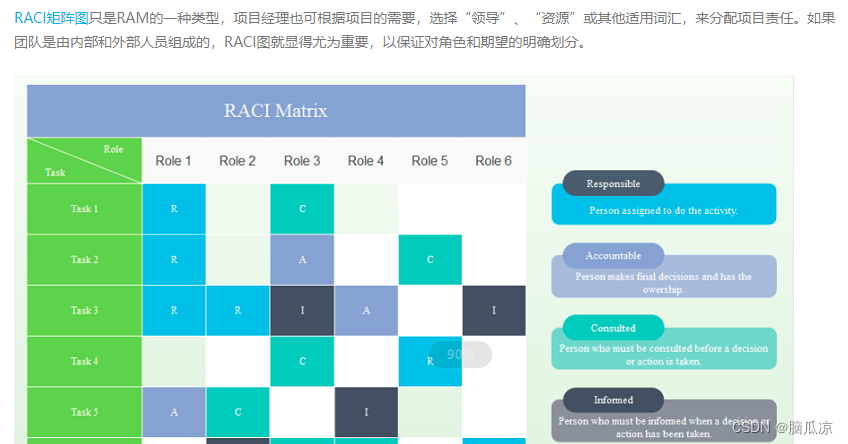
软考信息系统项目管理师_历年真题_2019下半年错题集_上午综合知识题---软考高级之信息系统项目管理师053

MySQL - database query - basic query
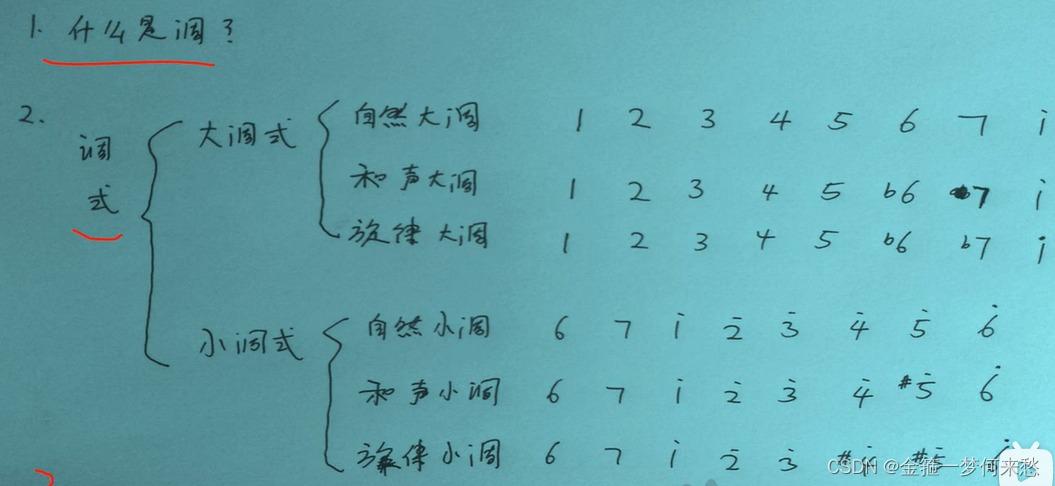
什么是调。调的故事
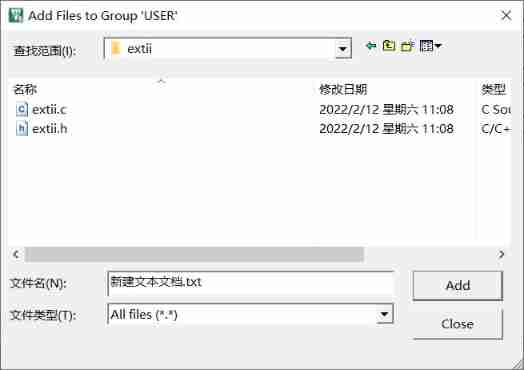
STM32 - Application of external interrupt induction lamp
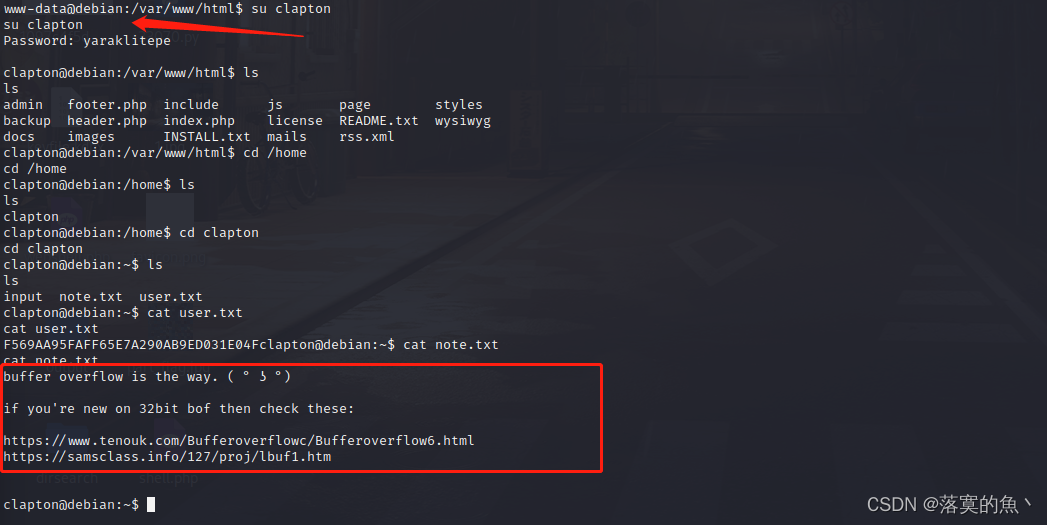
After reading this article, I will teach you to play with the penetration test target vulnhub - drivetingblues-9

Work experience of a hard pressed programmer

【数据挖掘】任务3:决策树分类
随机推荐
How is the mask effect achieved in the LPL ban/pick selection stage?
Thinkphp+redis realizes simple lottery
VIM 9.0 is officially released! The execution speed of the new script can be increased by up to 100 times
Mathematical knowledge: step Nim game game game theory
Swiftui component Encyclopedia: using scenekit and swiftui to build interactive 3D pie charts (tutorial with source code)
【数据挖掘】任务1:距离计算
软考信息系统项目管理师_历年真题_2019下半年错题集_上午综合知识题---软考高级之信息系统项目管理师053
Pytest learning notes (12) -allure feature · @allure Step () and allure attach
[shutter] animation animation (basic process of shutter animation | create animation controller | create animation | set value listener | set state listener | use animation values in layout | animatio
Why can't the start method be called repeatedly? But the run method can?
STM32 - Application of external interrupt induction lamp
LDC Build Shared Library
【数据挖掘】任务5:K-means/DBSCAN聚类:双层正方形
The difference between tail -f, tail -f and tail
d,ldc構建共享庫
[self management] time, energy and habit management
JUC thread scheduling
Wireshark data analysis and forensics a.pacapng
不登陆或者登录解决oracle数据库账号被锁定。
【数据挖掘】任务3:决策树分类