当前位置:网站首页>Simple use of qtreeview of QT (including source code + comments)
Simple use of qtreeview of QT (including source code + comments)
2022-06-13 03:07:00 【LW only eats 100 million points】
One 、QTreeView Operation example diagram
1. Example of adding and deleting nodes
The following figure shows an example of adding and deleting nodes , This includes adding top-level nodes 、 Add child nodes 、 Remove nodes and other operations ; The source code is in the third section of this article ( The source code contains detailed comments ).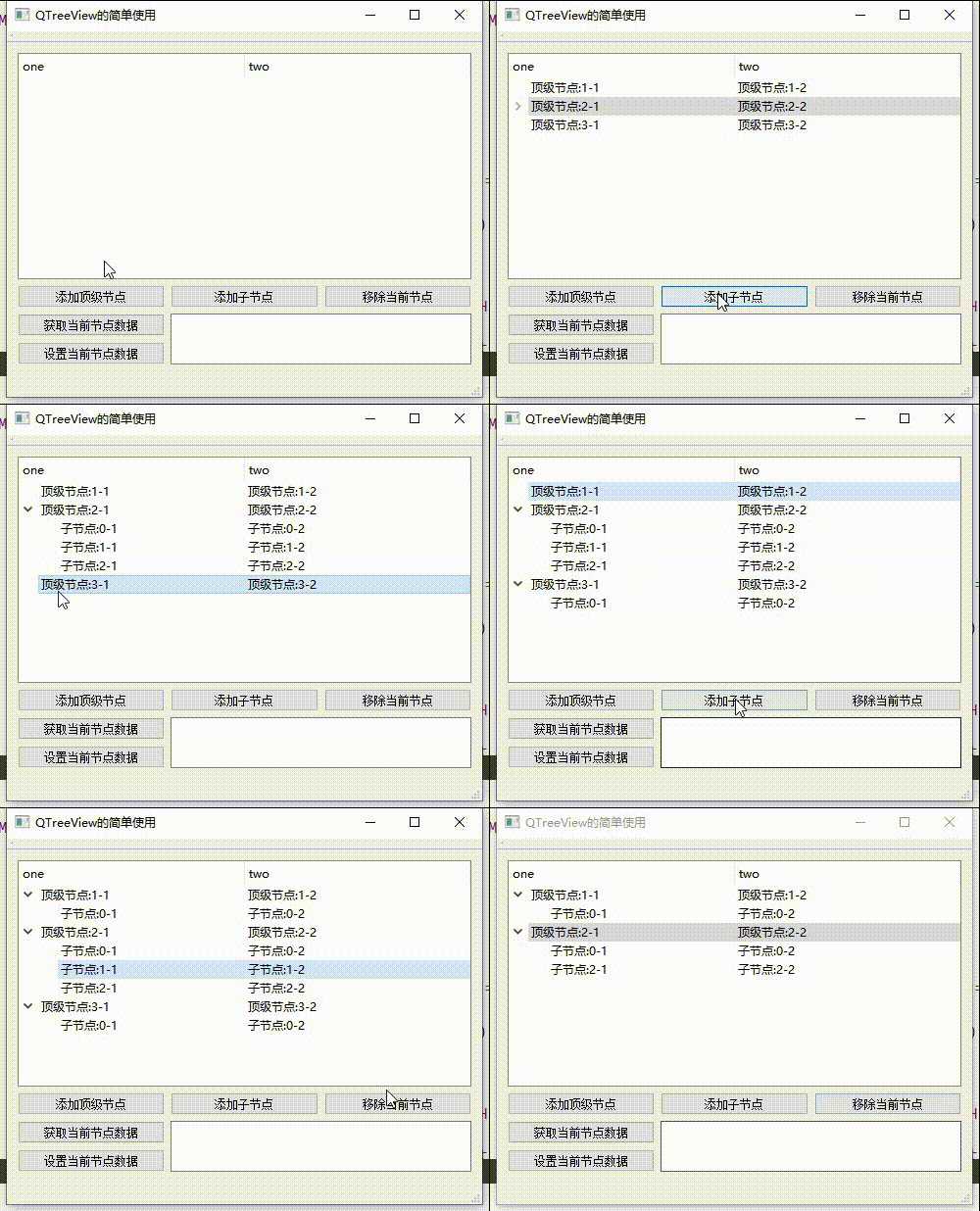
2. Get and modify the value of the node
The following figure shows the operation of nodes on node values , This includes getting values 、 Set values, etc ; The source code is in the third section of this article ( The source code contains detailed comments ).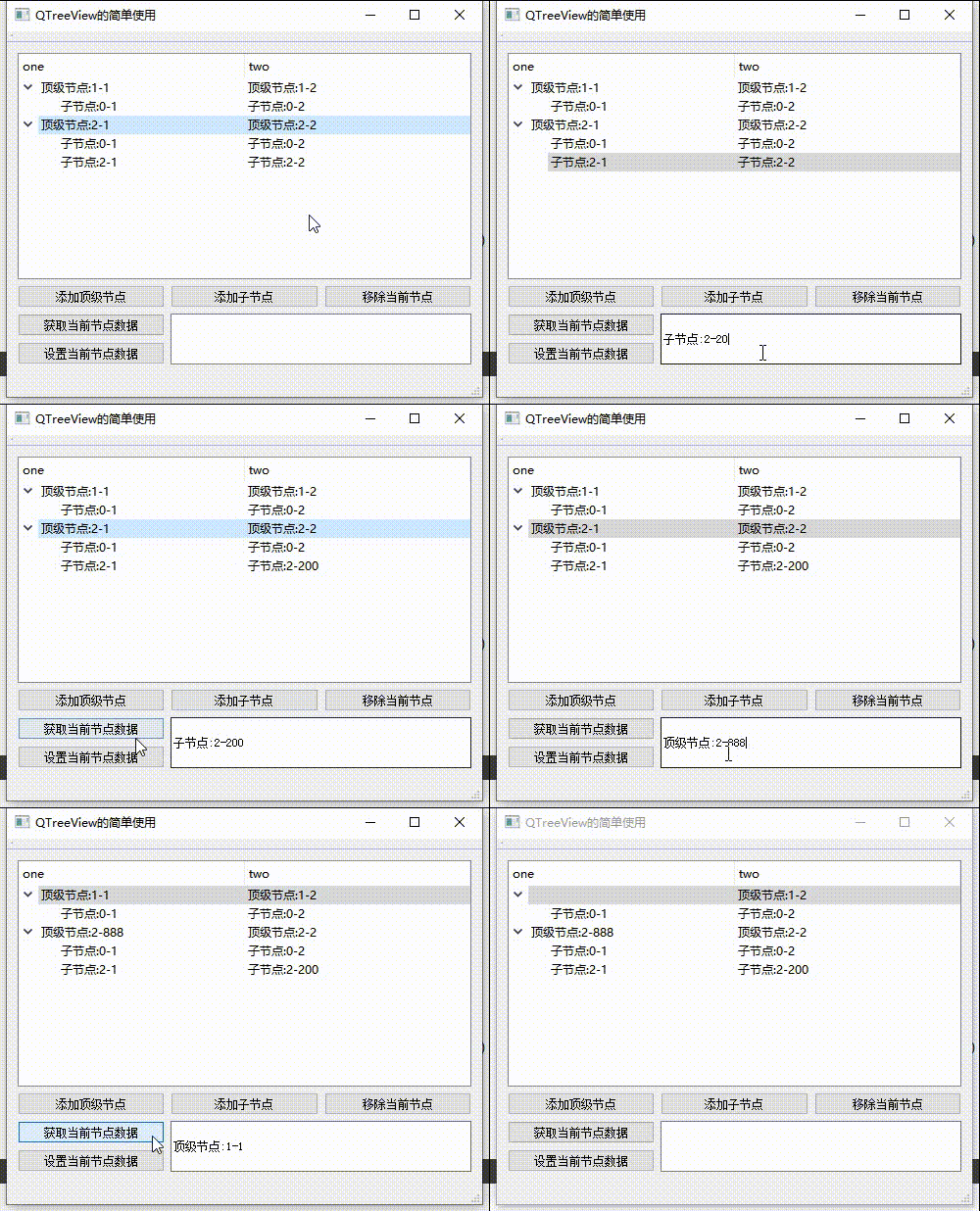
Two 、QTreeView( Personal understanding )
Here we will QTreeView and QTableView Compare the
- Both are similar MVC(Model View Controller) Pattern , It all includes Delegate, Please check out Qt The realization of agent ( Button chapter )、Qt The realization of agent ( General controls );
- Use both QStandardItemModel Storing data ;
- QTreeView There is also an inheritance QTreeWidget Subclasses of ;
- QTreeView The only difference is that I can operate item Child nodes of .
3、 ... and 、 Source code
CMainWindow.h
#ifndef CMAINWINDOW_H
#define CMAINWINDOW_H

#include <QMainWindow>
#include <QStandardItemModel> // Data model class

namespace Ui {

class CMainWindow;
}

class CMainWindow : public QMainWindow
{

    Q_OBJECT

public:
    explicit CMainWindow(QWidget *parent = 0);
    ~CMainWindow();

private slots:

    /** * @brief on_getCurNodeDataBtn_clicked  Get current node value  */
    void on_getCurNodeDataBtn_clicked();

    /** * @brief on_setCurNodeDataBtn_clicked  Set the current node value  */
    void on_setCurNodeDataBtn_clicked();

    /** * @brief on_addTopNodeBtn_clicked  Add top-level nodes  */
    void on_addTopNodeBtn_clicked();

    /** * @brief on_addChildNodeBtn_clicked  Add child nodes  */
    void on_addChildNodeBtn_clicked();

    /** * @brief on_removeCurNodeBtn_clicked  Remove the current node  */
    void on_removeCurNodeBtn_clicked();

private:
    Ui::CMainWindow     *ui;

    QStandardItemModel  *m_pModel;      // Data model object pointer
};
CMainWindow.cpp
#include "CMainWindow.h"
#include "ui_CMainWindow.h"

CMainWindow::CMainWindow(QWidget *parent) :
    QMainWindow(parent),
    ui(new Ui::CMainWindow)
{

    ui->setupUi(this);
    // Set the window title
    this->setWindowTitle("QTreeView Simple use ");

    //=============== Data model (QStandardItemModel)===============
    // Create the data model object space and specify the parent object
    m_pModel = new QStandardItemModel(ui->treeView);
    // Set the data model to the tree view
    ui->treeView->setModel(m_pModel);
    // Set the average score of horizontal header column
    ui->treeView->header()->setSectionResizeMode(QHeaderView::Stretch);
    // Add column headings
    m_pModel->setHorizontalHeaderLabels(QStringList() << "one" << "two");

}

CMainWindow::~CMainWindow()
{

    //!  Destructor :
    //!  Some of my friends will find that I don't destruct model、m_pFilterModel object ,
    //!  That's because I specified the parent object when I got the object space ,
    //!  When its parent object is destructed , The object whose child object is a pointer will be destructed first .
    delete ui;
}

void CMainWindow::on_getCurNodeDataBtn_clicked()
{

    // Get the current row and column
    QModelIndex curIndex = ui->treeView->currentIndex();
    int row = curIndex.row();
    int column = curIndex.column();

    // The current location contains -1 Value returns
    if( -1 == row || -1 == column)
    {

        return;
    }

    /// Do not get item The situation of ///
    ///  Use... Only when you need to get text
    //!  adopt index Get value , default data What you get is Qt::DisplayRole Value ,
    //!  Generally speaking, the value obtained is the displayed value
    ui->valueEdit->setText(curIndex.data().toString());

}

void CMainWindow::on_setCurNodeDataBtn_clicked()
{

    // Get the current row and column
    QModelIndex curIndex = ui->treeView->currentIndex();
    int row = curIndex.row();
    int column = curIndex.column();

    // The current location contains -1 Value returns
    if( -1 == row || -1 == column)
    {

        return;
    }

    /// Need to get item The situation of ///
    /// \brief curItem  When you need to get specific item/ Use... In position
    ///  Setting up item value

    QStandardItem *curItem;
    int parentRow = curIndex.data(Qt::UserRole + 1).toInt();
    // Judge the top-level node value and select the corresponding operation
    if(-1 == parentRow)
    {

        curItem = m_pModel->item(row, column);
    }
    else
    {

        // Get the top-level node of the current location
        QStandardItem *parentItem = m_pModel->item(parentRow);
        // Get child nodes from top-level nodes
        curItem = parentItem->child(row, column);
    }

    // Get the value in the value edit box and set it to item On
    curItem->setText(ui->valueEdit->text());
}

void CMainWindow::on_addTopNodeBtn_clicked()
{

    int index = m_pModel->rowCount();
    QList<QStandardItem *> topList;
    // Add top-level nodes to the linked list container
    topList << new QStandardItem(QString(" Top level nodes :%1-1").arg(index + 1))
            << new QStandardItem(QString(" Top level nodes :%1-2").arg(index + 1));

    //!  Set up Qt::UserRole + n:  User defined values
    //!  When n When values are different , Equivalent to different key values , Similarly, different keys can set different values
    //!  Set here data To get the top-level node value , Judge and make corresponding operation through this value
    topList[0]->setData(-1, Qt::UserRole + 1); // Set parent node row , The duty of -1 Is currently the top-level node
    topList[1]->setData(-1, Qt::UserRole + 1);
    // Add top-level nodes
    m_pModel->appendRow(topList);
}

void CMainWindow::on_addChildNodeBtn_clicked()
{

    // Get the current row and column
    QModelIndex curIndex = ui->treeView->currentIndex();
    int row = curIndex.row();
    int column = curIndex.column();
    int parentRow = curIndex.data(Qt::UserRole + 1).toInt();

    // The current row and column values contain -1 Value or when the current node is not a top-level node
    if( -1 == row || -1 == column || -1 != parentRow)
    {

        return;
    }

    // Gets the first... Of the specified row item
    QStandardItem *curTopItem = m_pModel->item(row);

    // Add child nodes to the top-level nodes
    QList<QStandardItem *> childList;
    childList << new QStandardItem(QString(" Child node :%1-1").arg(curTopItem->rowCount()))
              << new QStandardItem(QString(" Child node :%1-2").arg(curTopItem->rowCount()));
    // Set up item Of data
    childList[0]->setData(row, Qt::UserRole + 1);
    childList[1]->setData(row, Qt::UserRole + 1);
    // Add child nodes
    curTopItem->appendRow(childList);
}

void CMainWindow::on_removeCurNodeBtn_clicked()
{

    // Get the current row and column
    QModelIndex curIndex = ui->treeView->currentIndex();
    int row = curIndex.row();
    int column = curIndex.column();

    // The current row and column values contain -1 Value or when the current node is not a top-level node
    if( -1 == row || -1 == column)
    {

        return;
    }

    int parentRow = curIndex.data(Qt::UserRole + 1).toInt();
    // Judge the top-level node value and select the corresponding removal operation
    if(-1 == parentRow)
    {

        m_pModel->removeRow(row);
    }
    else
    {

        // To remove a child node, you need to find its top-level node
        QStandardItem *parentItem = m_pModel->item(parentRow);
        parentItem->removeRow(row);
    }

}
Four 、 expand : Acquisition and judgment of superior nodes
The judgment of nodes in this paper is through data Set the... For user-defined value operations , There's another way , By getting the current location QModelIndex Object gets the of its parent object QModelIndex Judge , The code is as follows ( The code below applies only to this article ):
Tips : It is said that the following methods are not rigorous , For example, when you manually specify the parent object .
void CMainWindow::parentIndex()
{

    // Get the... Of the current node QModelIndex object
    QModelIndex index = ui->treeView->currentIndex();
    // Get the parent object of the current node QModelIndex object
    QModelIndex parentIndex = index.parent();
    // Determine the row and column values of the parent node , The parent node row and column values of the top-level node are -1
    if(-1 == parentIndex.row() || -1 == parentIndex.column())
    {

        qDebug() << " The current node is a top-level node ";
    }
    else
    {

        qDebug() << " The current node is a child node ";
    }

}
summary
QTreeView When determining the node position, you should pay attention to , And to set a child node, you need to get the line to its parent node ; Each child node can only pass through its parent node with the row position of 0 Of item To set ;QTreeView Set the proxy method and QTableView equally , It should be noted that , The columns set will run through the child nodes ( The corresponding columns of child nodes will also take effect ).
Another week , We will continue to move bricks tomorrow , come on. !
Related articles
Qt And QTableView Simple use ( Including source code + notes )
Qt The realization of agent ( Button chapter , Including source code + notes )
Qt The realization of agent ( General controls , Including source code + notes )
Qt And QTableView Set the multi column header check box ( Customize QHeaderView)、 Cell check box ( Including source code + notes )
Qt And QSortFilterProxyModel Simple use (QTableView Search function , Including source code + notes )
Friendship tips —— Where can't you understand? It's private , Let's make progress together
( It's not easy to create , Please leave a free praise thank you ^o^/)
notes : This paper summarizes the problems encountered by the author in the process of programming , The content is for reference only , If there are any mistakes, please point out .
notes : If there is any infringement , Please contact the author for deletion
边栏推荐
- Vs Code modify default terminal_ Modify the default terminal opened by vs Code
- js 解构赋值
- Supervisor -- Process Manager
- Node uses post to request req Pit with empty body
- Kotlin memorandum
- Operating principle of JS core EventLoop
- Linked list: palindrome linked list
- Hash table: least recently used cache
- A wechat app for shopping
- Linked list: the entry node of the link in the linked list
猜你喜欢

js 解构赋值

The weight of the input and textarea components of the applet is higher than that of the fixed Z-index

Summary of the latest IOS interview questions in June 2020 (answers)

Use of jstack

Flutter reports an error type 'Int' is not a subtype of type 'string' wonderful experience

Linked list: the first coincident node of two linked lists

JVM JMM (VI)

Use and arrangement of wechat applet coordinate position interface (I)

The latest Matlab r2020 B ultrasonic detailed installation tutorial (with complete installation files)

Wechat applet switch style rewriting
随机推荐
Using binary heap to implement priority queue
Introduction and download of common data sets for in-depth learning (with network disk link)
Traverse the array and delete an element until it is deleted
Install MySQL database
Linked list: reverse linked list
Mongodb distributed cluster deployment process
Understanding of intermediatelayergetter
C# . NET ASP. Net relationships and differences
Redis server configuration
Ijkplayer source code - setting option 2
Digital IC Design -- FIFO design
二叉树初始化代码
Graduation project - campus old thing recycling system based on stm32
IOS development internal volume interview questions
JVM class loading (I)
Simple use of leaflet - offline map scheme
Linked list: the first coincident node of two linked lists
JS multiple judgment writing
Pycharm installation pyqt5 and its tools (QT designer, pyuic, pyrcc) detailed tutorial
. Net compact Framework2.0 wince intelligent device development project experience sharing Net drag space advanced