当前位置:网站首页>数据湖(十二):Spark3.1.2与Iceberg0.12.1整合
数据湖(十二):Spark3.1.2与Iceberg0.12.1整合
2022-07-02 18:37:00 【Lansonli】
 文章目录
文章目录
Spark3.1.2与Iceberg0.12.1整合
Spark可以操作Iceberg数据湖,这里使用的Iceberg的版本为0.12.1,此版本与Spark2.4版本之上兼容。由于在Spark2.4版本中在操作Iceberg时不支持DDL、增加分区及增加分区转换、Iceberg元数据查询、insert into/overwrite等操作,建议使用Spark3.x版本来整合Iceberg0.12.1版本,这里我们使用的Spark版本是3.1.2版本。
一、向pom文件导入依赖
在Idea中创建Maven项目,在pom文件中导入以下关键依赖:
<!-- 配置以下可以解决 在jdk1.8环境下打包时报错 “-source 1.5 中不支持 lambda 表达式” -->
<properties>
<project.build.sourceEncoding>UTF-8</project.build.sourceEncoding>
<maven.compiler.source>1.8</maven.compiler.source>
<maven.compiler.target>1.8</maven.compiler.target>
</properties>
<dependencies>
<!-- Spark-core -->
<dependency>
<groupId>org.apache.spark</groupId>
<artifactId>spark-core_2.12</artifactId>
<version>3.1.2</version>
</dependency>
<!-- Spark与Iceberg整合的依赖包-->
<dependency>
<groupId>org.apache.iceberg</groupId>
<artifactId>iceberg-spark3</artifactId>
<version>0.12.1</version>
</dependency>
<dependency>
<groupId>org.apache.iceberg</groupId>
<artifactId>iceberg-spark3-runtime</artifactId>
<version>0.12.1</version>
</dependency>
<!-- avro格式 依赖包 -->
<dependency>
<groupId>org.apache.avro</groupId>
<artifactId>avro</artifactId>
<version>1.10.2</version>
</dependency>
<!-- parquet格式 依赖包 -->
<dependency>
<groupId>org.apache.parquet</groupId>
<artifactId>parquet-hadoop</artifactId>
<version>1.12.0</version>
</dependency>
<!-- SparkSQL -->
<dependency>
<groupId>org.apache.spark</groupId>
<artifactId>spark-sql_2.12</artifactId>
<version>3.1.2</version>
</dependency>
<!-- SparkSQL ON Hive-->
<dependency>
<groupId>org.apache.spark</groupId>
<artifactId>spark-hive_2.12</artifactId>
<version>3.1.2</version>
</dependency>
<!--<!–mysql依赖的jar包–>-->
<!--<dependency>-->
<!--<groupId>mysql</groupId>-->
<!--<artifactId>mysql-connector-java</artifactId>-->
<!--<version>5.1.47</version>-->
<!--</dependency>-->
<!--SparkStreaming-->
<dependency>
<groupId>org.apache.spark</groupId>
<artifactId>spark-streaming_2.12</artifactId>
<version>3.1.2</version>
</dependency>
<!-- SparkStreaming + Kafka -->
<dependency>
<groupId>org.apache.spark</groupId>
<artifactId>spark-streaming-kafka-0-10_2.12</artifactId>
<version>3.1.2</version>
</dependency>
<!--<!– 向kafka 生产数据需要包 –>-->
<!--<dependency>-->
<!--<groupId>org.apache.kafka</groupId>-->
<!--<artifactId>kafka-clients</artifactId>-->
<!--<version>0.10.0.0</version>-->
<!--<!– 编译和测试使用jar包,没有传递性 –>-->
<!--<!–<scope>provided</scope>–>-->
<!--</dependency>-->
<!-- StructStreaming + Kafka -->
<dependency>
<groupId>org.apache.spark</groupId>
<artifactId>spark-sql-kafka-0-10_2.12</artifactId>
<version>3.1.2</version>
</dependency>
<!-- Scala 包-->
<dependency>
<groupId>org.scala-lang</groupId>
<artifactId>scala-library</artifactId>
<version>2.12.14</version>
</dependency>
<dependency>
<groupId>org.scala-lang</groupId>
<artifactId>scala-compiler</artifactId>
<version>2.12.14</version>
</dependency>
<dependency>
<groupId>org.scala-lang</groupId>
<artifactId>scala-reflect</artifactId>
<version>2.12.14</version>
</dependency>
<dependency>
<groupId>log4j</groupId>
<artifactId>log4j</artifactId>
<version>1.2.12</version>
</dependency>
<dependency>
<groupId>com.google.collections</groupId>
<artifactId>google-collections</artifactId>
<version>1.0</version>
</dependency>
</dependencies>二、SparkSQL设置catalog配置
以下操作主要是SparkSQL操作Iceberg,同样Spark中支持两种Catalog的设置:hive和hadoop,Hive Catalog就是iceberg表存储使用Hive默认的数据路径,Hadoop Catalog需要指定Iceberg格式表存储路径。
在SparkSQL代码中通过以下方式来指定使用的Catalog:
val spark: SparkSession = SparkSession.builder().master("local").appName("SparkOperateIceberg")
  //指定hive catalog, catalog名称为hive_prod
  .config("spark.sql.catalog.hive_prod", "org.apache.iceberg.spark.SparkCatalog")
  .config("spark.sql.catalog.hive_prod.type", "hive")
  .config("spark.sql.catalog.hive_prod.uri", "thrift://node1:9083")
  .config("iceberg.engine.hive.enabled", "true")

  //指定hadoop catalog,catalog名称为hadoop_prod
  .config("spark.sql.catalog.hadoop_prod", "org.apache.iceberg.spark.SparkCatalog")
  .config("spark.sql.catalog.hadoop_prod.type", "hadoop")
  .config("spark.sql.catalog.hadoop_prod.warehouse", "hdfs://mycluster/sparkoperateiceberg")
  .getOrCreate()
三、使用Hive Catalog管理Iceberg表
使用Hive Catalog管理Iceberg表默认数据存储在Hive对应的Warehouse目录下,在Hive中会自动创建对应的Iceberg表,SparkSQL 相当于是Hive客户端,需要额外设置“iceberg.engine.hive.enabled”属性为true,否则在Hive对应的Iceberg格式表中查询不到数据。
1、创建表
//创建表 ,hive_pord:指定catalog名称。default:指定Hive中存在的库。test:创建的iceberg表名。
spark.sql(
      """
        | create table if not exists hive_prod.default.test(id int,name string,age int) using iceberg
      """.stripMargin)
注意:
1)创建表时,表名称为:${catalog名称}.${Hive中库名}.${创建的Iceberg格式表名}
2)表创建之后,可以在Hive中查询到对应的test表,创建的是Hive外表,在对应的Hive warehouse 目录下可以看到对应的数据目录。

2、插入数据
//插入数据
spark.sql(
  """
    |insert into hive_prod.default.test values (1,"zs",18),(2,"ls",19),(3,"ww",20)
  """.stripMargin)
3、查询数据
//查询数据
spark.sql(
  """
    |select * from hive_prod.default.test
  """.stripMargin).show()
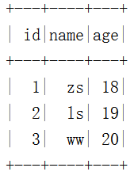
结果如下:
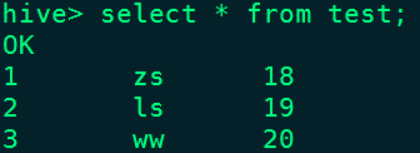
在Hive对应的test表中也能查询到数据:
4、删除表
//删除表,删除表对应的数据不会被删除
spark.sql(
  """
    |drop table hive_prod.default.test
  """.stripMargin)
注意:删除表后,数据会被删除,但是表目录还是存在,如果彻底删除数据,需要把对应的表目录删除。
四、用Hadoop Catalog管理Iceberg表
使用Hadoop Catalog管理表,需要指定对应Iceberg存储数据的目录。
1、创建表
//创建表 ,hadoop_prod:指定Hadoop catalog名称。default:指定库名称。test:创建的iceberg表名。
spark.sql(
  """
    | create table if not exists hadoop_prod.default.test(id int,name string,age int) using iceberg
  """.stripMargin)
注意:
1)创建表名称为:${Hadoop Catalog名称}.${随意定义的库名}.${Iceberg格式表名}
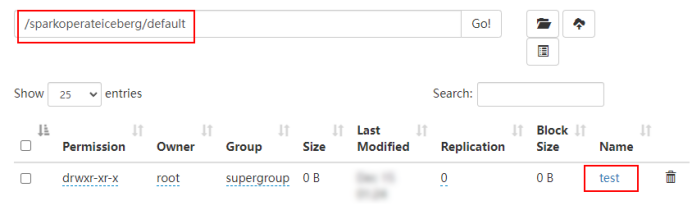
2)创建表后,会在hadoop_prod名称对应的目录下创建该表
2、插入数据
//插入数据
spark.sql(
  """
    |insert into hadoop_prod.default.test values (1,"zs",18),(2,"ls",19),(3,"ww",20)
  """.stripMargin)
3、查询数据
spark.sql(
  """
    |select * from hadoop_prod.default.test
""".stripMargin).show() 
4、创建对应的Hive表映射数据
在Hive表中执行如下建表语句:
CREATE TABLE hdfs_iceberg  (
  id int,
  name string,
  age int
)
STORED BY 'org.apache.iceberg.mr.hive.HiveIcebergStorageHandler'
LOCATION 'hdfs://mycluster/sparkoperateiceberg/default/test'
TBLPROPERTIES ('iceberg.catalog'='location_based_table');
在Hive中查询“hdfs_iceberg”表数据如下:

5、删除表
spark.sql(
  """
    |drop table hadoop_prod.default.test
  """.stripMargin)
注意:删除iceberg表后,数据被删除,对应的库目录存在。
- 博客主页:https://lansonli.blog.csdn.net
- 欢迎点赞 收藏 留言 如有错误敬请指正!
- 本文由 Lansonli 原创,首发于 CSDN博客
- 停下休息的时候不要忘了别人还在奔跑,希望大家抓紧时间学习,全力奔赴更美好的生活
边栏推荐
- 股票证券公司排名,有安全保障吗
- What is the MySQL backup suffix_ MySQL backup restore
- Web2.0的巨头纷纷布局VC,Tiger DAO VC或成抵达Web3捷径
- AcWing 903. 昂贵的聘礼 题解(最短路—建图、dijkstra)
- High frequency interview questions
- MySQL
- NPOI导出Excel2007
- End-to-End Object Detection with Transformers(DETR)论文阅读与理解
- Typescript 之 快速入门
- AcWing 1137. 选择最佳线路 题解(最短路)
猜你喜欢

Tutorial (5.0) 09 Restful API * fortiedr * Fortinet network security expert NSE 5

PHP-Parser羽毛球预约小程序开发require线上系统

High frequency interview questions
According to the atlas of data security products and services issued by the China Academy of information technology, meichuang technology has achieved full coverage of four major sectors

Web2.0 giants have deployed VC, and tiger Dao VC may become a shortcut to Web3
冒泡排序数组

Yunna | why use the fixed asset management system and how to enable it

IEDA refactor的用法

Processing strategy of message queue message loss and repeated message sending
Introduction to the paper | application of machine learning in database cardinality estimation
随机推荐
[pytorch learning notes] tensor
Preprocessing and preprocessing macros
AcWing 1134. 最短路计数 题解(最短路)
LeetCode 0871. Minimum refueling times - similar to poj2431 jungle adventure
Windows2008R2 安装 PHP7.4.30 必须 LocalSystem 启动应用程序池 不然500错误 FastCGI 进程意外退出
Bubble sort array
Gamefi chain game system development (NFT chain game development function) NFT chain game system development (gamefi chain game development source code)
Chapter 7 - class foundation
PHP-Parser羽毛球预约小程序开发require线上系统
Talk about the design of red envelope activities in e-commerce system
Web2.0 giants have deployed VC, and tiger Dao VC may become a shortcut to Web3
注解开发方式下AutowiredAnnotationBeanPostProcessor的注册时机
ICDE 2023|TKDE Poster Session(CFP)
PHP asymmetric encryption method private key and public key encryption and decryption method
Mobile robot path planning: artificial potential field method [easy to understand]
Windows2008r2 installing php7.4.30 requires localsystem to start the application pool, otherwise 500 error fastcgi process exits unexpectedly
juypter notebook 修改默认打开文件夹以及默认浏览器
codeforces每日5题(均1700)-第四天
Advanced performance test series "24. Execute SQL script through JDBC"
Horizontal ultra vires and vertical ultra vires [easy to understand]