当前位置:网站首页>Maui migration guide
Maui migration guide
2022-06-11 03:48:00 【Dotnet cross platform】
Preface
In order to make everyone better understand the new MAUI frame , So this migration guide mainly explains the migration from Xamarin.Forms Upgrade to MAUI What new changes have been brought about , The following will focus on the following points .
Single code base evolution
Start configuration evolution
Unified resource management
Dependency injection
Implicit using Instructions
Essentials Merge
New namespace
You only need to have Xamarin.Forms Some basic concepts of
Single code base evolution
as follows , Demonstrated a Xamarin.Forms Project structure for typical applications , Contains a shared class library and 2 A native platform application (Android/IOS).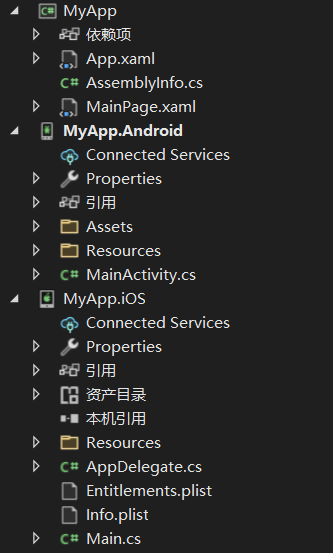
MyApp( Shared class library ): It is used to write business logic implementation code that is not specific to the platform
MyApp.Android( Native Android apps ): contain Android Platform specific configuration 、 resources 、 Assembly dependency .
MyApp.iOS( Native Android apps ): contain IOS Platform specific configuration 、 resources 、 Assembly dependency .
If your app chooses Windows platform , There will be one more UWP Project options , similar , This is only for UWP Relevant configuration of the platform .
below , It demonstrates a MAUI Project results of typical applications of , Only one project is included .
MAUI The applied projects include One Platform Folder , Each subfolder represents .NET MAUI Can be oriented to the platform 
At the time of generation , The generation system only includes the code in each folder when generating for that particular platform . for example , For Android When generating platform Android Files in folder > Built into the app package , But files in other platform folders will not .
With single code base support , We no longer need to maintain projects with multiple platforms alone , Repetitive SDK quote , Resource file definitions, etc .
About multi-objective based configuration , May refer to MAUI Configure multiple targets in
Start configuration evolution
stay Xamarin.Forms among , Whether we start Android still IOS project , We all need to initialize before starting Xamarin.Forms frame .
Android
protected override void OnCreate(Bundle savedInstanceState)
        {
            base.OnCreate(savedInstanceState);
            // initialization Xamarin.Forms
            Xamarin.Essentials.Platform.Init(this, savedInstanceState);
            global::Xamarin.Forms.Forms.Init(this, savedInstanceState);
            LoadApplication(new App());
        }
IOS in
public override bool FinishedLaunching(UIApplication app, NSDictionary options)
        {
            // initialization Xamarin.Forms
            global::Xamarin.Forms.Forms.Init();
            LoadApplication(new App());

            return base.FinishedLaunching(app, options);
        }
Throughout the initialization process , We can't configure it , for example : Scan assembly configuration container service 、 Export Fonts 、 Load the default control renderer 、 Platform binding, etc . That means , about Xamarin.Forms for ,
Most functions are configured according to the Convention , Cannot customize , And services are mostly loaded by scanning assemblies for reflection .
stay MAUI among , Similar to the common host structure is used to initialize .NET MAUI Applications . This will provide users with a very Microsoft experience , And make a lot of code conform to ASP.NET Core normal form .
public static MauiApp CreateMauiApp()
	{
		var builder = MauiApp.CreateBuilder();
		builder
			.UseMauiApp<App>()
			.ConfigureFonts(fonts =>
			{
				fonts.AddFont("OpenSans-Regular.ttf", "OpenSansRegular");
				fonts.AddFont("OpenSans-Semibold.ttf", "OpenSansSemibold");
			});

		return builder.Build();
	}
By default , Each individual platform calls CreateMauiApp To build the service dependencies of the application .
Unified resource management
stay Xamarin.Forms in , Each project contains its own resource file , Most of the time , We will repeatedly define several sets of the same resources ( typeface 、 style 、 Images ) On the corresponding platform 
MAUI Single project solves this problem , stay Resources In the folder , Contains all the resource file definitions .
Dependency injection
stay Xamarin.Forms in , If we want to use dependency injection , To implement the implementation of a specific platform , First, you need to define the standard interface in the shared class library , Then each platform is implemented separately .
In concrete implementation classes , We also need assembly level attribute tags , For convenience Xamarin.Forms During initialization, the assembly can be scanned and loaded into the container .
[assembly: Xamarin.Forms.Dependency(typeof(LocalService))]
namespace MyApp.Droid
{
    public class LocalService : ILocalService
    {
        public void SetValue(string key, object value)
        {

        }
    }
}
How to get Container Services , You can use the DependencyService Static method to get .
var localService= DependencyService.Get<ILocalService>();Again , Access to Fonts , It is also loaded by scanning the assembly
[assembly: ExportFont("iconfont.ttf", Alias = "iconfont")]that , stay MAUI among , In the form of a universal host , The container can be customized and configured .
public static MauiApp CreateMauiApp()
    {
        var builder = MauiApp.CreateBuilder();
        builder
            .UseMauiApp<App>()
            .ConfigureFonts(fonts =>
            {
                // Inject Fonts
                fonts.AddFont("OpenSans-Regular.ttf", "OpenSansRegular");
                fonts.AddFont("OpenSans-Semibold.ttf", "OpenSansSemibold");
            });

        // Injection service
        builder.Services.AddScoped<ILocalService, LocalService>();
        return builder.Build();
    }
Is it easy ? Not only is it very intuitive , It also greatly improves the development efficiency and performance
Implicit using Instructions
With global using , We don't need to define namespaces repeatedly in multiple classes , Just one sentence global using, From this other class will automatically reference .
global using System;
global using System.Threading;
global using System.Linq;
global using System.ComponentModel;
For some very common namespaces , We can all use global using.
Essentials Merge
Xamarin.Forms period , We use Essentials It is done alone nuget Distribution and maintenance , When configuring , We also need separate initialization code .
Xamarin.Essentials.Platform.Init(this, savedInstanceState);PLAINTEXT Copy full screen MAUI Will Essentials All merged into MAUI In the project , Named controls are Microsoft.MAUI Next , For example, accessing devices .
using Microsoft.Maui.DevicesNew namespace
Xamarin.Forms Which we use using Xamarin.Forms Turned into using Microsoft.Maui relevant .Performance improvements
Performance has also been greatly improved , Refer to the article : .NET MAUI Performance improvements inAbout more
1. Event handler
2. Compatible with existing renderer modes
I'll go on later ...
边栏推荐
猜你喜欢

Iqoo 8 measured hands-on experience: return of the king, never high profile

Shopping and retail backstage management system of chain supermarket based on SSM framework

Detailed explanation of scenario method for common test case design methods

OpenGL第七章 基础光照

Simple image browsing with fragment
Canvas drawing -- how to place the drawing in the center of the canvas

SQL query users logged in for three consecutive days

The tide play power is really firepower! The first big screen cinema for young people? Cool open TV Max 86 "sudden attack

Canvas rotation drawing H5 animation JS effect

【ELT.ZIP】OpenHarmony啃论文俱乐部——数据高通量无损压缩方案
随机推荐
Record a VMware problem
Jscpcp L. collecting diamonds (thinking)
Nsthread of the multithreaded Trilogy
PMM monitoring Oracle
J. Balanced Tree
Rhel7 switch character encoding to GBK
OpenGl第十章 投光物
js实现柯里化
Benefits of declaring variables
Product milestones in May 2022
Object storage Minio tutorial
[interpretable] | axiomatic attribute for deep networks
OpenGL Chapter 10 illuminant
给孩子的国学经典
大厂外包or自研公司?测试人找工作怎么选?
js最常用的排序---手撕js系列
OpenGL第七章 基础光照
Shopping and retail backstage management system of chain supermarket based on SSM framework
OpenGL第八章 材质material
OpenGL第十一章 多光源