当前位置:网站首页>[flutter topic] 66 diagram basic constraints box (I) yyds dry goods inventory
[flutter topic] 66 diagram basic constraints box (I) yyds dry goods inventory
2022-06-29 03:09:00 【A Ze young monk】
In the process of learning , In order to adjust or adapt Widget Big hour , Will be set Widget Or nest some constraints Widget; Let's learn about this series of constraints Box;
SizedBox
Source code analysis
Analyze the source code to know ,SizeBox Inherited from SingleChildRenderObjectWidget Only sub Child The storage of does not provide update logic ; And SizedBox Provides a variety of ways to use , Try the dishes one by one ;
Case study
1. SizedBox({ Key key, this.width, this.height, Widget child })
SizedBox Customizable width and height, When limiting width and height , Son Widget No matter how wide or high , Are filled by default ; By setting double.infinity Fill in the parent class Widget Wide and high , Note that there should be restrictions on the parent class at this time , It's not infinite width and height ; When width and height Not set time , According to Widget Size display ;

2. SizedBox.expand({ Key key, Widget child })
.expand It's a convenient way , Default width and height Are all double.infinity, Fill the entire parent class Widget;

3. SizedBox.shrink({ Key key, Widget child })
.shrink It's also a convenient way , but width and height Are all 0.0, Regardless of son Widget How many settings are not displayed ; I haven't figured out the application scenario of this method yet ;
4. SizedBox.fromSize({ Key key, Widget child, Size size })
.fromSize The convenient method is basically the same as the basic construction method , It's just width and height from Size encapsulation , This method can achieve the same effect as the basic method ;
ConstrainedBox
Source code analysis
Analyze the source code to know ,ConstrainedBox Also inherited from SingleChildRenderObjectWidget; The way of constraint is mainly to constraints The operation of ; be relative to SizedBox More flexible constraints ;
Case study
1. BoxConstraints()
BoxConstraints The construction method of can set the four properties of maximum, minimum width and height , It can be flexibly used in the actual scene ; The size of the constraint is in accordance with minWidth <= child.width <= maxWidth && minHeight <= child.Height <= maxHeight, When we don't set the width and height dimensions ,minWidth = 0.0 && minHeight = 0.0 && maxWidth = double.infinity && maxHeight = double.infinity;
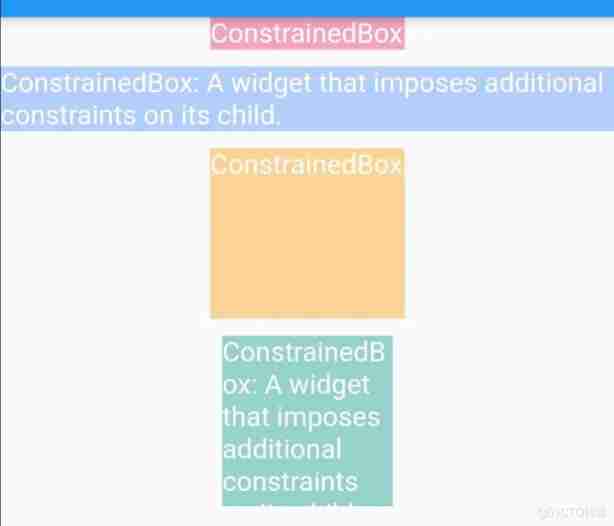
2. BoxConstraints.tight(Size size)
.tight The construction method needs to pass a fixed size Size among minWidth == maxWidth == size.width && maxWidth == maxHeight == size.height; Regardless of son Widget Set the width and height according to Size Width and height constraints ;

3. BoxConstraints.tightFor()
I understand .tightFor The way is .tight Refinement of methods , You can customize width and height; If width and height are not set , Then the maximum width and height is infinite , The minimum width and height is 0.0; If the width and height are set, the constraint is carried out according to the set size ;

4. BoxConstraints.tightForFinite()
.tightForFinite And .tightFor similar , The default maximum width and height is infinite , The minimum width and height is 0.0, It determines whether the set width and height are infinite , No double.infinity be minWidth == maxWidth == width && maxWidth == maxHeight == height Constraint ;

5. BoxConstraints.loose()
.loose Way to limit a given Size size ,minWidth / minHeight Are all 0.0, The maximum width and height is Size size ; The overall constraint is determined by Size Limit , Actual display and sub Widget Size related ;

6. BoxConstraints.expand()
Most of the .expand The method is filling , Default fill parent Widget, If width and height are not set , Default minWidth == maxWidth == double.infinity && minHeight == maxHeight == double.infinity, When using, pay attention to the parent constraint ;

Flutter Provides a variety of constraints Box, All roads lead to Rome , The same effect can be achieved in many ways , But I think we should know more about , Try the best possible solution ; It's a piece of cake Box The series of research is still very simple , If there are mistakes, please give more guidance !
source : Little monk aze
边栏推荐
- The method of displaying or closing the network flying line in Allegro design
- Overview of PMP project management
- 1110: 最近共同祖先(函数专题)
- Only in the past four years, Microsoft finally gave it up!
- 信息学奥赛一本通 1361:产生数(Produce) | 洛谷 P1037 [NOIP2002 普及组] 产生数
- Leetcode counts the logarithm of points that cannot reach each other in an undirected graph
- matlab习题 —— 图像绘制练习
- Jerry's monitoring alarm clock [chapter]
- 蓝桥杯2022初赛——扫雷
- If you dare to write MQ message queue middleware on your resume, you must win these questions!
猜你喜欢

2022-2028 global secondary butyl lithium industry research and trend analysis report
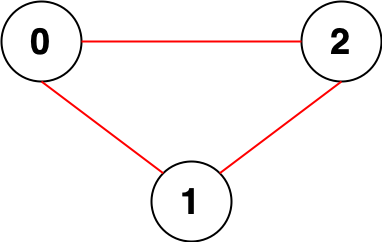
Leetcode counts the logarithm of points that cannot reach each other in an undirected graph
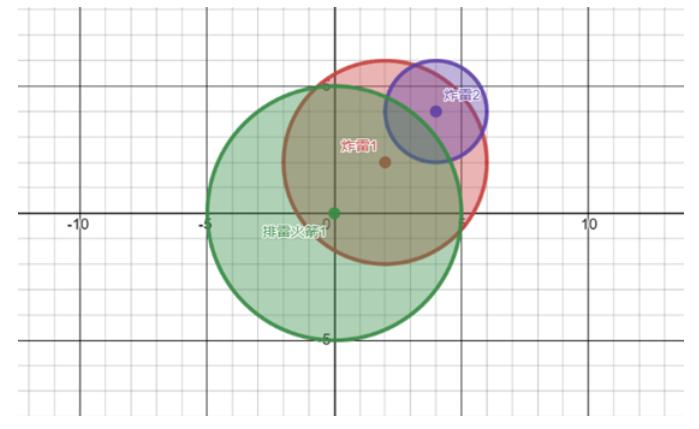
蓝桥杯2022初赛——扫雷

Today's sleep quality record 82 points

PWN攻防世界Level2
2022-2028 global UAV detection radar industry research and trend analysis report
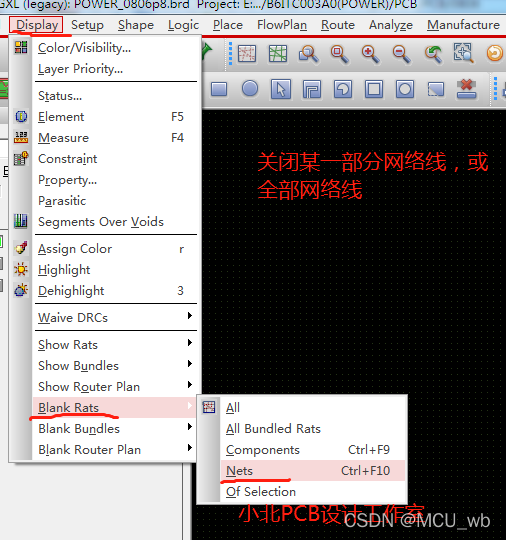
allegro 设计中显示网络飞线或关闭网络飞线的方法
![[linear algebra] 1.1 second and third order determinants](/img/ea/70b59c64d3287a887e371a9181fe45.png)
[linear algebra] 1.1 second and third order determinants
LabVIEW jump to web page

Leetcode counts the number of ways to place houses
随机推荐
Ten commands commonly used in SVN
LeetCode 每日一题——324. 摆动排序 II
map,set用pari作为key值,如何定义
On the fact that lambda expressions cannot handle recursion
PMP Business Analysis Overview
[线性代数] 1.1 二阶与三阶行列式
2022-2028 global secondary butyl lithium industry research and trend analysis report
Several ways to add breakpoints using GDB
[線性代數] 1.1 二階與三階行列式
Jerry's watch obtains alarm mode settings [chapter]
PWN attack and defense world level2
Square root of X
Bluetooth solution | Lenz technology Amazon direct connected magic lantern solution
Analytic hierarchy process (AHP)
兰宝传感科技冲刺科创板:年营收3.5亿 许永童家族色彩浓厚
arraylist基操和添加元素源码
FPGA (VII) RTL code III (complex circuit design 2)
PHP database ODBC
If you dare to write MQ message queue middleware on your resume, you must win these questions!
线程池是什么老鸡?