当前位置:网站首页>Data analysis course notes (V) common statistical methods, data and spelling, index and composite index
Data analysis course notes (V) common statistical methods, data and spelling, index and composite index
2022-07-07 00:21:00 【M Walker x】
Data analysis course notes
pandas Common statistical methods

Data sources :https://www.kaggle.com/damianpanek/sunday-eda/data
# coding=utf-8
import pandas as pd
import numpy as np

file_path = "IMDB-Movie-Data.csv"
df = pd.read_csv(file_path)

# print(df.info())

print(df.head(1))

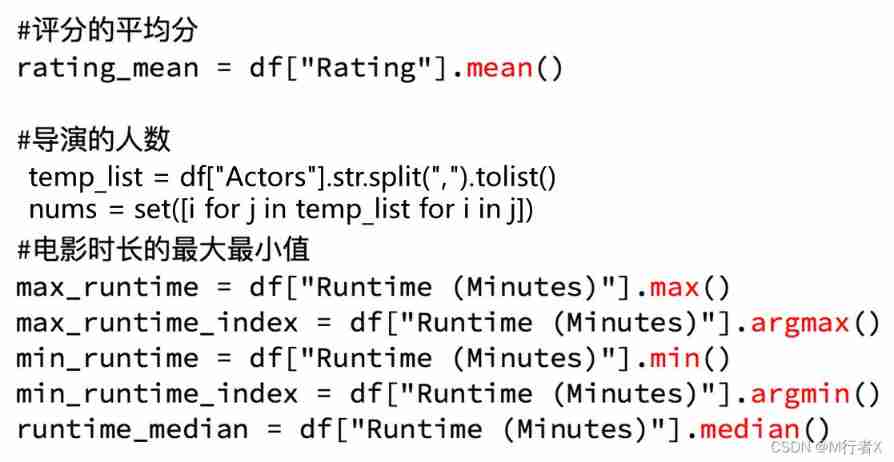
# Get the average score
print(df["Rating"].mean())

# The number of Directors
# print(len(set(df["Director"].tolist())))
print(len(df["Director"].unique()))

# Get the number of actors
temp_actors_list = df["Actors"].str.split(", ").tolist()
actors_list = [i for j in temp_actors_list for i in j]
actors_num = len(set(actors_list))
print(actors_num)

# coding=utf-8
import pandas as pd
from matplotlib import pyplot as plt
file_path = "./IMDB-Movie-Data.csv"

df = pd.read_csv(file_path)
# print(df.head(1))
# print(df.info())

#rating,runtime Distribution situation
# Select graphics , Histogram
# Prepare the data
runtime_data = df["Rating"].values

max_runtime = runtime_data.max()
min_runtime = runtime_data.min()

# Count groups
print(max_runtime-min_runtime)
num_bin = (max_runtime-min_runtime)//0.5


# Set the size of the graph
plt.figure(figsize=(20,8),dpi=80)
plt.hist(runtime_data,num_bin)

_x = [min_runtime]
i = min_runtime
while i<=max_runtime+0.5:
    i = i+0.5
    _x.append(i)

plt.xticks(_x)

plt.show()
import numpy as np
from matplotlib import pyplot as plt

runtime_data = np.array([8.1, 7.0, 7.3, 7.2, 6.2, 6.1, 8.3, 6.4, 7.1, 7.0, 7.5, 7.8, 7.9, 7.7, 6.4, 6.6, 8.2, 6.7, 8.1, 8.0, 6.7, 7.9, 6.7, 6.5, 5.3, 6.8, 8.3, 4.7, 6.2, 5.9, 6.3, 7.5, 7.1, 8.0, 5.6, 7.9, 8.6, 7.6, 6.9, 7.1, 6.3, 7.5, 2.7, 7.2, 6.3, 6.7, 7.3, 5.6, 7.1, 3.7, 8.1, 5.8, 5.6, 7.2, 9.0, 7.3, 7.2, 7.4, 7.0, 7.5, 6.7, 6.8, 6.5, 4.1, 8.5, 7.7, 7.4, 8.1, 7.5, 7.2, 5.9, 7.1, 7.5, 6.8, 8.1, 7.1, 8.1, 8.3, 7.3, 5.3, 8.8, 7.9, 8.2, 8.1, 7.2, 7.0, 6.4, 7.8, 7.8, 7.4, 8.1, 7.0, 8.1, 7.1, 7.4, 7.4, 8.6, 5.8, 6.3, 8.5, 7.0, 7.0, 8.0, 7.9, 7.3, 7.7, 5.4, 6.3, 5.8, 7.7, 6.3, 8.1, 6.1, 7.7, 8.1, 5.8, 6.2, 8.8, 7.2, 7.4, 6.7, 6.7, 6.0, 7.4, 8.5, 7.5, 5.7, 6.6, 6.4, 8.0, 7.3, 6.0, 6.4, 8.5, 7.1, 7.3, 8.1, 7.3, 8.1, 7.1, 8.0, 6.2, 7.8, 8.2, 8.4, 8.1, 7.4, 7.6, 7.6, 6.2, 6.4, 7.2, 5.8, 7.6, 8.1, 4.7, 7.0, 7.4, 7.5, 7.9, 6.0, 7.0, 8.0, 6.1, 8.0, 5.2, 6.5, 7.3, 7.3, 6.8, 7.9, 7.9, 5.2, 8.0, 7.5, 6.5, 7.6, 7.0, 7.4, 7.3, 6.7, 6.8, 7.0, 5.9, 8.0, 6.0, 6.3, 6.6, 7.8, 6.3, 7.2, 5.6, 8.1, 5.8, 8.2, 6.9, 6.3, 8.1, 8.1, 6.3, 7.9, 6.5, 7.3, 7.9, 5.7, 7.8, 7.5, 7.5, 6.8, 6.7, 6.1, 5.3, 7.1, 5.8, 7.0, 5.5, 7.8, 5.7, 6.1, 7.7, 6.7, 7.1, 6.9, 7.8, 7.0, 7.0, 7.1, 6.4, 7.0, 4.8, 8.2, 5.2, 7.8, 7.4, 6.1, 8.0, 6.8, 3.9, 8.1, 5.9, 7.6, 8.2, 5.8, 6.5, 5.9, 7.6, 7.9, 7.4, 7.1, 8.6, 4.9, 7.3, 7.9, 6.7, 7.5, 7.8, 5.8, 7.6, 6.4, 7.1, 7.8, 8.0, 6.2, 7.0, 6.0, 4.9, 6.0, 7.5, 6.7, 3.7, 7.8, 7.9, 7.2, 8.0, 6.8, 7.0, 7.1, 7.7, 7.0, 7.2, 7.3, 7.6, 7.1, 7.0, 6.0, 6.1, 5.8, 5.3, 5.8, 6.1, 7.5, 7.2, 5.7, 7.7, 7.1, 6.6, 5.7, 6.8, 7.1, 8.1, 7.2, 7.5, 7.0, 5.5, 6.4, 6.7, 6.2, 5.5, 6.0, 6.1, 7.7, 7.8, 6.8, 7.4, 7.5, 7.0, 5.2, 5.3, 6.2, 7.3, 6.5, 6.4, 7.3, 6.7, 7.7, 6.0, 6.0, 7.4, 7.0, 5.4, 6.9, 7.3, 8.0, 7.4, 8.1, 6.1, 7.8, 5.9, 7.8, 6.5, 6.6, 7.4, 6.4, 6.8, 6.2, 5.8, 7.7, 7.3, 5.1, 7.7, 7.3, 6.6, 7.1, 6.7, 6.3, 5.5, 7.4, 7.7, 6.6, 7.8, 6.9, 5.7, 7.8, 7.7, 6.3, 8.0, 5.5, 6.9, 7.0, 5.7, 6.0, 6.8, 6.3, 6.7, 6.9, 5.7, 6.9, 7.6, 7.1, 6.1, 7.6, 7.4, 6.6, 7.6, 7.8, 7.1, 5.6, 6.7, 6.7, 6.6, 6.3, 5.8, 7.2, 5.0, 5.4, 7.2, 6.8, 5.5, 6.0, 6.1, 6.4, 3.9, 7.1, 7.7, 6.7, 6.7, 7.4, 7.8, 6.6, 6.1, 7.8, 6.5, 7.3, 7.2, 5.6, 5.4, 6.9, 7.8, 7.7, 7.2, 6.8, 5.7, 5.8, 6.2, 5.9, 7.8, 6.5, 8.1, 5.2, 6.0, 8.4, 4.7, 7.0, 7.4, 6.4, 7.1, 7.1, 7.6, 6.6, 5.6, 6.3, 7.5, 7.7, 7.4, 6.0, 6.6, 7.1, 7.9, 7.8, 5.9, 7.0, 7.0, 6.8, 6.5, 6.1, 8.3, 6.7, 6.0, 6.4, 7.3, 7.6, 6.0, 6.6, 7.5, 6.3, 7.5, 6.4, 6.9, 8.0, 6.7, 7.8, 6.4, 5.8, 7.5, 7.7, 7.4, 8.5, 5.7, 8.3, 6.7, 7.2, 6.5, 6.3, 7.7, 6.3, 7.8, 6.7, 6.7, 6.6, 8.0, 6.5, 6.9, 7.0, 5.3, 6.3, 7.2, 6.8, 7.1, 7.4, 8.3, 6.3, 7.2, 6.5, 7.3, 7.9, 5.7, 6.5, 7.7, 4.3, 7.8, 7.8, 7.2, 5.0, 7.1, 5.7, 7.1, 6.0, 6.9, 7.9, 6.2, 7.2, 5.3, 4.7, 6.6, 7.0, 3.9, 6.6, 5.4, 6.4, 6.7, 6.9, 5.4, 7.0, 6.4, 7.2, 6.5, 7.0, 5.7, 7.3, 6.1, 7.2, 7.4, 6.3, 7.1, 5.7, 6.7, 6.8, 6.5, 6.8, 7.9, 5.8, 7.1, 4.3, 6.3, 7.1, 4.6, 7.1, 6.3, 6.9, 6.6, 6.5, 6.5, 6.8, 7.8, 6.1, 5.8, 6.3, 7.5, 6.1, 6.5, 6.0, 7.1, 7.1, 7.8, 6.8, 5.8, 6.8, 6.8, 7.6, 6.3, 4.9, 4.2, 5.1, 5.7, 7.6, 5.2, 7.2, 6.0, 7.3, 7.2, 7.8, 6.2, 7.1, 6.4, 6.1, 7.2, 6.6, 6.2, 7.9, 7.3, 6.7, 6.4, 6.4, 7.2, 5.1, 7.4, 7.2, 6.9, 8.1, 7.0, 6.2, 7.6, 6.7, 7.5, 6.6, 6.3, 4.0, 6.9, 6.3, 7.3, 7.3, 6.4, 6.6, 5.6, 6.0, 6.3, 6.7, 6.0, 6.1, 6.2, 6.7, 6.6, 7.0, 4.9, 8.4, 7.0, 7.5, 7.3, 5.6, 6.7, 8.0, 8.1, 4.8, 7.5, 5.5, 8.2, 6.6, 3.2, 5.3, 5.6, 7.4, 6.4, 6.8, 6.7, 6.4, 7.0, 7.9, 5.9, 7.7, 6.7, 7.0, 6.9, 7.7, 6.6, 7.1, 6.6, 5.7, 6.3, 6.5, 8.0, 6.1, 6.5, 7.6, 5.6, 5.9, 7.2, 6.7, 7.2, 6.5, 7.2, 6.7, 7.5, 6.5, 5.9, 7.7, 8.0, 7.6, 6.1, 8.3, 7.1, 5.4, 7.8, 6.5, 5.5, 7.9, 8.1, 6.1, 7.3, 7.2, 5.5, 6.5, 7.0, 7.1, 6.6, 6.5, 5.8, 7.1, 6.5, 7.4, 6.2, 6.0, 7.6, 7.3, 8.2, 5.8, 6.5, 6.6, 6.2, 5.8, 6.4, 6.7, 7.1, 6.0, 5.1, 6.2, 6.2, 6.6, 7.6, 6.8, 6.7, 6.3, 7.0, 6.9, 6.6, 7.7, 7.5, 5.6, 7.1, 5.7, 5.2, 5.4, 6.6, 8.2, 7.6, 6.2, 6.1, 4.6, 5.7, 6.1, 5.9, 7.2, 6.5, 7.9, 6.3, 5.0, 7.3, 5.2, 6.6, 5.2, 7.8, 7.5, 7.3, 7.3, 6.6, 5.7, 8.2, 6.7, 6.2, 6.3, 5.7, 6.6, 4.5, 8.1, 5.6, 7.3, 6.2, 5.1, 4.7, 4.8, 7.2, 6.9, 6.5, 7.3, 6.5, 6.9, 7.8, 6.8, 4.6, 6.7, 6.4, 6.0, 6.3, 6.6, 7.8, 6.6, 6.2, 7.3, 7.4, 6.5, 7.0, 4.3, 7.2, 6.2, 6.2, 6.8, 6.0, 6.6, 7.1, 6.8, 5.2, 6.7, 6.2, 7.0, 6.3, 7.8, 7.6, 5.4, 7.6, 5.4, 4.6, 6.9, 6.8, 5.8, 7.0, 5.8, 5.3, 4.6, 5.3, 7.6, 1.9, 7.2, 6.4, 7.4, 5.7, 6.4, 6.3, 7.5, 5.5, 4.2, 7.8, 6.3, 6.4, 7.1, 7.1, 6.8, 7.3, 6.7, 7.8, 6.3, 7.5, 6.8, 7.4, 6.8, 7.1, 7.6, 5.9, 6.6, 7.5, 6.4, 7.8, 7.2, 8.4, 6.2, 7.1, 6.3, 6.5, 6.9, 6.9, 6.6, 6.9, 7.7, 2.7, 5.4, 7.0, 6.6, 7.0, 6.9, 7.3, 5.8, 5.8, 6.9, 7.5, 6.3, 6.9, 6.1, 7.5, 6.8, 6.5, 5.5, 7.7, 3.5, 6.2, 7.1, 5.5, 7.1, 7.1, 7.1, 7.9, 6.5, 5.5, 6.5, 5.6, 6.8, 7.9, 6.2, 6.2, 6.7, 6.9, 6.5, 6.6, 6.4, 4.7, 7.2, 7.2, 6.7, 7.5, 6.6, 6.7, 7.5, 6.1, 6.4, 6.3, 6.4, 6.8, 6.1, 4.9, 7.3, 5.9, 6.1, 7.1, 5.9, 6.8, 5.4, 6.3, 6.2, 6.6, 4.4, 6.8, 7.3, 7.4, 6.1, 4.9, 5.8, 6.1, 6.4, 6.9, 7.2, 5.6, 4.9, 6.1, 7.8, 7.3, 4.3, 7.2, 6.4, 6.2, 5.2, 7.7, 6.2, 7.8, 7.0, 5.9, 6.7, 6.3, 6.9, 7.0, 6.7, 7.3, 3.5, 6.5, 4.8, 6.9, 5.9, 6.2, 7.4, 6.0, 6.2, 5.0, 7.0, 7.6, 7.0, 5.3, 7.4, 6.5, 6.8, 5.6, 5.9, 6.3, 7.1, 7.5, 6.6, 8.5, 6.3, 5.9, 6.7, 6.2, 5.5, 6.2, 5.6, 5.3])
max_runtime = runtime_data.max()
min_runtime = runtime_data.min()
print(min_runtime,max_runtime)

# Set unequal group spacing ,hist What you get in the method will be a left closed and right open interval [1.9,3.5)
num_bin_list = [1.9,3.5]
i=3.5
while i<=max_runtime:
    i += 0.5
    num_bin_list.append(i)
print(num_bin_list)

# Set the size of the graph
plt.figure(figsize=(20,8),dpi=80)
plt.hist(runtime_data,num_bin_list)

#xticks Let the previous group spacing correspond to
plt.xticks(num_bin_list)

plt.show()

# coding=utf-8
import pandas as pd
from matplotlib import pyplot as plt
import numpy as np
file_path = "./IMDB-Movie-Data.csv"

df = pd.read_csv(file_path)
print(df["Genre"].head(3))
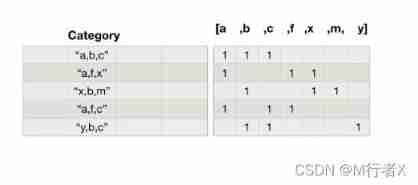
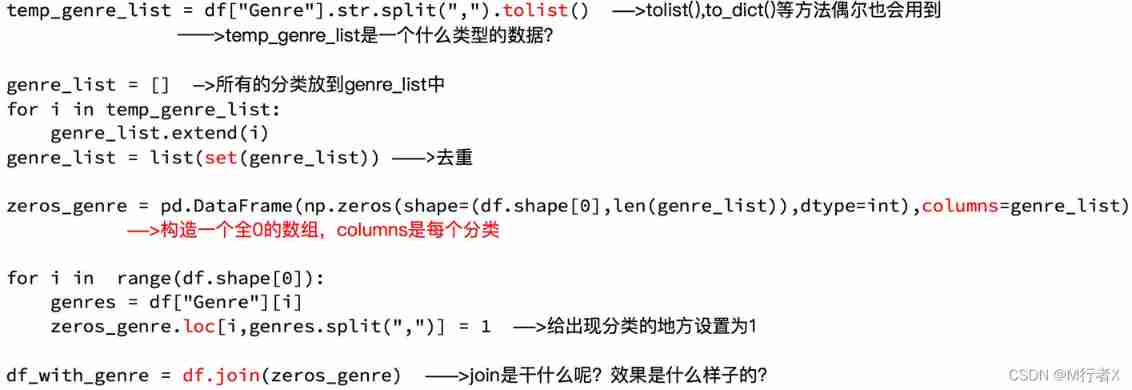
# List of statistical classifications
temp_list = df["Genre"].str.split(",").tolist()  #[[],[],[]]

genre_list = list(set([i for j in temp_list for i in j]))

# The structure is all 0 Array of
zeros_df = pd.DataFrame(np.zeros((df.shape[0],len(genre_list))),columns=genre_list)
# print(zeros_df)

# Assign a value to the location of each movie occurrence category 1
for i in range(df.shape[0]):
    #zeros_df.loc[0,["Sci-fi","Mucical"]] = 1
    zeros_df.loc[i,temp_list[i]] = 1

# print(zeros_df.head(3))

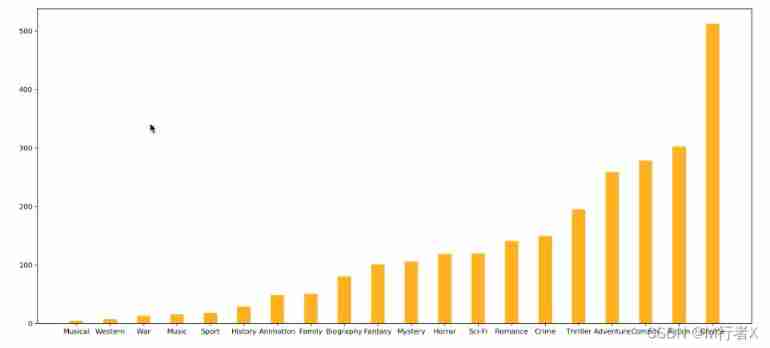
# Count the number and number of films in each category
genre_count = zeros_df.sum(axis=0)
print(genre_count)

# Sort
genre_count = genre_count.sort_values()
_x = genre_count.index
_y = genre_count.values
# drawing
plt.figure(figsize=(20,8),dpi=80)
plt.bar(range(len(_x)),_y,width=0.4,color="orange")
plt.xticks(range(len(_x)),_x)
plt.show()
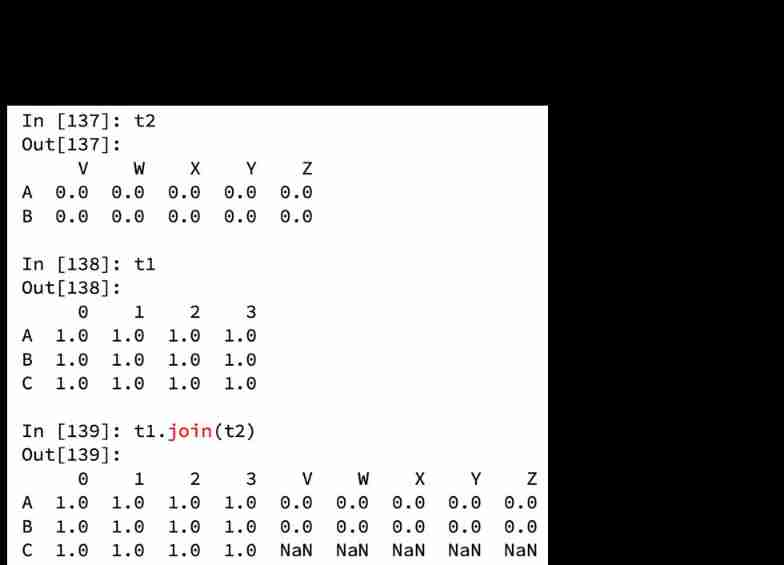
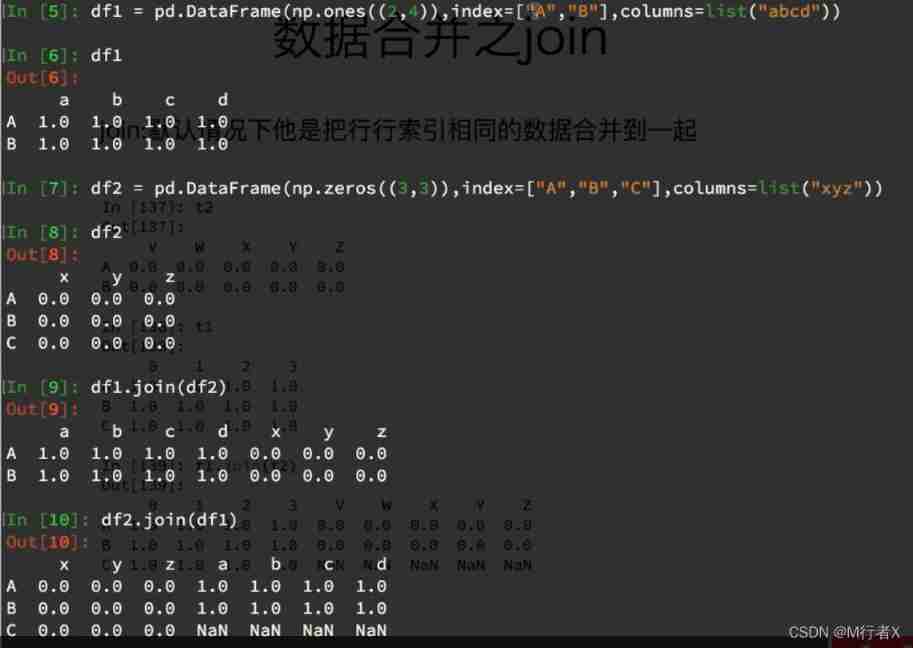
Data merging Join
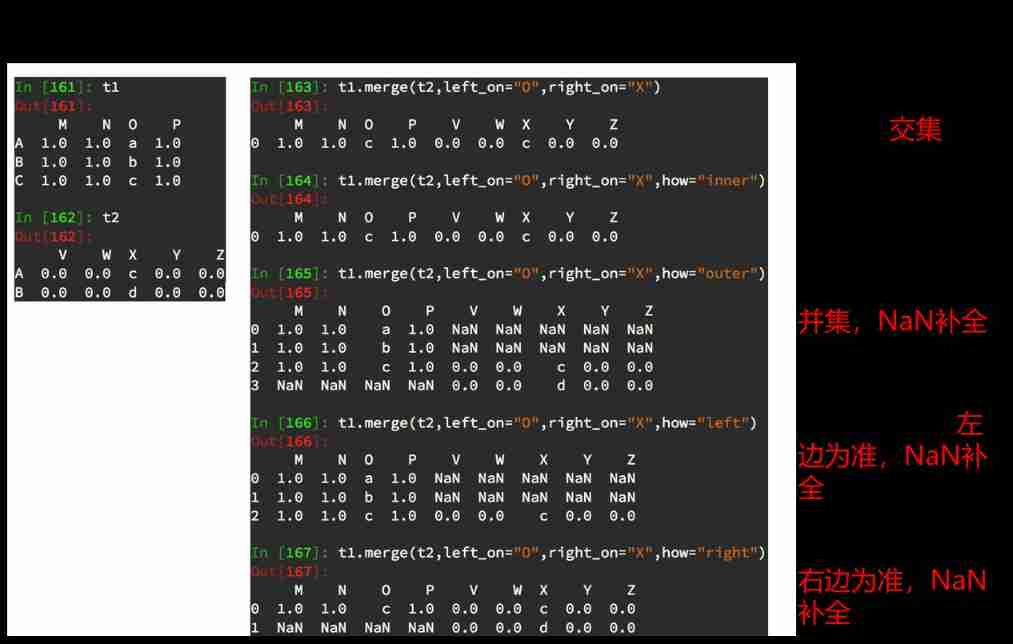
Data merging Merge

Group and aggregate

Data sources :https://www.kaggle.com/starbucks/store-locations/data




# coding=utf-8
import pandas as pd
import numpy as np

file_path = "./starbucks_store_worldwide.csv"

df = pd.read_csv(file_path)
# print(df.head(1))
# print(df.info())
# grouped = df.groupby(by="Country")
# print(grouped)

#DataFrameGroupBy
# It can be traversed
# for i,j in grouped:
# print(i)
# print("-"*100)
# print(j,type(j))
# print("*"*100)
# df[df["Country"]="US"]
# Call aggregate method


# country_count = grouped["Brand"].count()
# print(country_count["US"])
# print(country_count["CN"])

# Count the number of stores in each province of China
# china_data = df[df["Country"] =="CN"]
#
# grouped = china_data.groupby(by="State/Province").count()["Brand"]
#
# print(grouped)

# Data is grouped according to multiple criteria , return Series
# grouped = df["Brand"].groupby(by=[df["Country"],df["State/Province"]]).count()
# print(grouped)
# print(type(grouped))

# Data is grouped according to multiple criteria , return DataFrame
grouped1 = df[["Brand"]].groupby(by=[df["Country"],df["State/Province"]]).count()
# grouped2= df.groupby(by=[df["Country"],df["State/Province"]])[["Brand"]].count()
# grouped3 = df.groupby(by=[df["Country"],df["State/Province"]]).count()[["Brand"]]

print(grouped1,type(grouped1))
# print("*"*100)
# print(grouped2,type(grouped2))
# print("*"*100)
#
# print(grouped3,type(grouped3))

# Index methods and properties
print(grouped1.index)
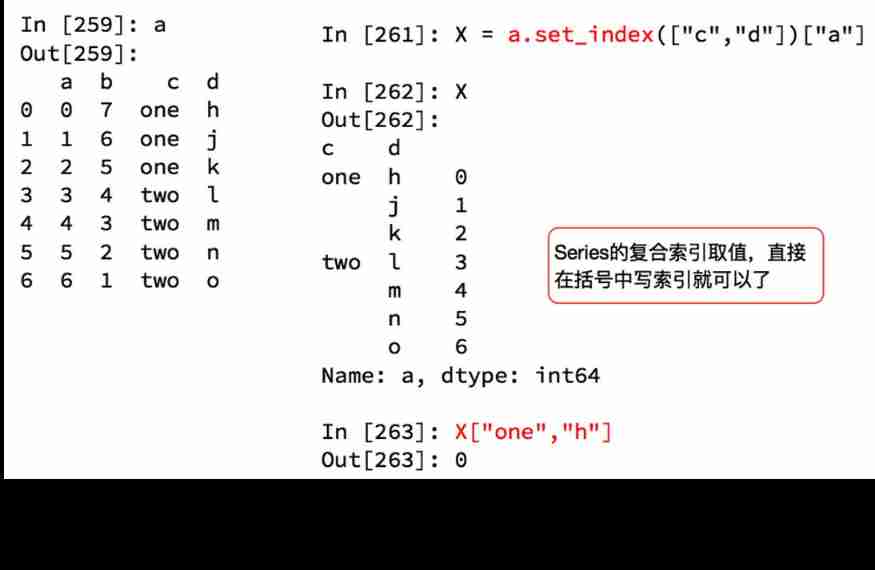
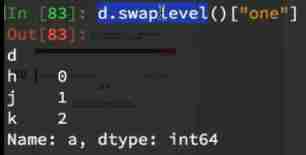
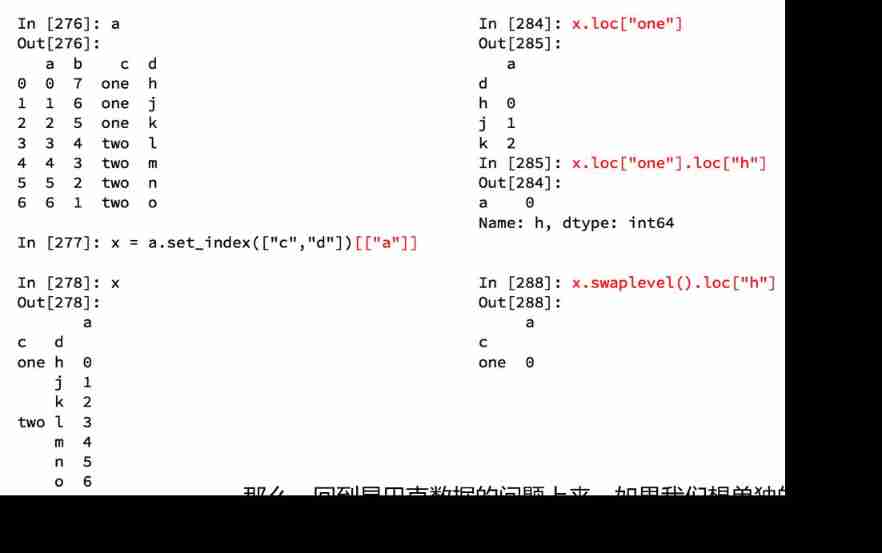
Index and composite index


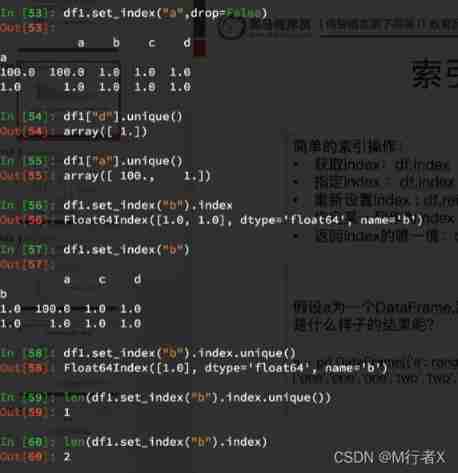

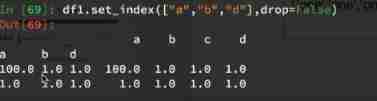
Composite index




# coding=utf-8
import pandas as pd
from matplotlib import pyplot as plt

file_path = "./starbucks_store_worldwide.csv"

df = pd.read_csv(file_path)

# Use matplotlib Show the top of the total number of stores 10 The country
# Prepare the data
data1 = df.groupby(by="Country").count()["Brand"].sort_values(ascending=False)[:10]

_x = data1.index
_y = data1.values

# drawing
plt.figure(figsize=(20,8),dpi=80)

plt.bar(range(len(_x)),_y)

plt.xticks(range(len(_x)),_x)

plt.show()
# coding=utf-8
import pandas as pd
from matplotlib import pyplot as plt
from matplotlib import font_manager

my_font = font_manager.FontProperties(fname="/Library/Fonts/Songti.ttc")

file_path = "./starbucks_store_worldwide.csv"

df = pd.read_csv(file_path)
df = df[df["Country"]=="CN"]

# Use matplotlib Show the top of the total number of stores 10 The country
# Prepare the data
data1 = df.groupby(by="City").count()["Brand"].sort_values(ascending=False)[:25]

_x = data1.index
_y = data1.values

# drawing
plt.figure(figsize=(20,12),dpi=80)

# plt.bar(range(len(_x)),_y,width=0.3,color="orange")
plt.barh(range(len(_x)),_y,height=0.3,color="orange")

plt.yticks(range(len(_x)),_x,fontproperties=my_font)

plt.show()

Receipt source :https://www.kaggle.com/zygmunt/goodbooks-10k
# coding=utf-8
import pandas as pd
from matplotlib import pyplot as plt


file_path = "./books.csv"

df = pd.read_csv(file_path)
# print(df.head(2))
#
# print(df.info())

# data1 = df[pd.notnull(df["original_publication_year"])]
#
# grouped = data1.groupby(by="original_publication_year").count()["title"]


# Average score of books in different years
# Remove original_publication_year In the column nan The line of
data1 = df[pd.notnull(df["original_publication_year"])]

grouped = data1["average_rating"].groupby(by=data1["original_publication_year"]).mean()

# print(grouped)

_x = grouped.index
_y = grouped.values

# drawing
plt.figure(figsize=(20,8),dpi=80)
plt.plot(range(len(_x)),_y)
print(len(_x))

plt.xticks(list(range(len(_x)))[::10],_x[::10].astype(int),rotation=45)
plt.show()

Data sources :https://www.kaggle.com/mchirico/montcoalert/data
# coding=utf-8
import pandas as pd
import numpy as np
from matplotlib import pyplot as plt


df = pd.read_csv("./911.csv")

print(df.head(5))
# Get categories
# print()df["title"].str.split(": ")
temp_list = df["title"].str.split(": ").tolist()
cate_list = list(set([i[0] for i in temp_list]))
print(cate_list)

# The structure is all 0 Array of
zeros_df = pd.DataFrame(np.zeros((df.shape[0],len(cate_list))),columns=cate_list)

# assignment
for cate in cate_list:
    zeros_df[cate][df["title"].str.contains(cate)] = 1
    # break
# print(zeros_df)

sum_ret = zeros_df.sum(axis=0)
print(sum_ret)
####  String discretization for statistics
  -  Get the list after classification and de duplication
  -  The structure is all 0 Of DataFrame, The shape is ( Number of rows of data , Length of classification list ), Column index is the list after classification and de duplication
  -  Traverse the raw data , Yes, it's all 0 Of df assignment
    - zeros_df.loc[i,["T","M"]] = 1
  -  Sum by column

#### join
  -  Merge by row index

#### merge
  -  Sum and merge according to a certain column

  [
  [1,2,3],
  [4,5,6]
  ]
  [
  [10,2,31],
  [43,52,62]
  ]
  ret:  Left connection
  [
  [1,2,3,10,2,31],
  [4,5,6,nan,nan,nan]
  ]

  ret:  Internal connection
  [
  [1,2,3,10,2,31]
  ]

  ret:  External connection
  [
  [1,2,3,10,2,31]
  [4,5,6,nan,nan,nan]
  [nan,nan,nan,43,52,62]
  ]

  ret:  The right connection
  [
  [1,2,3,10,2,31]
  [nan,nan,nan,43,52,62]
  ]


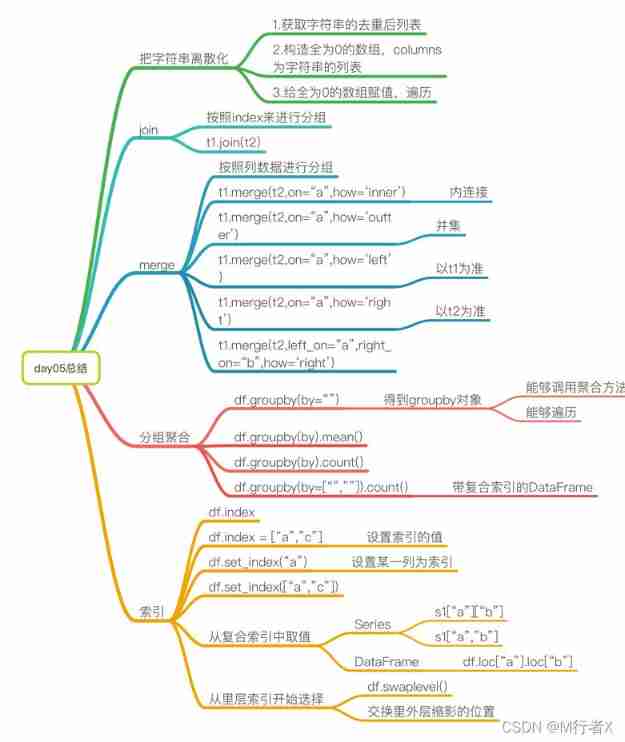
####  Grouping and aggregation of data
  - groupby(by="").count()

  - groupby(by=["",""]).count() ---> Returns the df

  -  Can the iteration


####  Relevant knowledge points of index
  - df.index
  - df.index = []
  - df.set_index(“a”) # Take a column as an index
  - df.set_index([“a”,"b"]) # Take some columns as indexes

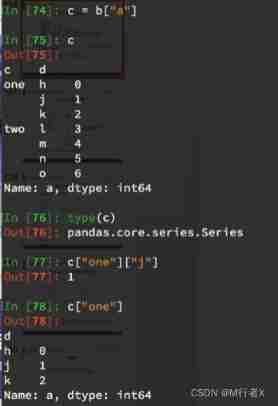
  - series
    - `s1["a"]["b"]`
    - `s1["a","b"]`

  - DataFrame
    - `df.loc["a"].loc["b"]`

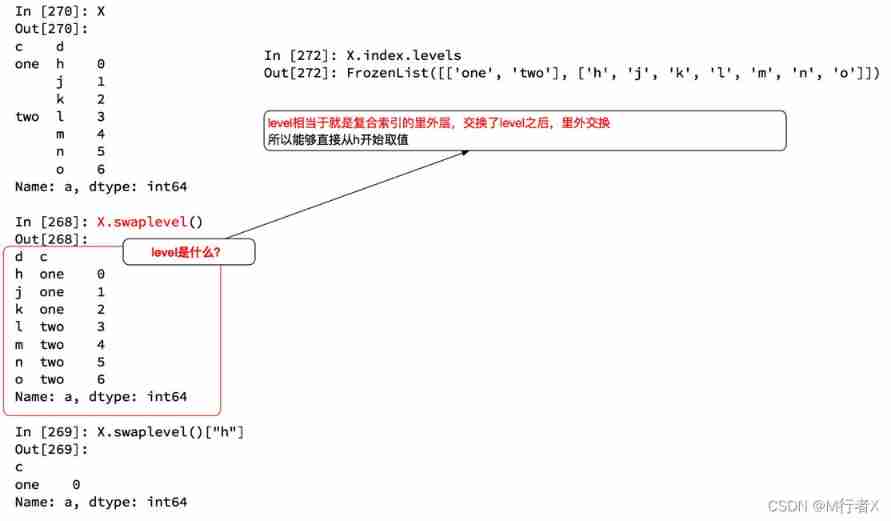
  -  Choose from the inner layer
    - df.swaplevel()
边栏推荐
- 基于GO语言实现的X.509证书
- 谷歌百度雅虎都是中国公司开发的通用搜索引擎_百度搜索引擎url
- Cas d'essai fonctionnel universel de l'application
- MySQL master-slave multi-source replication (3 master and 1 slave) setup and synchronization test
- 数据运营平台-数据采集[通俗易懂]
- uniapp中redirectTo和navigateTo的区别
- pytest多进程/多线程执行测试用例
- PostgreSQL高可用之repmgr(1主2从+1witness)+Pgpool-II实现主从切换+读写分离
- Personal digestion of DDD
- File and image comparison tool kaleidoscope latest download
猜你喜欢

DAY ONE
Wind chime card issuing network source code latest version - commercially available
Jenkins' user credentials plug-in installation
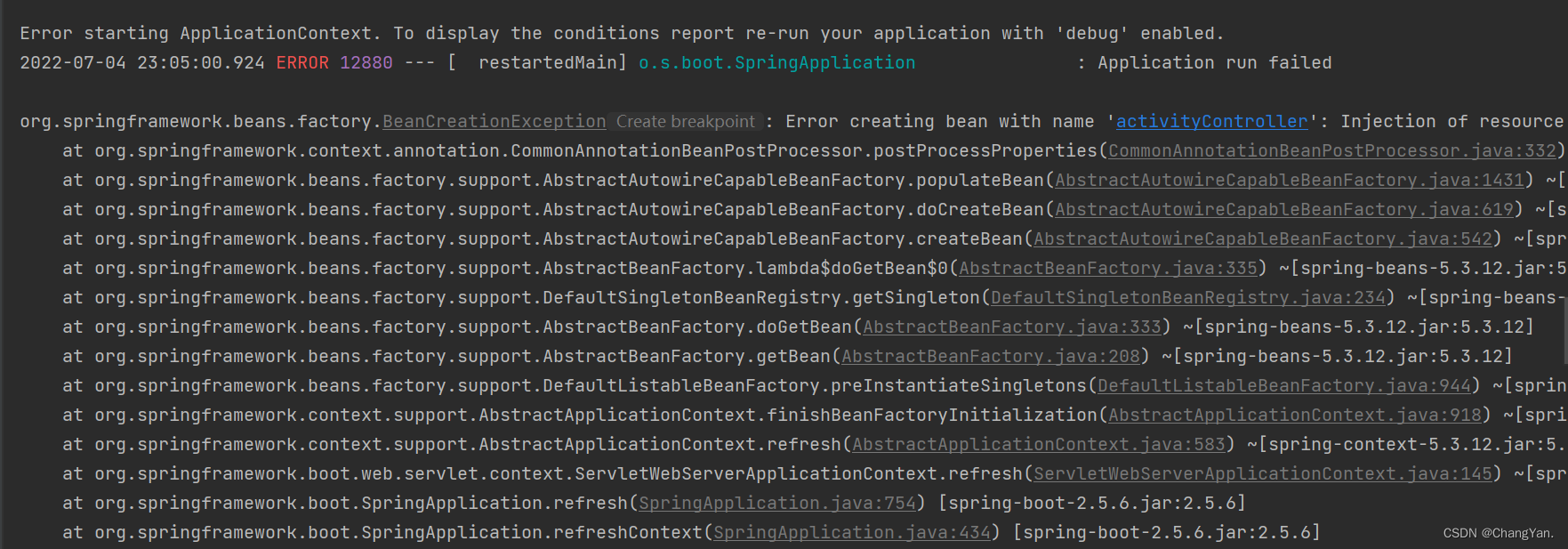
@TableId can‘t more than one in Class: “com.example.CloseContactSearcher.entity.Activity“.

Three application characteristics of immersive projection in offline display
![[boutique] Pinia Persistence Based on the plug-in Pinia plugin persist](/img/53/95ab85bfd99d943f98881596d0aa8c.png)
[boutique] Pinia Persistence Based on the plug-in Pinia plugin persist

MVC and MVVM
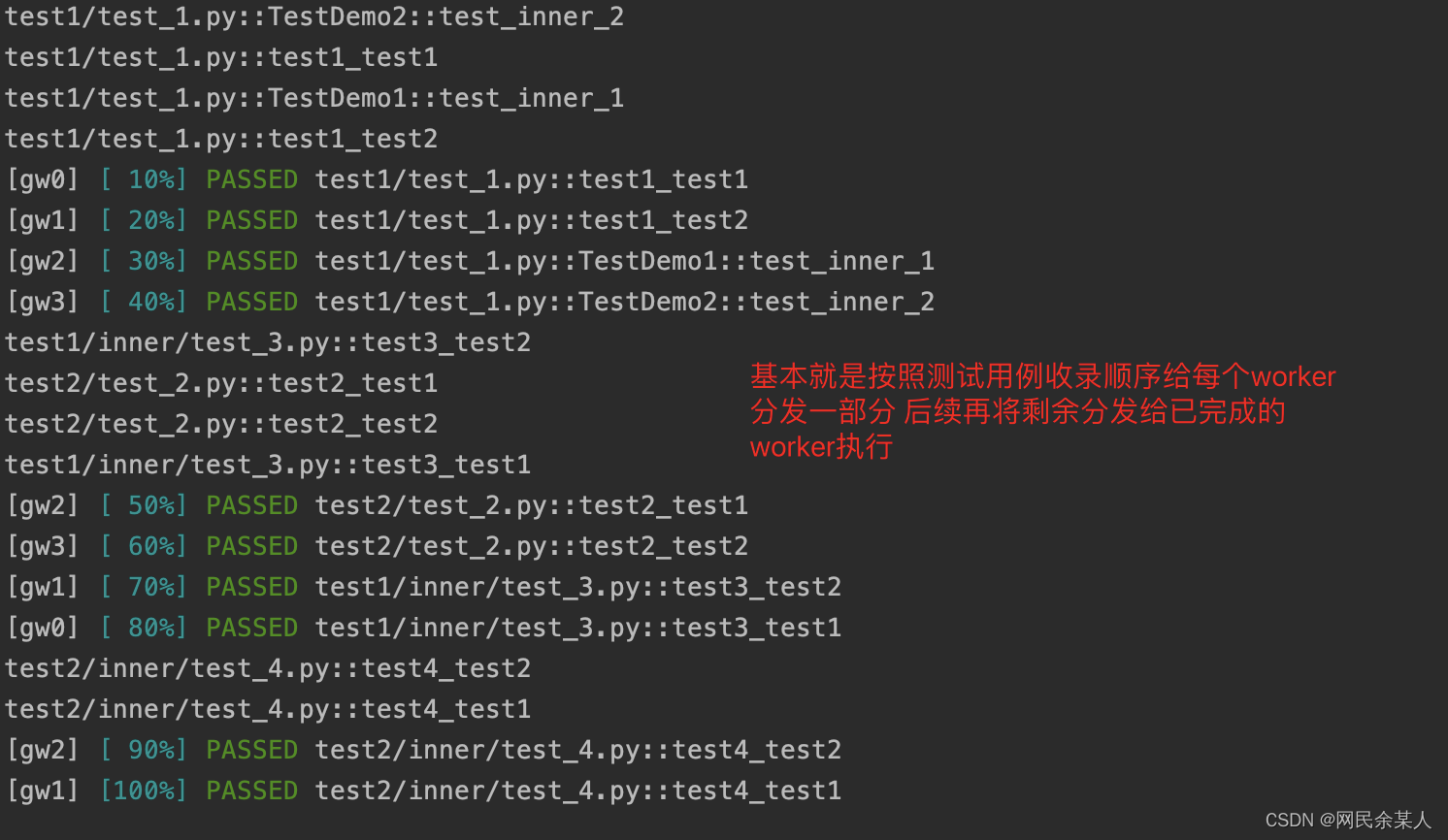
Pytest multi process / multi thread execution test case

DAY SIX

Core knowledge of distributed cache
随机推荐
DAY ONE
48页数字政府智慧政务一网通办解决方案
App general function test cases
Leecode brush questions record interview questions 32 - I. print binary tree from top to bottom
How to answer the dualistic opposition of Zhihu
Things like random
Use source code compilation to install postgresql13.3 database
陀螺仪的工作原理
Leecode brushes questions to record interview questions 17.16 massagist
Liuyongxin report | microbiome data analysis and science communication (7:30 p.m.)
【CVPR 2022】半监督目标检测:Dense Learning based Semi-Supervised Object Detection
ldap创建公司组织、人员
@TableId can‘t more than one in Class: “com.example.CloseContactSearcher.entity.Activity“.
37页数字乡村振兴智慧农业整体规划建设方案
DAY FOUR
Leecode brush questions record sword finger offer 44 A digit in a sequence of numbers
AVL树到底是什么?
What can the interactive slide screen demonstration bring to the enterprise exhibition hall
Cas d'essai fonctionnel universel de l'application
Rails 4 asset pipeline vendor asset images are not precompiled