当前位置:网站首页>One script of unity actual combat realizes radar chart
One script of unity actual combat realizes radar chart
2022-06-30 18:12:00 【Hua Weiyun】
Preface
Recently, I came into contact with a new term ——“ Radar map ”. This is the first time I came into contact with this noun . The so-called radar chart is a graphic method for displaying multivariable data in the form of two-dimensional charts of three or more quantitative variables represented on the axis starting from the same point . The relative position and angle of the axis are usually uninformative . Radar charts are also called network charts , Spiders , Star map , Spider web , Irregular polygon , Polar chart or Kiviat chart . It's equivalent to a parallel graph , The shaft is arranged radially .
Du Niang explained , I heard the brain buzzing , Open the diagram quickly , what the fuck , It's this thing ~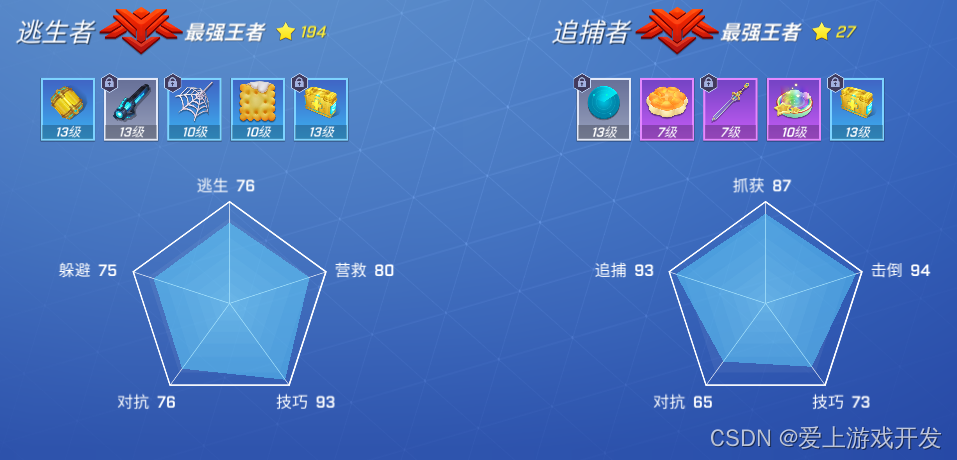
The importance of radar charts
In the game , Some game attributes are directly displayed in words , It doesn't seem intuitive , It will be more vivid to show in the form of pictures . But what? , This picture varies from person to person ,
So use it directly Image It will cause a lot of unnecessary trouble , also , It is conceivable that more pictures will consume more memory . Usually , This kind of attribute graph is realized by radar graph
Radar chart composition
that , What constitutes a radar chart ? Simply speaking , A radar chart is a polygonal plane composed of vertices and edges . therefore , Make a radar map , First of all, we need to know that this radar chart has several vertices , After knowing the vertex number , We know from the composition principle of closed graph , Number of edges +1 = Number of vertices
C# Code
using UnityEngine.UI;using UnityEngine;using System.Collections.Generic;/// <summary>/// UI polygon /// </summary>public class UIPolygon : MaskableGraphic{ [SerializeField] Texture m_Texture; /// <summary> /// fill /// </summary> public bool fill = true; /// <summary> /// Number of edges /// </summary> [Range(3, 360)] public int sides = 3; /// <summary> /// Rotation Angle /// </summary> [Range(0, 360)] public float rotation = 0; /// <summary> /// Vertex array /// </summary> [Range(0, 1)] public float[] VerticesDistances = new float[3]; private float size = 0; public override Texture mainTexture { get { return m_Texture == null ? s_WhiteTexture : m_Texture; } } public Texture texture { get { return m_Texture; } set { if (m_Texture == value) return; m_Texture = value; SetVerticesDirty(); SetMaterialDirty(); } } #region Provide external interfaces public void DrawPolygon(int _sides) { sides = _sides; VerticesDistances = new float[_sides + 1]; for (int i = 0; i < _sides; i++) VerticesDistances[i] = 1; } public void DrawPolygonNew() { List<float> datas = new List<float>(); for (int i = 0; i < VerticesDistances.Length; i++) { datas.Add(VerticesDistances[i]); } DrawPolygon(datas); } public void DrawPolygon(List<float> datas) { List<float> finalDatas = new List<float>(datas); sides = finalDatas.Count; // Add the last point , The last point coincides with the first finalDatas.Add(finalDatas[0]); VerticesDistances = finalDatas.ToArray(); // Trigger redraw SetVerticesDirty(); } #endregion public void SetDirty() { SetVerticesDirty(); } void Update() { // Fit the size according to the width and height size = rectTransform.rect.width; if (rectTransform.rect.width > rectTransform.rect.height) size = rectTransform.rect.height; else size = rectTransform.rect.width; } protected UIVertex[] SetVertexs(Vector2[] vertices, Vector2[] uvs) { UIVertex[] vbo = new UIVertex[4]; for (int i = 0; i < vertices.Length; i++) { var vert = UIVertex.simpleVert; vert.color = color; vert.position = vertices[i]; vert.uv0 = uvs[i]; vbo[i] = vert; } return vbo; } /// <summary> /// rewrite OnPopulateMesh Method /// </summary> /// <param name="vh"></param> protected override void OnPopulateMesh(VertexHelper vh) { vh.Clear(); Vector2 prevX = Vector2.zero; Vector2 prevY = Vector2.zero; Vector2 uv0 = new Vector2(0, 0); Vector2 uv1 = new Vector2(0, 1); Vector2 uv2 = new Vector2(1, 1); Vector2 uv3 = new Vector2(1, 0); Vector2 pos0; Vector2 pos1; Vector2 pos2; Vector2 pos3; float degrees = 360f / sides; int vertices = sides + 1; if (VerticesDistances.Length != vertices) { VerticesDistances = new float[vertices]; for (int i = 0; i < vertices - 1; i++) VerticesDistances[i] = 1; } // The last vertex , That's the first vertex VerticesDistances[vertices - 1] = VerticesDistances[0]; for (int i = 0; i < vertices; i++) { float outer = -rectTransform.pivot.x * size * VerticesDistances[i]; float inner = -rectTransform.pivot.x * size * VerticesDistances[i]; float rad = Mathf.Deg2Rad * (i * degrees + rotation); float c = Mathf.Cos(rad); float s = Mathf.Sin(rad); uv0 = new Vector2(0, 1); uv1 = new Vector2(1, 1); uv2 = new Vector2(1, 0); uv3 = new Vector2(0, 0); pos0 = prevX; pos1 = new Vector2(outer * c, outer * s); if (fill) { pos2 = Vector2.zero; pos3 = Vector2.zero; } else { pos2 = new Vector2(inner * c, inner * s); pos3 = prevY; } prevX = pos1; prevY = pos2; vh.AddUIVertexQuad(SetVertexs(new[] { pos0, pos1, pos2, pos3 }, new[] { uv0, uv1, uv2, uv3 })); } }}UI Interface
1. Create a Image object , It is the background of radar chart 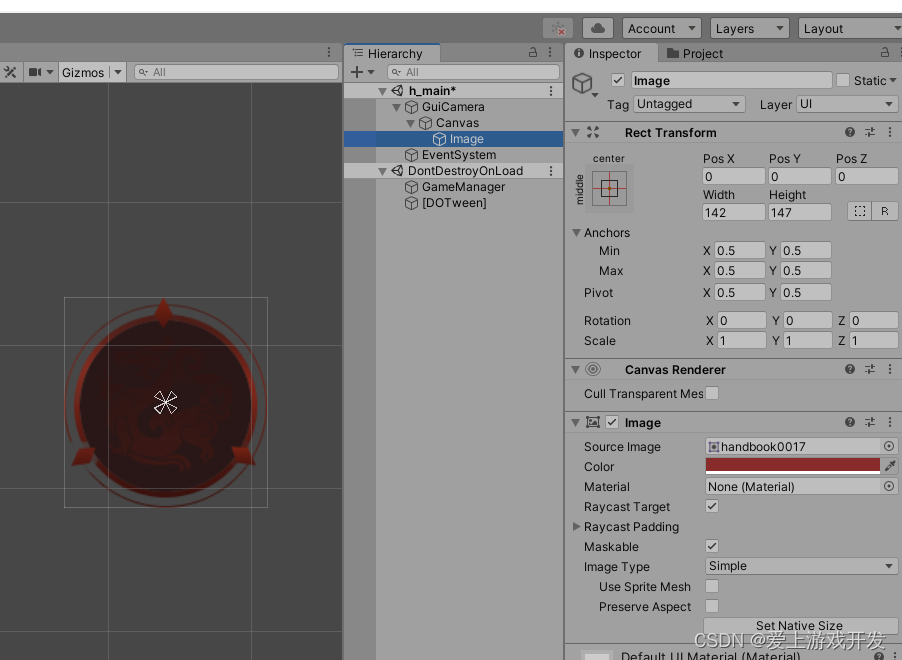
2. Assume that the radar chart currently has 3 individual , establish 3 individual Text, Used to display the attributes of text tags .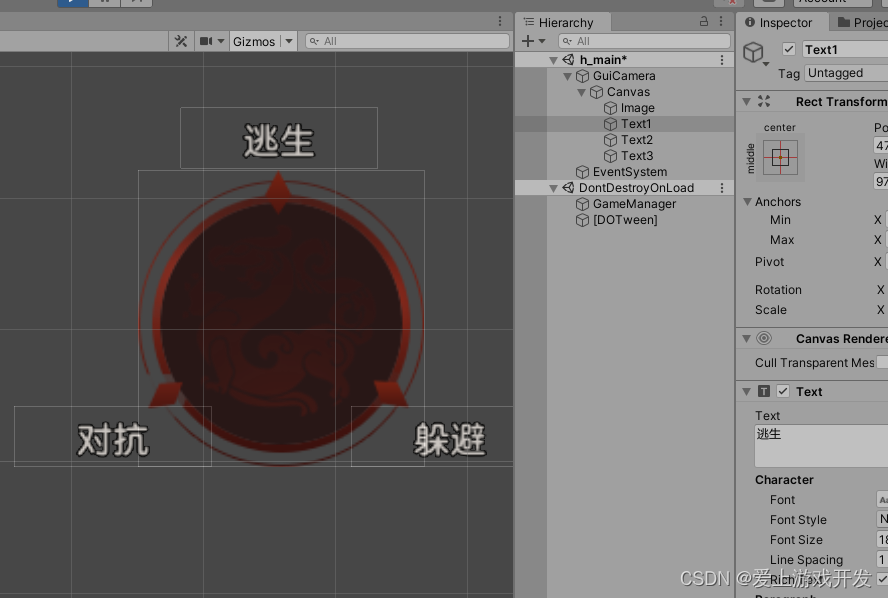
3. Create a GameObject , And mount
UIPolygon.cs Script .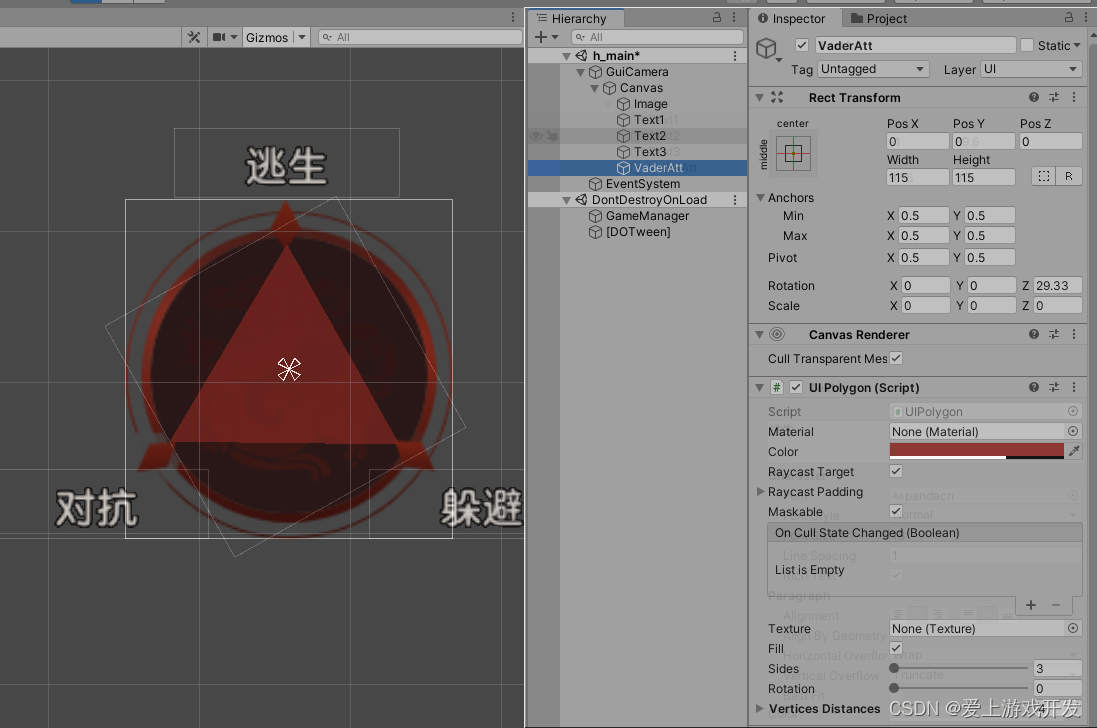
UIPolygon Introduction to component properties 
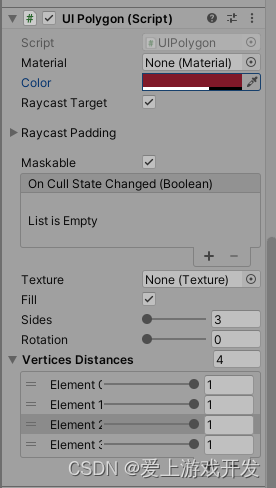
Slider: The number of polygon sides
VerticesDistances: Vertex array , The following number represents the size of the array , Vertex number
At the bottom of the Element Represents the ratio of each vertex , That is, attribute percentage
. As described earlier , The relationship between the number of edges and vertices : Number of edges +1 = Number of vertices , That is, the number of sides determines the number of vertices , When we manually change the number of sides , The number of vertices changes , Here's the picture :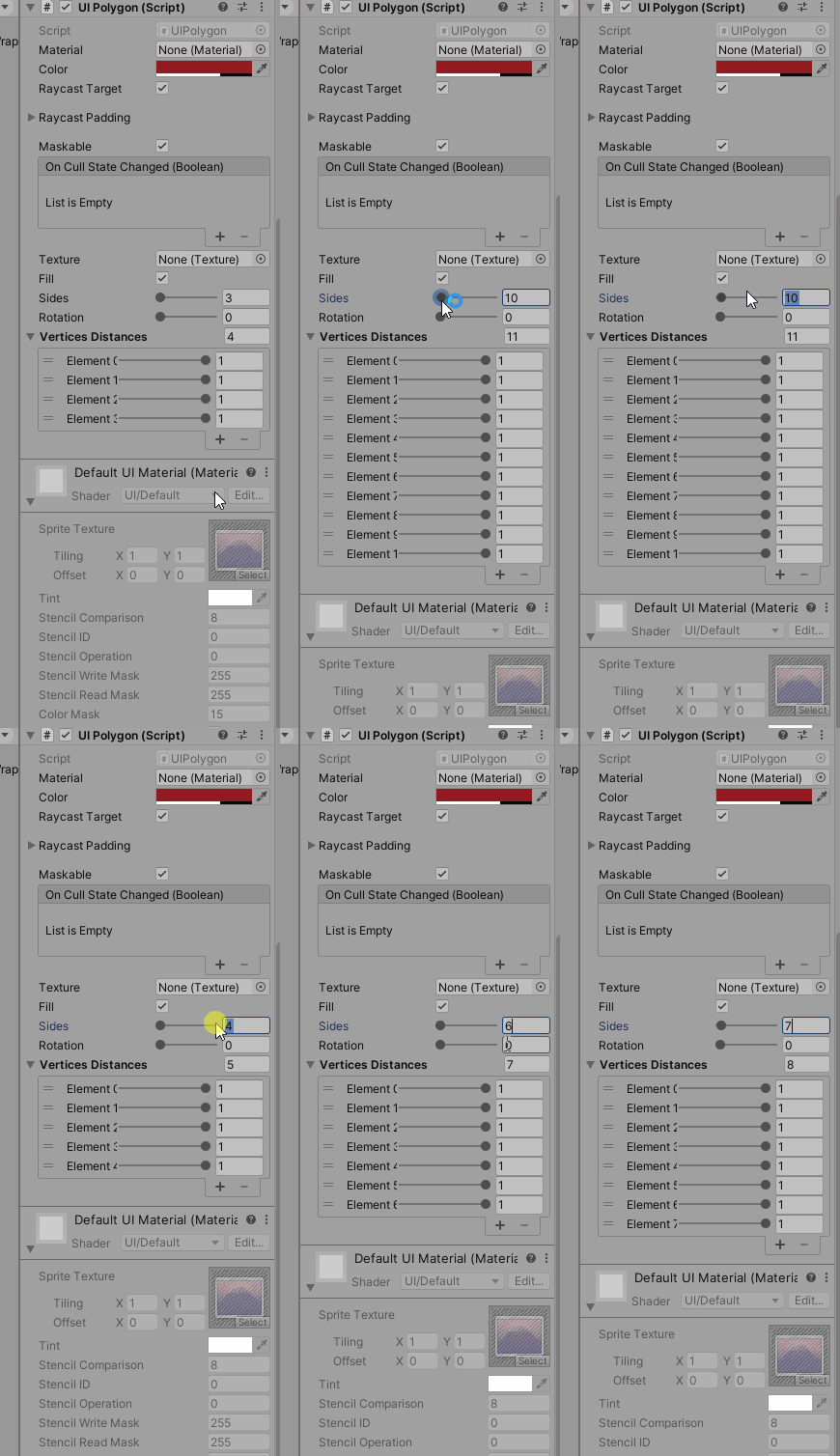
Code
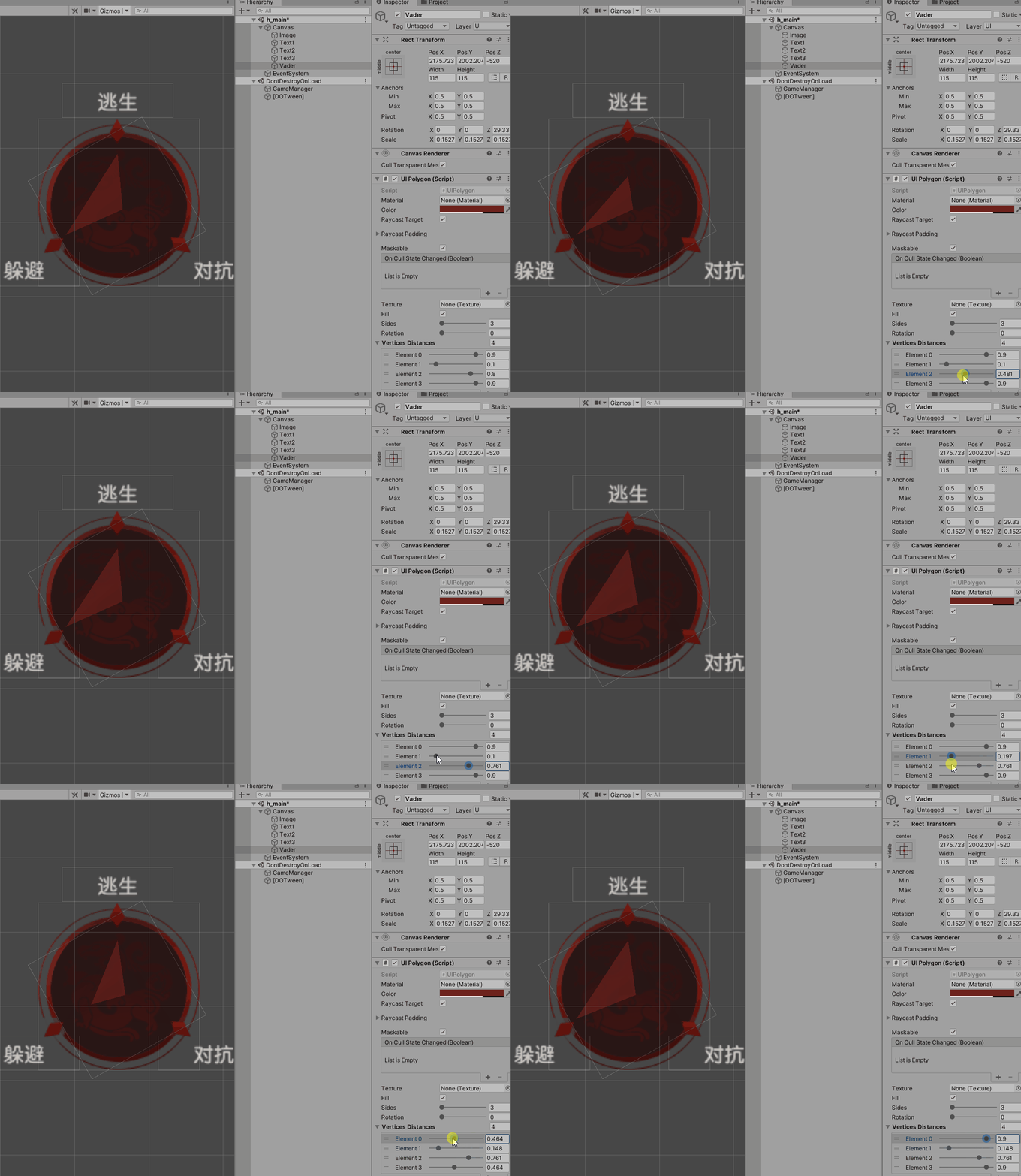
local att = {90,10,80}--- Test data , They represent escape , against , avoid for i=1,3 do ui.polygon.VerticesDistances[i-1] = att[i] / 100endbase.coroutine = coroutine.start(function() coroutine.wait(0.05) ui.polygon:SetVerticesDirty()end)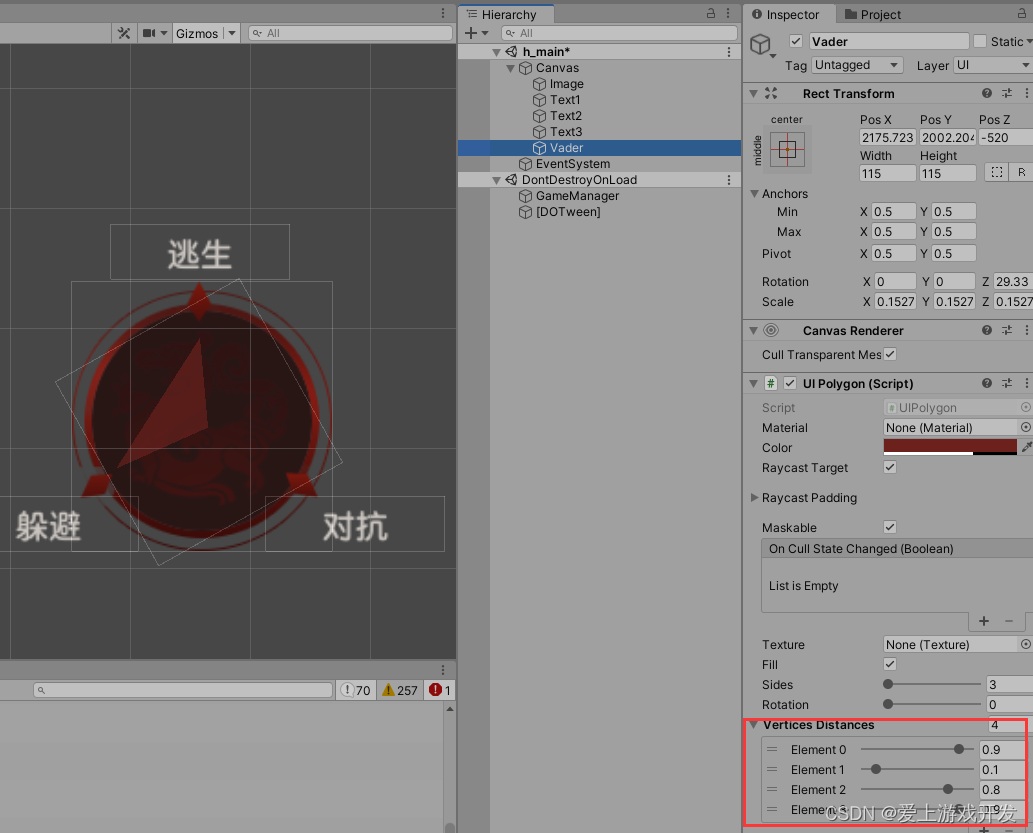
边栏推荐
- leetcode:787. The cheapest transfer flight in station K [k-step shortest path + DFS memory + defaultdict (dict)]
- 港科大&MSRA新研究:关于图像到图像转换,Finetuning is all you need
- Thinking on large file processing (upload, download)
- Communication network electronic billing system based on SSH
- Dropout: immediate deactivation
- 2022上半年盘点:20+主流数据库重大更新及技术要点汇总
- 【二叉树】前序遍历构造二叉搜索树
- 腾讯云安装mysql数据库
- 生成对抗网络,从DCGAN到StyleGAN、pixel2pixel,人脸生成和图像翻译。
- [PROJECT] Xiaomao school (IX)
猜你喜欢

Deep understanding of JVM (II) - memory structure (II)

Communication network electronic billing system based on SSH

腾讯持久化框架MMKV原理探究

What does software testing need to learn? Test learning outline sorting

Importing alicloud ECS locally to solve deployment problems

基於SSH的網上商城設計

LRN local response normalization

Redis (V) - advanced data types

What will be the game changes brought about by the meta universe?

Deep understanding of JVM (III) - memory structure (III)
随机推荐
基于SSH的通讯网络电子计费系统
Importing alicloud ECS locally to solve deployment problems
[sword finger offer] 52 The first common node of two linked lists
Exploration and practice of "flow batch integration" in JD
Unity开发bug记录100例子(第1例)——打包后shader失效或者bug
如何写一个技术方案
Advanced Mathematics (Seventh Edition) Tongji University General exercises one person solution
Unity实战之一个脚本实现雷达图
Php8.0 environment detailed installation tutorial
[zero basic IOT pwn] environment construction
元宇宙带来的游戏变革会是怎样的?
Ten thousand volumes - list sorting [01]
Babbitt | yuanuniverse daily must read: minors ask for a refund after a reward. The virtual anchor says he is a big wrongdoer. How do you think of this regulatory loophole
Servlet operation principle_ API details_ Advanced path of request response construction (servlet_2)
Partition marble (multiple knapsack + binary optimization)
Development: how to install offline MySQL in Linux system?
Spin lock exploration
Apache parsing vulnerability (cve-2017-15715)_ Vulnerability recurrence
Development details of NFT casting trading platform
K-line diagram must be read for quick start