当前位置:网站首页>Tornado environment construction and basic framework construction -- familiar Hello World
Tornado environment construction and basic framework construction -- familiar Hello World
2022-06-11 16:45:00 【InfoQ】
- tornado Official documents :
- Official English documents
- chinese 4.3
1. Project environment construction
- In the virtual machine, create the python A virtual environment ( Appoint python Version is python3)ubuntu command :
mkvirtualenv -p python3 tudo
- install tornado library ( Specify version as 5.1.1)ubuntu command :
pip install tornado==5.1.1
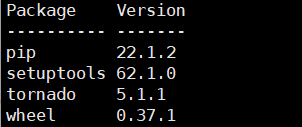
- ubuntu View the installation package commands :
pip list
2.tornado The basic framework of the project is built
① conversant hello world
- Code (hello.py):
# -*- coding: utf-8 -*-
"""
__author__ =  Lonely and cold
"""
#  function tornado The library of
import tornado.ioloop

import tornado.web


# HTTP Request processing   similar Django Class view in
class MainHandler(tornado.web.RequestHandler):
 def get(self):
 self.write("Hello, world")


#  Defining interfaces
application = tornado.web.Application(
 [(r'/',MainHandler)]
)


if __name__ == '__main__':
 #  Define port
 application.listen(8080)
 #  function tornado
 tornado.ioloop.IOLoop.current().start()
- Run the top py After the file, the browser accesses the specified port (127.0.0.1:8080) The following response indicates that the test is successful —— Can carry out project development !

3. Construction of the basic framework of the project
① To write tornado Run the file (app.py):
- If all the code is written together like test code , Will create a py The consequence of the file being too large —— It also contains all the code for defining interfaces and class views , And it's not easy to distinguish the functions of specific code blocks ( Of course , If you have to do that, it's not impossible ,tornado It's so casual ~);
- therefore , Now use another way of writing —— Inherit and override the class that defines the interface tornado.web.Application, Make the definition interface written separately from the class view !!!
# -*- coding: utf-8 -*-
"""
__author__ =  Lonely and cold
"""
import tornado.ioloop
import tornado.web

import tornado.options

from tornado.options import define,options

from handlers import main

define('port',default='8000',help='Listeningport',type=int)

class Application(tornado.web.Application):
 def __init__(self):
 handlers = [
 ('/',main.IndexHandler),
 ('/explore',main.ExploreHandler),
 ('/post/(?P<post_id>[0-9]+)',main.PostHandler),
 ]
 settings = dict(
 debug=True,
 #  Configure template path
 template_path='templates',
 #  Configure static file path
 static_path='static'
 )

 super().__init__(handlers, **settings)
application = Application()


if __name__ == '__main__':
 tornado.options.parse_command_line()
 application.listen(options.port)
 print('Server start on port {}'.format(options.port))
 tornado.ioloop.IOLoop.current().start()
② establish handlers package , Created within main.py Document business logic :

# -*- coding: utf-8 -*-
"""
__author__ =  Lonely and cold
"""
import tornado.web


class IndexHandler(tornado.web.RequestHandler):
 def get(self, *args, **kwargs):
 self.render('index.html')


class ExploreHandler(tornado.web.RequestHandler):
 def get(self, *args, **kwargs):
 self.render('explore.html')


class PostHandler(tornado.web.RequestHandler):
 def get(self, post_id):
 #  Pass parameters to post.html
 self.render('post.html',post_id=post_id)
③ Create template file (templates Folder ):
- The parent template —— Used for template inheritance (base.html):
<!DOCTYPE html>
<html lang="en">
<head>
<meta charset="UTF-8">
<title>{% block title %}Tornado Title{% end %}</title>
</head>
<body>
{% block content %}Default body of base {% end %}
</body>
</html>
- home page (index.html):
{% extends 'base.html' %}


{% block title %} index page{% end %}

{% block content %}
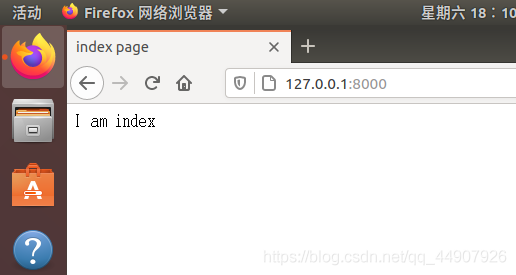
I am index
{% end %}
- Discovery page (explore.html):
{% extends 'base.html'%}

{% block title %}explore page{% end %}

{% block content %}
I am explore
{% end %}
- Details page (post.html):【 Display the received parameters post_id
{% extends 'base.html' %}

{% block title %} post page {% end %}
{% block content %}
I am post {{ post_id }}
{% end %}
④ establish static The file is used to store js and css
⑤ Run the project :


- Full column at CSDN to update , Those who are interested can go and see it ~
边栏推荐
- Composition of JVM
- Development planning of China's stainless steel market and suggestions on the development direction of the 14th five year plan 2022-2028
- Text driven for creating and editing images (with source code)
- R1 Quick Open Pressure Vessel Operation test Library and Simulation Test in 2022
- A set of ThinkPHP wechat applet mall source code with background management
- 为什么芯片设计也需要「匠人精神」?
- 一套ThinkPHP微信小程序商城源码带后台管理
- 微服务连接云端Sentinel 控制台失败及连接成功后出现链路空白问题(已解决)
- 2022g1 industrial boiler stoker test questions and simulation test
- web安全-靶场笔记
猜你喜欢

基于udp端口猜测的内网穿透

Learn about Prometheus from 0 to 1

消息队列-推/拉模式学习 & ActiveMQ及JMS学习

Kernel density estimation (2D, 3D)

Analysis report on the "fourteenth five year plan" proposal and innovation environment of global and Chinese sodium pyrophosphate industry (2022-2028)

基于文本驱动用于创建和编辑图像(附源代码)

数据库全量SQL分析与审计系统性能优化之旅

485天,我远程办公的 21 条心得分享|社区征文

CLP Jinxin helps Rizhao bank put into operation its new financial ecological network

Leetcode 1974. Minimum time to type words using a special typewriter (yes, once)
随机推荐
Drug evaluation index
Using MATLAB and dcraw to process digital camera raw files
Redis --- 学习 NoSQL 五大类型
Leetcode 1974. 使用特殊打字机键入单词的最少时间(可以,一次过)
[ISITDTU 2019]EasyPHP
The flat life of older farmers from Beijing to Holland
2022年R1快开门式压力容器操作考试题库及模拟考试
核密度估计(二维、三维)
The micro service failed to connect to the cloud sentinel console and the link blank problem occurred after the connection was successful (resolved)
消息队列-推/拉模式学习 & ActiveMQ及JMS学习
Detailed explanation of the functions of list and dict data types
Rdkit tutorial
Weekly recommended short video: rookie CEO talks about the new logistics track in the future
Rdkit installation
【clickhouse专栏】新建库、用户及角色
2022年高处安装、维护、拆除考试模拟100题及在线模拟考试
Web security - shooting range notes
RDKit教程
unittest 如何知道每个测试用例的执行时间
学生网站模板棕色蛋糕甜品网站设计——棕色蛋糕甜品店(4页) 美食甜品网页制作期末大作业成品_生鲜水果网页设计期末作业