当前位置:网站首页>Entity of cesium data visualization (Part 1)
Entity of cesium data visualization (Part 1)
2022-07-07 09:11:00 【FOR. GET】
Record a problem to be solved
- There is no effect after the contour width is set
One 、Billboard Billboard ( Picture form )
Used to draw position icons , It is convenient to view the characteristics of the region according to the icon , Such as the display of the national flag , And the display of city landmark buildings . The official link : Click on the access
var entity = viewer.entities.add({

        // id: "", //  Unique identifier of this object . If not provided , Will generate GUID.
        name: "billboard", //  Get or set the name of the object
        // description: "", //  Get or set HTML describe
        // orientation: "", //  Get or set the direction
        position: Cesium.Cartesian3.fromDegrees(-75.59777, 40.03883), //  Get or set the location
        billboard: {

            show: true, // default  Whether to display the entity
            image: "/static/images/pythondjango.png", //  Designated billboard URL,Django Can be static files or media files
            scale: 1.0, // default: 1.0 , A numeric attribute , Specify the scale to apply to the image size
            // Pixel offset  type: Cartesian2 default:Cartesian2.ZERO
            pixelOffset: new Cesium.Cartesian2(0, 0), //  Two dimensional Cartesian coordinate system
            // Eye deflection  type: Cartesian3 default:Cartesian3.ZERO
            eyeOffset: new Cesium.Cartesian3(0.0, 0.0, 0.0), //  Three dimensional Cartesian coordinate points
            //  Horizontal alignment  type: HorizontalOrigin default:HorizontalOrigin.CENTER
            // CENTER  The origin is at the horizontal center of the object ;LEFT  The origin is on the left side of the object ;RIGHT  The origin is on the right side of the object
            horizontalOrigin: Cesium.HorizontalOrigin.CENTER,
            //  Vertical alignment  type: VerticalOrigin default:VerticalOrigin.CENTER
            // CENTER  The origin is at  BASELINE  and  TOP  The vertical center between ;BOTTOM  The origin is at the bottom of the object ;
            // BASELINE  If the object contains text , Then the origin is at the baseline of the text , Otherwise, the origin is at the bottom of the object ;TOP  The origin is at the top of the object
            verticalOrigin: Cesium.VerticalOrigin.CENTER, // default: CENTER  Vertical alignment position   Reference resources Cesium.VerticalOrigin
            //  Get or set the height reference of this billboard  type: HeightReference default:HeightReference.NONE
            // NONE  Absolute position ;CLAMP_TO_GROUND  The position is fixed on the terrain ;RELATIVE_TO_GROUND  Position height refers to the height above the terrain
            heightReference: Cesium.HeightReference.NONE,
            //  Color  type: Color default:Color.WHITE
            color: Cesium.Color.LIME,
            //  Gets or sets the rotation angle in radians  type: number default:0
            rotation: 0,
            //  Gets or sets the alignment axis in world space  type:Cartesian3 default:Cartesian3.ZERO
            alignedAxis: Cesium.Cartesian3.ZERO,
            width: 50, //  Used to specify the width of the billboard ( In pixels ), And cover the original size .
            height: 50, //  Used to specify the height of the billboard ( In pixels ), And cover the original size .
            //  Get or set the near and far zoom attributes of the billboard according to the distance between the billboard and the camera  type:NearFarScalar
            // new Cesium.NearFarScalar (
            // near:  Lower limit of camera range  default=0,
            // nearValue: The value of the lower limit of the camera range  default=0,
            // far  Upper limit of camera range  default=1,
            // farValue  The value of the upper limit of the camera range  default=0)
            scaleByDistance: new Cesium.NearFarScalar(1.0e3, 2.0, 2.0e3, 1.0),
            //  According to the distance from the billboard to the camera , Get or set the near and far translucency properties of billboards  type:NearFarScalar
            translucencyByDistance: new Cesium.NearFarScalar(
                1.0e3,
                1.0,
                1.5e6,
                0.5
            ),
            //  According to the distance between the billboard and the camera , Get or set the near pixel offset and far pixel offset scaling properties of the billboard  type:NearFarScalar
            pixelOffsetScaleByDistance: new Cesium.NearFarScalar(
                1.0e3,
                1.0,
                1.5e6,
                0.0
            ),
            // Defines the sub area of the image to be used for the billboard , Not the whole image , Instead, start from the lower left corner in pixels .
            //imageSubRegion: Cesium.BoundingRectangle ( x , y , width , height )
            //  It specifies that this billboard will be displayed at a distance from the camera
            distanceDisplayCondition: new Cesium.DistanceDisplayCondition(0.0, 5000.0),
            //  Get or set the distance from the camera , Disable depth testing at depth , for example , To prevent cutting the terrain .
            //  When set to zero , Depth tests will always be applied . Set to Number.POSITIVE_INFINITY when , Never apply depth testing .
            disableDepthTestDistance: Number.POSITIVE_INFINITY,
        },
    });
    //  Set up the camera asynchronously to view one or more entities or data sources provided . If the data source is still loading , Or the visualization is still loading , This method waits for the data to be ready before performing scaling .
    viewer.zoomTo(entity);
    //  Change the relevant properties of the billboard , Instantiate first , And then it's like python The change value of the dictionary
    var billboard = entity.billboard;
    billboard.scale = 1.0;
    billboard.color = Cesium.Color.WHITE.withAlpha(1);

Two 、Box The box ( Cuboid )
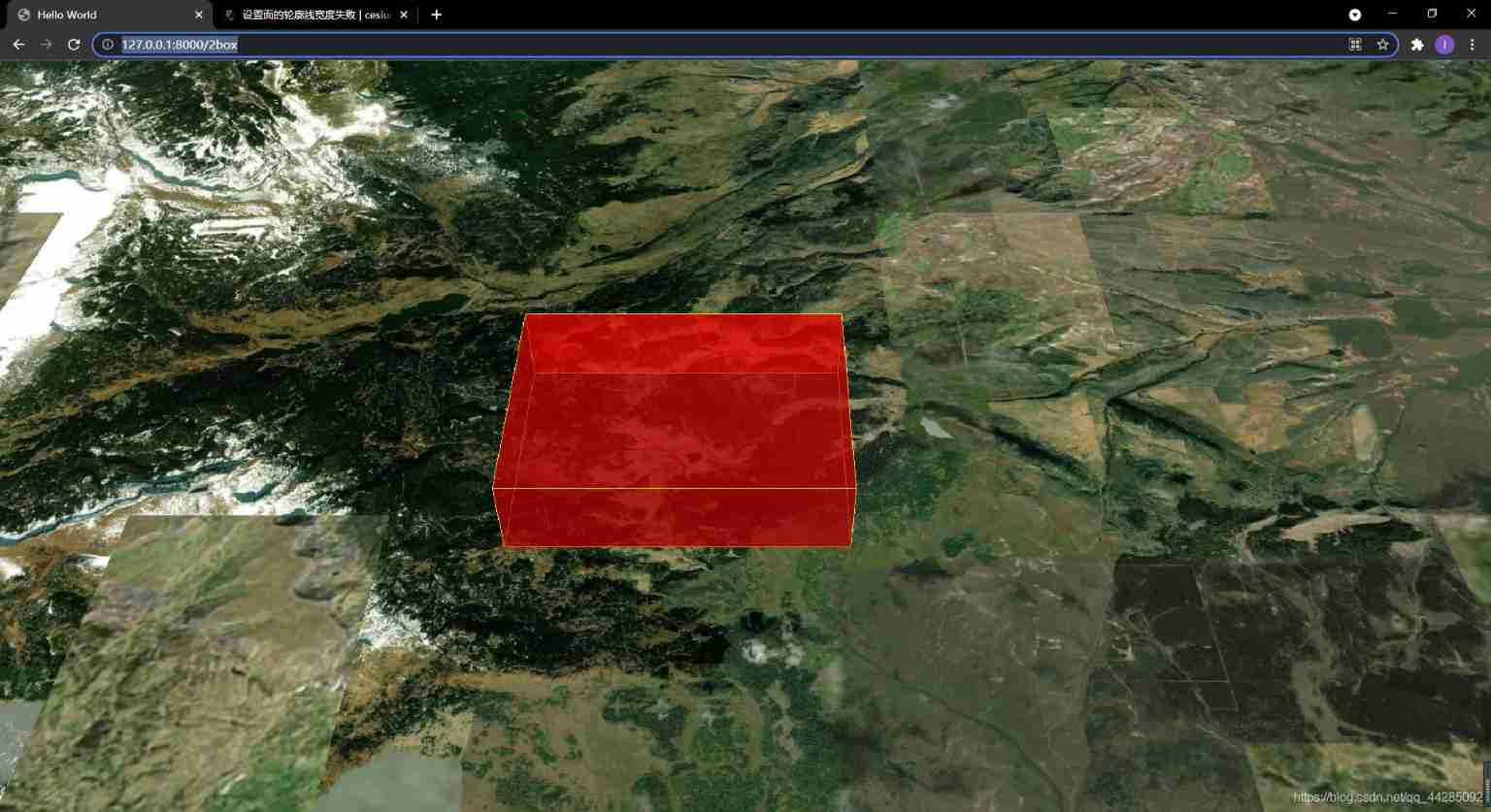
 var entity = viewer.entities.add({

      name: "box", //  Set the new name
      position: Cesium.Cartesian3.fromDegrees(-107.0, 40.0, 3000.0),  //  Set the position of the box Center
      box: {

        show: true, //  Set whether to display
        dimensions: new Cesium.Cartesian3(4000.0, 3000.0, 1000.0), // Cartesian3 type , Used to specify the length of the box , Width and height
        //  Specify the height relative to the position of the entity . default: HeightReference.NONE
        // NONE  Absolute position ;CLAMP_TO_GROUND  The position is fixed on the terrain ;RELATIVE_TO_GROUND  Position height refers to the height above the terrain .
        heightReference: Cesium.HeightReference.NONE,
        fill: true, //  Specify whether to fill the box with the supplied material .
        // MaterialProperty|Color default:Color.WHITE //  Used to specify the material used to fill the box
        material: Cesium.Color.RED.withAlpha(0.5),
        outline: true, //  Whether to display outline
        // type:Property|Color default:Color.BLACK  Contour color
        outlineColor: Cesium.Color.YELLOW,
        outlineWidth: 20, //  Contour width

        // type:ShadowMode default:ShadowMode.DISABLED
        // DISABLED  Objects do not cast or receive shadows ;ENABLED  Objects cast and receive shadows ;
        // CAST_ONLY  Objects cast shadows only ;RECEIVE_ONLY  This object only receives shadows .
        shadows: Cesium.ShadowMode.DISABLED,
        // type:DistanceDisplayCondition  Specify to display this box at a distance from the camera .(a,b) It means that a and b Between
         distanceDisplayCondition: new Cesium.DistanceDisplayCondition(1.0e3,2.0e3 ),
      },
    });
    viewer.zoomTo(entity);
3、 ... and 、Corridor corridor
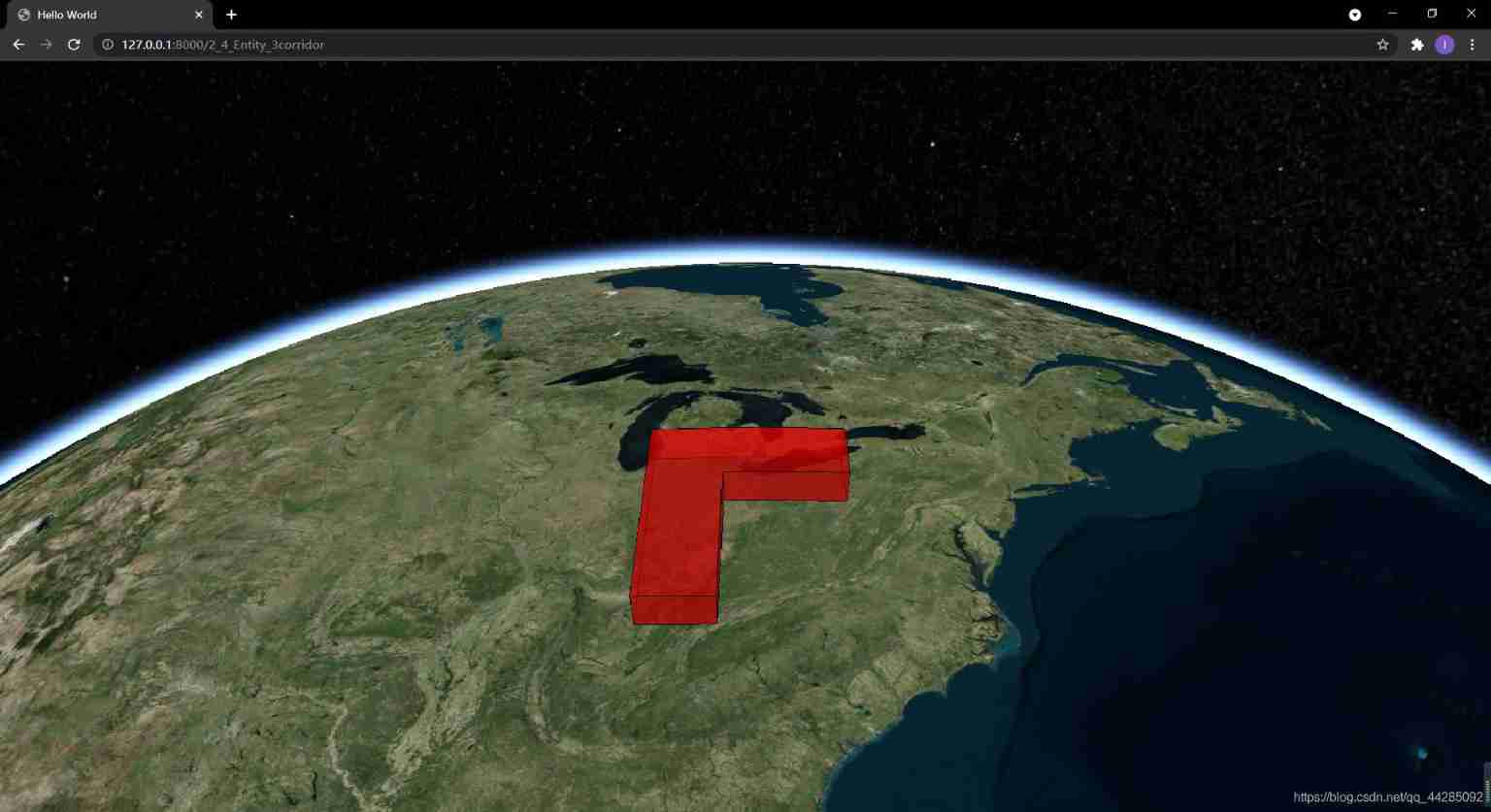
 var entity = viewer.entities.add({

      name: "corridor",
      corridor: {

        // show: true,
        //  Specify the  Cartesian3  An array of positions  type: Cartesian3
        positions: Cesium.Cartesian3.fromDegreesArray([
          -80.0,
          40.0,
          -85.0,
          40.0,
          -85.0,
          35.0,
        ]),
        width: 200000.0, //  Specify the distance between road edges .
        height: 200000.0, //  Specify the height of the corridor relative to the ellipsoidal surface .
          //  Specify the height relative to the position of the entity . default: HeightReference.NONE
        // NONE  Absolute position ;CLAMP_TO_GROUND  The position is fixed on the terrain ;RELATIVE_TO_GROUND  Position height refers to the height above the terrain .
        heightReference: Cesium.HeightReference.NONE,
        extrudedHeight: 100000.0, //  Specify the height of the protruding surface of the corridor relative to the ellipsoid .
          //  Specify the height of the protruding surface of the corridor relative to .
        extrudedHeightReference: Cesium.HeightReference.NONE,

        //  The style of the corner  type:CornerType default:CornerType.ROUNDED
        // ROUNDED  The corners have smooth edges ;MITERED  The corner point is the intersection of adjacent edges ;BEVELED  The corners are trimmed
        cornerType: Cesium.CornerType.MITERED,
        granularity: Cesium.Math.RADIANS_PER_DEGREE, //  The distance between each latitude and longitude
        fill: true, //  Specify whether to provide filling materials
        //  texture of material  type:MaterialProperty|Color default:Color.WHITE
        material: Cesium.Color.RED.withAlpha(0.5),
        outline: true, // height or extrudedHeight must be set for outlines to display
        outlineColor: Cesium.Color.BLACK,
        outlineWidth: 1.0,
          // type:ShadowMode default:ShadowMode.DISABLED
        // DISABLED  Objects do not cast or receive shadows ;ENABLED  Objects cast and receive shadows ;CAST_ONLY  Objects cast shadows only ;RECEIVE_ONLY  This object only receives shadows .
        shadows: Cesium.ShadowMode.CAST_ONLY,
          //  Display between the height from the ground
        // distanceDisplayCondition: new Cesium.DistanceDisplayCondition(
        // 1.0e3,
        // 2.0e3
        // ),
        //  When the corridor is on the ground, it will be opposite to the terrain ,3D tiles Or classify the two  type:ClassificationType default:ClassificationType.BOTH
        // TERRAIN  Only terrain will be classified ;CESIUM_3D_TILE  Will only 3D Tiles To classify ;BOTH  At the same time Terrain and 3D Tiles To classify .
        classificationType: Cesium.ClassificationType.BOTH,
      },
       // zindex:1,//  An attribute , Specify the zIndex, Only if undefined height and extrudedHeight And only when the road is static .
    });
    viewer.zoomTo(entity);
Four 、Cylinder prism ( cone )
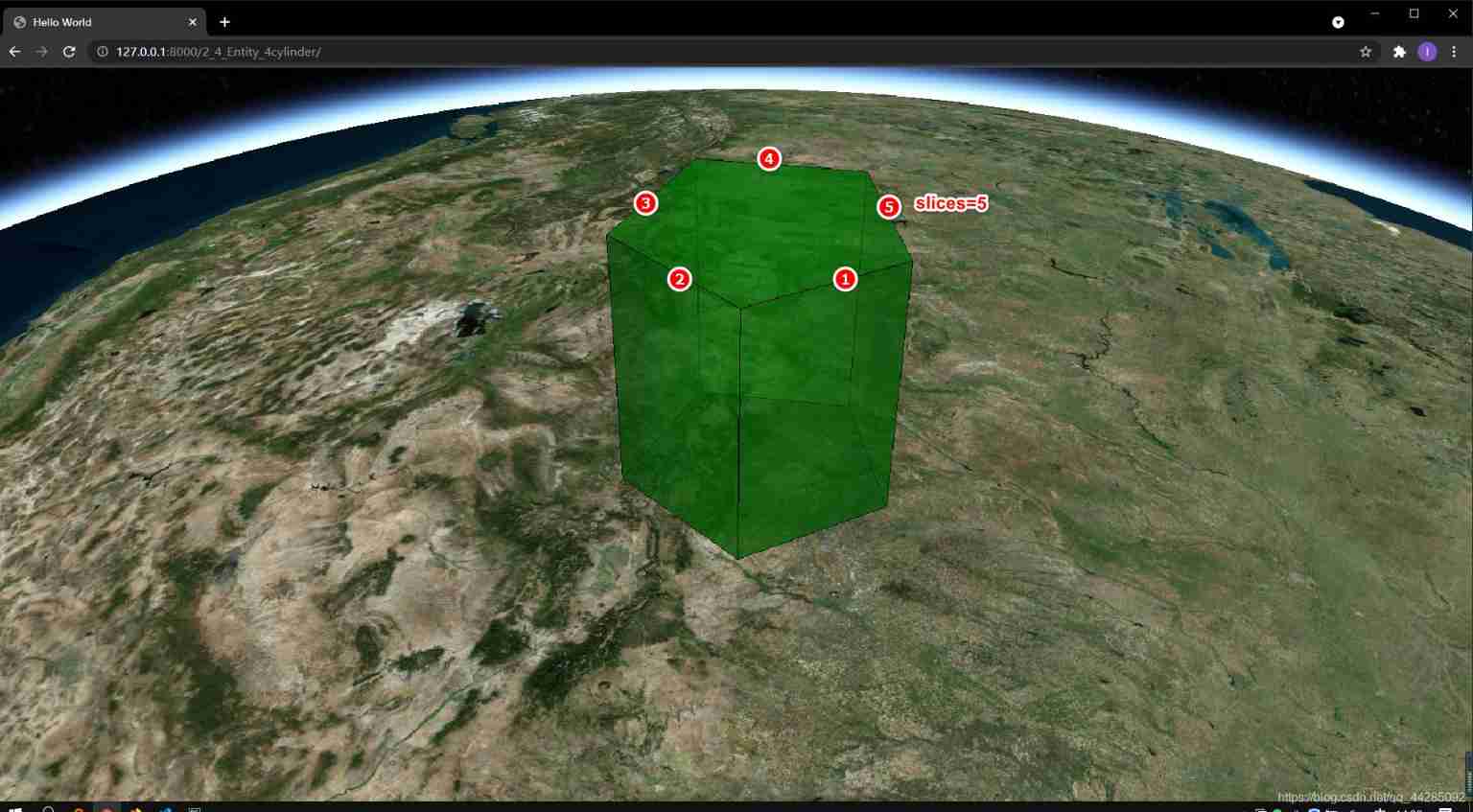
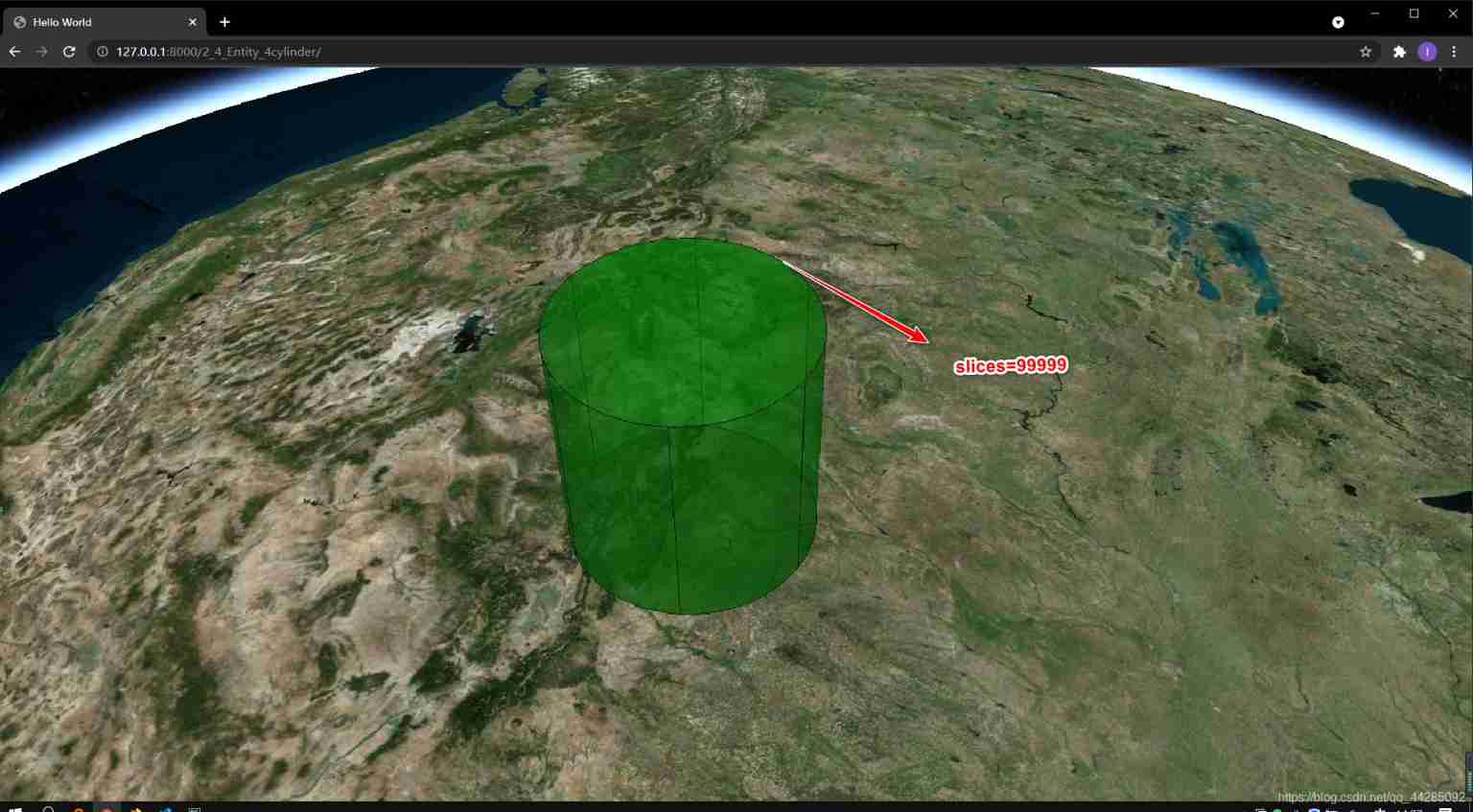
Why should I call it prism , Because
slicesAttribute hours are actually prisms , It is a circle only when the value is infinite .
var entity = viewer.entities.add({

      name: "cylinder", //  Draw a cylinder
      position: Cesium.Cartesian3.fromDegrees(-105.0, 40.0, 200000.0),
      cylinder: {

        // show: true,
        length: 400000.0, //  Cylinder length
        topRadius: 200000.0, //  Top radius of cylinder
        bottomRadius: 200000.0, //  Radius of cylinder bottom
          //  Specify the height relative to the position of the entity . default: HeightReference.NONE
        // NONE  Absolute position ;CLAMP_TO_GROUND  The position is fixed on the terrain ;RELATIVE_TO_GROUND  Position height refers to the height above the terrain .
        heightReference: Cesium.HeightReference.NONE, //
        fill: true,
        material: Cesium.Color.GREEN.withAlpha(0.5),
        outline: true,
        outlineColor: Cesium.Color.DARK_GREEN,
        outlineWidth: 1.0,
        numberOfVerticalLines: 6, //  Used to specify the number of vertical lines drawn along the perimeter of the profile .
           // type:ShadowMode default:ShadowMode.DISABLED
        // DISABLED  Objects do not cast or receive shadows ;ENABLED  Objects cast and receive shadows ;CAST_ONLY  Objects cast shadows only ;RECEIVE_ONLY  This object only receives shadows .
        shadows: Cesium.ShadowMode.DISABLED,
        slices: 8, //  Number of edges around the cylinder , A large number makes a circle
          //  Set the height between which to display
        // distanceDisplayCondition: new Cesium.DistanceDisplayCondition(
        // 1.0e3,
        // 2.0e3
        // ),
      },
    });
    viewer.zoomTo(entity);
- When
slicesGreater thannumberOfVerticalLineswhen ,numberOfVerticalLinesWill take effect
- Tongduo adjustment The radius of the bottom of the cylinder is
0

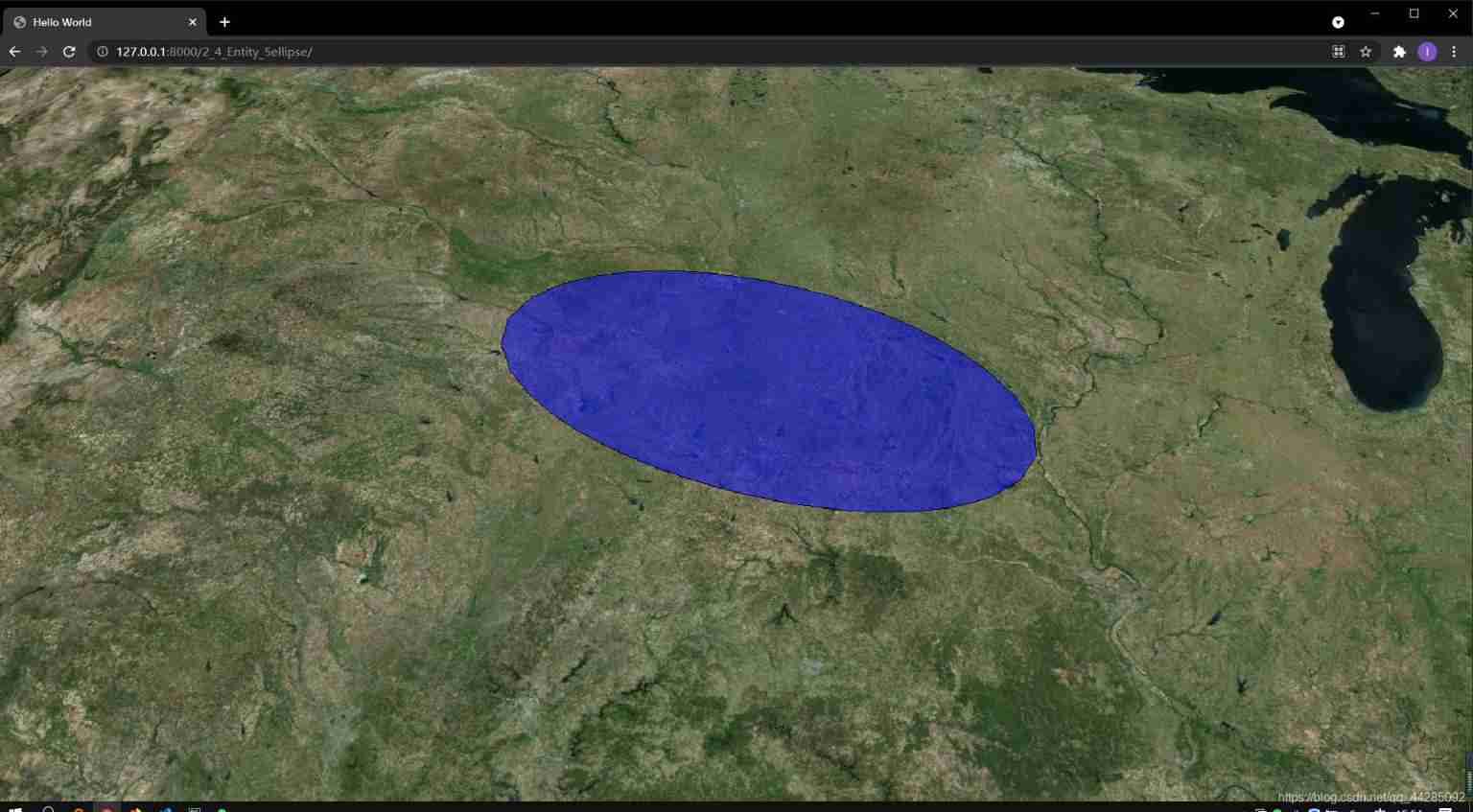
5、 ... and 、Ellipse The ellipse
Tip:If the distance between the long axis and the short axis is equal, the circle is drawn
var entity = viewer.entities.add({

        name: "Circles and Ellipses",
        //  Specify the center of the ellipse
        position: Cesium.Cartesian3.fromDegrees(-95.0, 40.0, 100000.0),
        ellipse: {

            show: true,
            semiMajorAxis: 300000.0, //  Long semi axis distance
            semiMinorAxis: 150000.0, //  Short semi axis distance
            height: 0.0, //  Specify the height of the ellipse relative to the ellipsoidal surface
            //  Specify the height relative to the position of the entity . default: HeightReference.NONE
            // NONE  Absolute position ;CLAMP_TO_GROUND  The position is fixed on the terrain ;RELATIVE_TO_GROUND  Position height refers to the height above the terrain .
            heightReference: Cesium.HeightReference.NONE,
            extrudedHeight: 0.0, //  Used to specify the height of the extruded surface of the ellipse relative to the ellipsoidal surface
            extrudedHeightReference: Cesium.HeightReference.NONE, //  Is used to specify the extrudedHeight Relative to what
            // rotation: Cesium.Math.toRadians(45), //  Specifies that the ellipse rotates counterclockwise from the North
            stRotation: 0.0, //  Used to specify that the elliptical texture rotates counterclockwise from the North
            granularity: Cesium.Math.RADIANS_PER_DEGREE, //  Angular distance between points on ellipse
            fill: true, //  Whether to fill
            material: Cesium.Color.BLUE.withAlpha(0.5),
            outline: true, //  Whether to display fill lines
            outlineColor: Cesium.Color.DARK_GREEN,
            outlineWidth: 1.0,
            numberOfVerticalLines: 16, //  The number of vertical lines drawn along the perimeter of the contour
            shadows: Cesium.ShadowMode.DISABLED,
            // distanceDisplayCondition: new Cesium.DistanceDisplayCondition(
            // 1.0e3,
            // 2.0e3
            // ),
            //  When on the ground, the terrain ,3D tiles Or classify the two  type:ClassificationType default:ClassificationType.BOTH
            // TERRAIN  Only terrain will be classified ;CESIUM_3D_TILE  Will only 3D Ceramic tiles are classified ;BOTH  At the same time Terrain and 3D Tile To classify .
            classificationType: Cesium.ClassificationType.BOTH,
        },
    });

    viewer.zoomTo(viewer.entities);
6、 ... and 、Ellipsoid ellipsoid
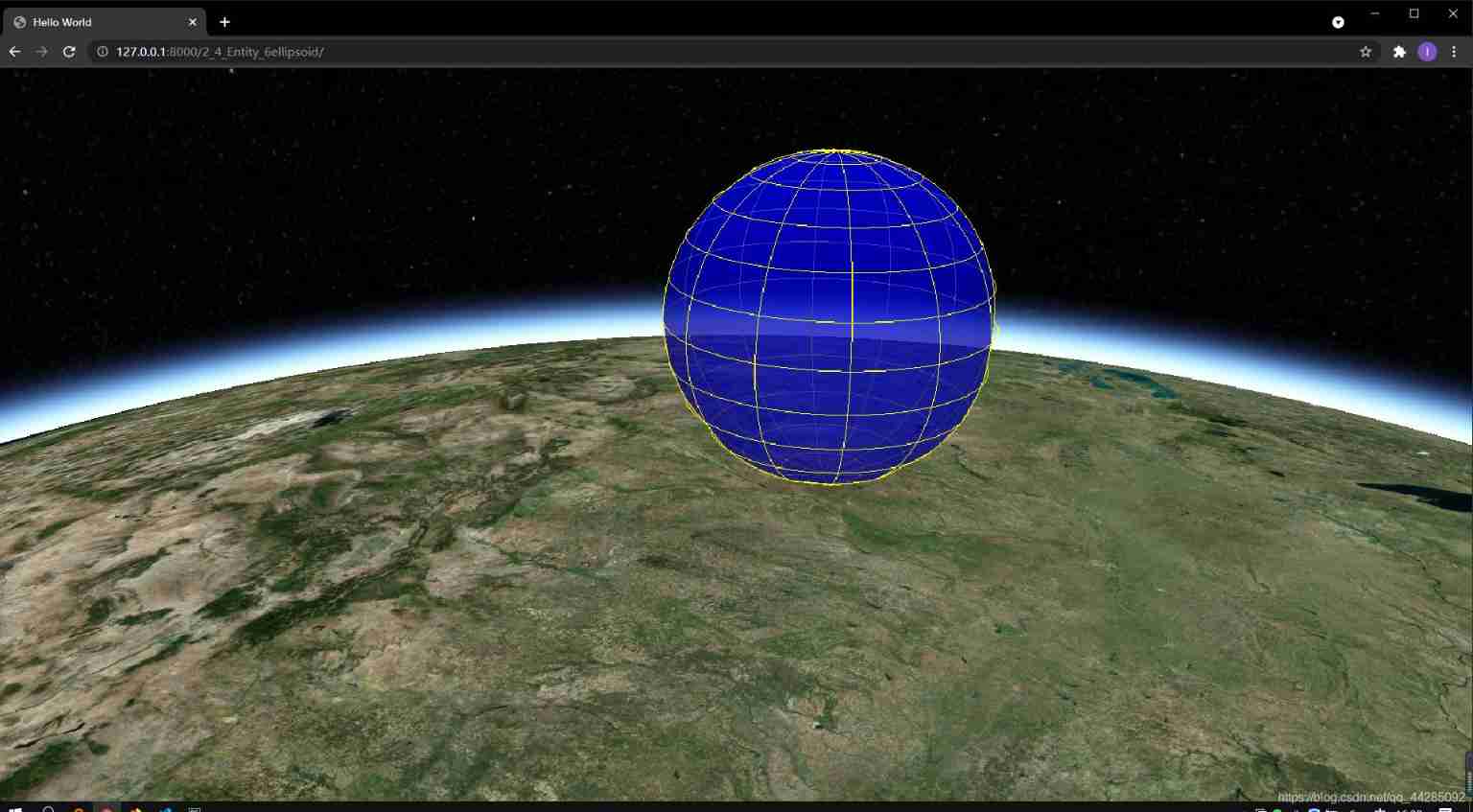
 var entity = viewer.entities.add({

      name: "Spheres and Ellipsoids",
      position: Cesium.Cartesian3.fromDegrees(-100.0, 40.0, 300000.0), //  Return from longitude and latitude values in degrees Cartesian3 Location .
      ellipsoid: {

        show: true,
        radii: new Cesium.Cartesian3(200000.0, 200000.0, 200000.0), //  Outer radius of ellipsoid
       // innerRadii: new Cesium.Cartesian3(1000.0, 1000.0, 1000.0), //  Inner radius of ellipsoid
        minimumClock: 0.0, //  Minimum clock angle
        maximumClock: 2 * Math.PI, //  Maximum clock angle
        minimumCone: 0.0, //  Minimum cone angle
        maximumCone: Math.PI, //  Maximum cone angle
        heightReference: Cesium.HeightReference.NONE,
        fill: true,
        material: Cesium.Color.BLUE.withAlpha(0.5),
        outline: true,
        outlineColor: Cesium.Color.YELLOW,
        outlineWidth: 1.0,

        stackPartitions: 12, //  The number of weft extension line cutting   grid
        slicePartitions: 12, //  The number of linear cutting along longitude   grid
        subdivisions: 120, //  Number of samples per contour ring , Determine the granularity of curvature , The bigger, the smoother

        shadows: Cesium.ShadowMode.DISABLED,
        // distanceDisplayCondition: new Cesium.DistanceDisplayCondition(
        // 1.0e3,
        // 2.0e3
        // ),
      },
    });

    viewer.zoomTo(viewer.entities);
7、 ... and 、Label label
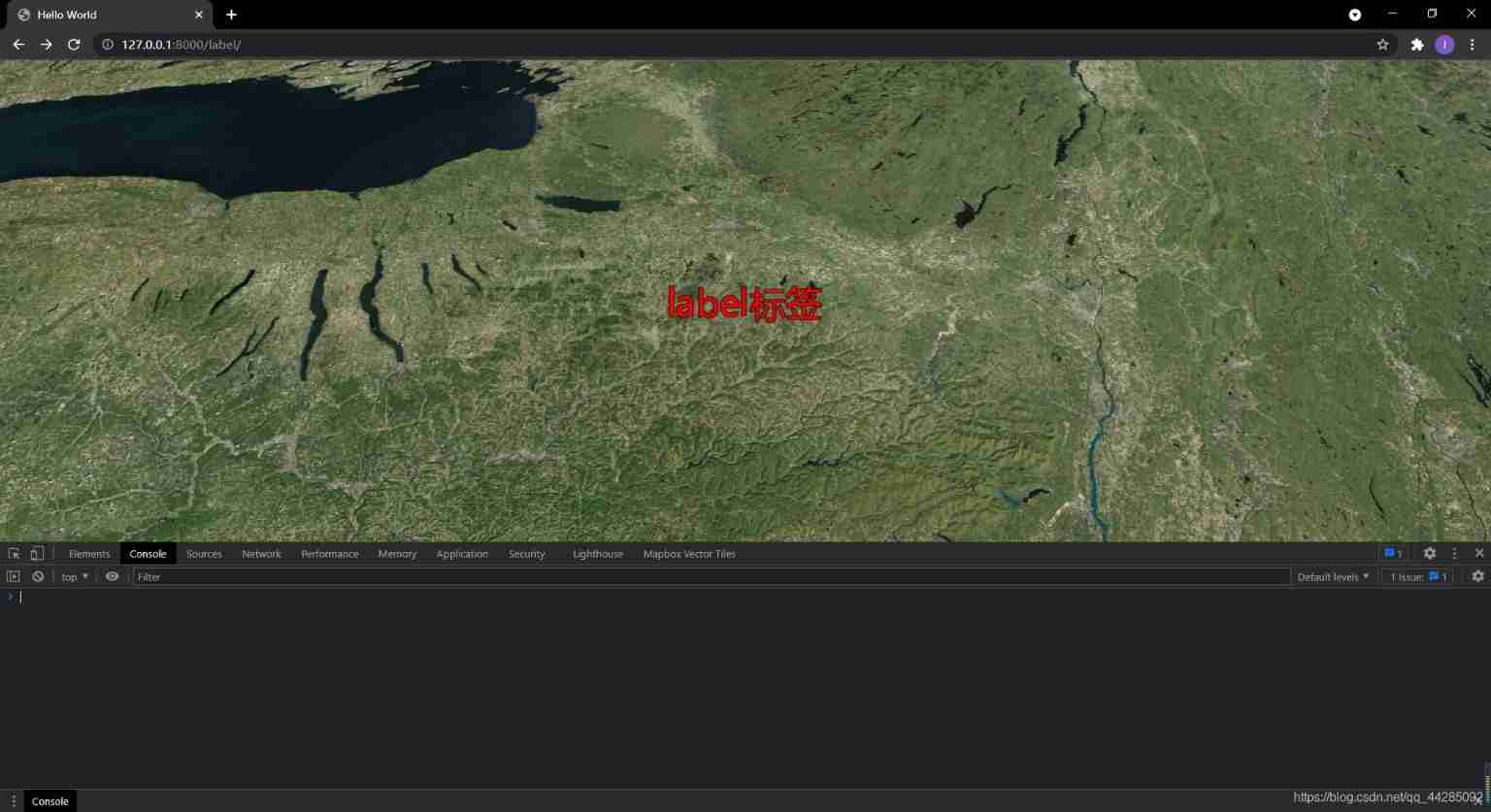
It is mainly used for marking the location of the map , It can be used with pictures (
billboardBillboard ), At this time, in order to prevent blocking , You can set an offset to avoid .
    var entity = viewer.entities.add({

      name: "label",
      position: Cesium.Cartesian3.fromDegrees(
        -75.1641667,
        39.9522222,
        300000.0
      ),
      label: {

        show: true, //  Whether to display text annotation
        text: "label label ", //  What are the displayed dimensions
        font: "normal 30px Sans-serif", //  Set the size and type of annotation font
                  fillColor: Cesium.Color.RED, //  The font color
        // FILL  fill ;OUTLINE  Show only borders ;FILL_AND_OUTLINE  Both filled and framed
        style: Cesium.LabelStyle.FILL_AND_OUTLINE,
        scale: 0.7, //  Zoom as a whole , If the font appears fuzzy, you can set twice the size of the font , Then zoom
        showBackground: false,//  Whether to display the background color of the annotation
        backgroundColor: Cesium.Color.BLUE, //  Set the background color
        backgroundPadding: new Cesium.Cartesian2(7, 5), //  Specify the properties of horizontal and vertical background filling in pixels
        pixelOffset: Cesium.Cartesian2.ZERO, //  Specify the attribute of pixel offset
        eyeOffset: Cesium.Cartesian3.ZERO, //  Specify eye offset
        horizontalOrigin: Cesium.HorizontalOrigin.CENTER, //  Horizontal alignment
        verticalOrigin: Cesium.VerticalOrigin.CENTER, //  The vertical alignment
        heightReference: Cesium.HeightReference.NONE,
        outlineColor: Cesium.Color.BLACK, //  Font peripheral color
        outlineWidth: 1,
          //  Used to set the attribute of semi transparency according to the distance from the camera
        translucencyByDistance: new Cesium.NearFarScalar(
          1.0e3,
          1.0,
          1.5e6,
          1
        ),
          //  Used to set according to the distance from the camera  pixelOffset  Properties of
        pixelOffsetScaleByDistance: new Cesium.NearFarScalar(
          1.0e3,
          1.0,
          1.5e6,
          0.0
        ),
          //  Attribute used to set the scale according to the distance from the camera
        scaleByDistance: new Cesium.NearFarScalar(1.0e3, 2.0, 2.0e3, 1.0),
         distanceDisplayCondition: new Cesium.DistanceDisplayCondition(
           0,
          2.0e4),
          //  An attribute , Specify the distance from the camera to disable the depth test
        disableDepthTestDistance: Number.POSITIVE_INFINITY,
      },
    });
    viewer.zoomTo(viewer.entities);
边栏推荐
- How to pass the PMP Exam in a short time?
- Digital triangle model acwing 275 Pass a note
- LeetCode 736. LISP syntax parsing
- Unityshader introduction essentials personal summary -- Basic chapter (I)
- 为不同类型设备构建应用的三大更新 | 2022 I/O 重点回顾
- Unity shader beginner's Essentials (I) -- basic lighting notes
- Personal deduction topic classification record
- OpenGL 3D graphics rendering
- 【ChaosBlade:节点 CPU 负载、节点网络延迟、节点网络丢包、节点域名访问异常】
- Troublesome problem of image resizing when using typora to edit markdown to upload CSDN
猜你喜欢
使用Typora编辑markdown上传CSDN时图片大小调整麻烦问题

面试题:高速PCB一般布局、布线原则
Interview question: general layout and wiring principles of high-speed PCB

2020 year end summary
PMP certificate preparation experience sharing
Why is access to the external network prohibited for internal services of the company?
C language pointer (special article)
C language pointer (Part 1)
Systick滴答定时器
LED模拟与数字调光
随机推荐
Screen automatically generates database documents
C语言指针(中篇)
Leetcode question brushing record (array) combination sum, combination sum II
JVM garbage collection detailed learning notes (II)
Newly found yii2 excel processing plug-in
Calculation s=1+12+123+1234+12345 C language
Locust performance test 3 (high concurrency, parameter correlation, assembly point)
数据在内存中的存储
Simulation volume leetcode [general] 1705 The maximum number of apples to eat
2022-06-30 unity core 8 - model import
STM32 clock system
Ppt template and material download website (pure dry goods, recommended Collection)
Vagrant failed to mount directory mount: unknown filesystem type 'vboxsf'
【Istio Network CRD VirtualService、Envoyfilter】
JVM 内存结构 详细学习笔记(一)
Isomorphic C language
Simulation volume leetcode [general] 1609 Parity tree
[istio introduction, architecture, components]
Pytest+request+allure+excel interface automatic construction from 0 to 1 [five nails / flying Book notice]
Postman interface test (I. installation and use)