当前位置:网站首页>flex布局语法
flex布局语法
2022-06-10 16:20:00 【华为云】
flex布局语法
一、flex 布局是什么?
Flex是 Flexible Box 的缩写,意为"弹性布局",用来为盒状模型提供最大的灵活性。
任何一个容器 都可以指定为 Flex 布局。
.box{ display: flex;}行内元素 也可以使用 Flex 布局。
.box{ display: inline-flex;}Webkit 内核的浏览器,必须加上-webkit前缀。
.box{ display: -webkit-flex; /* Safari */ display: flex;}注意,设为 Flex 布局以后,子元素的float、clear和vertical-align属性将失效。
二、基本概念
采用 Flex 布局的元素,称为 Flex 容器(flex container),简称"容器"。它的所有子元素自动成为容器成员,称为 Flex 项目(flex item),简称"项目"。
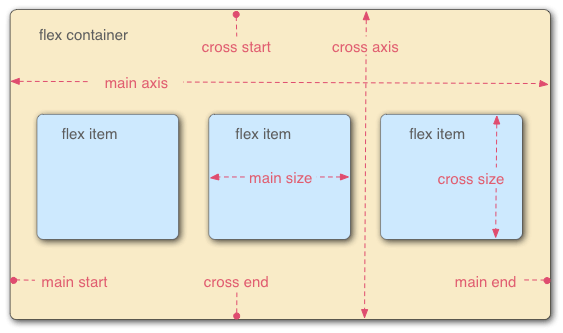
容器默认存在两根轴:水平的主轴(或x轴)(main axis)和垂直的交叉轴(或y轴)(cross axis)。主轴的开始位置(与边框的交叉点)叫做main start,结束位置叫做main end;交叉轴的开始位置叫做cross start,结束位置叫做cross end。
项目默认沿主轴排列。单个项目占据的主轴空间叫做main size,占据的交叉轴空间叫做cross size。
三、容器的属性
以下6个属性设置在容器上。(即设置在 display: flex; 的元素上)
flex-direction 方向 决定项目的排列方向
flex-wrap 换行
flex-flow 方向和换行的简写
justify-content 主轴对齐方式
align-items 交叉轴对齐方式
align-content 多轴线的对齐方式
3.1 flex-direction属性
flex-direction属性决定主轴的方向(即项目的排列方向)。
.box { flex-direction: row | row-reverse | column | column-reverse;}
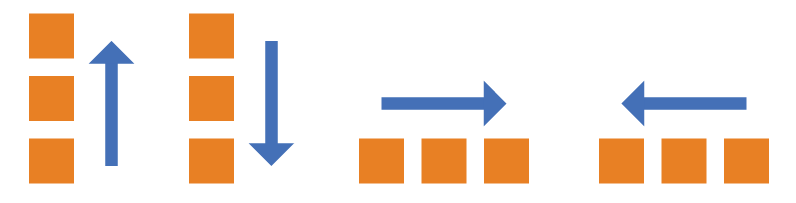
它可能有4个值。
row(默认值):主轴为水平方向,起点在左端。row-reverse:主轴为水平方向,起点在右端。column:主轴为垂直方向,起点在上沿。column-reverse:主轴为垂直方向,起点在下沿。
3.2 flex-wrap属性
默认情况下,项目都排在一条线(又称"轴线")上。flex-wrap属性定义,如果一条轴线排不下,如何换行。

.box{ flex-wrap: nowrap | wrap | wrap-reverse;}
它可能取三个值。
(1)nowrap(默认):不换行。会压缩项目的宽度
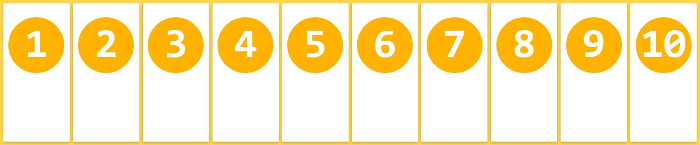
(2)wrap:换行,第一行在上方。

(3)wrap-reverse:换行,第一行在下方。

3.3 flex-flow
flex-flow属性是flex-direction属性和flex-wrap属性的简写形式,默认值为row nowrap。
.box { flex-flow: <flex-direction> || <flex-wrap>;}
3.4 justify-content属性
justify-content属性定义了项目在主轴上的对齐方式。
.box { justify-content: flex-start | flex-end | center | space-between | space-around;}
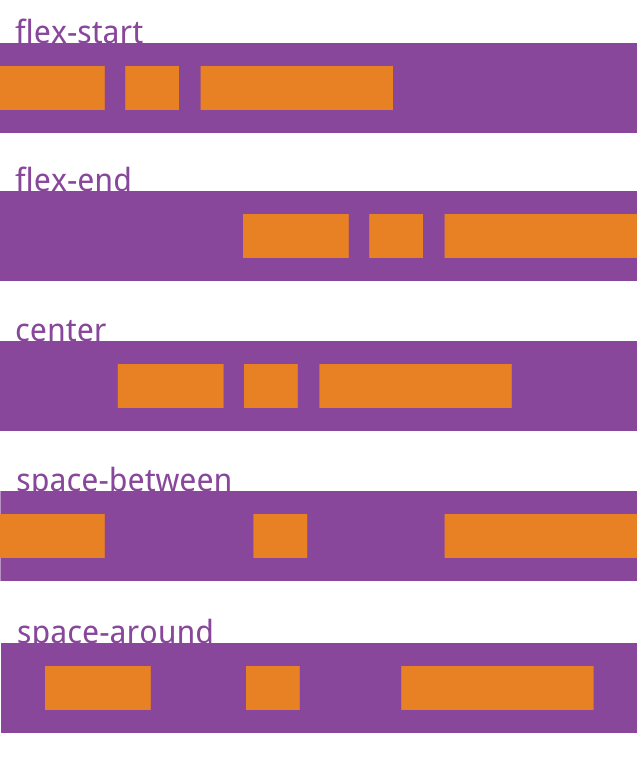
它可能取5个值,具体对齐方式与轴的方向有关。下面假设主轴为从左到右。
flex-start(默认值):左对齐flex-end:右对齐center: 居中space-between:两端对齐,项目之间的间隔都相等。space-around:每个项目两侧的间隔相等。所以,项目之间的间隔比项目与边框的间隔大一倍。
3.5 align-items属性
align-items属性定义项目在交叉轴上如何对齐。
.box { align-items: flex-start | flex-end | center | baseline | stretch;}
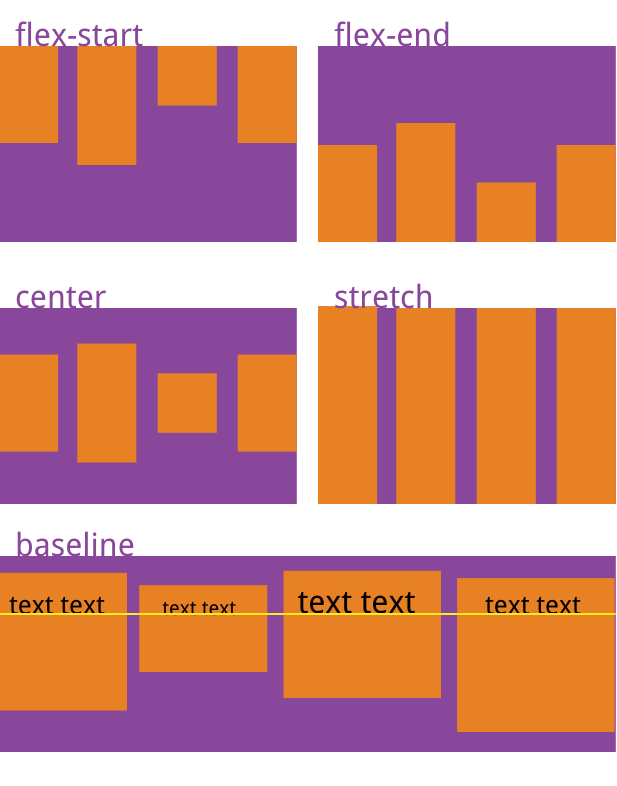
它可能取5个值。具体的对齐方式与交叉轴的方向有关,下面假设交叉轴从上到下。
flex-start:交叉轴的起点对齐。flex-end:交叉轴的终点对齐。center:交叉轴的中点对齐。baseline: 项目的第一行文字的基线对齐。stretch(默认值):如果项目未设置高度或设为auto,将占满整个容器的高度。
3.6 align-content属性
align-content属性定义了多根轴线的对齐方式(一排项目为一根轴线)。如果项目只有一根轴线,该属性不起作用。
.box { align-content: flex-start | flex-end | center | space-between | space-around | stretch;}
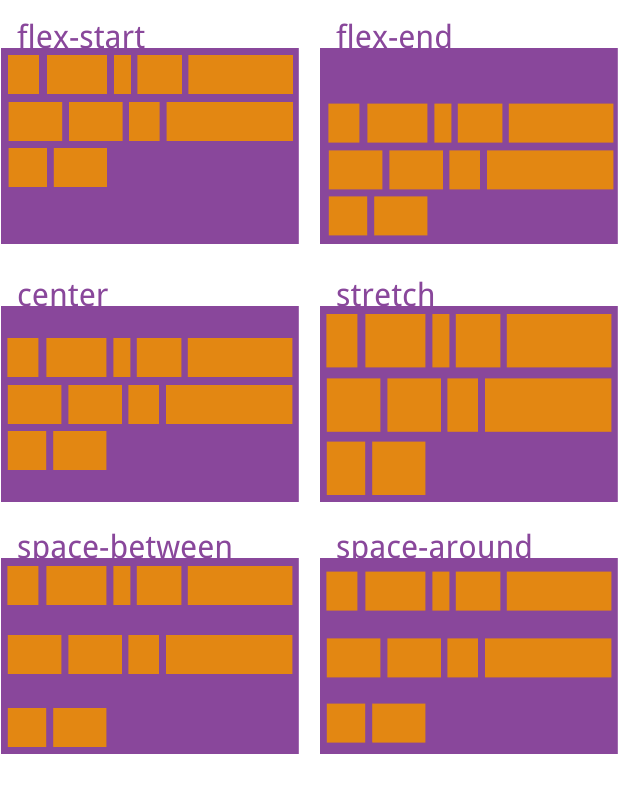
该属性可能取6个值。
flex-start:与交叉轴的起点对齐。flex-end:与交叉轴的终点对齐。center:与交叉轴的中点对齐。space-between:与交叉轴两端对齐,轴线之间的间隔平均分布。space-around:每根轴线两侧的间隔都相等。所以,轴线之间的间隔比轴线与边框的间隔大一倍。stretch(默认值):轴线占满整个交叉轴。
四、项目的属性
以下6个属性设置在项目上。
orderflex-growflex-shrinkflex-basisflexflex-grow,flex-shrink和flex-basis的简写align-self
4.1 order属性
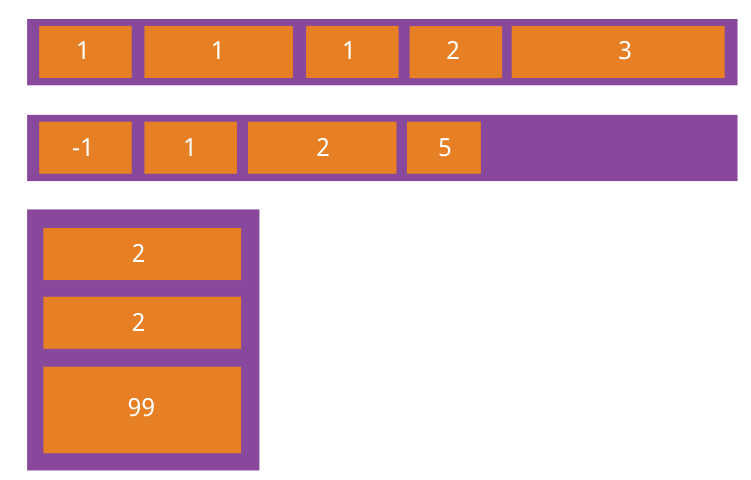
order属性定义项目的排列顺序。数值越小,排列越靠前,默认为0。
.item { order: <integer>;}
4.2 flex-grow属性
flex-grow属性定义项目的放大比例,默认为0,即如果存在剩余空间,也不放大。
.item { flex-grow: <number>; /* default 0 */}
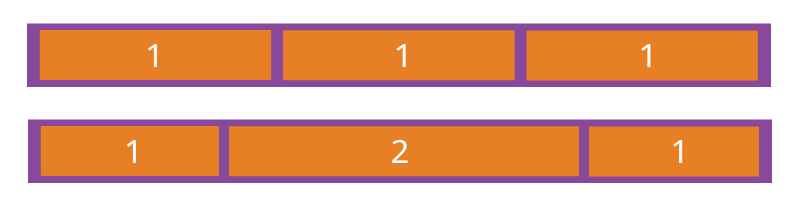
如果所有项目的flex-grow属性都为1,则它们将等分剩余空间(如果有的话)。如果一个项目的flex-grow属性为2,其他项目都为1,则前者占据的剩余空间将比其他项多一倍。
4.3 flex-shrink属性
flex-shrink属性定义了项目的缩小比例,默认为1,即如果空间不足,该项目将缩小。
.item { flex-shrink: <number>; /* default 1 */}

如果所有项目的flex-shrink属性都为1,当空间不足时,都将等比例缩小。如果一个项目的flex-shrink属性为0,其他项目都为1,则空间不足时,前者不缩小。
负值对该属性无效。
4.4 flex-basis属性
flex-basis属性定义了在分配多余空间之前,项目占据的主轴空间(main size)。浏览器根据这个属性,计算主轴是否有多余空间。它的默认值为auto,即项目的本来大小。
.item { flex-basis: <length> | auto; /* default auto */}
它可以设为跟width或height属性一样的值(比如350px),则项目将占据固定空间。
4.5 flex属性
flex属性是flex-grow, flex-shrink 和 flex-basis的简写,默认值为0 1 auto。后两个属性可选。
.item { flex: none | [ <'flex-grow'> <'flex-shrink'>? || <'flex-basis'> ]}
该属性有两个快捷值:auto (1 1 auto) 和 none (0 0 auto)。
建议优先使用这个属性,而不是单独写三个分离的属性,因为浏览器会推算相关值。
4.6 align-self属性
align-self属性允许单个项目有与其他项目不一样的对齐方式,可覆盖align-items属性。默认值为auto,表示继承父元素的align-items属性,如果没有父元素,则等同于stretch。
.item { align-self: auto | flex-start | flex-end | center | baseline | stretch;}
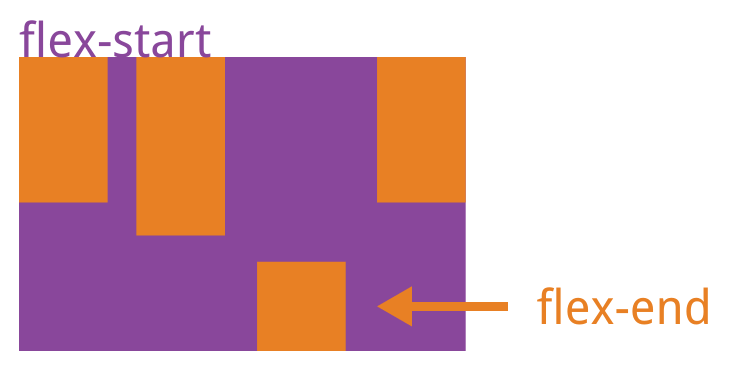
该属性可能取6个值,除了auto,其他都与align-items属性完全一致。
(完)
来源:
边栏推荐
- [web security self-study] section 1 building of basic Web Environment
- 海外数据中心需要为不可预测的灾难做好准备
- Richard Behrman, the founder of dynamic planning
- 当v-if和v-for需要同时使用的时候
- Swift 3pThread tool Promise Pipeline Master/Slave Serial Thread confinement Serial queue
- Fail fast and fail safe
- Mysql database implementation setting field length
- [proteus simulation] ds18b20+ alarm temperature adjustable +lm016 display
- 全链路追踪 & 性能监控工具 SkyWalking 实战
- Rethinking atlas revolution for semantic image segmentation (deeplobv3) personal summary
猜你喜欢

Richard Behrman, the founder of dynamic planning
Carry forward the past and forge ahead into the future, multiple residuals | densenet (I)
带你初步了解 类和对象 的基本机制

Web3 is the most complete money making secret script. Just read this one

Rethinking atlas revolution for semantic image segmentation (deeplobv3) personal summary
Eliminate if Five ways of else

For more than 20 years, there are only Durex, Okamoto and jasbon in the condom market

Numpy learning notes

vscode常用插件与配置
Example analysis of SQL injection error reporting

随机推荐
消除业务代码中if....else的五种方式
VBA divides strings, stores them in an array, writes them to a file, and saves them
隐形马尔可夫模型及其训练(一)
Detailed derivation of perspective projection transformation and related applications
Basic use of pycharm
智慧景區視頻監控 5G智慧燈杆網關組網綜合杆
It has become a unicorn since its establishment one year ago. Tencent didi is the "backer". This year's new unicorn is not simple
【玩转华为云】鲲鹏DevKit迁移实战
Set up proxy for chocolate
Example code of PHP for uploading multiple pictures
Under the "plastic ban order", does the Hong Kong stock exchange pay for the deep excavation of degradable plastics by Zhongbao new materials?
运筹说 第64期丨动态规划奠基人——理查德·贝尔曼
Fabric. JS lock the background image, not affected by zooming and dragging
Fail fast and fail safe
域名备案和icp备案有哪些区别?
Flood control and drainage monitoring automatic monitoring and telemetering terminal for flood control and drainage
全链路追踪 & 性能监控工具 SkyWalking 实战
Facebook AI | 从数百万预测结构中学习逆向折叠
adb不是内部或外部命令,也不是可运行的程序或批处理文件
Xinsi technology helps Israel visuality systems promote the "left shift" of security