当前位置:网站首页>Android Studio 实现登录注册-源代码 (连接MySql数据库)
Android Studio 实现登录注册-源代码 (连接MySql数据库)
2022-07-30 04:15:00 【m0_54861649】
Android Studio 实现登录注册-源代码 (连接MySql数据库)
Android Studio 实现登录注册-源代码 二(Servlet + 连接MySql数据库)
[Android Studio 实现登录注册-源代码 三(Servlet + 连接MySql数据库)实现学生信息的查询 (JSON通信)]
Android Studio 实现实现学生信息的增删改查 -源代码 四(Servlet + 连接MySql数据库)


一、创建工程
1、创建一个空白工程

2、随便起一个名称

3、设置网络连接权限

<uses-permission android:name="android.permission.INTERNET" />
二、引入Mysql驱动包
1、切换到普通Java工程
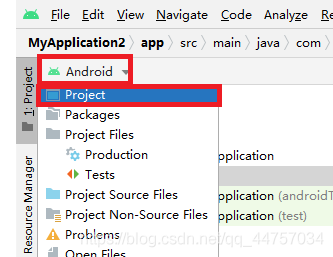
2、在libs当中引入MySQL的jar包
将mysql的驱动包复制到libs当中

三、编写数据库和dao以及JDBC相关代码
1、在数据库当中创建表
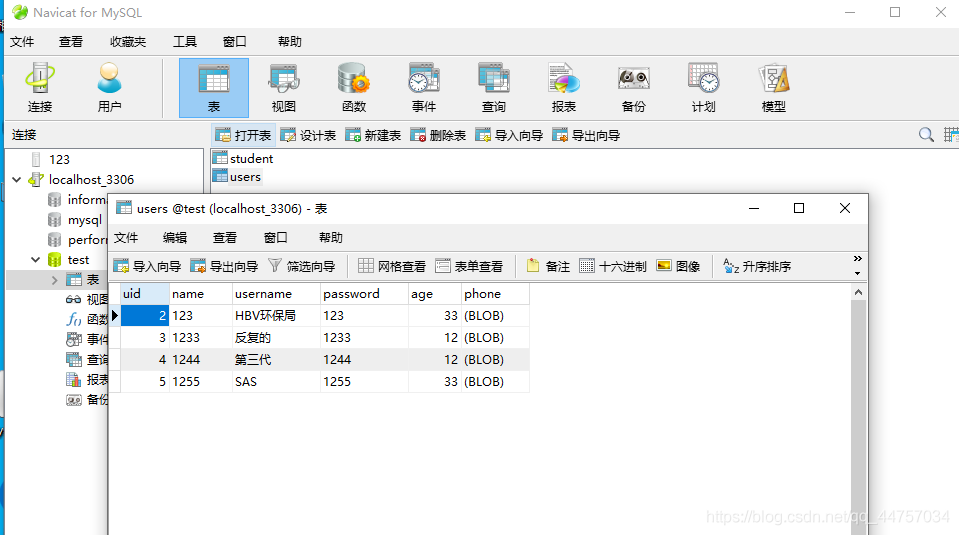
SQL语句
/*
Navicat MySQL Data Transfer

Source Server         : localhost_3306
Source Server Version : 50562
Source Host           : localhost:3306
Source Database       : test

Target Server Type    : MYSQL
Target Server Version : 50562
File Encoding         : 65001

Date: 2021-05-10 17:28:36
*/

SET FOREIGN_KEY_CHECKS=0;

-- ----------------------------
-- Table structure for `student`
-- ----------------------------
DROP TABLE IF EXISTS `student`;
CREATE TABLE `student` (
  `sid` int(11) NOT NULL AUTO_INCREMENT,
  `sname` varchar(255) NOT NULL,
  `sage` int(11) NOT NULL,
  `address` varchar(255) NOT NULL,
  PRIMARY KEY (`sid`)
) ENGINE=InnoDB AUTO_INCREMENT=3 DEFAULT CHARSET=utf8;

-- ----------------------------
-- Records of student
-- ----------------------------
INSERT INTO `student` VALUES ('1', 'andi', '21', '21212');
INSERT INTO `student` VALUES ('2', 'a', '2121', '2121');

-- ----------------------------
-- Table structure for `users`
-- ----------------------------
DROP TABLE IF EXISTS `users`;
CREATE TABLE `users` (
  `uid` int(11) NOT NULL AUTO_INCREMENT,
  `name` varchar(255) NOT NULL,
  `username` varchar(255) NOT NULL,
  `password` varchar(255) NOT NULL,
  `age` int(255) NOT NULL,
  `phone` longblob NOT NULL,
  PRIMARY KEY (`uid`)
) ENGINE=InnoDB AUTO_INCREMENT=6 DEFAULT CHARSET=utf8;

-- ----------------------------
-- Records of users
-- ----------------------------
INSERT INTO `users` VALUES ('2', '123', 'HBV环保局', '123', '33', 0x3133333333333333333333);
INSERT INTO `users` VALUES ('3', '1233', '反复的', '1233', '12', 0x3132333333333333333333);
INSERT INTO `users` VALUES ('4', '1244', '第三代', '1244', '12', 0x3133333333333333333333);
INSERT INTO `users` VALUES ('5', '1255', 'SAS', '1255', '33', 0x3133333333333333333333);
2、在Android Studio当中创建JDBCUtils类
切换会Android视图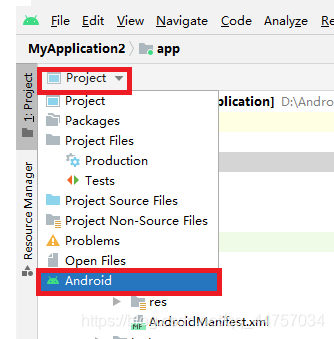

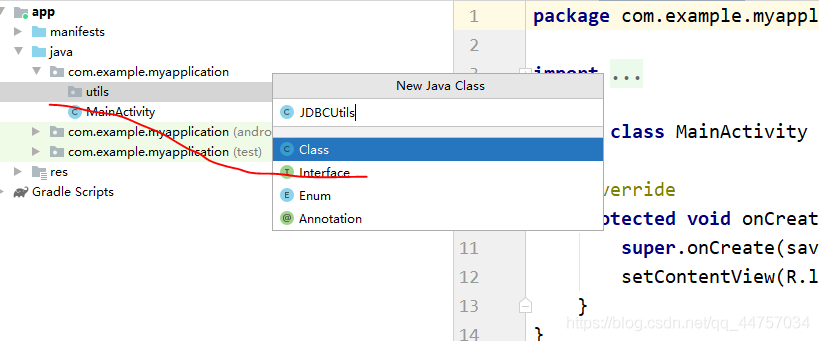

注意链接数据库的地址是:jdbc:mysql://10.0.2.2:3306/test
package com.example.myapplication.utils;


import java.sql.Connection;
import java.sql.DriverManager;
import java.sql.SQLException;

public class JDBCUtils {


    static {

        try {
            Class.forName("com.mysql.jdbc.Driver");
        } catch (ClassNotFoundException e) {
            e.printStackTrace();
        }

    }

    public static Connection getConn() {
        Connection  conn = null;
        try {
            conn= DriverManager.getConnection("jdbc:mysql://10.0.2.2:3306/test","root","root");
        }catch (Exception exception){
            exception.printStackTrace();
        }
        return conn;
    }

    public static void close(Connection conn){
        try {
            conn.close();
        } catch (SQLException throwables) {
            throwables.printStackTrace();
        }
    }

}
3、创建User实体类

package com.example.myapplication.entity;

public class User {

    private int id;
    private String name;
    private String username;
    private String password;
    private int age;
    private String phone;


    public User() {
    }

    public User(int id, String name, String username, String password, int age, String phone) {
        this.id = id;
        this.name = name;
        this.username = username;
        this.password = password;
        this.age = age;
        this.phone = phone;
    }

    public int getId() {
        return id;
    }

    public void setId(int id) {
        this.id = id;
    }

    public String getName() {
        return name;
    }

    public void setName(String name) {
        this.name = name;
    }

    public String getUsername() {
        return username;
    }

    public void setUsername(String username) {
        this.username = username;
    }

    public String getPassword() {
        return password;
    }

    public void setPassword(String password) {
        this.password = password;
    }

    public int getAge() {
        return age;
    }

    public void setAge(int age) {
        this.age = age;
    }

    public String getPhone() {
        return phone;
    }

    public void setPhone(String phone) {
        this.phone = phone;
    }
}
4、创建dao层和UserDao

package com.example.myapplication.dao;

import com.example.myapplication.entity.User;
import com.example.myapplication.utils.JDBCUtils;

import java.sql.Connection;
import java.sql.PreparedStatement;
import java.sql.ResultSet;
import java.sql.SQLException;

public class UserDao {


    public boolean login(String name,String password){

        String sql = "select * from users where name = ? and password = ?";

        Connection  con = JDBCUtils.getConn();

        try {
            PreparedStatement pst=con.prepareStatement(sql);

            pst.setString(1,name);
            pst.setString(2,password);

            if(pst.executeQuery().next()){

                return true;

            }

        } catch (SQLException throwables) {
            throwables.printStackTrace();
        }finally {
            JDBCUtils.close(con);
        }

        return false;
    }

    public boolean register(User user){

        String sql = "insert into users(name,username,password,age,phone) values (?,?,?,?,?)";

        Connection  con = JDBCUtils.getConn();

        try {
            PreparedStatement pst=con.prepareStatement(sql);

            pst.setString(1,user.getName());
            pst.setString(2,user.getUsername());
            pst.setString(3,user.getPassword());
            pst.setInt(4,user.getAge());
            pst.setString(5,user.getPhone());

            int value = pst.executeUpdate();

            if(value>0){
                return true;
            }


        } catch (SQLException throwables) {
            throwables.printStackTrace();
        }finally {
            JDBCUtils.close(con);
        }
        return false;
    }

    public User findUser(String name){

        String sql = "select * from users where name = ?";

        Connection  con = JDBCUtils.getConn();
        User user = null;
        try {
            PreparedStatement pst=con.prepareStatement(sql);

            pst.setString(1,name);

            ResultSet rs = pst.executeQuery();

            while (rs.next()){

               int id = rs.getInt(0);
               String namedb = rs.getString(1);
               String username = rs.getString(2);
               String passworddb  = rs.getString(3);
               int age = rs.getInt(4);
                String phone = rs.getString(5);
               user = new User(id,namedb,username,passworddb,age,phone);
            }

        } catch (SQLException throwables) {
            throwables.printStackTrace();
        }finally {
            JDBCUtils.close(con);
        }

        return user;
    }


}
四、编写页面和Activity相关代码
1、编写登录页面

<?xml version="1.0" encoding="utf-8"?>
<androidx.constraintlayout.widget.ConstraintLayout xmlns:android="http://schemas.android.com/apk/res/android"
    xmlns:app="http://schemas.android.com/apk/res-auto"
    xmlns:tools="http://schemas.android.com/tools"
    android:layout_width="match_parent"
    android:layout_height="match_parent"
    tools:context=".MainActivity">


    <LinearLayout
        android:layout_width="match_parent"
        android:layout_height="match_parent"
        android:orientation="vertical"
        tools:layout_editor_absoluteX="219dp"
        tools:layout_editor_absoluteY="207dp"
        android:padding="50dp"

        >

        <LinearLayout
            android:layout_width="match_parent"
            android:layout_height="wrap_content"
            android:orientation="horizontal">


            <TextView
                android:id="@+id/textView"
                android:layout_width="wrap_content"
                android:layout_height="wrap_content"
                android:layout_weight="1"
                android:textSize="15sp"
                android:text="账号:" />

            <EditText
                android:id="@+id/name"
                android:layout_width="wrap_content"
                android:layout_height="wrap_content"
                android:layout_weight="1"
                android:ems="10"
                android:inputType="textPersonName"
                android:text="" />
        </LinearLayout>
        <LinearLayout
            android:layout_width="match_parent"
            android:layout_height="wrap_content"
            android:orientation="horizontal">


            <TextView
                android:id="@+id/textView2"
                android:layout_width="wrap_content"
                android:layout_height="wrap_content"
                android:layout_weight="1"
                android:textSize="15sp"
                android:text="密码:"

                />

            <EditText
                android:id="@+id/password"
                android:layout_width="wrap_content"
                android:layout_height="wrap_content"
                android:layout_weight="1"
                android:ems="10"
                android:inputType="textPersonName"
               />
        </LinearLayout>
        <LinearLayout
            android:layout_width="match_parent"
            android:layout_height="wrap_content"
            android:orientation="horizontal">


        </LinearLayout>

        <Button
            android:layout_marginTop="50dp"
            android:id="@+id/button2"
            android:layout_width="match_parent"
            android:layout_height="wrap_content"
            android:text="登录"
            android:onClick="login"
            />

        <Button
            android:id="@+id/button3"
            android:layout_width="match_parent"
            android:layout_height="wrap_content"
            android:onClick="reg"
            android:text="注册" />
    </LinearLayout>
</androidx.constraintlayout.widget.ConstraintLayout>
效果
2、编写注册页面代码


<?xml version="1.0" encoding="utf-8"?>
<androidx.constraintlayout.widget.ConstraintLayout xmlns:android="http://schemas.android.com/apk/res/android"
    xmlns:app="http://schemas.android.com/apk/res-auto"
    xmlns:tools="http://schemas.android.com/tools"
    android:layout_width="match_parent"
    android:layout_height="match_parent"
    tools:context=".RegisterActivity">

    <LinearLayout
        android:layout_width="match_parent"
        android:layout_height="match_parent"
        android:orientation="vertical"
        tools:layout_editor_absoluteX="219dp"
        tools:layout_editor_absoluteY="207dp"
        android:padding="50dp"

        >

        <LinearLayout
            android:layout_width="match_parent"
            android:layout_height="wrap_content"
            android:orientation="horizontal">


            <TextView
                android:id="@+id/textView"
                android:layout_width="wrap_content"
                android:layout_height="wrap_content"
                android:layout_weight="1"
                android:textSize="15sp"
                android:text="账号:" />

            <EditText
                android:id="@+id/name"
                android:layout_width="wrap_content"
                android:layout_height="wrap_content"
                android:layout_weight="1"
                android:ems="10"
                android:inputType="textPersonName"
                 />
        </LinearLayout>
        <LinearLayout
            android:layout_width="match_parent"
            android:layout_height="wrap_content"
            android:orientation="horizontal">


            <TextView
                android:layout_width="wrap_content"
                android:layout_height="wrap_content"
                android:layout_weight="1"
                android:textSize="15sp"
                android:text="昵称:" />

            <EditText
                android:id="@+id/username"
                android:layout_width="wrap_content"
                android:layout_height="wrap_content"
                android:layout_weight="1"
                android:ems="10"
                android:inputType="textPersonName"
                />
        </LinearLayout>
        <LinearLayout
            android:layout_width="match_parent"
            android:layout_height="wrap_content"
            android:orientation="horizontal">


            <TextView
                android:id="@+id/textView2"
                android:layout_width="wrap_content"
                android:layout_height="wrap_content"
                android:layout_weight="1"

                android:textSize="15sp"
                android:text="密码:"

                />

            <EditText
                android:id="@+id/password"
                android:layout_width="wrap_content"
                android:layout_height="wrap_content"
                android:layout_weight="1"
                android:ems="10"
                android:inputType="textPassword"
                />
        </LinearLayout>
        <LinearLayout
            android:layout_width="match_parent"
            android:layout_height="wrap_content"
            android:orientation="horizontal">


            <TextView
                android:layout_width="wrap_content"
                android:layout_height="wrap_content"
                android:layout_weight="1"

                android:textSize="15sp"
                android:text="手机:"

                />

            <EditText
                android:id="@+id/phone"
                android:layout_width="wrap_content"
                android:layout_height="wrap_content"
                android:layout_weight="1"
                android:ems="10"
                android:inputType="phone"
                />
        </LinearLayout>
        <LinearLayout
            android:layout_width="match_parent"
            android:layout_height="wrap_content"
            android:orientation="horizontal">


            <TextView
                android:layout_width="wrap_content"
                android:layout_height="wrap_content"
                android:layout_weight="1"

                android:textSize="15sp"
                android:text="年龄:"

                />

            <EditText
                android:id="@+id/age"
                android:layout_width="wrap_content"
                android:layout_height="wrap_content"
                android:layout_weight="1"
                android:ems="10"
                android:inputType="number"
                />
        </LinearLayout>
        <LinearLayout
            android:layout_width="match_parent"
            android:layout_height="wrap_content"
            android:orientation="horizontal">


        </LinearLayout>

        <Button
            android:layout_marginTop="50dp"
            android:id="@+id/button2"
            android:layout_width="match_parent"
            android:layout_height="wrap_content"
            android:text="注册"
            android:onClick="register"
            />

        <Button
            android:id="@+id/button3"
            android:layout_width="match_parent"
            android:layout_height="wrap_content"
            android:text="重置" />
    </LinearLayout>
</androidx.constraintlayout.widget.ConstraintLayout>
3、完善MainActivity

package com.example.application01;

import androidx.appcompat.app.AppCompatActivity;

import android.content.Intent;
import android.os.Bundle;
import android.os.Handler;
import android.os.Message;
import android.view.View;
import android.widget.EditText;
import android.widget.Toast;

import com.example.application01.dao.UserDao;

public class MainActivity extends AppCompatActivity {

    @Override
    protected void onCreate(Bundle savedInstanceState) {
        super.onCreate(savedInstanceState);
        setContentView(R.layout.activity_main);
    }

    public void reg(View view){

        startActivity(new Intent(getApplicationContext(),RegisterActivity.class));

    }


    public void login(View view){

        EditText EditTextname = (EditText)findViewById(R.id.name);
        EditText EditTextpassword = (EditText)findViewById(R.id.password);

        new Thread(){
            @Override
            public void run() {

                UserDao userDao = new UserDao();

                boolean aa = userDao.login(EditTextname.getText().toString(),EditTextpassword.getText().toString());
                int msg = 0;
                if(aa){
                    msg = 1;
                }

                hand1.sendEmptyMessage(msg);


            }
        }.start();


    }
    final Handler hand1 = new Handler()
    {
        @Override
        public void handleMessage(Message msg) {

            if(msg.what == 1)
            {
                Toast.makeText(getApplicationContext(),"登录成功",Toast.LENGTH_LONG).show();

            }
            else
            {
                Toast.makeText(getApplicationContext(),"登录失败",Toast.LENGTH_LONG).show();
            }
        }
    };

}
4、完善RegisterActivity

package com.example.application01;

import androidx.appcompat.app.AppCompatActivity;

import android.content.Intent;
import android.os.Bundle;
import android.os.Handler;
import android.os.Message;
import android.view.View;
import android.widget.EditText;
import android.widget.Toast;

import com.example.application01.dao.UserDao;
import com.example.application01.entity.User;

public class RegisterActivity extends AppCompatActivity {
    EditText name = null;
    EditText username = null;
    EditText password = null;
    EditText phone = null;
    EditText age = null;
    @Override
    protected void onCreate(Bundle savedInstanceState) {
        super.onCreate(savedInstanceState);
        setContentView(R.layout.activity_register);

         name = findViewById(R.id.name);
         username = findViewById(R.id.username);
         password = findViewById(R.id.password);
         phone = findViewById(R.id.phone);
         age = findViewById(R.id.age);
    }


    public void register(View view){


        String cname = name.getText().toString();
        String cusername = username.getText().toString();
        String cpassword = password.getText().toString();

        System.out.println(phone.getText().toString());

        String cphone = phone.getText().toString();
        int cgae = Integer.parseInt(age.getText().toString());

        if(cname.length() < 2 || cusername.length() < 2 || cpassword.length() < 2 ){
            Toast.makeText(getApplicationContext(),"输入信息不符合要求请重新输入",Toast.LENGTH_LONG).show();
            return;

        }


        User user = new User();

        user.setName(cname);
        user.setUsername(cusername);
        user.setPassword(cpassword);
        user.setAge(cgae);
        user.setPhone(cphone);

        new Thread(){
            @Override
            public void run() {

                int msg = 0;

                UserDao userDao = new UserDao();

                User uu = userDao.findUser(user.getName());

                if(uu != null){
                    msg = 1;
                }

                boolean flag = userDao.register(user);
                if(flag){
                    msg = 2;
                }
                hand.sendEmptyMessage(msg);

            }
        }.start();


    }
    final Handler hand = new Handler()
    {
        @Override
        public void handleMessage(Message msg) {
            if(msg.what == 0)
            {
                Toast.makeText(getApplicationContext(),"注册失败",Toast.LENGTH_LONG).show();

            }
            if(msg.what == 1)
            {
                Toast.makeText(getApplicationContext(),"该账号已经存在,请换一个账号",Toast.LENGTH_LONG).show();

            }
            if(msg.what == 2)
            {
                //startActivity(new Intent(getApplication(),MainActivity.class));

                Intent intent = new Intent();
                //将想要传递的数据用putExtra封装在intent中
                intent.putExtra("a","註冊");
                setResult(RESULT_CANCELED,intent);
                finish();
            }

        }
    };
}
五、运行测试效果

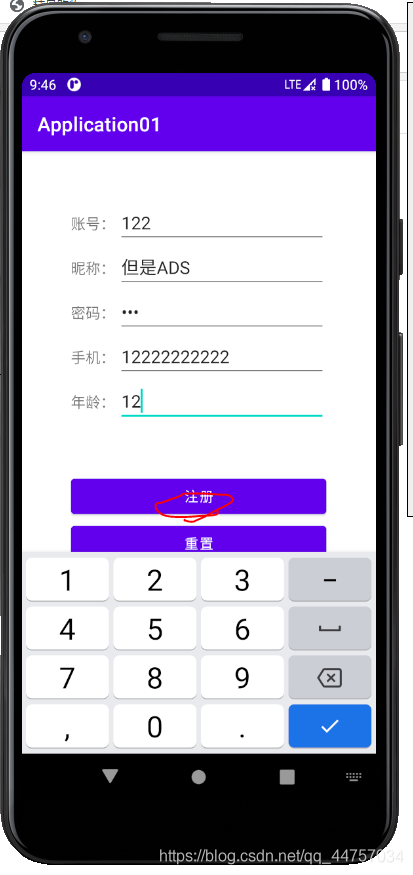
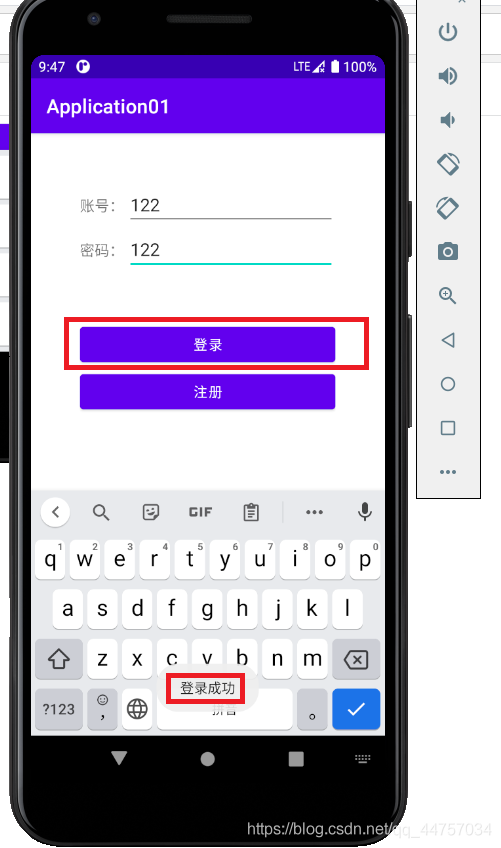
Android Studio 实现登录注册-源代码 (连接MySql数据库)
Android Studio 实现登录注册-源代码 二(Servlet + 连接MySql数据库)
[Android Studio 实现登录注册-源代码 三(Servlet + 连接MySql数据库)实现学生信息的查询 (JSON通信)]
边栏推荐
- Pytorch framework learning record 2 - the use of TensorBoard
- 【翻译】Envoy Fundamentals,这是一个培训课程,使人们能够更快地采用Envoy Proxy。...
- 2021山东省网络搭建与应用赛项试题
- Smart answer function, CRMEB knowledge payment system must have!
- Alibaba search new product data API by keyword
- [Node accesses MongoDB database]
- mysql structure, index details
- The difference between BGP room and ordinary room in Beijing
- Advanced [C] array to participate in the function pointer
- The implementation and basic operation of sub-database sub-table, ER table, global table, fragmentation rules, global sequence, etc. in MyCat
猜你喜欢

骁龙7系芯片表现如何?Reno8 Pro佐证新一代神U

Let's learn the layout components of flutter together

Mini Program Graduation Works WeChat Points Mall Mini Program Graduation Design Finished Products (3) Background Functions

海外多家权威媒体热议波场TRON:为互联网去中心化奠定基础

Based on all volunteers - H and D1 XR806 rare plant monitoring device
How to solve the error "no such file or directory" when EasyCVR starts?

Redis【超详解!!!】

Mini Program Graduation Works WeChat Second-hand Trading Mini Program Graduation Design Finished Works (7) Interim Inspection Report
Many overseas authoritative media hotly discuss TRON: laying the foundation for the decentralization of the Internet

Pytorch framework learning record 5 - the use of DataLoader
随机推荐
使用EFR32作为Zigbee/Thread的sniffer的用法
Redis "super explanation!!!!!!"
【驱动】udev设置GPIO加载后所有者、所属组和权限
Advanced [C] array to participate in the function pointer
MySQL data query (subtotal and sorting)
redis分布式锁的原子保证
error: The following untracked working tree files would be overwritten by
MySQL 安装报错的解决方法
Flutter records and learns different animations (1)
Uptime Monitoring: How to Ensure Network Device Uptime
Pytorch框架学习记录2——TensorBoard的使用
Unity3D Application模拟进入前后台及暂停
国内首家沉浸式高逼真元宇宙,希元宇宙正式上线
Smart answer function, CRMEB knowledge payment system must have!
2022.7.29-----leetcode.593
sqlmap use tutorial Daquan command Daquan (graphics)
函数的底层机制
Mini Program Graduation Works WeChat Second-hand Trading Mini Program Graduation Design Finished Works (6) Question Opening Reply PPT
(题目练习)条件概率+权值线段树+FWT+后缀数组
High Concurrency Framework Disruptor