当前位置:网站首页>[jspwiki]jspwiki installation deployment and configuration
[jspwiki]jspwiki installation deployment and configuration
2022-07-28 15:24:00 【Hello, did you touch it】
1、JSPWiki Installation and deployment
Linux Next JSPWiki Installation and deployment of . The purpose is to customize the transformation .
If you want to experience , You can choose docker install .
docker Look here
// command
docker pull apache/jspwiki
docker run -d -p 8080:8080 --name jspwiki apache/jspwiki
// visit
http://localhost:8080/
// No, docker Baidu keyword of
linux yum Installation configuration
linux docker Installation configuration
Catalog
1.1、 Introduce
- Official website :
https://jspwiki.apache.org/ - github:
https://github.com/apache/jspwiki - Installation environment
 precondition :
Tomcat 9.x or higher
JDK 1.8 or higher
1.2、 Front environment installation
1.2.1JDK
Get into https://www.oracle.com/java/technologies/downloads/archive/, Select the version you want 
Linux The corresponding version is jdk-8u331-linux-x64.tar.gz
After uploading to the server, use the following command to decompress
tar -zxvf jdk-8u331-linux-x64.tar.gz
#  Enter the unzipped directory ,pwd Get path
pwd
#  Environment variable configuration , Enter the following command and press i To configure
vim /etc/profile
The configuration is as follows , Replace ’JAVA_HOME=' The content is jdk Unzip the directory , Don't have to bin
export JAVA_HOME=/usr/local/jdk1.8.0_331
export PATH=$PATH:${JAVA_HOME}/bin:${CATALINA_HOME}/bin
export CLASSPATH=$CLASSPATH:${JAVA_HOME}/lib:${CATALINA_HOME}/lib
When the configuration is complete , Use the following command to refresh the configuration . If you need to switch users , Remember that other users also execute this command
source /etc/profile
1.2.2、Tomcat
Install first jdk
Get into https://tomcat.apache.org/, Select the required version 
Linux The corresponding version is xx.tar.gz
And just now jdk Upload and decompress the same , Just add configuration
tar -zxvf
vim /etc/profile
source /etc/profile
export CATALINA_HOME=/usr/local/tomcat
export PATH=$PATH:${JAVA_HOME}/bin:${CATALINA_HOME}/bin
export CLASSPATH=$CLASSPATH:${JAVA_HOME}/lib:${CATALINA_HOME}/lib
1.3、JSPWiki Material download
Get into https://archive.apache.org/dist/jspwiki/2.11.2/binaries/webapp/,
perhaps https://jspwiki-wiki.apache.org/Wiki.jsp?page=Downloads
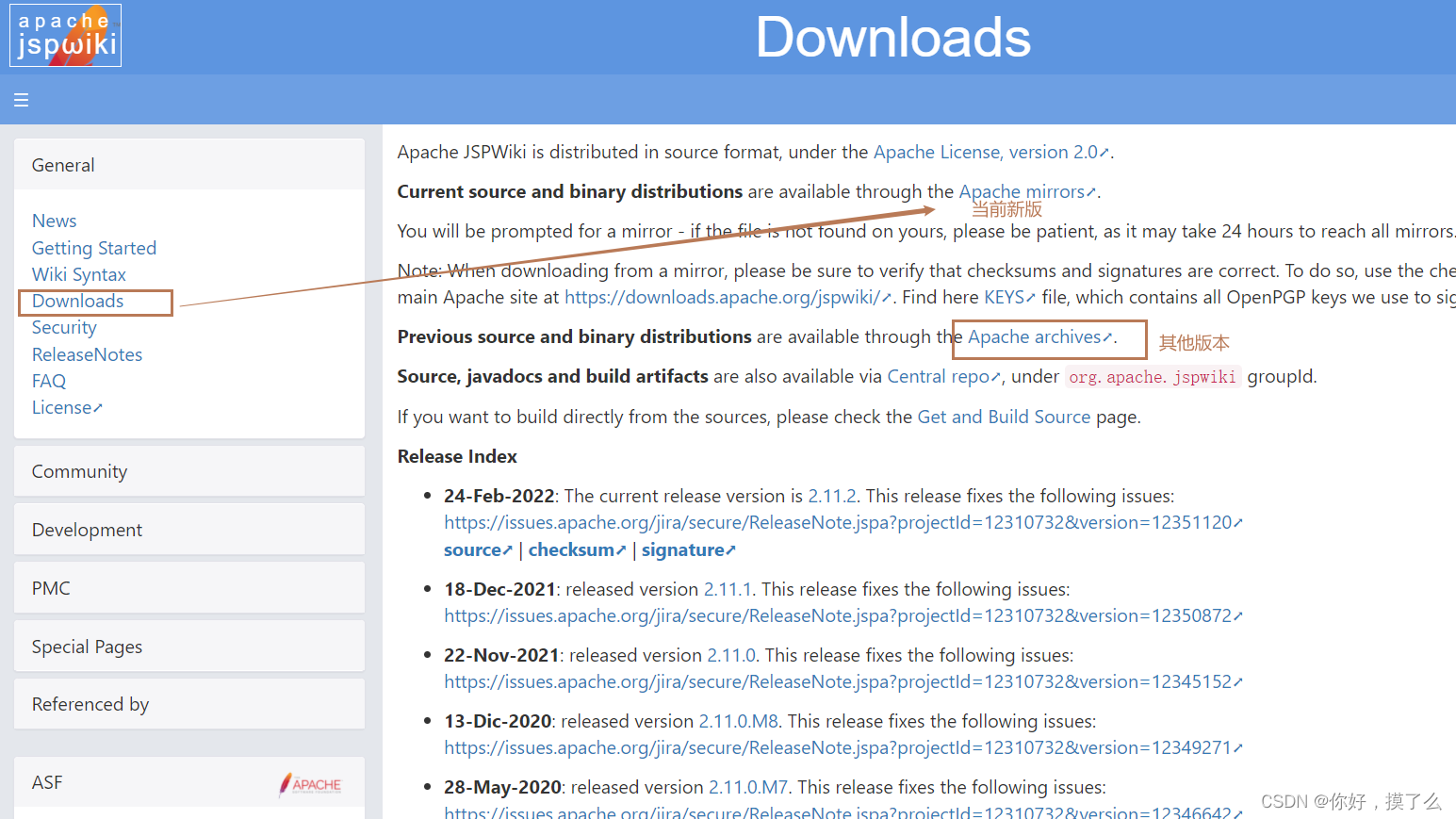

Download requires Chinese language pack and deployment JSPWiki.war package
- war Package path
/jspwiki/2.11.2/binaries/webapp/JSPWiki.war
- Chinese language pack path
/jspwiki/2.11.2/wikipages/jspwiki-wikipages-zh_CN-2.11.2.zip
1.4、JSPWiki install
- Some basic definition statements
appname:
 Yours war Package name , Affect access links
http://.../warName
- Upload files
hold war The bag is placed in tomcat The installation directory /webapps Next - tomcat start-up
Get into tomcat bin Under the table of contents
#  start-up tomcat service
nohup ./startup.sh &
- First visit
visit http://myhost/appname/Install.jsp
tomcat It's usually
http://host:8080/xxxx
- Preliminary Configuration
Page storage VersioningFileProvider , Choose one of your linux Catalog
You can configure jspwiki-custom.properties change
Click configuration , Will generate jspwiki.properties The documents are as follows
jspwiki.basicAttachmentProvider.storageDir = /home/xxx/jsp_wiki/jspwiki-files
jspwiki.fileSystemProvider.pageDir = /home/xxx/jsp_wiki/jspwiki-files
jspwiki.applicationName = jspwiki
jspwiki.pageProvider = VersioningFileProvider
jspwiki.workDir =  /home/xxx/jsp_wiki/cache
- Set language in advance
Remember to stop first tomcat, Generated profile jspwiki-custom.properties stay tomcat/temp Next , Don't look jspwiki.properties 了 , Not at all
find / -name jspwiki.properties
jspwiki.fileSystemProvider.pageDir, Unzip the language pack and copy it to this directory
#  Unzip the language pack
unzip xxx.zip
To configure jspwiki-custom.properties (jspwiki-custom.properties priority > jspwiki.properties)
#  Support more picture formats
jspwiki.translatorReader.inlinePattern.1 = *.jpg
jspwiki.translatorReader.inlinePattern.2 = *.png
jspwiki.translatorReader.inlinePattern.3 = *.gif
#  Support Chinese search
jspwiki.encoding = UTF-8
jspwiki.lucene.analyzer = org.apache.lucene.analysis.cjk.CJKAnalyzer
- restart tomcat
To tomcat/bin Under the table of contents
./shutdown.sh
 nohup ./startup.sh &
visit wiki,http://myhost/appname/, If not myhost yes “ip+port”
1.5、JSPWiki Configure customization
Transfer tomcat/temp Under the jspwiki-custom.properties To tomcat/lib
Specify the profile location jspwiki-custom.properties
stay /WEB-INF/classes Of web.xml in
<context-param> Add below
<jspwiki.custom.config>your path/jspwiki-custom.properties</jspwiki.custom.config>
2、JSPWiki woc
JSPWiki The default template cannot create pages , There is no button .
Write another article , Record the configuration and use of templates .
边栏推荐
- crmeb 标准版Window+phpstudy8安装教程(一)
- sql 开发篇一 之 表锁查询及解锁
- What are the functions to be added in crmeb pro2.2?
- DAY:7/11
- 3511. Water pouring problem
- Solve the problem of pycharm using PowerShell
- 从thinkphp远程代码执行学php反射类
- Three pain points of software development! How to solve the applet container?
- Shader顶点着色器修改顶点高度的一个思路
- Mysql易错知识点整理(待更新)
猜你喜欢

MySQL 8.0 common (continuous update)

MPLS LDP的原理与配置

Chrome plug-in debugging

crmeb 标准版Window+phpstudy8安装教程(一)

Repvgg paper explanation and model reproduction using pytoch

crmeb 标准版window+phpstudy8安装教程(二)

Multi merchant mall system with relatively clean code

Establish binary tree + C language code from preorder and middle order

PMP【敏捷教材+全真模拟题】,续6月25日考试之后,敏捷就成为了重中

SRTT-110VDC-4H-C时间继电器
随机推荐
Hjs-de1/2 time relay
Shellcode writing (unfinished)
Three pain points of software development! How to solve the applet container?
Establish binary tree + C language code from preorder and middle order
解决pycharm使用powershell出错问题
.net core 2.2 版本跨域配置
Specific operation process of network security emergency response
Cross domain problems in the configuration of.Net core version 3.1
Jogy-61 voltage relay
JY-7GA/1电压继电器
JS learning notes 24-28: end
What are the CCSP cloud security design principles
pyppeteer 遇到的问题
7/13(水塘抽样)
svg 验证码识别体验
Why do enterprises need user autonomous digital identity
Enterprise wechat customer service link, enterprise wechat customer service chat
How Charles installs and uses
Touch hands to realize canal how to access Mysql to realize data write operation monitoring
经典Dijkstra与最长路