当前位置:网站首页>图形视图框架
图形视图框架
2022-07-02 22:06:00 【Htht111】
思路
新建场景、图元、和视图。
图元添加到场景,场景与视图关联,视图显示。
初始例子
头文件
#include <QGraphicsScene> //场景:添加图元 void addItem(QGraphicsItem *item)
#include <QGraphicsView> //视图;显示场景
#include <QGraphicsItem> //图元
main.cpp
    QGraphicsScene *scene = new QGraphicsScene;  //场景
    QGraphicsRectItem *item = new QGraphicsRectItem(100,100,50,50);  //矩形项
    scene->addItem(item);  //项添加到场景
    QGraphicsView *view = new QGraphicsView; //视图
    view->setScene(scene);  //视图关联场景
    view->resize(500,500);
    view->show();  //显示视图
具体操作
新建一个图元类MyItem继承QGraphicsItem,可以实现自定义的图元项
注意需要重写两个虚函数boundingRect()和paint(),不然编译会有错误
myitem.h
#ifndef MYITEM_H
#define MYITEM_H
#include <QGraphicsItem>

class MyItem : public QGraphicsItem
{

public:
    MyItem();
    QRectF boundingRect() const override;
    void paint(QPainter *painter, const QStyleOptionGraphicsItem *option, QWidget *widget = nullptr) override;
   };

#endif // MYITEM_H
myitem.cpp
#include "myitem.h"
#include <QPainter>
MyItem::MyItem()
{


}

QRectF MyItem::boundingRect() const
{


    qreal penWidth = 1;//笔宽
    return QRectF(0 - penWidth/2,0-penWidth/2,20+penWidth,20+penWidth);//返回矩形边框(坐标、宽高)
}

void MyItem::paint(QPainter *painter, const QStyleOptionGraphicsItem *option, QWidget *widget)
{


    //标明该参数没有使用
       Q_UNUSED(option)
       Q_UNUSED(widget)

       painter->setBrush(Qt::green);//用绿色的 笔刷
       painter->drawEllipse(0,0,50,50);//画圆
}
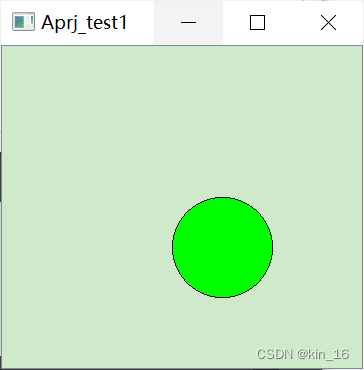
效果1:一个绿色的圆形::
main.cpp
#include "widget.h"
#include <QApplication>
#include "animation.h"
#include <QDebug>
#include "myitem.h"
int main(int argc, char *argv[])
{


    QApplication a(argc, argv);
// Widget w;
// w.show();

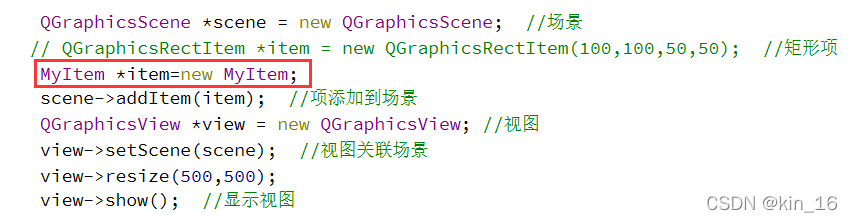
    QGraphicsScene *scene = new QGraphicsScene;  //场景
   // QGraphicsRectItem *item = new QGraphicsRectItem(100,100,50,50); //矩形项
    MyItem *item=new MyItem;//新建图元类对象
    scene->addItem(item);  //项添加到场景
    QGraphicsView *view = new QGraphicsView; //视图
    view->setScene(scene);  //视图关联场景
    view->resize(500,500);
    view->show();  //显示视图

    return a.exec();
}
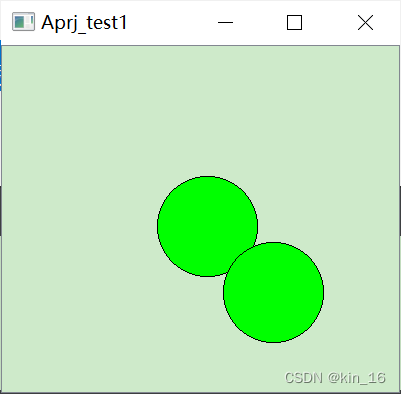
效果2:两个绿色的圆形
操作:再定义一个图元类对象,记得修改第二个图元位置(防止与第一个重合)
main.cpp
#include "widget.h"
#include <QApplication>
#include "animation.h"
#include <QDebug>
#include "myitem.h"
int main(int argc, char *argv[])
{

   	QApplication a(argc, argv);
    QGraphicsScene *scene = new QGraphicsScene;  //场景
   // QGraphicsRectItem *item = new QGraphicsRectItem(100,100,50,50); //矩形项
    MyItem *item=new MyItem;
    MyItem *item1=new MyItem;
    scene->addItem(item);  //项添加到场景
    scene->addItem(item1);
    item1->setPos(66,66);//设置第二个图元位置
    QGraphicsView *view = new QGraphicsView; //视图
    view->setScene(scene);  //视图关联场景
    view->resize(500,500);
    view->show();  //显示视图

    return a.exec();
}
图元移动
定义advance函数实现移动,需要绑定定时器
碰撞检测
边栏推荐
- U++ learning note pile
- New feature of go1.18: introduce new netip Network Library
- It's not easy to say I love you | use the minimum web API to upload files (swagger support) # yyds dry inventory #
- I admire that someone explained such an obscure subject as advanced mathematics so easily
- Ransack组合条件搜索实现
- Methods of adding styles to native JS
- Oracle-PL/SQL编程
- [shutter] shutter custom fonts (download TTF fonts | pubspec.yaml configure font resources | synchronize resources | globally apply fonts | locally apply fonts)
- NC24325 [USACO 2012 Mar S]Flowerpot
- Market Research - current market situation and future development trend of genome editing mutation detection kit
猜你喜欢

Pointer and string
【外刊】睡眠与减肥
Kubernetes resource object introduction and common commands (4)
![[shutter] shutter page life cycle (initialization period | createstate | initstate | update period | build | destroy period | dispose)](/img/07/6f2dfb543cb0ab4f27169da7e6ad07.jpg)
[shutter] shutter page life cycle (initialization period | createstate | initstate | update period | build | destroy period | dispose)

Simpleitk use - 4 Strange question
![[shutter] shutter gesture interaction (small ball following the movement of fingers)](/img/5a/a8dad8a0943645c980cc4fe7cb55d4.gif)
[shutter] shutter gesture interaction (small ball following the movement of fingers)

情感计算与理解研究发展概述

Lightgbm principle and its application in astronomical data
#include errors detected. Please update your includePath.

Commodity information management system (C language document version)
随机推荐
任务和特权级保护
Market Research - current situation and future development trend of environmental friendly fireworks Market
Web侧防御指南
Basic concepts of image and deep understanding of yuv/rgb
【AUTOSAR-DCM】-4.3-UDS $22和$2E服务如何读取和写入NVM数据
Market Research - current market situation and future development trend of high tibial osteotomy plate
SimpleITK使用——4. 奇怪的問題
Utilisation de simpletk - 4. Question étrange
LxC terminal login method
Market Research - current market situation and future development trend of third-party data platform
Market Research - current market situation and future development trend of aircraft audio control panel system
"New programmer 003" was officially launched, and the cloud native and digital practical experience of 30+ companies such as Huawei and Alibaba
Technological Entrepreneurship: failure is not success, but reflection is
基于ASP.net的手机销售管理系统(二手手机销售管理系统)+ASP.NET+C#语言+VS2010+数据库可以用于课设、毕设学习
C语言,实现三子棋小游戏
Simpleitk use - 4 Strange question
phpcms实现订单直接支付宝支付功能
540. Single element in ordered array
20220702-程序员如何构建知识体系?
Perceptron model and Application