当前位置:网站首页>regular expression
regular expression
2022-07-03 13:07:00 【Jiutwo】
Regular expression validation tool :https://regex101.com/
Basic characters
[] : For custom range sets , Characters can be specified 、 Character range 、 Or fixed range set
| expression | describe |
|---|---|
[abc] | Arbitrary range character set . Match any single character contained in the set . |
[^abc] | Exclude range character set . Match any character that is not in the set . |
[a-z] | character in range . Match any single character in the specified range . |
. | Matches any single character except the newline character , Including itself . |
\ | Escape character . Used to represent special characters , Such as :^-[]$/ Equal character |
\w | Match any letter 、 Numbers 、 Any single character in the underscore ( Equivalent to [A-Za-z0-9_]). |
\W | \W Express \w Other characters , Equivalent to [^A-Za-z0-9_]). |
\d | Numbers . matching 0-9 Any number . |
\D | The digital . Match any non numeric characters . |
\s | blank . Matches any whitespace characters , Including Spaces 、 tabs 、 Line break . |
\S | Nonwhite space character . Matches any non-whitespace characters . |
Multiple character sets can be combined , Form a larger character set , Such as :[\d\s]
Logical controller
There are also logical evaluators in regular expressions , For example, regular Hi , Indicates that the first character is equal to H also The second character is equal to i, They are default && Calculation . If you want to express or The relationship between , Just add one in the middle | , Such as H|i Is equal to H or be equal to i.
There are only the following three groups of logical controllers in regular :
| Logical sign | describe |
|---|---|
| ` | ` or |
() The subexpression shows | Used to calculate the contents in parentheses independently , Support nesting . Such as :`( Zhang |
{} Quantity control | Limit the number range of characters or word expressions . Such as : Zhang .{1,3} Express “ Zhang ” It can only be followed by 1 To 3 Any character . |
Be careful : There is no XOR in regular ( ^ ) Logic
explain :| In the class Unix Use problems in the system
because
|In the class Unix There are special characters in the system , When you usegreporvimWhen performing regular search , Must be carried out escape . In the class Unix The correct posture of the system using regular search is :# grep Use regular grep '401\|403\|404\|500' nginx.access.log # stay vim Input in / Start regular search , Again | Need to escape /401\|403\|404\|500
subexpression
Subexpression shows support nesting , Such as :(www|mvn|test-(bj|sz|gz|sh)).coderead.cn Express test The subdomain name can be further divided into test-bj、test-sz、test-sh、test-gz.
The subexpression can also be used Group references .
Quantity control
quantifiers : That is, the symbol used for range control in regular expressions , Such as * + ? {m}
Quantity control acts on character or The subexpression shows , Its quantity range has been limited .\d{6} Must be 6 Digit number . Please note that : One {} Only act on the single character before it, such as :hi{2} Express hii, instead of hihi.
quantifiers * + ? In fact, it is to use {} An abbreviation for quantity control
| expression | describe |
|---|---|
? | Match the previous expression 0 Or 1 individual . Means optional . amount to {0,1} |
+ | Match the previous expression At least 1 individual . |
* | Match the previous expression 0 One or more . |
{m} | Match the previous expression m individual . |
{m,} | Match the previous expression at least m individual . |
{m,n} | Match the previous expression at least m individual , most n individual . |
Q: How to limit the length range of text ?
A: For example, limit the length of the password to 6~20 position :^.{6,20}$
Be careful :? It can be used after the quantifier to express the meaning of minimizing matching ( Laziness matches )
Here's an example ? Usage scenarios of , Several pairs are included below <span></span> label ?
<span>hello</span> <span>uncle</span>
According to general thinking, there must be two pairs <span> label , But actually there is 3 Yes , Because for the whole text, there is another pair <span>hello...uncle</span> .
As shown in the figure , If you use regular expressions <span>.*<span> matching <span> label , Then it will match the largest <span>hello...uncle</span> label , Instead of matching two small ones as expected / label .

At this time, you can add ?, Tell the regular expression engine to match by minimization .
<span>.*?</span> and <span>.*</span> The difference can be understood in this way , Both regularities are based on <span> start , Anything in the middle , Until I met </span>. but .* very “ diligence ”, Even if you encounter one </span>, We will continue to look back to see if there are any , Then I found another one , Whichever is finally found . and .*? On the comparison “ lazy ”, The first one </span> Just match directly into a pair <span> label , Then go to find the next pair <span> The label .
grouping 、 Quote and replace
| expression | describe |
|---|---|
(expression) | grouping . Match the entire expression in parentheses . |
(?:expression) | Non capture grouping . Match the whole string in parentheses but don't get the matching result , Can't get the group reference . |
\num | A reference to the previously matched group . such as (\d)\1 You can match two identical numbers ,(Code)(Sheep)\1\2 You can match CodeSheepCodeSheep. |
$ Group number | Replace . The replacement operation refers to the content to which the regularization is matched , Replace with the specified string , This string can be passed through $ Group number Reference groups for assembly . adopt $0 You can quote the whole matching content .($0 stay Python And Javascript China does not support it. , Use $& Instead of ) |
explain :
- [] and () One difference that needs attention is [] Only single characters can be matched , and () Can match multiple characters .
[abc]  matching  a  and  b  and  c
(abc)  matching  abc
grouping
grouping Refers to what will match , Use ( ) Divided into multiple blocks , The divided groups can be used for extract 、 reverse quote as well as Replace operation .

give an example 1: stay javascript Use grouping in
// javascript
" Xiao Li's birthday is 2011-11-23".match(/(\d{
    4})-(\d{
    2})-(\d{
    2})/);
//  The results are as follows :
['2011-11-23', '2011', '11', '23']
//  A pair of parentheses indicates a grouping , from 1 Start counting
Remove group
() That is, it is used to express , It is also a group . If you only want to use it as a subexpression , Instead of grouping, you can use (?: ) Remove from the group list . such as (?:\d{4})-(\d{2})-(\d{2}) This expression shows that there are only two groups , month $1 And Japan $2.
Nested grouping
How is the group number named in nested groups ? such as : Birthday ((\d{4})-(\d{2})(\d{2})) The naming order of the group number is Open bracket The order of occurrence shall prevail .

grouping + quantifiers
If quantifiers are used in the same group , This group will represent multiple values , At this time through $ Group number When you extract the value, you will get the last matching value of the Group . Such as (\d)+ matching 12345, adopt $1 Will get 5
backreferences
backreferences : Means to pass in expression \ Group number quote Before The grouping , But you can't quote the following content .
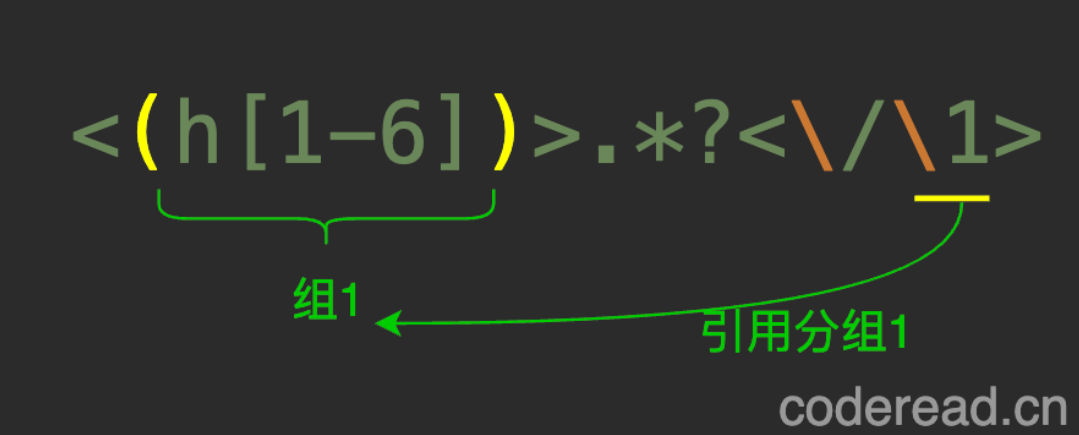
give an example 2: Reference grouping in regular , matching html All titles in
The text is as follows
<h1> First level title </h1>
<h2> Secondary title </h2>
If you don't use grouping , You can match as follows , But this is very cumbersome .
<h1>.*?<\/h1>|<h2>.*?<\/h2>
Regular expressions can be simplified by backreferencing
<(h[1-2])>.*?<\/\1>
Quote replace
Quote replace : Regular has powerful substitution ability , For example, match all blank lines in the text , Then replace with empty ( Delete ); Or match all comments , Then replace with empty ; Or match all in plain text http link , Then replace with <a> label ; Or replace the text with insert sql sentence . 
give an example 3: Replace all dates below with yyyy-MM-dd Format
The steps to realize replacement are as follows :
- Write the regular matching date :
\d{4}[-.\/]\d{2}[-.\/]\d{2} - For date year 、 month 、 Group by day :
(\d{4})[-.\/](\d{2})[-.\/](\d{2}) - Reference groups in replacement characters :
$1-$2-$3
The result of replacement

Case conversion
stay Idea、VS Code、Sublime、Notepad++ Wait for tools to replace , You can also use the operators in the following table for case conversion , But it is not supported in programming languages .
| The operator | describe |
|---|---|
| \u Single to capital | Convert the next character to Big Write |
| \U Capitalize all | transformation \U After all characters turn Big Write |
| \U…\E Turn interval into capital | \U And \E The content of the interval is transferred Big Write |
| \l Single to lowercase | Convert one character to lowercase |
| \L All lowercase | transformation \L All characters after are converted to lowercase |
| \L…\E Interval to lowercase | \L And \U The contents of the interval are converted to lowercase |
The specific method of use is : Add a conversion operator to the replacement string .
give an example : Turn the first letter of a word into capital
- Write matching rules :
\w+ - Capitalize and replace :
\u$0

The converted result is :Hello World!
Boundary assertion
Boundary assertion : Refers to a passage of expression Before and after Whether the specified Conditions , This condition consists of a sub expression , Boolean value is calculated based on whether the characters before and after match . Because the assertion part will not consume matching characters , Solid is also called Zero width assertion .
Boundary assertion Let regular have Conditions Ability to judge , More powerful .
Special boundary assertion
| expression | describe |
|---|---|
^ | Match assertion text or line start . |
$ | Match assertion text or end of line . |
\b | Match the beginning or end of the assertion word . such as Sheep\b Can match CodeSheep Last Sheep, Can't match CodeSheepCode Medium Sheep. |
\B | Match non word boundaries or endings . such as Code\B Can match HelloCodeSheep Medium Code, Can't match HelloCode Medium Code. |
\A Beginning of text | Assert the beginning of the text .JavaScript I won't support it |
\Z End of text | Assert the end of the text .JavaScript I won't support it |
explain :
^and$Fit Boundary/mUse to indicate the beginning and end of each line , Otherwise, it means the beginning and end of the whole text . BymAfter modification ,^Indicates the beginning of a line , Equivalent to(?<=\n|\A), BymAfter modification ,$Indicates the end of the line , Equivalent to(?=\n|\Z).\bWord boundary is essentially a boundary assertion , Characteristics that conform to boundary assertions .\bAssert that the word is preceded by\Wcharacter , Or another boundary ( Row boundary , Text boundaries )\bhello\b Equivalent to (?<=^|\W|\A)Hello(?=$|\W|\Z)
Boundary assertion syntax
| expression | describe |
|---|---|
(?=) | Pre assertion , Determine an expression front Whether the conditions are met . such as Code(?=Sheep) Can match CodeSheep Medium Code, But can't match CodePig Medium Code. |
(?!) | Prepositional negative assertion , Determine an expression front whether dissatisfaction Conditions . such as Code(?!Sheep) Can't match CodeSheep Medium Code, But it can match. CodePig Medium Code. |
(?<=) | Post assertion , Determine an expression Back Whether the conditions are met . such as (?<=Code)Sheep Can match CodeSheep Medium Sheep, But can't match ReadSheep Medium Sheep. |
(?<!) | Post negative assertion , Judge a paragraph of expression Back whether dissatisfaction Conditions . such as (?<!Code)Sheep Can't match CodeSheep Medium Sheep, But it can match. ReadSheep Medium Sheep. |
explain : The so-called pre post is centered on the expression , The boundary assertion is in front of the expression ( On the left ) And the back ( On the right )
for example :
(?<= height )\d{3}(?=cm)in(?<= height )For post assertion ( After the expression ),(?=cm)For pre assertion .
Be careful : The post assertion is in javascript There are only Some browsers Support . In addition, post assertion is very performance consuming , So... Is not recommended infinity Quantifiers such as :*+{n,}. Even in JAVA、Python、PHP Will report directly to Grammar mistakes .
Advanced features
- Zero width assertion : The assertion condition itself does not consume characters
- ** Multi boundary assertion :** A regular rule can have multiple boundary assertions at the same time . The boundary of assertion is determined according to its location .
- Conditional combination : Multiple sub assertions can perform Boolean operations, such as :
&&||(), - Any boundary : It can be any legal expression boundary , It could even be empty Character boundary .
Conditional combination of advanced features
The boundary condition is essentially Boolean calculation , It can naturally carry out similar &&||() Boolean operation , To cope with more complex scenes . There are several ways of writing :
h(?= Conditions 1)(?= Conditions 2)Andoperation , It means that multiple conditions must be met at the same timeh(?=(?= Conditions 1)(?= Conditions 2))Andoperation , Conditions 1 And conditions 2 Form a new condition , And both conditions must be meth(?=(?= Conditions 1)|(?! Conditions 2))oroperation , Meet the conditions 1 perhaps dissatisfaction Conditions 2h(?= expression 1|(?= Conditions 1)(?! Conditions 2))blendoperation , Indicates that the expression is satisfied 1 Or meet the conditions at the same time 1、2
The above conditions are combined in Post assertion The same applies to , And there are no additional compatibility issues . In addition, any of the above conditions are based on The same boundary Calculate , That is, the characters h
Modifier
Modifier Matching logic for influencing expressions .
| expression | describe |
|---|---|
/.../i | Ignore case .(… Represents a regular expression ) |
/.../g | The global matching . By default, only one result will be matched , add g All matching results will be matched |
/.../m | Line boundary modifier . For multiline matching . |
/.../s | After using this modifier . Can match any character , Include line breaks . |
/.../x | Whitespace characters are ignored when writing regular expressions , Can write in multiple lines , And can be used # Annotate .JavaScript I won't support it |
Yes
/mThe understanding of the : Its function is to define^And$Scope of boundary assertion . By default^$Represent the beginning and end of the text respectively , After adding, it means Head of line And At the end of the line , It also includes the beginning and end of the text . General regular expression applications will addmModifier .
Similar in use idea,vs code, or notepad++ When waiting for tools , Its regularity has been added gmi Three modifiers , And in addition to i Don't omit case , Nothing else can be changed .
Examples of common regular expressions
details Reference resources
Reference material
边栏推荐
- Create a dojo progress bar programmatically: Dojo ProgressBar
- Nodejs+express+mysql realizes login function (including verification code)
- [exercise 6] [Database Principle]
- Ali & ant self developed IDE
- 2022-02-10 introduction to the design of incluxdb storage engine TSM
- Sword finger offer 15 Number of 1 in binary
- [review questions of database principles]
- [Database Principle and Application Tutorial (4th Edition | wechat Edition) Chen Zhibo] [Chapter III exercises]
- 【習題七】【數據庫原理】
- 2022-02-13 plan for next week
猜你喜欢
Drop down refresh conflicts with recyclerview sliding (swiperefreshlayout conflicts with recyclerview sliding)

Finite State Machine FSM
![[Database Principle and Application Tutorial (4th Edition | wechat Edition) Chen Zhibo] [Chapter 6 exercises]](/img/c0/92e9e52f1f643b66720697523a1794.png)
[Database Principle and Application Tutorial (4th Edition | wechat Edition) Chen Zhibo] [Chapter 6 exercises]

ncnn神經網絡計算框架在香柳丁派OrangePi 3 LTS開發板中的使用介紹
![[Database Principle and Application Tutorial (4th Edition | wechat Edition) Chen Zhibo] [sqlserver2012 comprehensive exercise]](/img/47/78d9dd098dcb894ba1f459873d5f52.png)
[Database Principle and Application Tutorial (4th Edition | wechat Edition) Chen Zhibo] [sqlserver2012 comprehensive exercise]
Quick learning 1.8 front and rear interfaces

Sword finger offer 14- ii Cut rope II
对业务的一些思考

February 14, 2022, incluxdb survey - mind map

【数据挖掘复习题】
随机推荐
Express abstract classes and methods
The latest version of lottery blind box operation version
SSH login server sends a reminder
CVPR 2022 image restoration paper
Xctf mobile--app2 problem solving
【R】 [density clustering, hierarchical clustering, expectation maximization clustering]
[colab] [7 methods of using external data]
When the R language output rmarkdown is in other formats (such as PDF), an error is reported, latex failed to compile stocks Tex. solution
[Database Principle and Application Tutorial (4th Edition | wechat Edition) Chen Zhibo] [Chapter V exercises]
The upward and downward transformation of polymorphism
我的创作纪念日:五周年
Kotlin - improved decorator mode
Kotlin - 改良装饰者模式
并网-低电压穿越与孤岛并存分析
C graphical tutorial (Fourth Edition)_ Chapter 20 asynchronous programming: examples - using asynchronous
[network counting] Chapter 3 data link layer (2) flow control and reliable transmission, stop waiting protocol, backward n frame protocol (GBN), selective retransmission protocol (SR)
Finite State Machine FSM
C graphical tutorial (Fourth Edition)_ Chapter 15 interface: interfacesamplep268
Enter the length of three sides of the triangle through the user, and calculate the area of the triangle, where the length is a real number
Social community forum app ultra-high appearance UI interface