当前位置:网站首页>NDK learning notes (12) native graphics API, using avilib to create an avi video player
NDK learning notes (12) native graphics API, using avilib to create an avi video player
2022-06-11 05:34:00 【Come and go】
List of articles
1. Practice hands , Use AVILib Create a AVI Video player
(1) First download transcode, And configuration avilib.
http://www.linuxfromscratch.org/blfs/view/svn/multimedia/transcode.html
take transcode Medium avilib Copy files to project .

edit platform.h file
#ifdef HAVE_CONFIG_H
#include "config.h"
#endif
stay avilib establish CMakeLists.txt
add_library( # Sets the name of the library.
        avi-lib

        # Sets the library as a shared library.
        SHARED

        # Provides a relative path to your source file(s).
        avilib.c
        platform_posix.c)
(2) establish AbstractPlayerActivity And implement native Method
Extract the shared code and abstract it into a class
public abstract class AbstractPlayerActivity extends Activity {


    public static final String EXTRA_FILE_NAME = "cn.study.aviplayer.EXTRA_FILE_NAME";

    protected long avi = 0;

    @Override
    protected void onStart() {

        super.onStart();

        try {


            avi = open(getFileName());
        } catch (IOException e) {


            new AlertDialog.Builder(this)
                    .setTitle(" Error message ")
                    .setMessage(e.getMessage())
                    .show();
        }
    }


    @Override
    protected void onStop() {

        super.onStop();

        if (0 != avi) {


            close(avi);
            avi = 0;
        }
    }

    protected String getFileName() {


        return getIntent().getExtras().getString(EXTRA_FILE_NAME);
    }


    /** *  Open the specified avi file  * * @return */
    protected native static long open(String fileName) throws IOException;

    /** *  Get the video width  * * @param avi * @return */
    protected native static int getWidth(long avi);

    /** *  Get video height  * * @param avi * @return */
    protected native static int getHeight(long avi);


    /** *  Get frame rate  * * @param avi * @return */
    protected native static double getFrameRate(long avi);

    /** *  Closes the specified based on the given file descriptor avi file  * * @param avi */
    protected native static void close(long avi);

}
Use javah To generate .h file .
/* DO NOT EDIT THIS FILE - it is machine generated */
#include <jni.h>
/* Header for class cn_study_aviplayer_AbstractPlayerActivity */

#ifndef _Included_cn_study_aviplayer_AbstractPlayerActivity
#define _Included_cn_study_aviplayer_AbstractPlayerActivity
#ifdef __cplusplus
extern "C" {

#endif
/* * Class: cn_study_aviplayer_AbstractPlayerActivity * Method: open * Signature: (Ljava/lang/String;)J */
JNIEXPORT jlong JNICALL Java_cn_study_aviplayer_AbstractPlayerActivity_open
  (JNIEnv *, jclass, jstring);

/* * Class: cn_study_aviplayer_AbstractPlayerActivity * Method: getWidth * Signature: (J)I */
JNIEXPORT jint JNICALL Java_cn_study_aviplayer_AbstractPlayerActivity_getWidth
  (JNIEnv *, jclass, jlong);

/* * Class: cn_study_aviplayer_AbstractPlayerActivity * Method: getHeight * Signature: (J)I */
JNIEXPORT jint JNICALL Java_cn_study_aviplayer_AbstractPlayerActivity_getHeight
  (JNIEnv *, jclass, jlong);

/* * Class: cn_study_aviplayer_AbstractPlayerActivity * Method: getFrameRate * Signature: (J)D */
JNIEXPORT jdouble JNICALL Java_cn_study_aviplayer_AbstractPlayerActivity_getFrameRate
  (JNIEnv *, jclass, jlong);

/* * Class: cn_study_aviplayer_AbstractPlayerActivity * Method: close * Signature: (J)V */
JNIEXPORT void JNICALL Java_cn_study_aviplayer_AbstractPlayerActivity_close
  (JNIEnv *, jclass, jlong);

#ifdef __cplusplus
}
#endif
#endif
stay native-lib.cpp Import avilib.h need .
extern "C" {

#include "avilib/avilib.h"
}
native-lib.cpp
#include <jni.h>
#include <string>

#include "cn_study_aviplayer_AbstractPlayerActivity.h"
#include "Common.h"
#include <android/bitmap.h>

extern "C" {

#include "avilib/avilib.h"
}

extern "C" JNIEXPORT jstring JNICALL
Java_cn_study_aviplayer_MainActivity_stringFromJNI(
        JNIEnv *env,
        jobject /* this */) {

    std::string hello = "Hello from C++";
    return env->NewStringUTF(hello.c_str());
}

extern "C"
JNIEXPORT jlong JNICALL
Java_cn_study_aviplayer_AbstractPlayerActivity_open(JNIEnv *env, jclass clazz, jstring file_name) {


    avi_t *avi = 0;
    // Get the file name and convert it to a string variable
    const char *cFileName = env->GetStringUTFChars(file_name, 0);
    if (0 == cFileName) {


        goto exit;
    }
    avi = AVI_open_input_file(cFileName, 1);
    env->ReleaseStringUTFChars(file_name, cFileName);

    if (0 == avi) {


        ThrowException(env, "java/io/IOException", AVI_strerror());
    }

    exit:
    return (jlong) avi;
}

extern "C"
JNIEXPORT jint JNICALL
Java_cn_study_aviplayer_AbstractPlayerActivity_getWidth(JNIEnv *env, jclass clazz, jlong avi) {


    return AVI_video_width((avi_t *) avi);
}

extern "C"
JNIEXPORT jint JNICALL
Java_cn_study_aviplayer_AbstractPlayerActivity_getHeight(JNIEnv *env, jclass clazz, jlong avi) {


    return AVI_video_height((avi_t *) avi);
}

extern "C"
JNIEXPORT jdouble JNICALL
Java_cn_study_aviplayer_AbstractPlayerActivity_getFrameRate(JNIEnv *env, jclass clazz, jlong avi) {


    return AVI_frame_rate((avi_t *) avi);
}

extern "C"
JNIEXPORT void JNICALL
Java_cn_study_aviplayer_AbstractPlayerActivity_close(JNIEnv *env, jclass clazz, jlong avi) {


    AVI_close((avi_t *) avi);
}
(3) To configure native-lib, Turn on jnigraphics, Connect avi-lib
cmake_minimum_required(VERSION 3.4.1)


add_library( # Sets the name of the library.
        native-lib

        # Sets the library as a shared library.
        SHARED

        # Provides a relative path to your source file(s).
        native-lib.cpp
        Common.cpp
        cn_study_aviplayer_BitmapPlayerActivity.cpp)
# Add subdirectories
add_subdirectory(avilib)


find_library( # Sets the name of the path variable.
        log-lib

        # Specifies the name of the NDK library that
        # you want CMake to locate.
        log)


find_library( # Sets the name of the path variable.
        jnigraphics-lib
        jnigraphics)

target_link_libraries( # Specifies the target library.
        native-lib
        # Links the target library to the log library
        # included in the NDK.
        ${
    jnigraphics-lib}# Turn on jnigraphics
        ${
    log-lib}
        avi-lib)
(4)jni graphics api
 retrieval bitmap Object information , Such as size 、 Pixel format . Successfully returns 0, Failure returns a negative number .
int AndroidBitmap_getInfo(JNIEnv* env, jobject jbitmap,AndroidBitmapInfo* info);
 Access the native pixel cache , Lock the pixel cache to ensure that the pixel's memory does not move .
 Successfully returns 0, Failure returns a negative number .
int AndroidBitmap_lockPixels(JNIEnv* env, jobject jbitmap, void** addrPtr);
 Free the native pixel cache
 Successfully returns 0, Failure returns a negative number
int AndroidBitmap_unlockPixels(JNIEnv* env, jobject jbitmap);
(5) Use bitmap Render to update avi player
public class BitmapPlayerActivity extends AbstractPlayerActivity {


    private final AtomicBoolean isPlaying = new AtomicBoolean();
    private SurfaceHolder surfaceHolder;
    private SurfaceView surfaceView;

    @Override
    protected void onCreate(Bundle savedInstanceState) {

        super.onCreate(savedInstanceState);
        setContentView(R.layout.activity_bitmap_player);

        surfaceView = findViewById(R.id.surface_view);

        surfaceHolder = surfaceView.getHolder();
        surfaceHolder.addCallback(shCallback);
    }


    private final SurfaceHolder.Callback shCallback = new SurfaceHolder.Callback2() {

        @Override
        public void surfaceRedrawNeeded(SurfaceHolder holder) {


        }

        @Override
        public void surfaceCreated(SurfaceHolder holder) {


            isPlaying.set(true);
            new Thread(renderer).start();
        }

        @Override
        public void surfaceChanged(SurfaceHolder holder, int format, int width, int height) {


        }

        @Override
        public void surfaceDestroyed(SurfaceHolder holder) {


            isPlaying.set(false);
        }
    };


    private final Runnable renderer = new Runnable() {


        @Override
        public void run() {


            Paint paint = new Paint();
            paint.setAntiAlias(true);
            paint.setColor(Color.BLACK);
            paint.setStyle(Paint.Style.FILL);


            int width = getWidth(avi);
            int height = getHeight(avi);


            Bitmap bitmap = Bitmap.createBitmap(width, height, Bitmap.Config.RGB_565);

            float sx = 2.0f;
            float sy = 2.0f;

            Matrix matrix = new Matrix();
            matrix.postScale(sx, sy);

            int vWidth = (int) (width * sx);
            int vHeight = (int) (height * sy);

            int x = (1080 - vWidth) / 2;
            int y = (1920 - vHeight) / 2;

            matrix.postTranslate(x, y);
            // Delay
            long frameDelay = (long) (1000 / getFrameRate(avi));
            while (isPlaying.get()) {

                render(avi, bitmap);

                Canvas canvas = surfaceHolder.lockCanvas();
                canvas.drawBitmap(bitmap, matrix, null);
                surfaceHolder.unlockCanvasAndPost(canvas);

                // Wait for the next stitch
                try {

                    Thread.sleep(frameDelay);

                } catch (InterruptedException e) {


                    break;
                }
            }

        }
    };

    /** *  from avi The file descriptor is output to the specified bitmap To render frames  * * @param avi * @param bitmap * @return */
    private native static boolean render(long avi, Bitmap bitmap);
}
cn_study_aviplayer_BitmapPlayerActivity.cpp
#include "Common.h"
#include "cn_study_aviplayer_BitmapPlayerActivity.h"
extern "C" {

#include "avilib/avilib.h"
}
#include <android/bitmap.h>

extern "C"
JNIEXPORT jboolean JNICALL
Java_cn_study_aviplayer_BitmapPlayerActivity_render(JNIEnv *env, jclass clazz, jlong avi,
                                                    jobject bitmap) {


    jboolean isFrameRead = JNI_FALSE;
    char *frameBuffer = 0;
    long frameSize = 0;
    int keyFrame = 0;

    if (0 > AndroidBitmap_lockPixels(env, bitmap, (void **) &frameBuffer)) {


        ThrowException(env, "java/io/IOException", " Cannot lock pixels ");
        goto exit;
    }

    // take avi frame byte Read bitmap in
    frameSize = AVI_read_frame((avi_t *) avi, frameBuffer, &keyFrame);

    // Unlock
    if (0 > AndroidBitmap_unlockPixels(env, bitmap)) {


        ThrowException(env, "java/io/IOException", " Cannot unlock pixels ");
        goto exit;
    }
    // Whether the reading is successful
    if (0 < frameSize) {


        isFrameRead = JNI_TRUE;
    }
    exit:
    return isFrameRead;

}
Want to use this avi player , The video file format must be avi Format , I hope the video load is through RGB565 The uncompressed original frame of color space .
Put the video in the specified directory , The operation effect is as follows :
Detailed code and video files
https://gitee.com/xd_box/AviPlayer
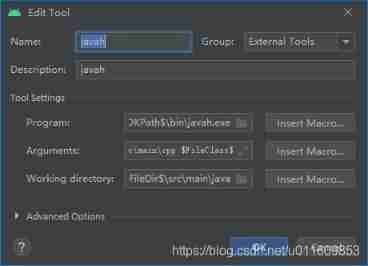
2.android studio To configure javah
file>Setting>Tools>External Tools Click on + Number .
program:$JDKPath$\bin\javah.exe
arguments:-classpath . -jni -d $ModuleFileDir$\src\main\cpp $FileClass$
working directory:$ModuleFileDir$\src\main\java
边栏推荐
- White Gaussian noise (WGN)
- Conversion relationship between coordinate systems (ECEF, LLA, ENU)
- Xposed bypasses 360 reinforcement to get a real classloader
- [go deep into kotlin] - get to know flow for the first time
- Sealem finance builds Web3 decentralized financial platform infrastructure
- SQLite installation and configuration tutorial +navicat operation
- WinForm (II) advanced WinForm and use of complex controls
- PageHelper page 2 collections in the same interface
- Dongmingzhu said that "Gree mobile phones are no worse than apple". Where is the confidence?
- Section IV: composition and materials of asphalt mixture (1) -- structure composition and classification
猜你喜欢

If the MAC fails to connect with MySQL, it will start and report an error

(十五)红外通信

White Gaussian noise (WGN)

BERT知识蒸馏

微信小程序text内置组件换行符不换行的原因-wxs处理换行符,正则加段首空格

Combien de courant le câblage des PCB peut - il supporter?

智能门锁为什么会这么火,米家和智汀的智能门锁怎么样呢?

自定义View之基础篇

Introduction to coordinate system in navigation system
微信自定义组件---样式--插槽
随机推荐
Recommend a free intranet penetration open source software that can be used in the local wechat official account under test
Section II: structural composition characteristics of asphalt pavement (1) structural composition
Multithreading tutorial (XXI) double checked locking problem
Section II: structural composition characteristics of asphalt pavement (2) structural layer and performance requirements
Opencv learning path (2-4) -- Deep parsing cvtcolor function
【深入kotlin】 - Flow 进阶
Linked list de duplication
In the future, how long will robots or AI have human creativity?
[go deep into kotlin] - get to know flow for the first time
Restoration of binary tree -- number restoration
Tightly coupled laser vision inertial navigation slam system: paper notes_ S2D. 66_ ICRA_ 2021_ LVI-SAM
Xposed bypasses 360 reinforcement to get a real classloader
Wechat applet, automatic line feed for purchasing commodity attributes, fixed number of divs, automatic line feed for excess parts
mysql字符串转数组,合并结果集,转成数组
Section V: Recycling Application of asphalt pavement materials
Leetcode 161 Editing distance of 1 (2022.06.10)
【深入kotlin】 - 初识 Flow
Zed2 camera manual
Create cool collectionviewcell conversion animation
Swap numbers (no temporary variables)