当前位置:网站首页>基于Pytorch的LSTM实战160万条评论情感分类
基于Pytorch的LSTM实战160万条评论情感分类
2022-07-06 09:11:00 【一曲无痕奈何】
数据以及代码的github地址
说明:训练速度使用cpu会很慢
# 目标:情感分类
# 数据集 Sentiment140, Twitter上的内容 包含160万条记录,0 : 负面, 2 : 中性, 4 : 正面
# 但是数据集中没有中性
# 1、整体流程:
# 2、导入数据
# 3、查看数据信息
# 4、数据预处理:
# (统计类别占比(正面和负面)
# 设置标签和文本
# 设置表头
# 样本划分(训练和测试以及验证进行划分数据)
# 构建词汇表
# 词汇表大小不一致进行padding)
# 5、模型构建
# 6、模型训练
一共160万条评论数据,数据格式如下:
"0","1467810369","Mon Apr 06 22:19:45 PDT 2009","NO_QUERY","_TheSpecialOne_","@switchfoot http://twitpic.com/2y1zl - Awww, that's a bummer.  You shoulda got David Carr of Third Day to do it. ;D"
"0","1467810672","Mon Apr 06 22:19:49 PDT 2009","NO_QUERY","scotthamilton","is upset that he can't update his Facebook by texting it... and might cry as a result  School today also. Blah!"
"0","1467810917","Mon Apr 06 22:19:53 PDT 2009","NO_QUERY","mattycus","@Kenichan I dived many times for the ball. Managed to save 50%  The rest go out of bounds"
"0","1467811184","Mon Apr 06 22:19:57 PDT 2009","NO_QUERY","ElleCTF","my whole body feels itchy and like its on fire "
"0","1467811193","Mon Apr 06 22:19:57 PDT 2009","NO_QUERY","Karoli","@nationwideclass no, it's not behaving at all. i'm mad. why am i here? because I can't see you all over there. "
"0","1467811372","Mon Apr 06 22:20:00 PDT 2009","NO_QUERY","joy_wolf","@Kwesidei not the whole crew "
# 目标:情感分类
# 数据集 Sentiment140, Twitter上的内容 包含160万条记录,0 : 负面, 2 : 中性, 4 : 正面
# 但是数据集中没有中性
# 1、整体流程:
# 2、导入数据
# 3、查看数据信息
# 4、数据预处理:
# (统计类别占比(正面和负面)
# 设置标签和文本
# 设置表头
# 样本划分(训练和测试以及验证进行划分数据)
# 构建词汇表
# 词汇表大小不一致进行padding)
# 5、模型构建
# 6、模型训练
#导入数据
import warnings
warnings.filterwarnings("ignore")
import pandas as pd
import matplotlib.pyplot as plt
#读取数据, engine 默认是C
dataset = pd.read_csv("./data/training.1600000.processed.noemoticon.csv",encoding="ISO-8859-1",engine='python',header = None)
#查看数据表的shape
dataset.info() #查看数据表信息
dataset.describe() # 数据表描述
# dataset.colums #列名
dataset.head() #默认前5行
dataset['sentiment_category'] = dataset[0].astype('category') # 类型转换-》分类变量
dataset['sentiment_category'].value_counts() # 统计各个类别数量
dataset['sentiment'] = dataset['sentiment_category'].cat.codes # 分类变量值转换为 0 和 1 两个类别
dataset.to_csv('./data/train-processed.csv',header = None, index = None) #保存文件
#随机选择10000个样本当做测试集
dataset.sample(10000).to_csv("./data/test_sample.csv",header = None,index = None)
#设置标签和文本
from torchtext.legacy import data
from torchtext.legacy.data import Field,TabularDataset,Iterator,BucketIterator
LABEL = data.LabelField() # 标签
CONTEXT = data.Field(lower = True) #内容和文本
#设置表头
fields = [('score',None),('id',None),('data',None),('query',None),('name',None),
('context',CONTEXT),('category',None),('label',LABEL)
]
#读取数据
contextDataset = data.TabularDataset(
path = './data/train-processed.csv',
format = 'CSV',
fields = fields,
skip_header = False
)
# 分离 train, test, val
train, test, val = contextDataset.split(split_ratio=[0.8, 0.1, 0.1], stratified=True, strata_field='label')
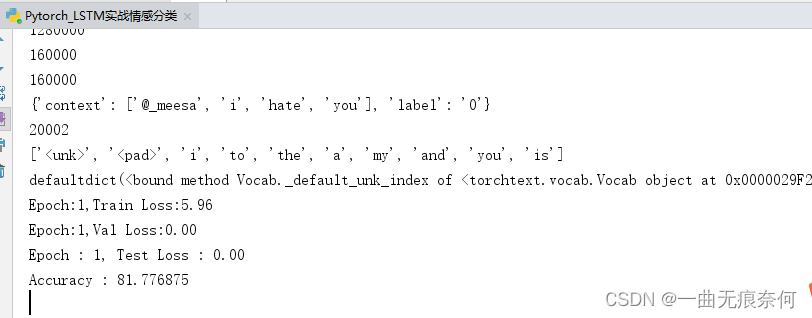
print(len(train))
print(len(test))
print(len(val))
#显示一个样本
print(vars(train.examples[11]))
#构建词汇表
vocab_size = 20000
CONTEXT.build_vocab(train, max_size = vocab_size)
LABEL.build_vocab(train)
#词汇表大小
print(len(CONTEXT.vocab)) # unk --> 未知单词,pad --> 填充
#查看词汇表中最常见的单词
CONTEXT.vocab.freqs.most_common(10)
# 词汇表大小
print(CONTEXT.vocab.itos[:10]) #索引到单词
print(CONTEXT.vocab.stoi) #单词到索引
import torch
device = 'cuda' if torch.cuda.is_available() else 'cpu' #设置用CPU 还是gpu
# 文本批处理,即一批一批地读取数据
train_iter , val_iter, test_iter = data.BucketIterator.splits((train, val, test),
batch_size=32,
device = device,
sort_within_batch = True,
sort_key = lambda x: len(x.context)
)
"""
sort_within_batch = True,一个batch内的数据就会按sort_key的排列规则降序排列,
sort_key是排列的规则,这里使用context的长度,即每条用户评论所包含的单词数量。
"""
# 模型构建
import torch.nn as nn
class simple_LSTM(nn.Module):
def __init__(self, hidden_size, embedding_dim, vocab_size, ):
super(simple_LSTM, self).__init__() #调用父类的构造方法
self.embedding = nn.Embedding(vocab_size, embedding_dim) # vocab_size词汇表大小, embedding_dim词嵌入维度
self.encoder = nn.LSTM(input_size=embedding_dim, hidden_size = hidden_size, num_layers=1)
self.predictor = nn.Linear(hidden_size,2) #全连接层 做一个二分类
def forward(self,seq): #seq 是一条评论
output,(hidden, cell) = self.encoder(self.embedding(seq)) #将评论做一个词嵌入
# output : torch.Size([24, 32, 100]) 24是评论多少个单词 ,32是batch_size 100hidden的大小
# hidden : torch.Size([1, 32, 100])
# cell : torch.Size([1, 32, 100])
preds = self.predictor(hidden.squeeze(0)) #因为hidden是1 32 100 我们不需要1,只需要拿到100是隐藏层的输入,所以把0的维度去除
return preds
#创建模型对象
lstm_model = simple_LSTM(hidden_size=100, embedding_dim=300, vocab_size=20002)
lstm_model.to(device) #部署到运行设备
#模型训练
from torch import optim
#优化器
optimizer = optim.Adam(lstm_model.parameters(),lr=0.001)
#损失函数
criterion = nn.CrossEntropyLoss() #多分类, (负面,中性,正面)
loss_list = [] #保存loss
accuracy_list = [] #保存accuracy
iteration_list = [] #保存循环次数
def train_val_test(model, optimizer, criterion, train_iter, val_iter, test_iter, epochs):
for epoch in range(1,epochs+1):
train_loss = 0.0 #训练损失
val_loss = 0.0 #验证损失
model.train() #声明开始训练
for indices ,batch in enumerate(train_iter):
#梯度置0
optimizer.zero_grad()
outputs = model(batch.context) # 预测输出output
# batch.label
loss = criterion(outputs,batch.label) #计算损失
loss.backward() #反向传播
optimizer.step() #更新参数
# batch.tweet shape : torch.Size([26, 32]) --> 26:序列长度, 32:一个batch_size的大小
train_loss += loss.data.item() * batch.context.size(0) # 累计每一批的损失值
train_loss /= len(train_iter) # 计算平均损失 len(train_iter) : 40000
print("Epoch:{},Train Loss:{:.2f} ".format(epoch,train_loss))
model.eval() # 声明模型验证
for indices, batch in enumerate(val_iter):
context = batch.context.to(device) #部署到device上
target = batch.label.to(device)
pred = model(context) #模型预测
loss = criterion(pred,target)
val_loss /= loss.item() * context.size(0) #累计每一批的损失值
val_loss /= len(val_iter) #计算平均损失
print("Epoch:{},Val Loss:{:.2f} ".format(epoch, val_loss))
model.eval() #声明
correct = 0.0 # 计算正确率
test_loss = 0.0 # 测试损失
for idx, batch in enumerate(test_iter):
context = batch.context.to(device) #部署到device上
target = batch.label.to(device)
outputs = model(context) # 输出
loss = criterion(outputs, target) # 计算损失
test_loss /= loss.item() * context.size(0) #累计每一批的损失值
# 获取最大预测值索引
preds = outputs.argmax(1)
# 累计正确数
correct += preds.eq(target.view_as(preds)).sum().item()
test_loss /= len(test_iter) #计算平均损失
# 保存accuracy, loss iteration
loss_list.append(test_loss)
accuracy_list.append(correct)
iteration_list.append(idx)
print("Epoch : {}, Test Loss : {:.2f}".format(epoch, test_loss))
print("Accuracy : {}".format(100 * correct / (len(test_iter) * batch.context.size(1))))
# 可视化 loss
plt.plot(iteration_list, loss_list)
plt.xlabel('Number of Iteration')
plt.ylabel('Loss')
plt.title('LSTM')
plt.show()
# 可视化 accuracy
plt.plot(iteration_list, accuracy_list, color='r')
plt.xlabel('Number of Iteration')
plt.ylabel('Accuracy')
plt.title('LSTM')
plt.savefig('LSTM_accuracy.png')
plt.show()
# 开始训练和验证
train_val_test(lstm_model, optimizer, criterion, train_iter, val_iter, test_iter, epochs=10)
边栏推荐
- CANoe下载地址以及CAN Demo 16的下载与激活,并附录所有CANoe软件版本
- Notes of Dr. Carolyn ROS é's social networking speech
- Implement sending post request with form data parameter
- Tianmu MVC audit I
- Const decorated member function problem
- MySQL实战优化高手03 用一次数据更新流程,初步了解InnoDB存储引擎的架构设计
- [CV] target detection: derivation of common terms and map evaluation indicators
- 再有人问你数据库缓存一致性的问题,直接把这篇文章发给他
- 四川云教和双师模式
- Canoe CAPL file operation directory collection
猜你喜欢
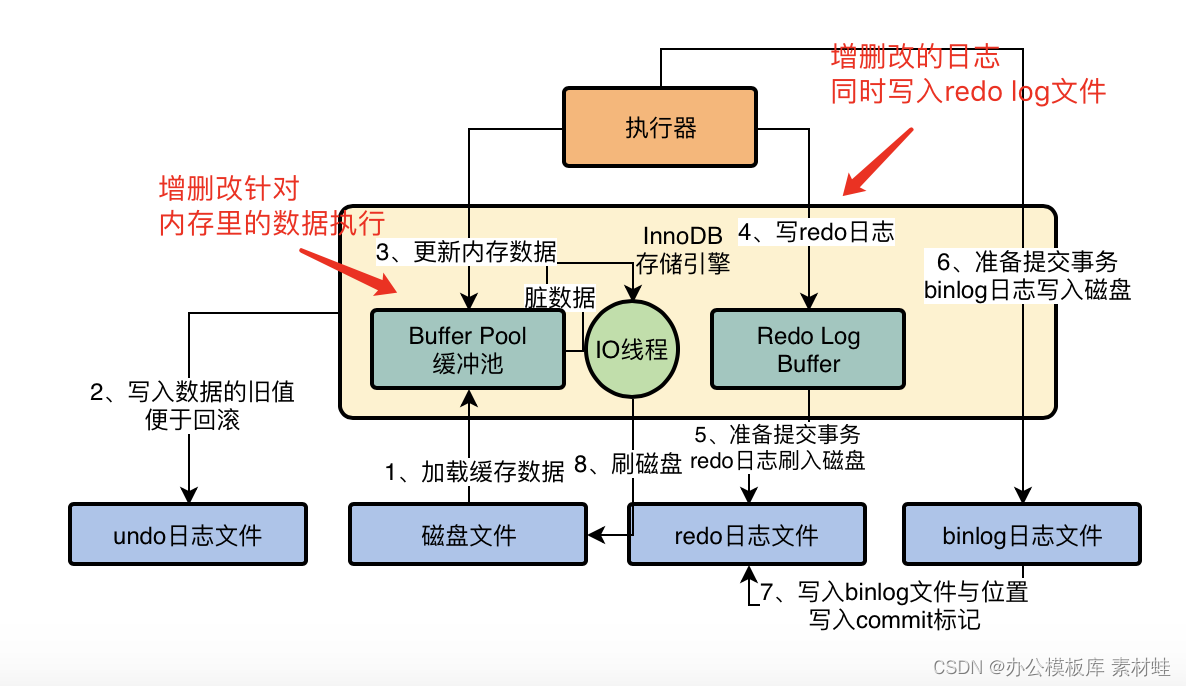
MySQL实战优化高手11 从数据的增删改开始讲起,回顾一下Buffer Pool在数据库里的地位
![[one click] it only takes 30s to build a blog with one click - QT graphical tool](/img/f0/52e1ea33a5abfce24c4a33d107ea05.jpg)
[one click] it only takes 30s to build a blog with one click - QT graphical tool
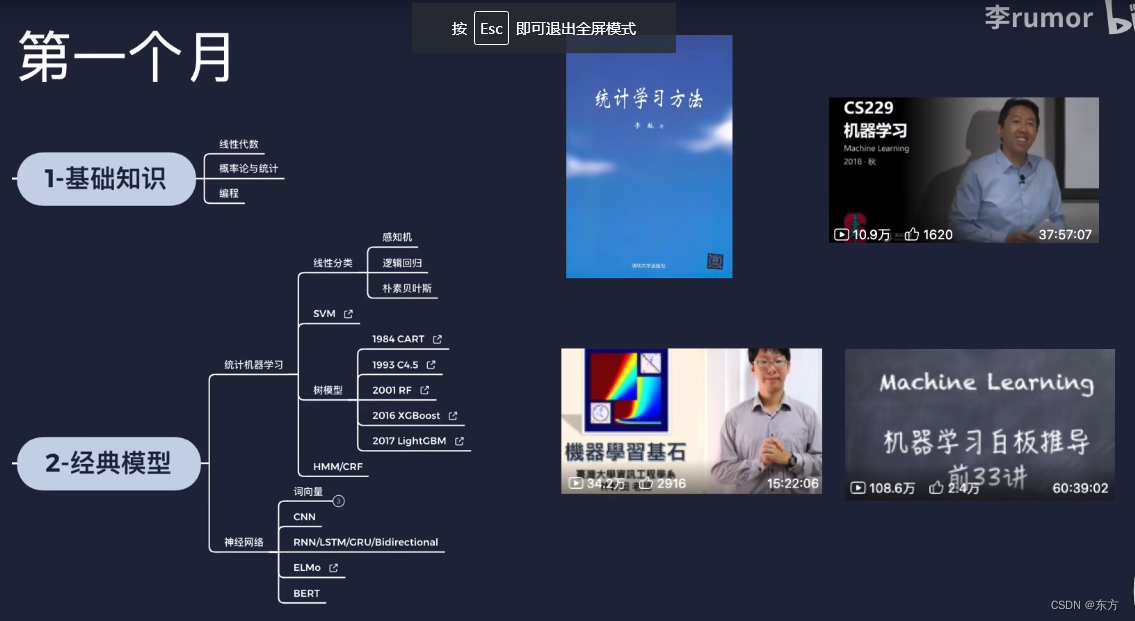
AI的路线和资源

Embedded development is much more difficult than MCU? Talk about SCM and embedded development and design experience
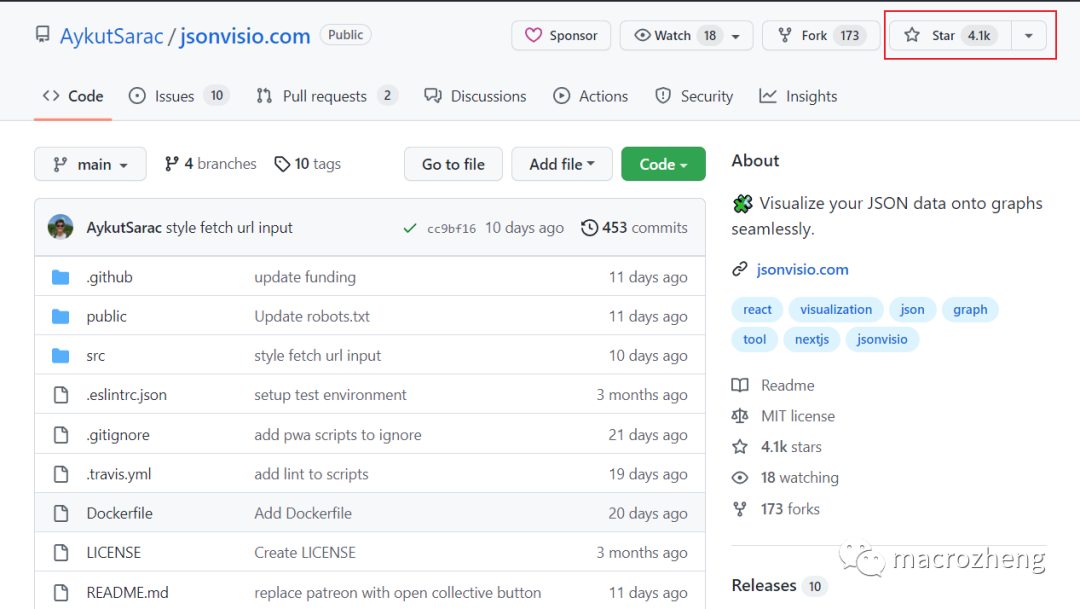
颜值爆表,推荐两款JSON可视化工具,配合Swagger使用真香
![16 medical registration system_ [order by appointment]](/img/7f/d94ac2b3398bf123bc97d44499bb42.png)
16 medical registration system_ [order by appointment]
Notes of Dr. Carolyn ROS é's social networking speech
MySQL storage engine
使用OVF Tool工具从Esxi 6.7中导出虚拟机
The appearance is popular. Two JSON visualization tools are recommended for use with swagger. It's really fragrant
随机推荐
CDC: the outbreak of Listeria monocytogenes in the United States is related to ice cream products
The programming ranking list came out in February. Is the result as you expected?
[one click] it only takes 30s to build a blog with one click - QT graphical tool
CAPL script pair High level operation of INI configuration file
Bugku web guide
Docker MySQL solves time zone problems
docker MySQL解决时区问题
flask运维脚本(长时间运行)
MySQL combat optimization expert 10 production experience: how to deploy visual reporting system for database monitoring system?
Random notes
MySQL实战优化高手11 从数据的增删改开始讲起,回顾一下Buffer Pool在数据库里的地位
Automation sequences of canoe simulation functions
Preliminary introduction to C miscellaneous lecture document
oracle sys_ Context() function
MySQL Real Time Optimization Master 04 discute de ce qu'est binlog en mettant à jour le processus d'exécution des déclarations dans le moteur de stockage InnoDB.
软件测试工程师发展规划路线
Canoe CAPL file operation directory collection
The governor of New Jersey signed seven bills to improve gun safety
MySQL底层的逻辑架构
MySQL combat optimization expert 07 production experience: how to conduct 360 degree dead angle pressure test on the database in the production environment?