当前位置:网站首页>Use of Arduino series pressure sensors and detected data displayed by OLED (detailed tutorial)
Use of Arduino series pressure sensors and detected data displayed by OLED (detailed tutorial)
2022-06-13 01:47:00 【It's Beichen bupiacra】
Use Arduino MEGA 2560 And Hx711 Pressure sensors and OLED Display the detected data
One 、 The pressure sensor is used alone
1.Hx711 And Arduino MEGA 2560 The wiring of the cable
Arduino MEGA 2560 -------- Hx711 modular
D8 -------------------------------- SCK
D9 -------------------------------- DT
Vcc ------------------------------- Vcc
Gnd ------------------------------ Gnd
D8 and D9 You can see the library file for the wiring of HX711.h Inside HX711_SCK and HX711_DT Change the following numbers to change the wiring , The library file is linked as follows :

Hx711 modular --------------------- sensor
E+ --------------------------------- red
E- ---------------------------------- black
A- ---------------------------------- white
A+ --------------------------------- green
2.Hx711 And Arduino MEGA 2560 Physical connection of
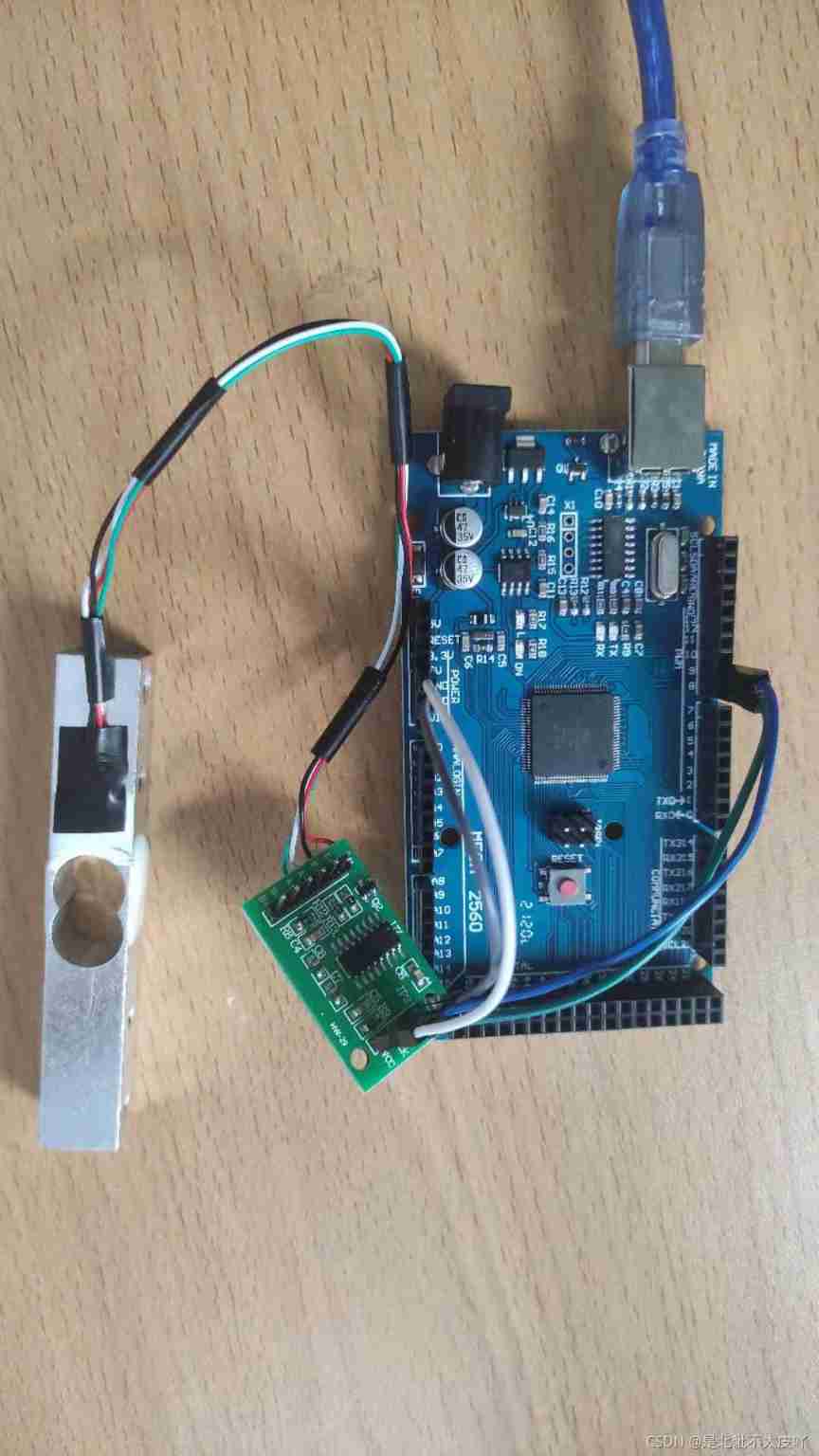
3.Hx711 And Arduino MEGA 2560 Code for
#include <HX711.h>
float Weight = 0;

void setup()
{

  Serial.begin(9600);
  Init_Hx711();
  Serial.print("Welcome to use!\n");
  Get_Maopi();
  delay(3000);
}


void loop()
{

  delay(100);
  int x = 0;
  Weight = Get_Weight();  // Calculate the weight of the weight placed on the sensor
// Serial.print(float(Weight/1000),3); // The serial port displays the weight
// Serial.print(" kg\n"); // Display units
// Serial.print("\n"); // Display units
  delay(200);        // Time delay 1s

  x = abs(Weight);
  Serial.print(x);
  Serial.print(" g\n");  // Display units
 }
Two 、OLED Used alone
1.OLED And Arduino MEGA 2560 attachment
OLED ------------------ Arduino MEGA 2560
Gnd -------------------- Gnd
Vcc --------------------- 3.3V
SCL -------------------- SCL
SDA -------------------- SDA
2.OLED And Arduino MEGA 2560 A physical picture

3.OLED And Arduino MEGA 2560 Code , Show numbers , english , chinese
// Display Chinese and English character program

#include <SPI.h>
#include <Wire.h>
#include <Adafruit_GFX.h>
#include <Adafruit_SSD1306.h>

#define OLED_RESET 4
Adafruit_SSD1306 display(OLED_RESET);

#define LOGO16_GLCD_HEIGHT 16 // Define the display height
#define LOGO16_GLCD_WIDTH 16 // Define the display width

// chinese : matter  ( Store lattice variables , Use functions display.drawBitmap() Call )
static const unsigned char PROGMEM str_1[] =
{

0x00,0x00,0x0C,0x00,0x0E,0x70,0x0E,0x60,0x3E,0xE0,0x3E,0xC0,0x3F,0xFE,0x6F,0xFE,
0x0E,0xFE,0x1F,0xFE,0x7F,0xEC,0xEF,0xCC,0x0F,0xBC,0x0C,0x18,0x0C,0x00,0x00,0x00,
};

// chinese : United
static const unsigned char PROGMEM str_2[] =
{

0x00,0x00,0x00,0x00,0x00,0x1C,0x3F,0xD8,0x7E,0xF0,0x36,0x3C,0x3F,0xF8,0x36,0x60,
0x3E,0xFE,0x37,0xF0,0x3E,0x70,0xF6,0xF8,0x07,0xDE,0x0F,0x0F,0x0E,0x00,0x00,0x00,
};

// chinese : network
static const unsigned char PROGMEM str_3[] =
{

0x00,0x00,0x00,0x00,0x00,0x78,0x3F,0xFC,0x18,0x1C,0x1B,0xFC,0x1B,0x7C,0x1F,0xFC,
0x1F,0xFC,0x1F,0xBC,0x1C,0x1C,0x38,0x1C,0x38,0x3C,0x38,0x3C,0x00,0x18,0x00,0x00,
};

#if (SSD1306_LCDHEIGHT != 64)
#error("Height incorrect, please fix Adafruit_SSD1306.h!");
#endif

void setup()
{

  Serial.begin(9600);

  // by default, we'll generate the high voltage from the 3.3v line internally! (neat!)
  display.begin(SSD1306_SWITCHCAPVCC, 0x3C);  // initialize with the I2C addr 0x3D (for the 128x64)
  // init done

  display.clearDisplay(); // Clear the screen

  // English character display , Direct use display.println or print Just display the string
  //println Line break ,print Don't wrap
  display.setTextSize(1);             // Set font size
  display.setTextColor(WHITE);        // Set the font color white
  display.setCursor(0,0);             // Set the starting position of the font
  display.println("Hello, world!");   // Output characters and wrap

  display.setTextColor(BLACK, WHITE); // Set the font black , Font background white
  display.println(3.141592);          // Output numbers and wrap

  display.setTextSize(2);             // Set font size
  display.setTextColor(WHITE);        // Set font white
  display.print("0x");                // The output characters
  display.println(0xDEADBEEF, HEX);   // Output is ASCII Coded hexadecimal
  //display.display(); // Show above

  // Chinese character display
  display.drawBitmap(26, 32, str_1, 16, 16, 1); // In coordinates X:26 Y:16 Display Chinese characters in the position of
  display.drawBitmap(42, 32, str_2, 16, 16, 1); // In coordinates X:42 Y:16 Chinese character couplets are displayed at the position of
  display.drawBitmap(58, 32, str_3, 16, 16, 1); // In coordinates X:26 Y:16 The location of the display Chinese character net
  display.display();                  // Show all cached
}

void loop()
{


}
3、 ... and 、OLED Used with pressure sensors
1. The wiring is the same as the above single use, so it is not repeated
2. Physical display

3.OLED With the gravity sensor and Arduino MEGA 2560 Code
#include "HX711.h"
float Weight = 0;

// Display Chinese and English character program
#include <SPI.h>
#include <Wire.h>
#include <Adafruit_GFX.h>
#include <Adafruit_SSD1306.h>
#define OLED_RESET -1
//#define TrigPin 2
//#define EchoPin 3

Adafruit_SSD1306 display(OLED_RESET);
//Adafruit_SSD1306 display(128, 64, &Wire, OLED_RESET);// Statement OLED
// One , Two parameters 0.9 " OLED The long model parameters are 128,64, The third parameter defaults to &Wire, Fourth parameter
// Set reset foot ,-1 Just don't set

void setup()
{

  // pressure
  Init_Hx711();// initialization HX711 Module connected IO Set up
  Serial.begin(9600);
  Serial.print("Welcome to use!\n");
  delay(3000);
  Get_Maopi();    // Get fur

  //oled
  display.begin(SSD1306_SWITCHCAPVCC, 0x3C);
  display.setTextColor(WHITE);// On pixel illumination
  display.clearDisplay();// Clear the screen
  display.setTextSize(2);// Set font size
}

void loop()
{

  int dis;
  Weight = Get_Weight();// Calculate the weight of the weight placed on the sensor
  Serial.print(float(Weight),3);// The serial port displays the weight
  Serial.print(" g\n");// Display units
  Serial.print("\n");// Display units
  delay(1000);

  dis = Weight;
  display.clearDisplay();// Clear the screen
  display.setCursor(50,10);// For positioning
  display.print(dis);
  display.println("g");
  display.drawRect(0, 33, 128, 12, WHITE);// Draw a matrix
  display.fillRect(2, 35, map(dis, 2, 30, 2, 124), 8, WHITE);
  //map( Values to map , The initial value of the old interval , The final value of the old interval , Initial value between new districts , The final value between new districts )
  display.display();// Turn on the display
}
It's not easy to create , Please support , Your support is the driving force of my renewal , A little praise and attention
边栏推荐
- Decompression and compression of chrome resource file Pak
- (no plug-in) summary of vim basic shortcut keys
- Copy (copy) constructors and assignment overloaded operators=
- Crypto JS reports uglifyjs error
- [WSL2]WSL2迁移虚拟磁盘文件ext4.vhdx
- [MySQL password management] - [administrator password known, unknown (forgotten), cracked]
- 服务器安装jupyterlab以及远程登录配置
- 谷歌加大型文字广告是什么?怎么用?
- dfs与bfs解决宝岛探险
- TensorFlow 2.x 多显卡分布式训练
猜你喜欢

numpy多维数组转置transpose

Introduction to Google unit testing tools GTEST and gmoke

V-inline-date, similar to Ctrip, flying pig, time selection with price

Project training (XVII) -- personal work summary

Establishment of microservice development environment

Quickly set the computer to turn off automatically

如何通过受众群体定位解决实际问题?

Camera model_

Developer contributions amd Xilinx Chinese Forum sharing - wisdom of questioning

URI, URL and urn difference, relation and syntax diagram
随机推荐
Padavan mounts SMB sharing and compiles ffmpeg
Anims of phaser3
Audiences with similar interests
leetcode743. 网络延迟时间(中等, dijkstra)
Calculation of accuracy, recall rate, F1 value and accuracy rate of pytorch prediction results (simple implementation)
Restful interface specification annotation of pringboot (2)
详细受众特征详细解释
This of phaser3 add. sprite
General IP address, account and password of mobile IPv6 optical cat login, and mobile optical cat is in bridging mode
Magics 23.0如何激活和使用视图工具页的切片预览功能
How does Google's audience work?
Copy (copy) constructors and assignment overloaded operators=
Super complete regular expressions
Quickly set the computer to turn off automatically
About constructive code blocks, static code blocks, and constructor execution order
Phaser3 load
TensorFlow 2.x 多显卡分布式训练
ng-tv-focusable
Plumber game
Use koa to mock data and set cross domain issues