当前位置:网站首页>程序员应该如何解决买菜难问题?手把手带你利用无障碍辅助功能快速下单抢菜
程序员应该如何解决买菜难问题?手把手带你利用无障碍辅助功能快速下单抢菜
2022-06-12 02:04:00 【失落夏天】
一、前言
现状:
目前疫情比较猖獗,导致很多人被迫在家办公。在家办公的多了,自然利用各种买菜APP买菜就变的非常的艰难。作者本人就是这样,每天6点,8点,8点半,10点设置各种闹钟,时间一到疯狂的点击,手都点酸了还是往往抢不到。
解决思路:
作为一名善于思考的程序员,可不能接受这样的现状,所以想到了利用安卓无障碍辅助帮助我们快速点击,辅助我们进行下单流程,从而解决频繁点击手酸导致点击速度下降的问题。
项目地址:
项目地址:GitHub - September26/MaiCaiPlugin
如果你是一个动手能力强的程序员,那么欢迎你加入到项目中,一起来维护这个项目。
如果你只是想体验一下这个功能,那么也完全没有问题,直接下载项目中release下的apk文件即可。
二、需求分析
2.1 下单流程
1.用户进入购物车页面,这时候点击去结算,跳转订单确认页面。这时候往往都是正常的
2.订单确认页面点击立即支付,跳转订单确认页面。这个页面会有两种问题
第一:进入页面就提示加载失败,请重新尝试。如下图所示:

第二:点击立即支付,提示前方拥挤,请稍后再试,一闪而过。我们大多数情况都是卡在了这一步。如下图所示:

3.支付选择页面选择具体的支付方式。能进入到这个页面基本上就代表着下单成功了。
2.2 需求流程规划
1.开发一个APP,在首页引导用户开启无障碍辅助功能和桌面悬浮窗功能。
2.用户离开APP后,在桌面上显示一个悬浮按钮,控制抢单功能的开关。
3.用户进入到买菜APP中,利用无障碍辅助监听用户页面。如果打开了购物车页面,则利用无障碍辅助功能里面点击“去结算”,跳转订单确认页面。
4.进入到订单确认后。这时候会出现三种情况
一:页面加载失败,这时候会提示加载失败,请重新尝试的弹框。这时候我们要点击“重新加载”按钮。
二:加载成功后。点击“立即支付”按钮。这时候大概率提示前方拥挤,请稍后再试的弹框。这时候我们只要等待弹框消失后继续点击“立即支付”按钮即可。
三:支付成功,弹出支付方式选择弹框。这时候就意味着下单成功了。
5.进入支付选择页面,则代表已经下单成功。则不需要任何操作了。
三、需求实现
3.1 开发一个买菜Demo的APP
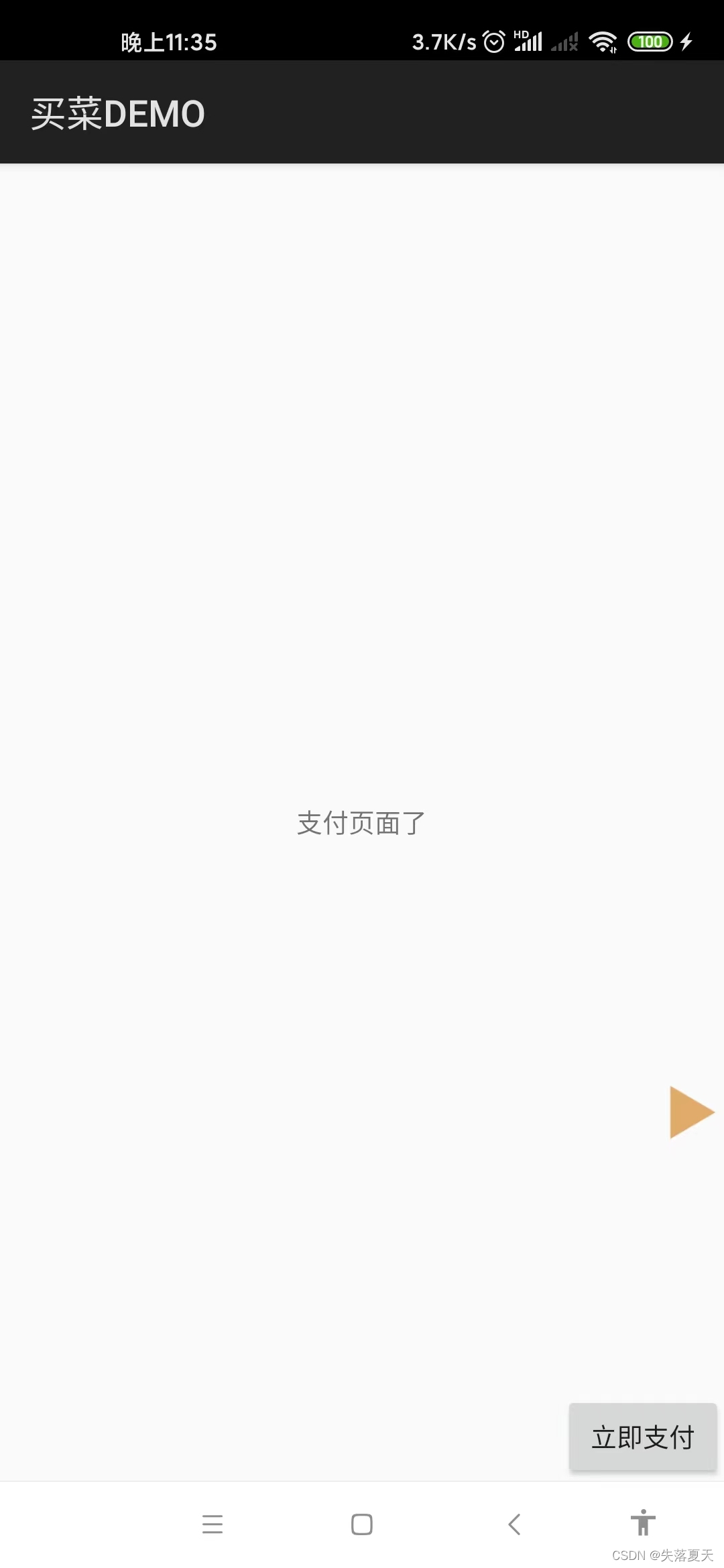
为了避免侵权以及方便调试,所以我们就不拿已上架的各大买菜APP作示范了。我们开发一个简单的买菜APP,只包含三个核心流程:
1.购物车页面。点击“去结算”进入订单确认页面。
2.订单确认页面。进入订单确认页面后,有90%的概率弹加载失败请重新尝试的弹框,10%的概率加载成功。
3.加载成功后,点击“立即支付”大概率提示前方拥挤,请稍后再试;小概率进入支付选择页面。
4.支付选择页面。证明已经下单成功,点击退出则彻底退出应用。
因为上面几个功能较为简单,这里不展开讲解了,有兴趣的朋友可以直接参考github上的代码即可,在项目的maicaidemo文件夹下。



3.2 注册无障碍辅助Service
注册OrderService,继承自AccessibilityService。
public class OrderService extends AccessibilityService {
    @Override
    public void onAccessibilityEvent(AccessibilityEvent event) {
    }

}
在mainfest中注册:
 <service
            android:name="com.monkeytong.riz.services.OrderService"
            android:canPerformGestures="true"
            android:directBootAware="true"
            android:exported="true"
            android:permission="android.permission.BIND_ACCESSIBILITY_SERVICE">
            <intent-filter>
                <action android:name="android.accessibilityservice.AccessibilityService" />
            </intent-filter>
            <meta-data
                android:name="android.accessibilityservice"
                android:resource="@xml/accessible_service_config" />
        </service>
在xml中注册accessible_service_config,声明无障碍辅助的功能。
<?xml version="1.0" encoding="utf-8"?>
<accessibility-service xmlns:android="http://schemas.android.com/apk/res/android"
    android:accessibilityEventTypes="typeWindowStateChanged|typeWindowContentChanged|typeNotificationStateChanged"
    android:accessibilityFeedbackType="feedbackAllMask"
    android:accessibilityFlags="flagDefault|flagRetrieveInteractiveWindows|flagIncludeNotImportantViews"
    android:canPerformGestures="true"
    android:canRetrieveWindowContent="true"
    android:description="@string/app_description"
    android:notificationTimeout="10"
    android:packageNames="com.tencent.mm,com.android.systemui,com.xt.client,com.yaya.zone,com.xt.maicai"
    android:settingsActivity="com.monkeytong.riz.activities.SettingsActivity" />
packageName指的是你的无障碍辅助要跑在哪些应用上,要把其对应的包名加上,以,分割。
accessibilityFlags代表触发的场景,一定要列全,否则会导致获取不到当前屏幕的root节点。
3.3 引导用户开启无障碍辅助功能和桌面悬浮窗权限
1.先判断是否具有桌面悬浮窗权限,如果没有则申请。这里注意一下,需要在manifest中申请:
<uses-permission android:name="android.permission.SYSTEM_ALERT_WINDOW" />
才可以。
2.如果具有了权限,则直接跳转系统设置/无障碍辅助页面,引导用户开启无障碍辅助即可。
 @TargetApi(Build.VERSION_CODES.M)
    public void openAccessibility(View view) {
        /**
         * 开启悬浮框,申请悬浮框权限
         */
        if (!Settings.canDrawOverlays(getApplicationContext())) {
            ToastUtil.showToast(this, "请先开启悬浮窗权限!");
            startActivityForResult(new Intent(Settings.ACTION_MANAGE_OVERLAY_PERMISSION, Uri.parse("package:" + getPackageName())), 5004);
            return;
        }
        try {
            Toast.makeText(this, "点击" + getString(R.string.app_name) + pluginStatusText.getText(), Toast.LENGTH_SHORT).show();
            Intent accessibleIntent = new Intent(Settings.ACTION_ACCESSIBILITY_SETTINGS);
            startActivity(accessibleIntent);
        } catch (Exception e) {
            Toast.makeText(this, "遇到一些问题,请手动打开系统设置>无障碍服务>" + getString(R.string.app_name), Toast.LENGTH_LONG).show();
            e.printStackTrace();
        }
    }
3.4 无障碍辅助Service中创建桌面悬浮窗及通信
在service的onCreate方法中,获取windowManager,并且添加悬浮窗并设置显示位置,以及支持拖动效果。
ShowUtil.setViewTouchGrag()方法为支持拖动效果。
@Override
    public void onCreate() {
        super.onCreate();
        LogUtil.logI(TAG, "OrderService onCreate()");
        //初始化WindowManager对象和LayoutInflater对象
        mWindowManager = (WindowManager) getApplicationContext().getSystemService(Context.WINDOW_SERVICE);
        showFloat();
    }

    private void showFloat() {
        floatView = LayoutInflater.from(getApplicationContext()).inflate(R.layout.showcar_login_btn, null);
        final View launcherButton = floatView.findViewById(R.id.bt_showcar_launcher);
        launcherButton.setOnClickListener(new View.OnClickListener() {
            @Override
            public void onClick(View view) {
                stateModel.isStart = !stateModel.isStart;
                launcherButton.setSelected(!launcherButton.isSelected());
                LogUtil.logI(TAG, "onClick");
            }
        });
        if (mWindowManager != null) {
            try {
                WindowManager.LayoutParams layoutParams = new WindowManager.LayoutParams();
                layoutParams.width = 100;
                layoutParams.height = 100;
                layoutParams.x = 0;
                layoutParams.y = 500;
                layoutParams.flags = WindowManager.LayoutParams.FLAG_NOT_FOCUSABLE | WindowManager.LayoutParams.FLAG_NOT_TOUCH_MODAL | WindowManager.LayoutParams.FLAG_LAYOUT_IN_SCREEN;
                //设置背景透明
//        mShowLogoutLayoutParams.format = PixelFormat.TRANSLUCENT;
                layoutParams.format = PixelFormat.RGBA_8888;
                layoutParams.gravity = Gravity.END | Gravity.BOTTOM;
                if (Build.VERSION.SDK_INT >= Build.VERSION_CODES.O) {
                    layoutParams.type = WindowManager.LayoutParams.TYPE_APPLICATION_OVERLAY;
                }
                ShowUtil.setViewTouchGrag(launcherButton, floatView, layoutParams, mWindowManager, false);
                mWindowManager.addView(floatView, layoutParams);
            } catch (Exception e) {
                Log.e(TAG, "showLauncherBtn: e =", e);
            }
        }
    }
用户点击悬浮窗开启关闭自动点击功能时,要通知到service。我这里的解决方案比较简单,直接创建了一个单例对象,设置和获取的都是这个单例对象。
public class StateModel {

    /**
     * 抢单模式
     */
    public int execType = 0;
    /**
     * 是否开启抢单
     */
    public boolean isStart = false;


    /**
     * 页面ID
     * 初始化=0
     * 购物车页面=1
     * 确认支付页面=2
     */
    public int pageId = 0;

    public interface PAGEID {
        public int OTHER = 0;
        public int GET_ELEMENT = 1;
        public int TO_PAY = 2;
    }
}
service中使用:
private final StateModel stateModel = CacheUtil.getInstance().getStateModel();
3.5 判断当前页面的包名和页面Activity
无障碍操作执行时,都会调用onAccessibilityEvent方法通知我们。所以我们要在这个方法中进行的逻辑操作。
首先,我们只关心用户进入到指定页面时才会触发操作,所以要屏蔽掉无关的应用和界面。
其次,我们要获取一下当前界面是哪个activity,如果比如进入了购物车或者订单确认页面我们则要触发操作。
第三,我们还要判断一下开关状态,如果是关闭状态,则我们也无需操作。
public void onAccessibilityEvent(AccessibilityEvent event) {
        if (event.getEventType() != AccessibilityEvent.TYPE_WINDOW_STATE_CHANGED) {
            return;
        }
        //非指定包名的不处理
        if (!Constant.packageName.equals(event.getPackageName().toString())) {
            return;
        }
        currentActivityName = ShowUtil.getForegroundActivity(getApplicationContext(), event).second;
        LogUtil.logI("getCurrgetentActivityName,currentActivityName:" + currentActivityName);
        if (!stateModel.isStart) {
            return;
        }
        LogUtil.logI("currentActivityName:" + currentActivityName);
        ...后续代码,下一章节将
    }
3.6 辅助用户点击去结算,立即支付,重新加载等操作
我这里仿照协程的原理,写了一个状态位机制。主要有以下几种状态位。每一种状态下都会反复触发点击,直至达到了下一状态值。
/**
     * 订单状态
     * 初始化=0
     * 购物车页面=1
     * 确认支付页面时,加载购物车失败=2
     * 确认支付页面时,加载购物车成功=3
     * 确认支付页面时,提交订单成功,弹出支付选择页面=4
     */
    public int currentState = 0;

    public interface OrderState {
        int INIT = 0;
        int GET_ELEMENT = 1;
        int LOAD_FAIL = 2;
        int TO_PAY = 3;
        int PAY_SUCESS = 4;
    }
1.如果用户进入到了购物车页面,则我们使用无障碍辅助帮助用户点击“去结算”按钮(PS:即使页面显示的是去结算(N),查找“去结算”也是可以查到的)。
2.如果用户进入到了订单确认页面。如果提示“加载失败,请重新尝试”,则使用无障碍辅助帮助用户点击“重新加载”按钮。直至提示加载成功。
3.加载成功后,我们帮助用户点击“立即支付”按钮。如果提示“前方拥挤,请稍后再试”,则等弹出框消失后继续点击立即支付。直至提示成功。
4.如果用户在订单确认页面点击立即支付,弹出了加载失败,请重新尝试的按钮,则我们使用无障碍辅助帮助用户点击“重新加载”按钮。
5.最后记录一下当面页面的节点状态,并持久化,方便后续排查问题。
@Override
    public void onAccessibilityEvent(AccessibilityEvent event) {
        ...上一章节讲了
        LogUtil.logI("currentActivityName:" + currentActivityName);
        if (Constant.ShoppingCartActivity.equals(currentActivityName)) {
            stateModel.pageId = StateModel.PAGEID.GET_ELEMENT;
            //疯狂点击 "去结算"
            clickDownTimer.startClick("去结算");
            return;
        }
        if (Constant.ConfirmOrderActivity.equals(currentActivityName)) {
            stateModel.pageId = StateModel.PAGEID.TO_PAY;
            //如果存在重新加载,则点击重新加载,否则点击立即支付。

            /**
             * 分为两种操作方式
             * 1.立即支付疯狂点击
             * 2.购物车和确认订单页面来回点
             */
            clickDownTimer.startClick("立即支付");
            return;
        }
        if (stateModel.pageId != StateModel.PAGEID.TO_PAY) {
            stateModel.pageId = StateModel.PAGEID.OTHER;
            return;
        }
        AccessibilityNodeInfo rootInActiveWindow = getRootInActiveWindow();
        if (rootInActiveWindow == null) {
            return;
        }
        List<AccessibilityNodeInfo> reloadList = getRootInActiveWindow().findAccessibilityNodeInfosByText("重新加载");
        if (reloadList.size() > 0) {
            clickDownTimer.startClick("重新加载");
        }
        List<String> list = new ArrayList<>();
        list.add(rootInActiveWindow.toString());
        IOHelper.write2File(getApplicationContext(), list);
    }
其中clickDownTimer.startClick("XXX");是我封装好的方法,其功能是持续若干时间,每隔100ms执行一次,如果不存在则继续下一次查询;如果存在则点击该按钮,直到进入到下一个状态。
class ClickDownTimer extends CountDownTimer {
        String text;

        ClickDownTimer(long millisInFuture, long countDownInterval) {
            super(millisInFuture, countDownInterval);
        }

        public void startClick(String text) {
            LogUtil.logI("click:" + text);
            this.text = text;
            start();
        }


        @Override
        public void onTick(long millisUntilFinished) {
            rootNodeInfo = getRootInActiveWindow();
            if (rootNodeInfo == null) {
                return;
            }
            List<AccessibilityNodeInfo> gettlement = rootNodeInfo.findAccessibilityNodeInfosByText(text);
            LogUtil.logI("find:" + text + ",result:" + gettlement.size());
            if (gettlement.size() > 0) {
                gettlement.get(0).performAction(AccessibilityNodeInfo.ACTION_CLICK);
                clickDownTimer.cancel();
            }
        }

        @Override
        public void onFinish() {

        }
    }
至此,核心功能已经开发完成。
四、使用流程
1.下载APK并安装,或者运行github上的app项目。
2.点击桌面图标,进入插件首页。点击开启插件,先开启桌面悬浮窗权限。返回后,再次点击开启插件,进入无障碍辅助设置页面,选择当前的应用:抢菜插件。
3.不同手机开启无障碍辅助的方式不一样,这里以小米距离。同时长按音量+和音量-三秒后开启无障碍辅助功能。此时首页的会变成关闭插件的状态。桌面悬浮图标也会显示。如下图所示:

4.进入买菜APP,把想买的东西提前加好购物车。
5.切换到其他页面或者桌面。点击悬浮按钮,开启自动点击状态。
6.切换回购物车界面,此时无障碍服务功能开启,会自动帮忙点击去结算按钮进入到支付页面
(PS:这个页面如果有网络问题,可手动点击。无障碍辅助不会影响正常点击事件)。
7.进入订单确认页面后,会自动帮忙点击立即支付。如果提示失败,则会自动帮忙点击重新加载按钮。直到订单提交成功进入支付选择页面。
8.如果想中止自动点击功能,则只需要点击桌面悬浮窗按钮关闭即可。
五、声明
本文及对应的开源项目仅供技术学习使用,禁止本项目用于一切商业项目,下载的测试apk请于24小时内自行删除。
如有侵权或其它商业合作,请通过csdn联系作者。
边栏推荐
- How to stop anti-virus software from blocking a web page? Take gdata as an example
- LeetCode LCP 07. 传递信息
- Installing MySQL version 5.5 database for Linux (centos6)
- On the night of the joint commissioning, I beat up my colleagues
- 联调这夜,我把同事打了...
- Redis实现消息队列的4种方案
- LeetCode Algorithm 1791. 找出星型图的中心节点
- MySQL表常用操作思维导图
- php安全开发 13博客系统的栏目模块的编写
- php安全开放10文章列表模块的分页编写
猜你喜欢

Graphic data analysis | business cognition and data exploration

超图倾斜数据合并根节点后转3dtiles
Redis cluster + sentinel mode + replicas

括号生成(回溯)

联调这夜,我把同事打了...

自适应搜索广告有哪些优势?

Data system provider Jidao technology joins dragon lizard community
Redis實現消息隊列的4種方案

kali安装empire过程中遇到的各种报错解决方案

Software engineering - system flow chart
随机推荐
力扣解法汇总732-我的日程安排表 III
Is there a female Bluetooth headset suitable for girls? 38 Bluetooth headsets worth getting started
Various error reporting solutions encountered by Kali during Empire installation
LeetCode Algorithm 1791. 找出星型图的中心节点
adb命令 利用jks文件给apk签名
超图倾斜数据合并根节点后转3dtiles
Invert words in a string (split, double ended queue)
Bracket generation (backtracking)
力扣解法汇总875-爱吃香蕉的珂珂
LeetCode Algorithm 1791. Find the central node of the star chart
括号生成(回溯)
Comprehensive quality of teaching resources in the second half of 2019 - subjective questions
Three main factors determining advertising quality
Almost all schools will ask for the second round exam! Come in and recite the answer!
如何最大化的利用各种匹配方式? ——Google SEM
Leetcode 55 jump game
决定广告质量的三个主要因素
小程序111111
Implementation scheme of iteration and combination pattern for general tree structure
Graphic data analysis | data cleaning and pretreatment