当前位置:网站首页>Learn iframes and use them to solve cross-domain problems
Learn iframes and use them to solve cross-domain problems
2022-08-04 03:35:00 【M78_Domestic 007】
Learn about iframes
The official definition is: iframe is HTML tag, which acts as a document in a document, or floatsframe (FRAME).The iframe element creates an inline frame (ie, an inline frame) that contains another document.
Simply understood as: iframe is an inline frame that can embed another document in the current HTML page.
iframe attributes
Only common attributes are introduced here
name: Specifies the name of the
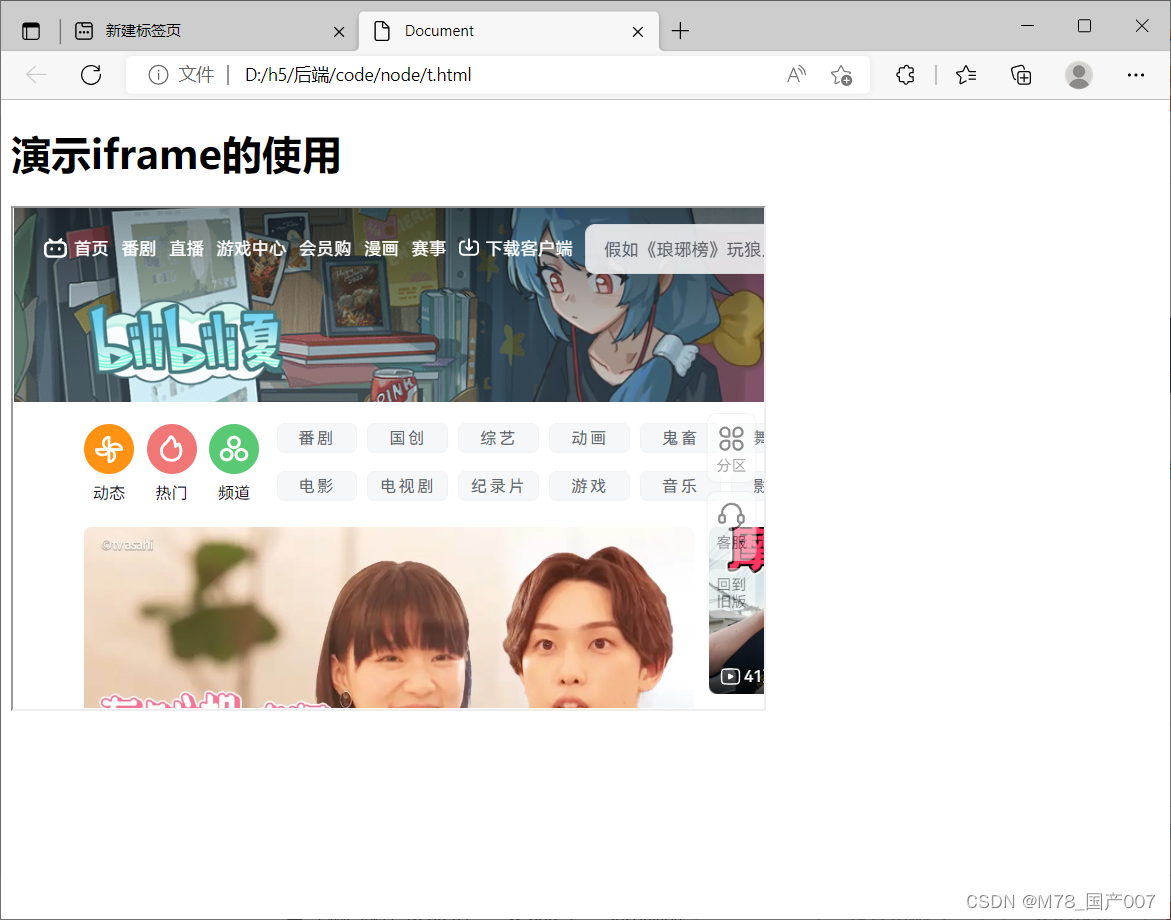
We set an inline frame named ifr with a width of 600 and a height of 400, showing the border, hiding the slider, and showing the document as site b (you can also choose a local html document).We can write a text description in the iframe tag, because some low-version browsers do not support this tag, and when the document cannot be displayed, the text we wrote will be displayed on the page.
Open the browser to see the effect:
Get the content inside the iframe
Demonstrate the use of iframe
Resolving cross-domain issues
1. document.domain+iframe
This method can only be used for cross-domain requests between different subdomains under the same main domain, such as between a.com and 1.a.com, and between 1.a.com and 2.a.com.
Just point the document.domian of both pages to the main domain, such as document.domain="a.com".
The parent page embeds the child page through iframe, obtains the window of the child page through iframe.contentWindow, and then operates the child page, and the child page accesses the window of the parent page through parent.window and parent.
Write an example:
//Parent page http://a.com/a.html//Subpage http://1.a.com/b.htmldocument.domain="a.com"var name2=2//Get the properties of the parent pagevar name11=parent.window.name12. window.name+iframe
The implementation is to pass data based on window.name.name is a property of the global window object in the browser environment.
When a new page is loaded in an iframe, the value of the name property remains the same.
边栏推荐
- PHP高级开发案例(1):使用MYSQL语句跨表查询无法导出全部记录的解决方案
- STM8S105k4t6c--------------点亮LED
- 跨境电商看不到另一面:商家刷单、平台封号、黑灰产牟利
- 内网服务器访问远程服务器的端口映射
- docker+网桥+redis主从+哨兵模式
- 数据湖(二十):Flink兼容Iceberg目前不足和Iceberg与Hudi对比
- Why use Selenium for automated testing
- 安装postgis时报找不到“POSTGIS_VERSION”这个函数
- Power button (LeetCode) 215. The first K largest elements in the array (2022.08.03)
- LeetCode每日一题(2285. Maximum Total Importance of Roads)
猜你喜欢

Introduction to mq application scenarios
外卖店优先级
STM8S105K4T6------Serial port sending and receiving
目标检测-中篇
uni-app 从零开始-基础模版(一)
mq应用场景介绍

4-way two-way HDMI integrated business high-definition video optical transceiver 8-way HDMI high-definition video optical transceiver
全网没有之一的JMeter 接口测试流程详解
Functions, recursion and simple dom operations
Architecture of the actual combat camp module three operations
随机推荐
Y86. Chapter iv Prometheus giant monitoring system and the actual combat, Prometheus storage (17)
Why use Selenium for automated testing
2022杭电多校联赛第五场 题解
Asynchronous programming solution Generator generator function, iterator iterator, async/await, Promise
Shell 函数
【观察】超聚变:首提“算网九阶”评估模型,共建开放繁荣的算力网络
嵌入式数据库开发编程MySQL(全)
深度学习——以CNN服装图像分类为例,探讨怎样评价神经网络模型
Homemade bluetooth mobile app to control stm8/stm32/C51 onboard LED
new Date converts strings into date formats Compatible with IE, how ie8 converts strings into date formats through new Date, how to replace strings in js, and explain the replace() method in detail
基本表单验证流程
初识Numpy
案例 | 重庆银行流动数据安全挑战及应对实践
unsafe.Pointer, pointer, reference in golang
db2中kettle报错 Field [XXX] is required and couldn‘t be found 解决方法
Power button (LeetCode) 215. The first K largest elements in the array (2022.08.03)
ingress 待完善
异步编程解决方案 Generator生成器函数、iterator迭代器、async/await、Promise
uni-app 从零开始-基础模版(一)
说说数据治理中常见的20个问题