当前位置:网站首页>Control statement if switch for while while break continue
Control statement if switch for while while break continue
2022-06-11 09:19:00 【lwj_ 07】
Control statement
* Selection structure
- if,if...else
-switch* Loop structure
-for
-while
-do while* Structure of control cycle
-break
-continue
if The four expressions of a sentence :
The first one is :
if( Boolean expression ){ ( The Boolean expression is true perhaps false)
java sentence ;
java sentence ;
java sentence ;
}
The second kind :
if( Boolean expression ){
java sentence ;
java sentence ;
java sentence ;
}else{
java sentence ;
java sentence ;
java sentence ;
}
The third kind of :
if( Boolean expression ){
java sentence ;
java sentence ;
java sentence ;
} else if( Boolean expression ){
java sentence ;
java sentence ;
java sentence ;
}
A fourth :
if( Boolean expression ){
java sentence ;
java sentence ;
java sentence ;
} else if( Boolean expression ){
java sentence ;
java sentence ;
java sentence ;
} else{
java sentence ;
java sentence ;
java sentence ;
}
/*
 demand : If KFC is within the kilometer range of the location , Go to KFC Drink spicy Hu soup   If not, go home 6 Steamed bread
*/

public class A
{
	public static void main(String[] args){
		double distance =6.0;
		if (distance<5)
		{
			System.out.println(" Let's go together KFC Drink spicy Hu soup !");
		}
		else{
			System.out.println(" get home 6 Let's go !");
		}
	}
}
How to make users input
First step Create a keyboard scanner object
java.util.Scanner s = new java.util.Scanner(System.in);
Accept text 【 Receive... As a string 】
String userInputContent = s.next();
Receive numbers 【 In integer form int To receive 】
int num =s.nextInt();
System.out.println(" The number you entered :"+num);
/*
	System.out.println();  Responsible for outputting to the console 【 From memory to console , The process of output 】

	 How to receive user keyboard input ?  【 from “ keyboard ” To “ Memory ”】

*/

public class A
{
	public static void main(String[] args){
		//  First step   Create a keyboard scanner object
		java.util.Scanner s = new java.util.Scanner(System.in);
		//  The second step   call scanner Object's next() Method to start receiving the user's keyboard input
		//  The program will stop when it reaches here   Waiting for user input
		//  When the user enters   And when you finally hit the Enter key   The input information is automatically assigned to userInputContent

		//  Accept text 【 Receive... As a string 】
		//String userInputContent = s.next();
		//  Output the data in memory to the console
		//System.out.println(" You entered :"+userInputContent);

		// Receive numbers 【 In integer form int To receive 】
		int num =s.nextInt();
		System.out.println(" The number you entered :"+num);
}
}
demand : Given a person's age
【0~5】 Young children
【6~10】 a juvenile
【11~18】 teenagers
【19~35】 youth
【36~55】 middle-aged
【56~150】 The elderly
public class A
{
	public static void main(String[] args){
		java.util.Scanner s = new java.util.Scanner(System.in);
		int userAge = s.nextInt();
		System.out.print(" The age you entered is :"+userAge);
		if (userAge>=0 & userAge<=5)
		{
			System.out.println(" Young children ");
		}
		else if (userAge>=6 & userAge<=10)
		{
			System.out.println(" a juvenile ");
		}
		else if (userAge>=11 & userAge<=18)
		{
			System.out.println(" teenagers ");
		}
		else if (userAge>=19 & userAge<=35)
		{
			System.out.println(" youth ");
		}
		else if (userAge>=36& userAge<=55)
		{
			System.out.println(" middle-aged ");
		}
		else if (userAge>=56 & userAge<=150)
		{
			System.out.println(" The elderly ");
		}
		}
	}
Improved version
/*
	 demand : Given a person's age
	【0~5】 Young children
	【6~10】 a juvenile
	【11~18】 teenagers
	【19~35】 youth
	【36~55】  middle-aged
	【56~150】  The elderly
*/

public class A
{
	public static void main(String[] args){
		java.util.Scanner s = new java.util.Scanner(System.in);
		int userAge = s.nextInt();
		System.out.print(" The age you entered is :"+userAge);
		//  Default a value
		String str =" The elderly ";
		if (userAge<0 || userAge>150)
		{
			str =" The age you entered is not 【0~150】 Between   Please re-enter !";
		}
		else if (userAge<=5)
		{
			str =" Young children ";
		}
		else if (userAge<=10)
		{
			str =" a juvenile ";
		}
		else if (userAge<=18)
		{
			str =" teenagers ";
		}
		else if (userAge<=35)
		{
			str =" youth ";
		}
		else if (userAge<=55)
		{
			str =" middle-aged ";
		}
		System.out.println(str);
	}
	}
Be careful :if (" It's raining ".equals(wea))
demand :
Judge the current weather :
When it rains outside :
Take an umbrella
Determine gender :
When the gender is male : Bring a big black umbrella
When the gender is female : Bring a small flower umbrella
When it's sunny outside :
Judge the temperature of the weather :
When the weather temperature is 30 Over degrees :
When the gender is male : Wear sunglasses
When the gender is female : Wear sunscreenTips : weather condition 、 temperature 、 Both sexes need to be entered from the keyboard . There is no need to judge the temperature when the weather is cloudy .
public class A
{
	public static void main(String[] args){
			java.util.Scanner s = new java.util.Scanner(System.in);

			//  Enter weather conditions
			System.out.print(" Please enter the current weather conditions :");
			String wea = s.next();

			//  Enter gender
			System.out.print(" Please enter gender :");
			String gender = s.next();
			//  When the weather is rainy
			if (" It's raining ".equals(wea)){
				//  Take an umbrella
				//  Determine gender
				if (" male ".equals(gender))
				{
					System.out.println(" Take a small black umbrella !");
				}
				else if (" Woman ".equals(gender))
				{
					System.out.println(" Bring a small flower umbrella !");
				}
				else{
					System.out.println(" What about sex !");
				}
			}

			//  When the weather is sunny
			else if (" a sunny day ".equals(wea))
			{
				//  Judge the temperature
				System.out.print(" Please enter the current weather temperature :");
				int temp = s.nextInt();
				if (temp>30)
				{
					if (" male ".equals(gender))
					{
						System.out.println(" Wear sunglasses !");
					}
					else if (" Woman ".equals(gender))
					{
						System.out.println(" Wear sunscreen !");
					}
					else{
						System.out.println(" What about sex !");
					}
				}
				else {
					System.out.println(" The temperature is less than 30 Centigrade   Go out and have fun ~");
				}
				}
			else{
				System.out.println(" The weather input is not accurate !");
			}
}
}
switch Control statement
1、switch Execution principle :
switch In the following parentheses “ data ” and case hinder “ data ” Match one by one , Match successful branch execution .2、 Match successful branch execution , At the end of the branch is “break” In words , Whole switch Statement termination
3、 Match successful branch execution , There's no... In the branch “break” In words , Go directly to the next branch for execution without matching case, This phenomenon is called case Penetration phenomenon .【 Provide break Can avoid penetrating 】
4、 If all branches fail to match , When there is default Sentence words , Will execute default The program in the branch
5、switch Back and case It can only be int perhaps String Data of type , It can't be detecting other types
* Of course byte,short,char You can also write directly to switch and case Back , Because they can do automatic type conversion byte,short,char It can be automatically converted to int type
6、case Can be combined
int i =10;
switch(i){
case1: case2: case3: case10:
System.out.println("...");
}
7、 usage :
switch(int or String A literal or variable of type ){
case int or String A literal or variable of type : // Match data If unsuccessful, match down
java sentence ;
...
break; // Program end
case int or String A literal or variable of type :
java sentence ;
...
break;
case int or String A literal or variable of type :
java sentence ;
...
break;
...
default; // If they don't match, they will default
java sentence ;
...
}
public class A
{
	public static void main(String[] args){
		java.util.Scanner s = new java.util.Scanner(System.in);
		System.out.print(" Please enter a number :");
		int num=s.nextInt();
		switch(num){
			case 1:
				System.out.println(" Monday ");
			break;
			case 2:
				System.out.println(" Tuesday ");
			break;
			case 3:
				System.out.println(" Wednesday ");
			break;
			case 4:
				System.out.println(" Thursday ");
			break;
			case 5:
				System.out.println(" Friday ");
			break;
			case 6:
				System.out.println(" Saturday ");
			break;
			case 7:
				System.out.println(" Sunday ");
			break;
			default :
				System.out.println(" Please enter the correct number ");
		}
	}
}


 The second kind  String type :

public class A
{
	public static void main(String[] args){
		java.util.Scanner s = new java.util.Scanner(System.in);
		System.out.print(" Please enter the day of the week :");
		String num=s.next();
		switch(num){
			case " Monday ":
				System.out.println("1");
			break;
			case " Tuesday ":
				System.out.println("2");
			break;
			case " Wednesday ":
				System.out.println("3");
			break;
			default :
				System.out.println(" Please enter the correct week ");
		}
	}
}
demand : A simple calculator computing system Be careful : The operator is a string String type
public class A
{
	public static void main(String[] args){
		java.util.Scanner s = new java.util.Scanner(System.in);
		System.out.println(" Welcome to the simple calculator system ");
		System.out.print(" Please enter the first number :");
		int num_1 = s.nextInt();
		System.out.print(" Please enter operator :");
		String i =s.next();
		System.out.print(" Please enter the second number :");
		int num_2 =s.nextInt();
		switch(i){
			case "+":
			int a = num_1+num_2;
			System.out.println(num_1+"+"+num_2+" The result of the calculation is :"+a);
			break;
			case "-":
			int b = num_1-num_2;
			System.out.println(num_1+"-"+num_2+" The result of the calculation is :"+b);
			break;
			case "*":
			int c = num_1*num_2;
			System.out.println(num_1+"*"+num_2+" The result of the calculation is :"+c);
			break;
			case "/":
			int d = num_1/num_2;
			System.out.println(num_1+"/"+num_2+" The result of the calculation is :"+d);
			break;
			case "%":
			int e = num_1%num_2;
			System.out.println(num_1+"%"+num_2+" The result of the calculation is :"+e);
			break;
			default :
				System.out.println(" Incorrect input   Please re-enter !");
				break;
		}
	}
}
Upgraded version :
public class A
{
	public static void main(String[] args){
		java.util.Scanner s = new java.util.Scanner(System.in);
		System.out.println(" Welcome to the simple calculator system ");
		System.out.print(" Please enter the first number :");
		int num_1 = s.nextInt();
		System.out.print(" Please enter operator :");
		String i =s.next();
		System.out.print(" Please enter the second number :");
		int num_2 =s.nextInt();
		int result = 0;
		switch(i){
			case"+":
				result = num_1+num_2;
				break;
			case"-":
				result = num_1-num_2;
				break;
			case"*":
				result = num_1*num_2;
				break;
			case"/":
				result = num_1*num_2;
				break;
			case"%":
				result = num_1*num_2;
				break;
				}
		System.out.println(num_1+i+num_2+" The result of the calculation is :"+result);


	}
}
Assume a given student grade ( Grades may be decimal )
The effective range of grades 【0-100】
【90-100】 A
【80-90】 B
【70-80】 C
【60-70】 D
【0-60】 E
Tips :(int)( achievement /10)
0
1
2
3
...
10
public class A
{
	public static void main(String[] args){
		java.util.Scanner s = new java.util.Scanner(System.in);
		System.out.println(" Welcome to the examinee score determination system ");
		System.out.print(" Please enter the test result :");
		double score1 = s.nextDouble();
		int score = (int)(score1/10);
		switch(score){
			case 9: case 10:
				System.out.println("A");
				break;
			case 8:
				System.out.println("B");
				break;
			case 7:
				System.out.println("C");
				break;
			case 6:
				System.out.println("D");
				break;
			default:
				System.out.println("E");
				break;

		}


	}
}
for loop
for The grammatical structure of a loop :
for( Initialization expression ; Boolean expression ; Update expression ){
// It's a piece of code that needs to be executed repeatedly 【 The loop body : from java Sentence structure 】
}for The execution of the loop / Execution principle ?【***** a key 】
* Initialization expression 、 Boolean expression 、 Updating expressions is not necessary !【 But two semicolons are necessary ( Dead cycle )】
* The initialization expression is executed first , And in the whole for Only execute once in the loop
* The Boolean expression must be true/false It can't be anything else
* If the Boolean expression is true Then execute the loop body If it's false The loop body... Is not executed
public class A
{
public static void main(String[] args){
for (int i=1;i<=10 ;i++ )
{
System.out.println(i);
}}
}

Be careful :
public class A
{
public static void main(String[] args){
int i =0;
for (;i<10 ;i++ ) // The default initial value is i=0
{
System.out.println("i ===>"+i);
}
System.out.println(i); // Because when i++ by 10 When Judge 10<10 by false So the output is 10
}
}The second kind :
public class A
{
public static void main(String[] args){
int i ;
for (i=0;i<10 ;i++ )
{
System.out.println("i ===>"+i);
}
System.out.println(i); // Because when i++ by 10 When Judge 10<10 by false So the output is 10
}
}

for A nested loop
public class A
{
public static void main(String[] args){
for (int i=1;i<=10 ;i++ ) // Cycle ten times j
{
for (int j=1;j<=3 ;j++ ) // The result of the cycle j:1 2 3
{
System.out.println("j ===>"+j);
}
}
}
}

multiplication table

public class A
{
	public static void main(String[] args){

		for (int i=1;i<=9 ;i++ )
		{
			for (int k=1;k<=i ;k++ )
			{
				System.out.print( k+ "×" +i+ "=" +i*k);

			}
			//  There are two ways to wrap lines
			//System.out.println();
			System.out.println("\n");


		}

		}
}
while loop
/*
while Loop structure :while( Boolean expression ){
The loop body ;
}*/
// Dead cycle
public class A
{
public static void main(String[] args){
while (true)
{
System.out.println(" Ha ha ha ");
}
}
}
Knowledge point ( Add :--k Yes, first 1 To assign a value k-- Is the assignment first Re reduction 1)
public class A
{
	public static void main(String[] args){
		while (10>3)	//  When while() When Boolean expressions are numeric comparisons   The compiler can detect 10>3 by true
						//	 So it's also an endless cycle   Below hello world  cannot access
                    {
	System.out.println(" Ha ha ha ");
        }
    System.out.println("hello world");

	}
}
public class A
{
	public static void main(String[] args){
		int i =10;
		int j =3;
		while (i>j)	{	//  It can be determined to be true artificially, but the compiler cannot judge whether it is true or not   Therefore, the output results are always in an endless loop " Ha ha ha "

	System.out.println(" Ha ha ha ");
					}
		System.out.println("Hello world");
	}
}
do while Loop structure
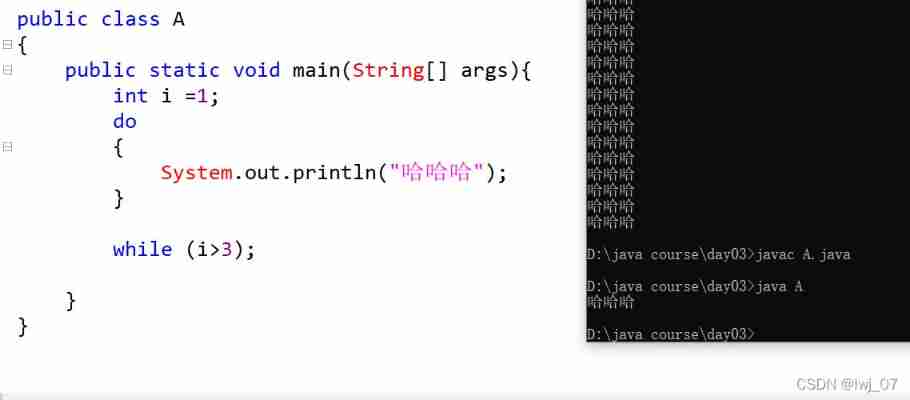
do while loop :
1、 Grammatical structure :
do{ The loop body ;}
while( Boolean expression );2、 Execution principle : First execute the loop body Then proceed while Judge If true, continue with the loop body End for false
3、do while cycles : The lowest execution cycle body
break continue sentence
break; Represents a break statement
By default : break The statement terminates the nearest circular statement .
break Indicates that the loop is no longer executed
continue It means to enter the next cycle directly Carry on .
public class A
{
	public static void main(String[] args){
		for (int i=1;i<=10 ;i++ )
		{
			if (i==5)
			{
				break;
			}
			System.out.println(">>>"+i); // 1 2 3 4
		}
		System.out.println("hello world!");

	}
} 
public class A
{
	public static void main(String[] args){
		for (int i=1;i<=10 ;i++ )
		{
			if (i==5)
			{
				continue;
			}
			System.out.println(">>>"+i); // 1 2 3 4
		}
		System.out.println("hello world!");

	}
}
边栏推荐
- MSF evasion模块的使用
- Talk about how to customize data desensitization
- shell脚本之sed详解 (sed命令 , sed -e , sed s/ new / old / ... )
- 【服装ERP】施行在项目中的重要性
- 企业需要考虑的远程办公相关问题
- 86. separate linked list
- openstack详解(二十四)——Neutron服务注册
- Complexity analysis of matrix inversion operation (complexity analysis of inverse matrix)
- Sword finger offer II 041 Average value of sliding window
- Error [detectionnetwork (1)][warning]network compiled for 6 shapes, maximum available 10, compiling for 5 S
猜你喜欢

Version mismatch between installed deeply lib and the required one by the script

Use of MSF evaluation module

Typescript high level feature 1 - merge type (&)

MSF给正常程序添加后门

Ecological co construction | 2021 streamnational excellent partner of the year comes out!

Install jupyter in the specified environment

【新手上路常见问答】关于数据可视化

Type-C蓝牙音箱单口可充可OTG方案

Augmented reality experiment IV of Shandong University
Bowen dry goods | Apache inlong uses Apache pulsar to create data warehousing
随机推荐
Tissu. JS définit dynamiquement la taille de la police
The mobile terminal page uses REM for adaptation
openstack详解(二十三)——Neutron其他配置、数据库初始化与服务启动
MySQL啟動報錯“Bind on TCP/IP port: Address already in use”
Clothing ERP: how do enterprises carry out implementation planning?
报错[error] input tesnor exceeds available data range [NeuralNetwork(3)] [error] Input tensor ‘0‘ (0)
Some learning records I=
Leveldb simple use example
Type-C蓝牙音箱单口可充可OTG方案
Talk about reading the source code
[ERP system] how much do you know about the professional and technical evaluation?
How to deal with these problems in the factory production process?
面试题 17.10. 主要元素
MySQL启动报错“Bind on TCP/IP port: Address already in use”
Why is it difficult to implement informatization in manufacturing industry?
【方案设计】基于单片机开发的家用血氧仪方案
报错device = depthai.Device(““, False) TypeError: _init_(): incompatible constructor arguments.
206. reverse linked list
Machine learning notes - the story of master kaggle Janio Martinez Bachmann
Augmented reality experiment IV of Shandong University