当前位置:网站首页>Whether the ZABBIX monitoring host is online
Whether the ZABBIX monitoring host is online
2022-06-11 06:49:00 【alfiy】
A little busy recently , I haven't updated my blog for a long time . Today's article mainly records how to pass zabbix Monitor whether a host is online .
All right, let's go .
1. Create a new template
The purpose of creating a new template is to add “ Monitoring item ” and “ trigger ” Of , If the number of hosts you want to monitor is very small , Of course, there is no need to create a new template , Instead, add directly to the host to be monitored “ Monitoring item ” and “ trigger ”. But if you want to monitor a very large number of hosts, it will be a bit laborious , Why don't you just “ Monitoring item ” and “ trigger ” Built on the template , In this way, the host you want to monitor only needs to apply the template you have created .
Log in first zabbix Configuration management page of , Locate the “ To configure —- Templates ” page , Click... In the upper right corner of the page “ Create a template ”, Follow the figure below , After filling in the required items of the template , Click on “ add to ” The button creates a new one named “MyTemplate” The template , Next, we will continue to add... To this custom template ” Monitoring item “ and ” trigger “.

2. To add a monitor item to a custom template
Still “ Templates ” Page quickly navigate to the newly created template by searching .
Enter the template details page , choice “ Monitoring item ” tab , Then click... In the upper right corner of the page “ Create monitor item ” Button , Add a new one “ Monitoring item ”.
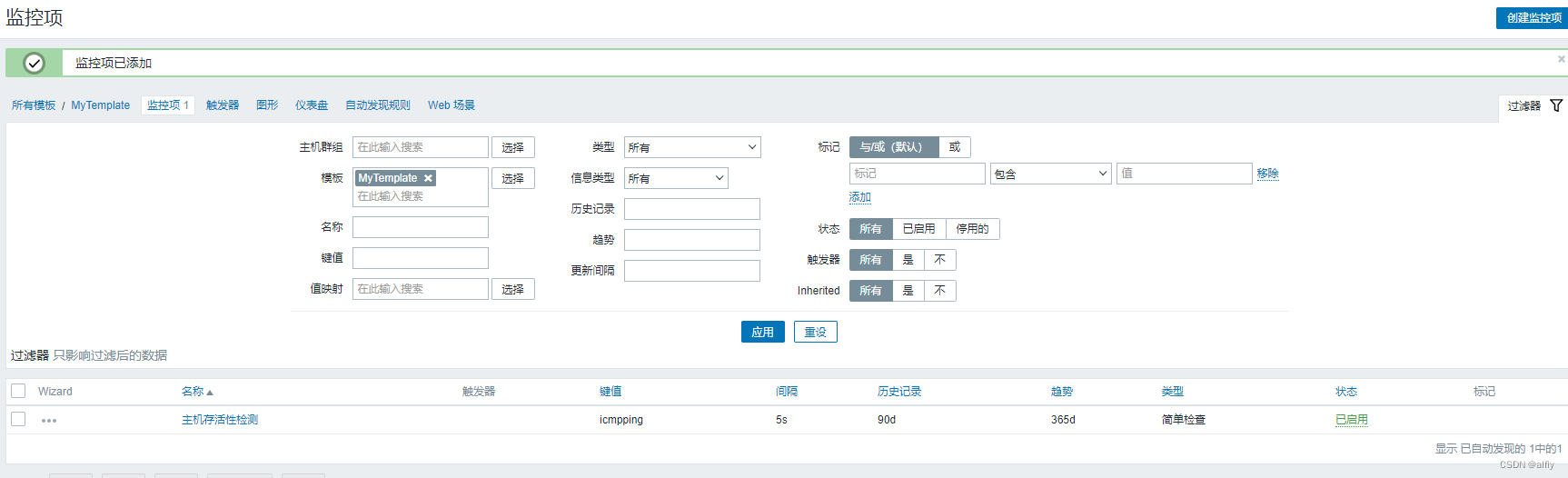
Fill in the required contents of the monitoring item , Click on “ add to ” Button , A new monitoring item is created for the custom template , The host using this set of templates can collect data through this monitoring item .
3. New trigger
Still “ Templates ” page , Click on “ trigger ” tab , Click on the “ Create trigger ” Button , Add a trigger for the custom template .

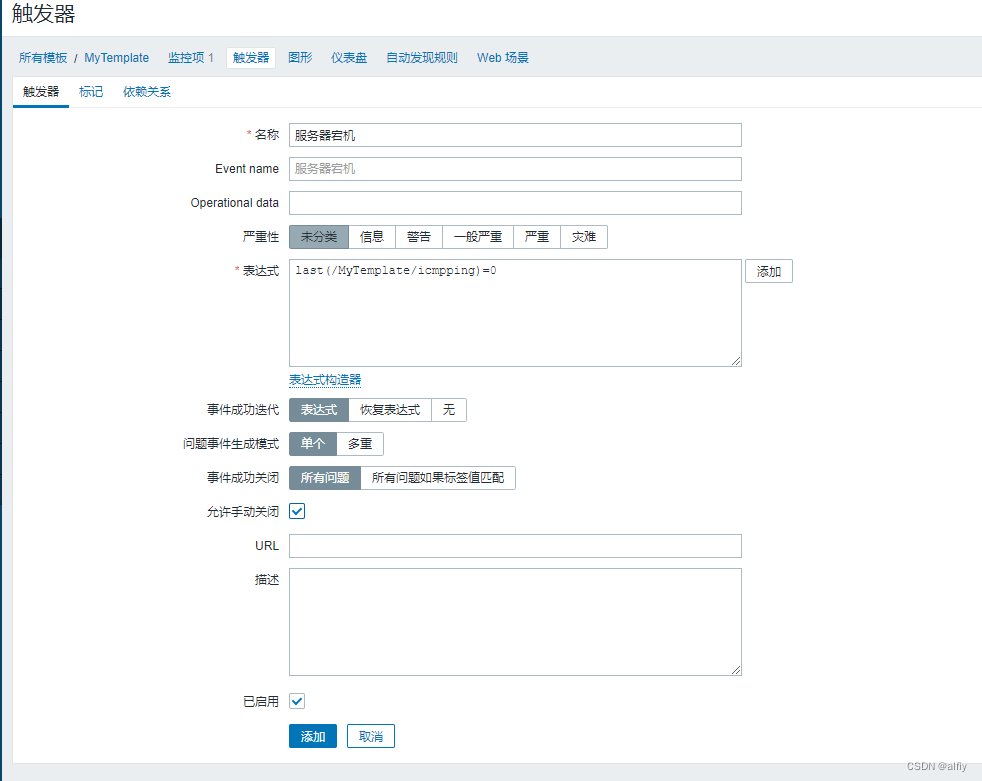
After the above operations are completed , You should also add a dependency to this trigger . You can think about it , Our monitoring item is a simple check , That's one ping command , If the host is not online, the trigger created according to the above will always be in the trigger state , Obviously this is a little out of common sense . We can solve this problem by adding dependencies .
Added in the above figure “zabbix agent is not available” The trigger is also a trigger to monitor whether the host is online , But it didn't icmping So sensitive , If opened “zabbix agent is not available” trigger , You can check its details , If “zabbix agent is not available” Trigger condition of trigger terminated , Then the trigger conditions that depend on it also terminate , In this way, the trigger is automatically closed .
4. Create a new trigger action
After the previous preparations, we can create a new trigger action , When the host is down, you can use e-mail or staples webhook A notification alarm has been given .
Get into “ action —-Trigger actions” page , Click on the top right corner of the page ” Create action “ Button , Add an action .

Next, add an action item to the action .

5. Apply custom templates
Okay , Now everything is ready , Next, you can apply the custom template to the host to be monitored .
Enter the host page in the configuration page , Click the host link to enter the host configuration details page .

By doing this , Add a custom template for the host .
6. test
Shut down the engine , Test triggers 、 Whether the trigger action works normally .
The alarm email has been received normally , thus zabbix The operation of monitoring host downtime is completed .

边栏推荐
- Scripy web crawler series tutorials (I) | construction of scripy crawler framework development environment
- During unity panoramic roaming, AWSD is used to control lens movement, EQ is used to control lens lifting, and the right mouse button is used to control lens rotation.
- Handwritten promise [01] - Implementation of promise class core logic
- 022-Redis数据库0基础入门
- A piece of code has been refactored six times by the boss, and my mind is broken
- instanceof到底是怎样判断引用数据类型的!
- Error code in ijkplayer
- 核查医药代表备案信息是否正确
- Alias the path with the help of craco
- Post exam summary
猜你喜欢

关于 QtCreator的设计器QtDesigner完全无法正常拽托控件 的解决方法

【Matlab WSN通信】A_Star改进LEACH多跳传输协议【含源码 487期】

Redux learning (III) -- using Redux saga, writing middleware functions, and splitting reducer files
![Handwritten promise [05] - exception capture of promise method and optional parameters of then method implementation](/img/e7/87069f921ae003511e32b23653703c.jpg)
Handwritten promise [05] - exception capture of promise method and optional parameters of then method implementation

The nearest common ancestor of 235 binary search tree

Differences between FindIndex and indexof

【概率论与数理统计】猴博士 笔记 p41-44 统计量相关小题、三大分布的判定、性质、总体服从正态分布的统计量小题
The realization of online Fox game server room configuration battle engagement customization function
![Resolve typeerror: ctx injections. tableRoot.$ scopedSlots[ctx.props.column.slot] is not a function](/img/29/de95cef86bd75107555b212f01ebb9.jpg)
Resolve typeerror: ctx injections. tableRoot.$ scopedSlots[ctx.props.column.slot] is not a function

On cursor in MySQL
随机推荐
[turn] flying clouds_ Qt development experience
Throttling and anti shake
无心剑汉英双语诗001.《爱》
100. 相同的树
What are the differences and usages of break and continue?
Summary of string processing skills III
Moment time plug-in tips -js (super detailed)
Text overflow failure
Difference between foreach, for... In and for... Of
Do you know what the quotation for it talent assignment service is? It is recommended that programmers also understand
100. same tree
JS implementation of graphic merging and sorting process [source code attached]
关于 QtCreator的设计器QtDesigner完全无法正常拽托控件 的解决方法
Flutter 约束容器组件
fatal: refusing to merge unrelated histories
Redux learning (I) -- the process of using Redux
Alias the path with the help of craco
JS implementation of Hill sort of graphic insertion sort [with source code]
Handwriting promise [02] - asynchronous logic implementation
JS judge whether the year is a leap year and the number of days in the month