当前位置:网站首页>Mujoco finite state machine and trajectory tracking
Mujoco finite state machine and trajectory tracking
2022-07-07 00:28:00 【Feisy】
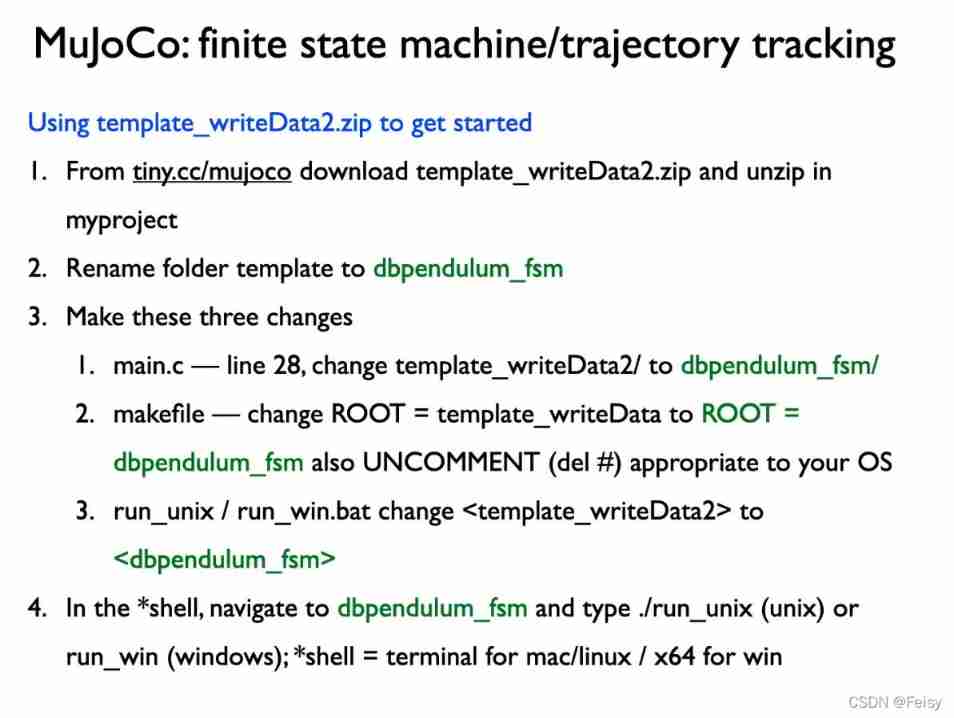
Course content
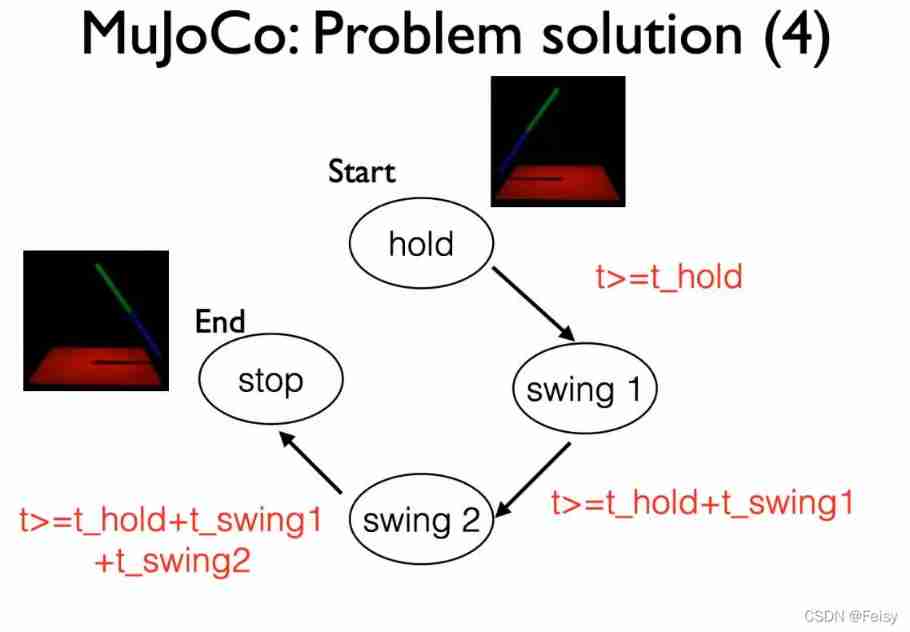
- Realization hold swing1 swing2 stop Switching of four states
- Trajectories in different states are generated in different ways
Use the motor to change the position
mujoco Demonstration of finite state machine
Use external force to change the position
If we cancel the motor of the joint , Use external force to control , The effect is as follows
Mujoco Use external force to realize state machine
It looks exactly like the one with motor . Therefore, the function of motor input and external force input is the same
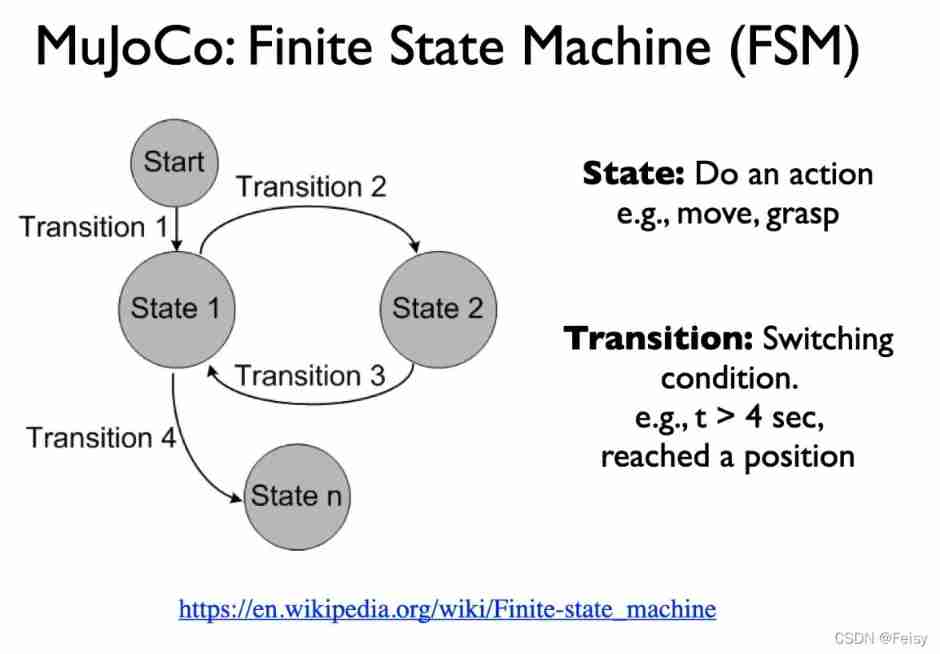
State machine diagram 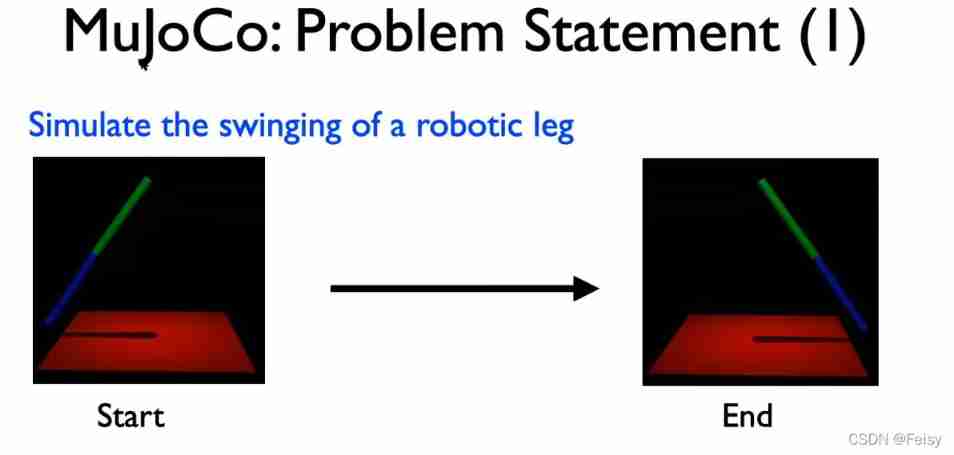
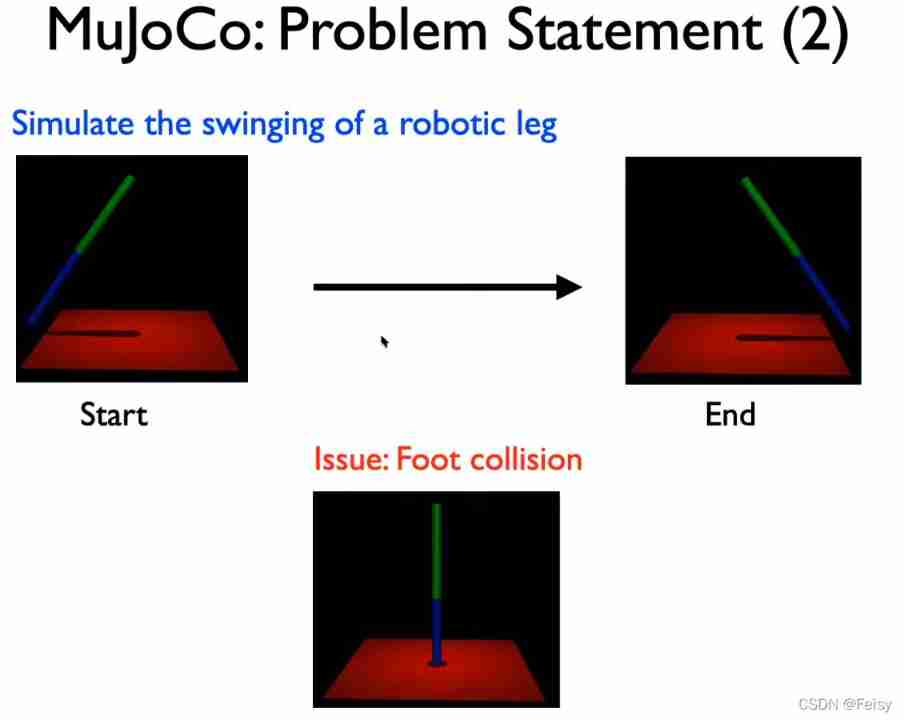
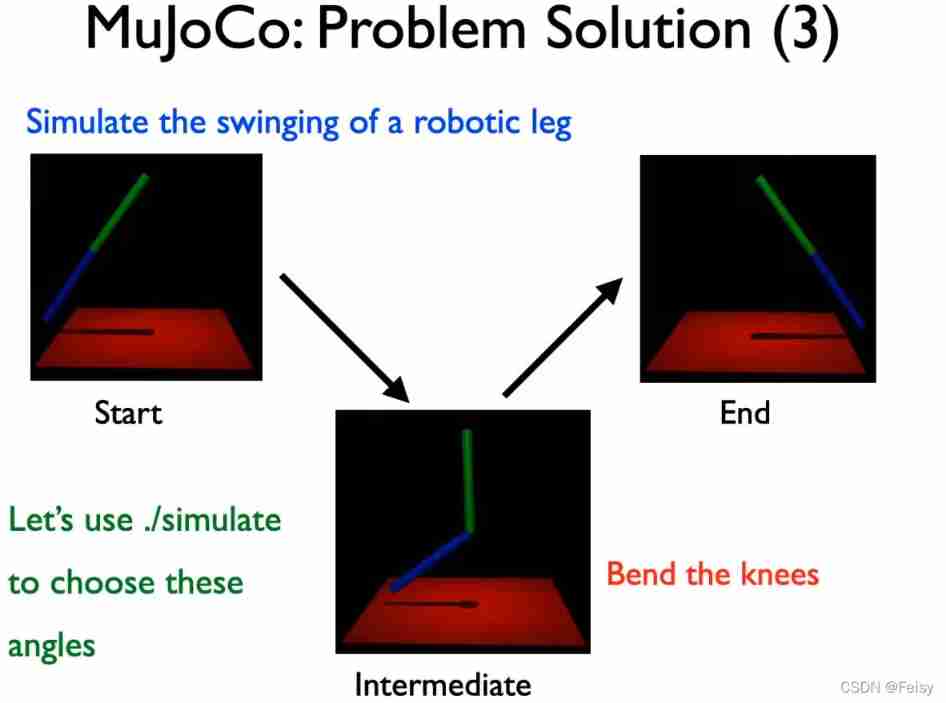
Code
#include<stdbool.h> //for bool
//#include<unistd.h> //for usleep
//#include <math.h>

//start: q0 = -1; q1 = 0
//intermediate: q0 = 0; q1 = -1.57 (pi/2)
//end: q0 = 1; q1 = 0;

double a0[2]={
    0},a1[2]={
    0},a2[2]={
    0},a3[2]={
    0};
double qref[2]={
    0}, uref[2]={
    0};

#include "mujoco.h"
#include "glfw3.h"
#include "stdio.h"
#include "stdlib.h"
#include "string.h"

//simulation end time
double simend = 5;

//state machine
int fsm_state;

#define fsm_hold 0
//const int fsm_hold = 0;
#define fsm_swing1 1
#define fsm_swing2 2
#define fsm_stop 3

const double t_hold = 0.5;
const double t_swing1 = 1;
const double t_swing2 = 1;

//related to writing data to a file
FILE *fid;
int loop_index = 0;
const int data_frequency = 10; //frequency at which data is written to a file


// char xmlpath[] = "../myproject/template_writeData/pendulum.xml";
// char datapath[] = "../myproject/template_writeData/data.csv";


//Change the path <template_writeData>
//Change the xml file
char path[] = "../myproject/dbpendulum_fsm/";
char xmlfile[] = "doublependulum.xml";


char datafile[] = "data.csv";


// MuJoCo data structures
mjModel* m = NULL;                  // MuJoCo model
mjData* d = NULL;                   // MuJoCo data
mjvCamera cam;                      // abstract camera
mjvOption opt;                      // visualization options
mjvScene scn;                       // abstract scene
mjrContext con;                     // custom GPU context

// mouse interaction
bool button_left = false;
bool button_middle = false;
bool button_right =  false;
double lastx = 0;
double lasty = 0;

// holders of one step history of time and position to calculate dertivatives
mjtNum position_history = 0;
mjtNum previous_time = 0;

// controller related variables
float_t ctrl_update_freq = 100;
mjtNum last_update = 0.0;
mjtNum ctrl;

// keyboard callback
void keyboard(GLFWwindow* window, int key, int scancode, int act, int mods)
{

    // backspace: reset simulation
    if( act==GLFW_PRESS && key==GLFW_KEY_BACKSPACE )
    {

        mj_resetData(m, d);
        mj_forward(m, d);
    }
}

// mouse button callback
void mouse_button(GLFWwindow* window, int button, int act, int mods)
{

    // update button state
    button_left =   (glfwGetMouseButton(window, GLFW_MOUSE_BUTTON_LEFT)==GLFW_PRESS);
    button_middle = (glfwGetMouseButton(window, GLFW_MOUSE_BUTTON_MIDDLE)==GLFW_PRESS);
    button_right =  (glfwGetMouseButton(window, GLFW_MOUSE_BUTTON_RIGHT)==GLFW_PRESS);

    // update mouse position
    glfwGetCursorPos(window, &lastx, &lasty);
}


// mouse move callback
void mouse_move(GLFWwindow* window, double xpos, double ypos)
{

    // no buttons down: nothing to do
    if( !button_left && !button_middle && !button_right )
        return;

    // compute mouse displacement, save
    double dx = xpos - lastx;
    double dy = ypos - lasty;
    lastx = xpos;
    lasty = ypos;

    // get current window size
    int width, height;
    glfwGetWindowSize(window, &width, &height);

    // get shift key state
    bool mod_shift = (glfwGetKey(window, GLFW_KEY_LEFT_SHIFT)==GLFW_PRESS ||
                      glfwGetKey(window, GLFW_KEY_RIGHT_SHIFT)==GLFW_PRESS);

    // determine action based on mouse button
    mjtMouse action;
    if( button_right )
        action = mod_shift ? mjMOUSE_MOVE_H : mjMOUSE_MOVE_V;
    else if( button_left )
        action = mod_shift ? mjMOUSE_ROTATE_H : mjMOUSE_ROTATE_V;
    else
        action = mjMOUSE_ZOOM;

    // move camera
    mjv_moveCamera(m, action, dx/height, dy/height, &scn, &cam);
}


// scroll callback
void scroll(GLFWwindow* window, double xoffset, double yoffset)
{

    // emulate vertical mouse motion = 5% of window height
    mjv_moveCamera(m, mjMOUSE_ZOOM, 0, -0.05*yoffset, &scn, &cam);
}


//****************************
//This function is called once and is used to get the headers
void init_save_data()
{

  //write name of the variable here (header)
   fprintf(fid,"t, ");
   fprintf(fid,"q0, q1, q0ref, q1ref ");

   //Don't remove the newline
   fprintf(fid,"\n");
}

//***************************
//This function is called at a set frequency, put data here
void save_data(const mjModel* m, mjData* d)
{

  //data here should correspond to headers in init_save_data()
  //seperate data by a space %f followed by space
  fprintf(fid,"%f, ",d->time);
  fprintf(fid,"%f, %f, %f, %f ",d->qpos[0],d->qpos[1],qref[0],qref[1]);

  //Don't remove the newline
  fprintf(fid,"\n");
}

/******************************/
void set_torque_control(const mjModel* m,int actuator_no,int flag)
{

  if (flag==0)
    m->actuator_gainprm[10*actuator_no+0]=0;
  else
    m->actuator_gainprm[10*actuator_no+0]=1;
}
/******************************/


/******************************/
void set_position_servo(const mjModel* m,int actuator_no,double kp)
{

  m->actuator_gainprm[10*actuator_no+0]=kp;
  m->actuator_biasprm[10*actuator_no+1]=-kp;
}
/******************************/

/******************************/
void set_velocity_servo(const mjModel* m,int actuator_no,double kv)
{

  m->actuator_gainprm[10*actuator_no+0]=kv;
  m->actuator_biasprm[10*actuator_no+2]=-kv;
}
/******************************/

//****************************
void generate_trajectory(double t0, double tf, double q_0[2],double q_f[2])
{

  int i;
  double tf_t0_3 = (tf-t0)*(tf-t0)*(tf-t0);
  for (i=0;i<2;i++)
  {

    double q0 = q_0[i], qf = q_f[i];
    a0[i] = qf*t0*t0*(3*tf-t0) + q0*tf*tf*(tf-3*t0); a0[i] = a0[i]/tf_t0_3;
    a1[i] = 6*t0*tf*(q0-qf); a1[i] = a1[i]/tf_t0_3;
    a2[i] = 3*(t0+tf)*(qf-q0); a2[i] = a2[i]/tf_t0_3;
    a3[i] = 2*(q0-qf); a3[i] = a3[i]/tf_t0_3;
  }
}
//**************************
void init_controller(const mjModel* m, mjData* d)
{

  fsm_state = fsm_hold;
  set_position_servo(m,1,0); //set pservo1 to 0
  set_velocity_servo(m,2,0); //set vservo1 to 0
  set_position_servo(m,4,0); //set pservo2 to 0
  set_velocity_servo(m,5,0); //set vservo2 to 0
}

//**************************
void mycontroller(const mjModel* m, mjData* d)
{

  //write control here
  int i;
  double t;
  t = d->time;
  //start: q0 = -1; q1 = 0
  //intermediate: q0 = 0; q1 = -1.57 (pi/2)
  //end: q0 = 1; q1 = 0;
  //transitions
  if (fsm_state == fsm_hold && d->time >=t_hold)
  {

    fsm_state = fsm_swing1;
    double q_0[2]={
    0}; double q_f[2]={
    0};
    q_0[0]= -1; q_0[1] = 0;
    q_f[0]= 0.5;  q_f[1] = -2;
    generate_trajectory(t_hold,t_hold + t_swing1,q_0,q_f);
  }
  if (fsm_state == fsm_swing1 && d->time >=t_hold+t_swing1)
  {

    fsm_state = fsm_swing2;
    double q_0[2]={
    0}; double q_f[2]={
    0};
    q_0[0]= 0.5; q_0[1] = -2;
    q_f[0]= 1;  q_f[1] = 0;
    generate_trajectory(t_hold+t_swing1,t_hold + t_swing1+t_swing2,q_0,q_f);
  }
  if (fsm_state == fsm_swing2 && d->time >=t_hold+t_swing1+t_swing2)
  {

    fsm_state = fsm_stop;
  }

  //actions
  //start: q0 = -1; q1 = 0
  //intermediate: q0 = 0; q1 = -1.57 (pi/2)
  //end: q0 = 1; q1 = 0;
  double q0, q1;
  double kp = 500, kv = 50;
  if (fsm_state == fsm_hold)
  {

    //q0 = -1; q1 = 0;
    qref[0]=-1; qref[1]=0;
    uref[0]=0;  uref[1]=0;
    d->ctrl[0] = -kp*(d->qpos[0]-qref[0])-kv*d->qvel[0];
    d->ctrl[3] = -kp*(d->qpos[1]-qref[1])-kv*d->qvel[1];

    // d->ctrl[1] = q0;
    // d->ctrl[4] = q1;
  }
  if (fsm_state == fsm_swing1) //generate trajectory
  {

    //q0 = 0; q1 = -1.57;


    for (i=0;i<2;i++)
    {

      qref[i] = a0[i] + a1[i]*t + a2[i]*t*t + a3[i]*t*t*t;
      uref[i] =      a1[i] + 2*a2[i]*t + 3*a3[i]*t*t;
    }
    d->ctrl[0] = -kp*(d->qpos[0]-qref[0])-kv*(d->qvel[0]-uref[0]);
    d->ctrl[3] = -kp*(d->qpos[1]-qref[1])-kv*(d->qvel[1]-uref[1]);

    // d->ctrl[1] = q0;
    // d->ctrl[4] = q1;
  }
  if (fsm_state == fsm_swing2) //generate trajectory
  {

    //q0 = 1; q1 = 0;

    //double qref[2]={0}, uref[2]={0};
    for (i=0;i<2;i++)
    {

      qref[i] = a0[i] + a1[i]*t + a2[i]*t*t + a3[i]*t*t*t;
      uref[i] =      a1[i] + 2*a2[i]*t + 3*a3[i]*t*t;
    }
    d->ctrl[0] = -kp*(d->qpos[0]-qref[0])-kv*(d->qvel[0]-uref[0]);
    d->ctrl[3] = -kp*(d->qpos[1]-qref[1])-kv*(d->qvel[1]-uref[1]);


    // d->ctrl[1] = q0;
    // d->ctrl[4] = q1;
  }
  if (fsm_state == fsm_stop)
  {

    qref[0]=1;  qref[1]=0;
    uref[0]=0;  uref[1]=0;
    d->ctrl[0] = -kp*(d->qpos[0]-qref[0])-kv*d->qvel[0];
    d->ctrl[3] = -kp*(d->qpos[1]-qref[1])-kv*d->qvel[1];

    // d->ctrl[1] = q0;
    // d->ctrl[4] = q1;
  }


  //write data here (dont change/dete this function call; instead write what you need to save in save_data)
  if ( loop_index%data_frequency==0)
    {

      save_data(m,d);
    }
  loop_index = loop_index + 1;
}


//************************
// main function
int main(int argc, const char** argv)
{


    // activate software
    mj_activate("mjkey.txt");

    char xmlpath[100]={
    };
    char datapath[100]={
    };

    strcat(xmlpath,path);
    strcat(xmlpath,xmlfile);

    strcat(datapath,path);
    strcat(datapath,datafile);


    // load and compile model
    char error[1000] = "Could not load binary model";

    // check command-line arguments
    if( argc<2 )
        m = mj_loadXML(xmlpath, 0, error, 1000);

    else
        if( strlen(argv[1])>4 && !strcmp(argv[1]+strlen(argv[1])-4, ".mjb") )
            m = mj_loadModel(argv[1], 0);
        else
            m = mj_loadXML(argv[1], 0, error, 1000);
    if( !m )
        mju_error_s("Load model error: %s", error);

    // make data
    d = mj_makeData(m);


    // init GLFW
    if( !glfwInit() )
        mju_error("Could not initialize GLFW");

    // create window, make OpenGL context current, request v-sync
    GLFWwindow* window = glfwCreateWindow(1244, 700, "Demo", NULL, NULL);
    glfwMakeContextCurrent(window);
    glfwSwapInterval(1);

    // initialize visualization data structures
    mjv_defaultCamera(&cam);
    mjv_defaultOption(&opt);
    mjv_defaultScene(&scn);
    mjr_defaultContext(&con);
    mjv_makeScene(m, &scn, 2000);                // space for 2000 objects
    mjr_makeContext(m, &con, mjFONTSCALE_150);   // model-specific context

    // install GLFW mouse and keyboard callbacks
    glfwSetKeyCallback(window, keyboard);
    glfwSetCursorPosCallback(window, mouse_move);
    glfwSetMouseButtonCallback(window, mouse_button);
    glfwSetScrollCallback(window, scroll);

    double arr_view[] = {
    89.608063, -11.588379, 5, 0.000000, 0.000000, 1.000000};
    cam.azimuth = arr_view[0];
    cam.elevation = arr_view[1];
    cam.distance = arr_view[2];
    cam.lookat[0] = arr_view[3];
    cam.lookat[1] = arr_view[4];
    cam.lookat[2] = arr_view[5];

    // install control callback
    mjcb_control = mycontroller;

    d->qpos[0] = -1;

    fid = fopen(datapath,"w");
    init_save_data();
    init_controller(m,d);

    // use the first while condition if you want to simulate for a period.
    while( !glfwWindowShouldClose(window))
    {

        // advance interactive simulation for 1/60 sec
        // Assuming MuJoCo can simulate faster than real-time, which it usually can,
        // this loop will finish on time for the next frame to be rendered at 60 fps.
        // Otherwise add a cpu timer and exit this loop when it is time to render.
        mjtNum simstart = d->time;
        while( d->time - simstart < 1.0/60.0 )
        {

            mj_step(m, d);
        }

        if (d->time>=simend)
        {

           fclose(fid);
           break;
         }

       // get framebuffer viewport
        mjrRect viewport = {
    0, 0, 0, 0};
        glfwGetFramebufferSize(window, &viewport.width, &viewport.height);

          // update scene and render
        mjv_updateScene(m, d, &opt, NULL, &cam, mjCAT_ALL, &scn);
        mjr_render(viewport, &scn, &con);
        //printf("{%f, %f, %f, %f, %f, %f};\n",cam.azimuth,cam.elevation, cam.distance,cam.lookat[0],cam.lookat[1],cam.lookat[2]);

        // swap OpenGL buffers (blocking call due to v-sync)
        glfwSwapBuffers(window);

        // process pending GUI events, call GLFW callbacks
        glfwPollEvents();

    }

    // free visualization storage
    mjv_freeScene(&scn);
    mjr_freeContext(&con);

    // free MuJoCo model and data, deactivate
    mj_deleteData(d);
    mj_deleteModel(m);
    mj_deactivate();

    // terminate GLFW (crashes with Linux NVidia drivers)
    #if defined(__APPLE__) || defined(_WIN32)
        glfwTerminate();
    #endif

    return 1;
}
边栏推荐
- dynamic programming
- After leaving a foreign company, I know what respect and compliance are
- 509 certificat basé sur Go
- Devops can help reduce technology debt in ten ways
- Leecode brush questions record sword finger offer 44 A digit in a sequence of numbers
- 互动滑轨屏演示能为企业展厅带来什么
- DAY FIVE
- On February 19, 2021ccf award ceremony will be held, "why in Hengdian?"
- 一图看懂对程序员的误解:西方程序员眼中的中国程序员
- Testers, how to prepare test data
猜你喜欢
Introduction to GPIO
How to set encoding in idea
ldap创建公司组织、人员
DAY ONE
GPIO簡介
Win10 startup error, press F9 to enter how to repair?

Clipboard management tool paste Chinese version

Amazon MemoryDB for Redis 和 Amazon ElastiCache for Redis 的内存优化

一图看懂对程序员的误解:西方程序员眼中的中国程序员

48 page digital government smart government all in one solution
随机推荐
Designed for decision tree, the National University of Singapore and Tsinghua University jointly proposed a fast and safe federal learning system
Leecode brush questions record interview questions 32 - I. print binary tree from top to bottom
JWT signature does not match locally computed signature. JWT validity cannot be asserted and should
微信小程序uploadfile服务器,微信小程序之wx.uploadFile[通俗易懂]
Jenkins' user credentials plug-in installation
数据运营平台-数据采集[通俗易懂]
TypeScript中使用类型别名
37 page overall planning and construction plan for digital Village revitalization of smart agriculture
Sword finger offer 26 Substructure of tree
[vector retrieval research series] product introduction
Use source code compilation to install postgresql13.3 database
DAY ONE
MySQL master-slave multi-source replication (3 master and 1 slave) setup and synchronization test
PostgreSQL uses pgpool II to realize read-write separation + load balancing
2022/2/10 summary
Leecode brush questions record sword finger offer 43 The number of occurrences of 1 in integers 1 to n
Common shortcuts to idea
JS import excel & Export Excel
基于GO语言实现的X.509证书
[CVPR 2022] target detection sota:dino: Detr with improved detecting anchor boxes for end to end object detection