当前位置:网站首页>3D视觉——4.手势识别(Gesture Recognition)入门——使用MediaPipe含单帧(Singel Frame)和实时视频(Real-Time Video)
3D视觉——4.手势识别(Gesture Recognition)入门——使用MediaPipe含单帧(Singel Frame)和实时视频(Real-Time Video)
2022-07-06 01:20:00 【游客26024】
上一话3D视觉——3.人体姿态估计(Pose Estimation) 算法对比 即 效果展示——MediaPipe与OpenPose https://blog.csdn.net/XiaoyYidiaodiao/article/details/125571632?spm=1001.2014.3001.5502这一章 讲述 使用MediaPipe的手势识别
单帧手势识别代码
重点简单代码讲解
1.solutions.hands
import mediapipe as mp
mp_hands = mp.solutions.hands
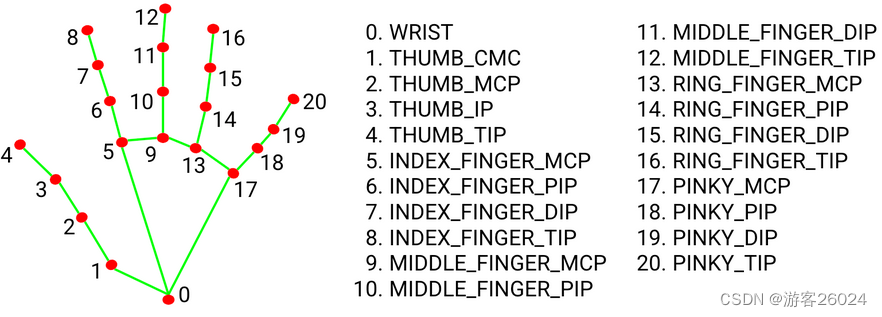
mediapipe手势模块(.solutions.hands)将手分成21个点(0-20)如下图1. ,可通过判断手势的角度,来识别是什么手势。8号关键点很重要,因为做HCI(人机交互)都是以8号关键点为要素。
2.mp_hand.Hands()
static_image_mode 表示 静态图像还是连续帧视频;
max_num_hands 表示 最多识别多少只手,手越多识别越慢;
min_detection_confidence 表示 检测置信度阈值;
min_tracking_confidence 表示 各帧之间跟踪置信度阈值;
hands = mp_hands.Hands(static_image_mode=True,
                           max_num_hands=2,
                           min_detection_confidence=0.5,
                           min_tracking_confidence=0.5)
3.mp.solutions.drawing_utils
绘图
draw = mp.solutions.drawing_utils
draw.draw_landmarks(img, hand, mp_hands.HAND_CONNECTIONS)
完整代码
import cv2
import mediapipe as mp
import matplotlib.pyplot as plt

if __name__ == '__main__':
    mp_hands = mp.solutions.hands
    hands = mp_hands.Hands(static_image_mode=True,
                           max_num_hands=2,
                           min_detection_confidence=0.5,
                           min_tracking_confidence=0.5)

    draw = mp.solutions.drawing_utils
    img = cv2.imread("3.jpg")

    # Flip Horizontal
    img = cv2.flip(img, 1)

    # BGR to RGB
    img = cv2.cvtColor(img, cv2.COLOR_BGR2RGB)

    results = hands.process(img)

    # detected hands
    if results.multi_hand_landmarks:
        for hand_idx, _ in enumerate(results.multi_hand_landmarks):
            hand = results.multi_hand_landmarks[hand_idx]
            draw.draw_landmarks(img, hand, mp_hands.HAND_CONNECTIONS)
    plt.imshow(img)
    plt.show()
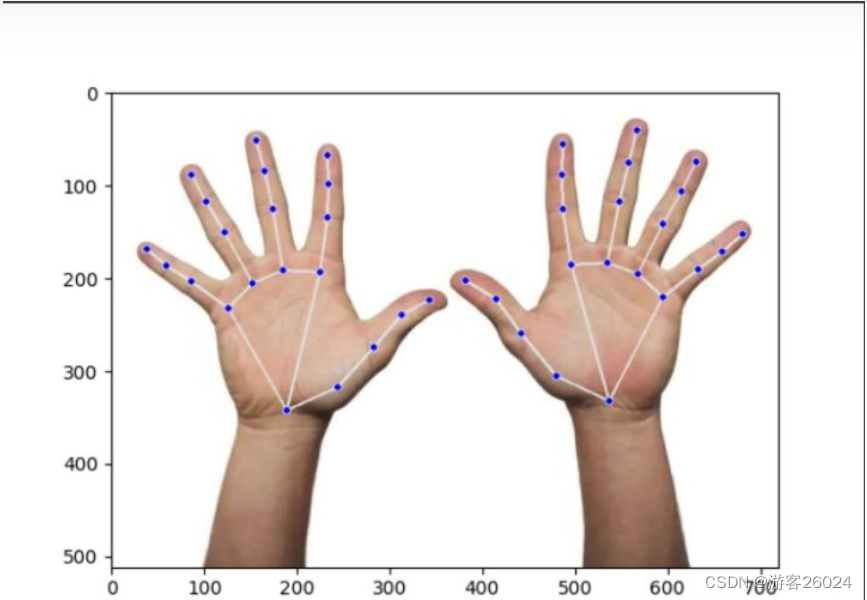
运行结果
输出结果解析
import cv2
import mediapipe as mp
import matplotlib.pyplot as plt
if __name__ == "__main__":
    mp_hands = mp.solutions.hands
    hands = mp_hands.Hands(static_image_mode=False,
                           max_num_hands=2,
                           min_detection_confidence=0.5,
                           min_tracking_confidence=0.5)
    draw = mp.soultions.drawing_utils
    img = cv2.imread("3.jpg")
    img = cv2.filp(img, 1)
    img = cv2.cvtColor(img, cv2.COLOR_BGR2RGB)
    results = hands.process(img)
    print(results.multi_handedness)
显示置信度与左右手
print(results.multi_handedness)
# results.multi_handedness
结果如下,其中:label 表示 左右手;socre 表示 置信度。
[classification {
  index: 0
  score: 0.9686367511749268
  label: "Left"
}
, classification {
  index: 1
  score: 0.9293265342712402
  label: "Right"
}
]

Process finished with exit code 0
调用索引为1的置信度或者标签(左右手)
print(results.multi_handedness[1].classification[0].label)
# results.multi_handedness[1].classification[0].label

print(results.multi_handedness[1].classification[0].score)
# results.multi_handedness[1].classification[0].scor
结果如下
Right

0.9293265342712402

Process finished with exit code 0
关键点坐标
所有手指的关键点坐标都显示出来
print(results.multi_hand_landmarks)
# results.multi_hand_landmarks
结果如下,其中这个z轴不是真正的归一化或者真实距离,是与第0号关键点(手腕根部)相对的单位,所以这个在另外一个方面这也算是2.5D
[landmark {
  x: 0.2627016007900238
  y: 0.6694213151931763
  z: 5.427047540251806e-07
}
landmark {
  x: 0.33990585803985596
  y: 0.6192424297332764
  z: -0.03650109842419624
}
landmark {
  x: 0.393616259098053
  y: 0.5356684923171997
  z: -0.052688632160425186
}
landmark {
  x: 0.43515193462371826
  y: 0.46728551387786865
  z: -0.06730890274047852
}
landmark {
  x: 0.47741779685020447
  y: 0.4358704090118408
  z: -0.08190854638814926
}
landmark {
  x: 0.3136638104915619
  y: 0.3786224126815796
  z: -0.031268805265426636
}
landmark {
  x: 0.32385849952697754
  y: 0.2627469599246979
  z: -0.05158748850226402
}
landmark {
  x: 0.32598018646240234
  y: 0.19216321408748627
  z: -0.06765355914831161
}
landmark {
  x: 0.32443925738334656
  y: 0.13277988135814667
  z: -0.08096525818109512
}
landmark {
  x: 0.2579415738582611
  y: 0.37382692098617554
  z: -0.032878294587135315
}
landmark {
  x: 0.2418910712003708
  y: 0.24533957242965698
  z: -0.052028004080057144
}
landmark {
  x: 0.2304030954837799
  y: 0.16545917093753815
  z: -0.06916359812021255
}
landmark {
  x: 0.2175263613462448
  y: 0.10054746270179749
  z: -0.08164216578006744
}
landmark {
  x: 0.2122785747051239
  y: 0.4006640613079071
  z: -0.03896263241767883
}
landmark {
  x: 0.16991624236106873
  y: 0.29440340399742126
  z: -0.06328895688056946
}
landmark {
  x: 0.14282439649105072
  y: 0.22940337657928467
  z: -0.0850684642791748
}
landmark {
  x: 0.12077423930168152
  y: 0.17327186465263367
  z: -0.09951525926589966
}
landmark {
  x: 0.17542198300361633
  y: 0.45321160554885864
  z: -0.04842161759734154
}
landmark {
  x: 0.11945687234401703
  y: 0.3971719741821289
  z: -0.07581596076488495
}
landmark {
  x: 0.08262123167514801
  y: 0.364059180021286
  z: -0.0922597199678421
}
landmark {
  x: 0.05292154848575592
  y: 0.3294071555137634
  z: -0.10204877704381943
}
, landmark {
  x: 0.7470765113830566
  y: 0.6501559019088745
  z: 5.611524898085918e-07
}
landmark {
  x: 0.6678823232650757
  y: 0.5958800911903381
  z: -0.02732565440237522
}
landmark {
  x: 0.6151978969573975
  y: 0.5073886513710022
  z: -0.04038363695144653
}
landmark {
  x: 0.5764827728271484
  y: 0.4352443814277649
  z: -0.05264268442988396
}
landmark {
  x: 0.5317870378494263
  y: 0.39630216360092163
  z: -0.0660330131649971
}
landmark {
  x: 0.6896227598190308
  y: 0.36289966106414795
  z: -0.0206490196287632
}
landmark {
  x: 0.6775739192962646
  y: 0.24553297460079193
  z: -0.040212471038103104
}
landmark {
  x: 0.6752403974533081
  y: 0.1725052148103714
  z: -0.0579310804605484
}
landmark {
  x: 0.6765506267547607
  y: 0.10879574716091156
  z: -0.07280831784009933
}
landmark {
  x: 0.7441056370735168
  y: 0.35811278223991394
  z: -0.027878733351826668
}
landmark {
  x: 0.7618186473846436
  y: 0.22912392020225525
  z: -0.04549985006451607
}
landmark {
  x: 0.7751038670539856
  y: 0.14770638942718506
  z: -0.06489630043506622
}
landmark {
  x: 0.788221538066864
  y: 0.07831943035125732
  z: -0.08037586510181427
}
landmark {
  x: 0.7893437743186951
  y: 0.38241785764694214
  z: -0.03979477286338806
}
landmark {
  x: 0.8274303674697876
  y: 0.27563461661338806
  z: -0.06700978428125381
}
landmark {
  x: 0.8543692827224731
  y: 0.20750769972801208
  z: -0.09000862389802933
}
landmark {
  x: 0.877074122428894
  y: 0.14460964500904083
  z: -0.10605450719594955
}
landmark {
  x: 0.8275361061096191
  y: 0.4312361180782318
  z: -0.05377437546849251
}
landmark {
  x: 0.879731297492981
  y: 0.3712681233882904
  z: -0.08328921347856522
}
landmark {
  x: 0.9155224561691284
  y: 0.33470967411994934
  z: -0.09889543056488037
}
landmark {
  x: 0.9464077949523926
  y: 0.297884464263916
  z: -0.109173983335495
}
]

Process finished with exit code 0
统计手的数量
print(len(results.multi_hand_landmarks))
# len(results.multi_hand_landmarks)
结果如下
2

Process finished with exit code 0
获取索引为1的第3号关键点的坐标
print(results.multi_hand_landmarks[1].landmark[3])
# results.multi_hand_landmarks[1].landmark[3]
结果如下
x: 0.5764827728271484
y: 0.4352443814277649
z: -0.05264268442988396


Process finished with exit code 0
以上的x,y坐标是根据高和宽归一化之后的结果,将其转化为图像中坐标结果
    height, width, _ = img.shape
    print("height:{},width:{}".format(height, width))
    cx = results.multi_hand_landmarks[1].landmark[3].x * width
    cy = results.multi_hand_landmarks[1].landmark[3].y * height
    print("cx:{}, cy:{}".format(cx, cy))
结果如下
height:512,width:720
cx:415.0675964355469, cy:222.84512329101562

Process finished with exit code 0
关键点之间的连接
print(mp_hands.HAND_CONNECTIONS)
# mp_hands.HAND_CONNECTIONS
结果如下
frozenset({(3, 4),
           (0, 5),
           (17, 18),
           (0, 17),
           (13, 14),
           (13, 17),
           (18, 19),
           (5, 6),
           (5, 9),
           (14, 15),
           (0, 1),
           (9, 10),
           (1, 2),
           (9, 13),
           (10, 11),
           (19, 20),
           (6, 7),
           (15, 16),
           (2, 3),
           (11, 12),
           (7, 8)})

Process finished with exit code 0
显示左右手信息
    if results.multi_hand_landmarks:
        hand_info = ""
        for h_idx, hand in enumerate(results.multi_hand_landmarks):
            hand_info += str(h_idx) + ":" + str(results.multi_handedness[h_idx].classification[0].label) + ", "
        print(hand_info)
结果如下
0:Left, 1:Right,

Process finished with exit code 0
单帧手势识别代码优化
完整代码
import cv2
import mediapipe as mp
import matplotlib.pyplot as plt

if __name__ == '__main__':
    mp_hands = mp.solutions.hands
    hands = mp_hands.Hands(static_image_mode=True,
                           max_num_hands=2,
                           min_detection_confidence=0.5,
                           min_tracking_confidence=0.5)

    draw = mp.solutions.drawing_utils
    img = cv2.imread("3.jpg")
    img = cv2.flip(img, 1)
    height, width, _ = img.shape
    img = cv2.cvtColor(img, cv2.COLOR_BGR2RGB)
    results = hands.process(img)
    if results.multi_hand_landmarks:
        handness_str = ''
        index_finger_tip_str = ''
        for h_idx, hand in enumerate(results.multi_hand_landmarks):
            # get 21 key points of hand
            hand_info = results.multi_hand_landmarks[h_idx]

            # log left and right hands info
            draw.draw_landmarks(img, hand_info, mp_hands.HAND_CONNECTIONS)

            temp_handness = results.multi_handedness[h_idx].classification[0].label
            handness_str += "{}:{} ".format(h_idx, temp_handness)

            cz0 = hand_info.landmark[0].z

            for idx, keypoint in enumerate(hand_info.landmark):
                cx = int(keypoint.x * width)
                cy = int(keypoint.y * height)
                cz = keypoint.z
                depth_z = cz0 - cz

                # radius about depth_z
                radius = int(6 * (1 + depth_z))

                if idx == 0:
                    img = cv2.circle(img, (cx, cy), radius * 2, (0, 0, 255), -1)
                elif idx == 8:
                    img = cv2.circle(img, (cx, cy), radius * 2, (193, 182, 255), -1)
                    index_finger_tip_str += '{}:{:.2f} '.format(h_idx, depth_z)
                elif idx in [1, 5, 9, 13, 17]:
                    img = cv2.circle(img, (cx, cy), radius, (16, 144, 247), -1)
                elif idx in [2, 6, 10, 14, 18]:
                    img = cv2.circle(img, (cx, cy), radius, (1, 240, 255), -1)
                elif idx in [3, 7, 11, 15, 19]:
                    img = cv2.circle(img, (cx, cy), radius, (140, 47, 240), -1)
                elif idx in [4, 12, 16, 20]:
                    img = cv2.circle(img, (cx, cy), radius, (223, 155, 60), -1)

    img = cv2.putText(img, handness_str, (10, 30), cv2.FONT_HERSHEY_SIMPLEX, 0.6, (255, 0, 0), 2)
    img = cv2.putText(img, index_finger_tip_str, (10, 80), cv2.FONT_HERSHEY_SIMPLEX, 0.6, (255, 0, 255), 2)
    plt.imshow(img)
    plt.show()
这次就不用那个莫兰迪色了,朋友说我用了那个莫兰迪色系还不如本来的颜色明显。
运行程序

视频手势识别
1.摄像头拍摄手势识别
简化版代码
import cv2
import mediapipe as mp

mp_hands = mp.solutions.hands
hands = mp_hands.Hands(static_image_mode=False,
                       max_num_hands=2,
                       min_tracking_confidence=0.5,
                       min_detection_confidence=0.5)
draw = mp.solutions.drawing_utils


def process_frame(img):
    img = cv2.flip(img, 1)
    height, width, _ = img.shape
    results = hands.process(img)
    if results.multi_hand_landmarks:
        for h_idx, hand in enumerate(results.multi_hand_landmarks):
            draw.draw_landmarks(img, hand, mp_hands.HAND_CONNECTIONS)

    return img


if __name__ == '__main__':
    cap = cv2.VideoCapture()
    cap.open(0)
    while cap.isOpened():
        success, frame = cap.read()
        if not success:
            raise ValueError("Error")
        frame = process_frame(frame)
        cv2.imshow("hand", frame)
        if cv2.waitKey(1) in [ord('q'), 27]:
            break
    cap.release()
    cv2.destroyAllWindows()
优化版代码
import cv2
import mediapipe as mp

mp_hands = mp.solutions.hands
hands = mp_hands.Hands(static_image_mode=False,
                       max_num_hands=2,
                       min_tracking_confidence=0.5,
                       min_detection_confidence=0.5)
draw = mp.solutions.drawing_utils


def process_frame(img):
    img = cv2.flip(img, 1)
    height, width, _ = img.shape
    results = hands.process(img)

    handness_str = ''
    index_finger_tip_str = ''
    if results.multi_hand_landmarks:
        for h_idx, hand in enumerate(results.multi_hand_landmarks):
            draw.draw_landmarks(img, hand, mp_hands.HAND_CONNECTIONS)
            # get 21 key points of hand
            hand_info = results.multi_hand_landmarks[h_idx]

            # log left and right hands info
            temp_handness = results.multi_handedness[h_idx].classification[0].label
            handness_str += "{}:{} ".format(h_idx, temp_handness)

            cz0 = hand_info.landmark[0].z
            for idx, keypoint in enumerate(hand_info.landmark):
                cx = int(keypoint.x * width)
                cy = int(keypoint.y * height)
                cz = keypoint.z
                depth_z = cz0 - cz

                # radius about depth_z
                radius = int(6 * (1 + depth_z))

                if idx == 0:
                    img = cv2.circle(img, (cx, cy), radius * 2, (0, 0, 255), -1)
                elif idx == 8:
                    img = cv2.circle(img, (cx, cy), radius * 2, (193, 182, 255), -1)
                    index_finger_tip_str += '{}:{:.2f} '.format(h_idx, depth_z)
                elif idx in [1, 5, 9, 13, 17]:
                    img = cv2.circle(img, (cx, cy), radius, (16, 144, 247), -1)
                elif idx in [2, 6, 10, 14, 18]:
                    img = cv2.circle(img, (cx, cy), radius, (1, 240, 255), -1)
                elif idx in [3, 7, 11, 15, 19]:
                    img = cv2.circle(img, (cx, cy), radius, (140, 47, 240), -1)
                elif idx in [4, 12, 16, 20]:
                    img = cv2.circle(img, (cx, cy), radius, (223, 155, 60), -1)
    img = cv2.putText(img, handness_str, (25, 50), cv2.FONT_HERSHEY_SIMPLEX, 0.6, (255, 0, 0), 2)
    img = cv2.putText(img, index_finger_tip_str, (25, 100), cv2.FONT_HERSHEY_SIMPLEX, 0.6, (255, 0, 255), 2)

    return img


if __name__ == '__main__':
    cap = cv2.VideoCapture()
    cap.open(0)
    while cap.isOpened():
        success, frame = cap.read()
        if not success:
            raise ValueError("Error")
        frame = process_frame(frame)
        cv2.imshow("hand", frame)
        if cv2.waitKey(1) in [ord('q'), 27]:
            break
    cap.release()
    cv2.destroyAllWindows()
此代码能正常运行,不展示运行结果!
2.视频实时手势识别
简化版完整代码
import cv2
from tqdm import tqdm
import mediapipe as mp

mp_hands = mp.solutions.hands
hands = mp_hands.Hands(static_image_mode=False,
                       max_num_hands=2,
                       min_tracking_confidence=0.5,
                       min_detection_confidence=0.5)
draw = mp.solutions.drawing_utils


def process_frame(img):
    img = cv2.flip(img, 1)
    height, width, _ = img.shape
    results = hands.process(img)
    if results.multi_hand_landmarks:
        for h_idx, hand in enumerate(results.multi_hand_landmarks):
            draw.draw_landmarks(img, hand, mp_hands.HAND_CONNECTIONS)

    return img


def out_video(input):
    file = input.split("/")[-1]
    output = "out-" + file
    print("It will start processing video: {}".format(input))
    cap = cv2.VideoCapture(input)
    frame_count = int(cap.get(cv2.CAP_PROP_FRAME_COUNT))
    frame_size = (cap.get(cv2.CAP_PROP_FRAME_WIDTH), cap.get(cv2.CAP_PROP_FRAME_HEIGHT))
    # create VideoWriter, VideoWriter_fourcc is video decode
    fourcc = cv2.VideoWriter_fourcc(*'mp4v')
    fps = cap.get(cv2.CAP_PROP_FPS)
    out = cv2.VideoWriter(output, fourcc, fps, (int(frame_size[0]), int(frame_size[1])))
    with tqdm(range(frame_count)) as pbar:
        while cap.isOpened:
            success, frame = cap.read()
            if not success:
                break
            frame = process_frame(frame)
            out.write(frame)
            pbar.update(1)
    pbar.close()
    cv2.destroyAllWindows()
    out.release()
    cap.release()
    print("{} finished!".format(output))


if __name__ == '__main__':
    video_dirs = "7.mp4"
    out_video(video_dirs)
运行结果
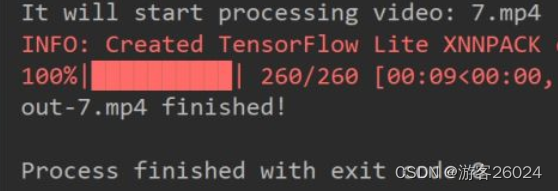
此视频是我在网上随便找来做实验的
手势识别
优化版完整代码
import cv2
import time
from tqdm import tqdm
import mediapipe as mp

mp_hands = mp.solutions.hands
hands = mp_hands.Hands(static_image_mode=False,
                       max_num_hands=2,
                       min_tracking_confidence=0.5,
                       min_detection_confidence=0.5)
draw = mp.solutions.drawing_utils


def process_frame(img):
    t0 = time.time()
    img = cv2.flip(img, 1)
    height, width, _ = img.shape
    results = hands.process(img)
    handness_str = ''
    index_finger_tip_str = ''
    if results.multi_hand_landmarks:
        for h_idx, hand in enumerate(results.multi_hand_landmarks):
            draw.draw_landmarks(img, hand, mp_hands.HAND_CONNECTIONS)

            # get 21 key points of hand
            hand_info = results.multi_hand_landmarks[h_idx]

            # log left and right hands info
            temp_handness = results.multi_handedness[h_idx].classification[0].label
            handness_str += "{}:{} ".format(h_idx, temp_handness)

            cz0 = hand_info.landmark[0].z
            for idx, keypoint in enumerate(hand_info.landmark):
                cx = int(keypoint.x * width)
                cy = int(keypoint.y * height)
                cz = keypoint.z
                depth_z = cz0 - cz

                # radius about depth_z
                radius = int(6 * (1 + depth_z))

                if idx == 0:
                    img = cv2.circle(img, (cx, cy), radius * 2, (0, 0, 255), -1)
                elif idx == 8:
                    img = cv2.circle(img, (cx, cy), radius * 2, (193, 182, 255), -1)
                    index_finger_tip_str += '{}:{:.2f} '.format(h_idx, depth_z)
                elif idx in [1, 5, 9, 13, 17]:
                    img = cv2.circle(img, (cx, cy), radius, (16, 144, 247), -1)
                elif idx in [2, 6, 10, 14, 18]:
                    img = cv2.circle(img, (cx, cy), radius, (1, 240, 255), -1)
                elif idx in [3, 7, 11, 15, 19]:
                    img = cv2.circle(img, (cx, cy), radius, (140, 47, 240), -1)
                elif idx in [4, 12, 16, 20]:
                    img = cv2.circle(img, (cx, cy), radius, (223, 155, 60), -1)
        img = cv2.putText(img, handness_str, (25, 100), cv2.FONT_HERSHEY_SIMPLEX, 0.6, (255, 0, 0), 2)
        img = cv2.putText(img, index_finger_tip_str, (25, 150), cv2.FONT_HERSHEY_SIMPLEX, 0.6, (255, 0, 255), 2)
        fps = 1 / (time.time() - t0)
        img = cv2.putText(img, "FPS:" + str(int(fps)), (25, 50), cv2.FONT_HERSHEY_SIMPLEX, 0.6, (0, 255, 0), 2)

    return img


def out_video(input):
    file = input.split("/")[-1]
    output = "out-optim-" + file
    print("It will start processing video: {}".format(input))
    cap = cv2.VideoCapture(input)
    frame_count = int(cap.get(cv2.CAP_PROP_FRAME_COUNT))
    frame_size = (cap.get(cv2.CAP_PROP_FRAME_WIDTH), cap.get(cv2.CAP_PROP_FRAME_HEIGHT))
    # create VideoWriter, VideoWriter_fourcc is video decode
    fourcc = cv2.VideoWriter_fourcc(*'mp4v')
    fps = cap.get(cv2.CAP_PROP_FPS)
    out = cv2.VideoWriter(output, fourcc, fps, (int(frame_size[0]), int(frame_size[1])))
    with tqdm(range(frame_count)) as pbar:
        while cap.isOpened:
            success, frame = cap.read()
            if not success:
                break
            frame = process_frame(frame)
            out.write(frame)
            pbar.update(1)
    pbar.close()
    cv2.destroyAllWindows()
    out.release()
    cap.release()
    print("{} finished!".format(output))


if __name__ == '__main__':
    video_dirs = "7.mp4"
    out_video(video_dirs)
运行结果
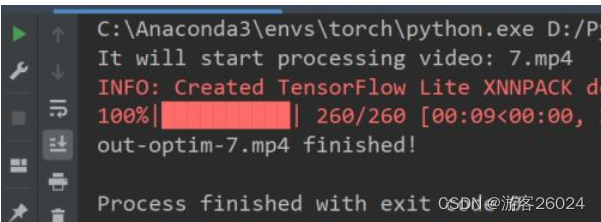
手势识别优化
未完...
边栏推荐
- Live broadcast system code, custom soft keyboard style: three kinds of switching: letters, numbers and punctuation
- How to extract MP3 audio from MP4 video files?
- 测试/开发程序员的成长路线,全局思考问题的问题......
- 现货白银的一般操作方法
- SCM Chinese data distribution
- GNSS terminology
- Who knows how to modify the data type accuracy of the columns in the database table of Damon
- Questions about database: (5) query the barcode, location and reader number of each book in the inventory table
- Interview must brush algorithm top101 backtracking article top34
- Electrical data | IEEE118 (including wind and solar energy)
猜你喜欢

WordPress collection plug-in automatically collects fake original free plug-ins
Differences between standard library functions and operators
3D model format summary
leetcode刷题_平方数之和

程序员搞开源,读什么书最合适?
Yii console method call, Yii console scheduled task
Daily practice - February 13, 2022

Vulhub vulnerability recurrence 74_ Wordpress
Pbootcms plug-in automatically collects fake original free plug-ins

Exciting, 2022 open atom global open source summit registration is hot
随机推荐
ubantu 查看cudnn和cuda的版本
Idea sets the default line break for global newly created files
Vulhub vulnerability recurrence 74_ Wordpress
视频直播源码,实现本地存储搜索历史记录
什么是弱引用?es6中有哪些弱引用数据类型?js中的弱引用是什么?
Questions about database: (5) query the barcode, location and reader number of each book in the inventory table
ORA-00030
2020.2.13
After 95, the CV engineer posted the payroll and made up this. It's really fragrant
Modify the ssh server access port number
Une image! Pourquoi l'école t'a - t - elle appris à coder, mais pourquoi pas...
【全网最全】 |MySQL EXPLAIN 完全解读
ORA-00030
General operation method of spot Silver
yii中console方法调用,yii console定时任务
SSH login is stuck and disconnected
Recursive method converts ordered array into binary search tree
Code Review关注点
黄金价格走势k线图如何看?
Interview must brush algorithm top101 backtracking article top34