当前位置:网站首页>Install yolov3 (Anaconda)
Install yolov3 (Anaconda)
2022-07-03 10:34:00 【-Plain heart to warm】
Environmental preparation
- anaconda( But there is no )
- yolov3-master
win10 install yolov3 package
- First of all to enter yolov3 package , Input cmd Enter command line mode
- adopt anaconda Create a new environment
conda create -n yolov3 python=3.7
- Installation required environment
pip install -r requirements.txt -i https://pypi.mirrors.ustc.edu.cn/simple/
because pip Download things from abroad , So add the domestic image source behind
Environmental requirements :
- python >= 3.7
- pytorch >= 1.1
- numpy
- tqdm
- opencv-python
Among them, only attention is needed pytorch Installation :
To https://pytorch.org/ According to the operating system ,python edition ,cuda Select the command such as version .
without vs Your compiler may not be installed successfully , So download vs tool
vs tool install :
link :https://pan.baidu.com/s/1UPwgRKHWr-uW5Jc56Ucl7Q
Extraction code :khw2
Download it vs tool Then repeat step 2, You can install it yolov3 The environment of
colab install yolov3
land google Cloud disk Go to the link : Google cloud disk .
I'll have a good yolov3 Packages uploaded to Google cloud disk
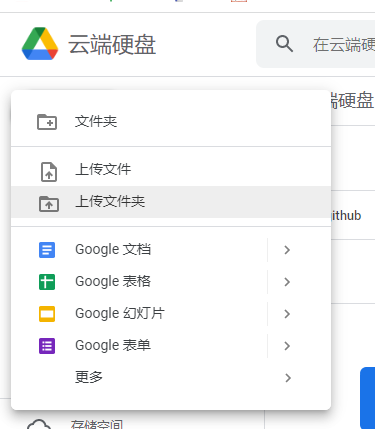
Open after uploading colab.colab
Connect colab And Google cloud
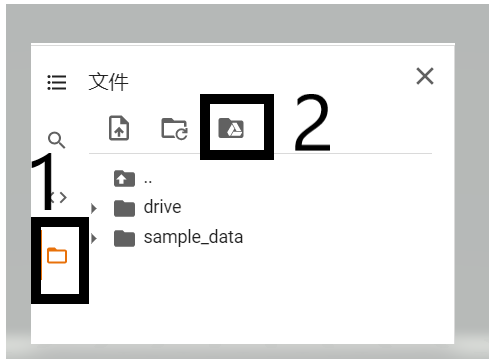
Click on the 2 Then a piece of code will pop up in the middle , Then click on the left run Button to run

Then a link and a box to fill in the password will pop up , First, click the link to authorize the permission of Google cloud disk , Then there will be a password string for us to copy , Back to colab Paste the password string in the box , press return .
After the link is successful, it can be officially in colab install yolov3 Environment .
- First, change the operation type to GPU( Very important , Change it every time you restart . This is a colab One of the reasons why it runs faster than our computer )

- New code snippet , Enter the following code and run
!cd /content/drive/MyDrive/yolov3-master && pip install -r requirements.txt
The previous path is written according to personal conditions
then colab The environment in Google cloud has been configured , But every time you restart colab All should be repeated 5 Step on . Then we can colab Train your training set .
- To solve Colab The problem of dropping the line without operation for a long time
You will find out , When we are training our models , If you don't operate for a long time Colab Then he will automatically disconnect , This is a headache , We can't just stare at it and run . Mo panic , You can solve it through the following simple operations :
First, in the Colab The interface opens the console ( Shortcut key Ctrl+Shift+I), Then copy the following code ( The function of this code is to set every 60000ms That is to say 1min Automatic click Colab Of “ Connect ” operation , In this way, the connection will not be automatically disconnected due to long-time misoperation , Of course, this is just an example , There's not only one way , You can also adjust your interval ):
function ClickConnect(){

    console.log("Working");
    document.querySelector("colab-toolbar-button#connect").click()
}
setInterval(ClickConnect, 60000)

边栏推荐
- Raspberry pie 4B installs yolov5 to achieve real-time target detection
- Ind kwf first week
- Several problems encountered in installing MySQL under MAC system
- Realize an online examination system from zero
- CSDN, I'm coming!
- Step 1: teach you to trace the IP address of [phishing email]
- Standard library header file
- Mise en œuvre d'OpenCV + dlib pour changer le visage de Mona Lisa
- Tensorflow—Neural Style Transfer
- Data classification: support vector machine
猜你喜欢

Leetcode - the k-th element in 703 data flow (design priority queue)

Knowledge map enhancement recommendation based on joint non sampling learning

Hands on deep learning pytorch version exercise answer - 2.2 preliminary knowledge / data preprocessing

神经网络入门之矩阵计算(Pytorch)
LeetCode - 715. Range module (TreeSet)*****

七、MySQL之数据定义语言(二)
『快速入门electron』之实现窗口拖拽

Label Semantic Aware Pre-training for Few-shot Text Classification
![[LZY learning notes -dive into deep learning] math preparation 2.5-2.7](/img/57/579357f1a07dbe179f355c4a80ae27.jpg)
[LZY learning notes -dive into deep learning] math preparation 2.5-2.7

Leetcode - 705 design hash set (Design)
随机推荐
Hands on deep learning pytorch version exercise solution-3.3 simple implementation of linear regression
20220531 Mathematics: Happy numbers
Stroke prediction: Bayesian
20220602 Mathematics: Excel table column serial number
Leetcode刷题---832
Leetcode刷题---1385
Advantageous distinctive domain adaptation reading notes (detailed)
2018 Lenovo y7000 black apple external display scheme
conda9.0+py2.7+tensorflow1.8.0
Tensorflow—Image segmentation
Out of the box high color background system
Model evaluation and selection
Label Semantic Aware Pre-training for Few-shot Text Classification
Powshell's set location: unable to find a solution to the problem of accepting actual parameters
Hands on deep learning pytorch version exercise solution - 3.1 linear regression
Leetcode刷题---704
Leetcode-404:左叶子之和
OpenCV Error: Assertion failed (size.width>0 && size.height>0) in imshow
Leetcode刷题---189
Leetcode刷题---1