当前位置:网站首页>Servlet 的初次部署
Servlet 的初次部署
2022-06-11 09:36:00 【Fly upward】
目录
1. servlet 主要工作
servlet 是一种实现动态页面的技术,是一组Tomcat 提供给程序员的 API,帮组程序员简单高效的开发一个 web app。而不必关注 Socket,HTTP协议格式,多线程并发等技术细节,降低了 web app 的开发门槛, 提高了开发效 率。
2. 第一个 Servlet 程序
2.1 创建项目

2) 选择项目要存放的目录

3) 项目创建完毕

2.2 引入依赖

<dependencies>
        <!-- https://mvnrepository.com/artifact/javax.servlet/javax.servlet-api -->
        <dependency>
            <groupId>javax.servlet</groupId>
            <artifactId>javax.servlet-api</artifactId>
            <version>3.1.0</version>
            <scope>provided</scope>
        </dependency>

    </dependencies>
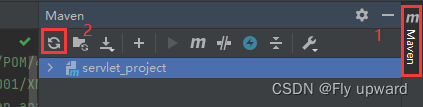
刚复制过来的时候,是标红的状态,那是因为我们的IDEA 还没有下载好 .jar 包。这就需要我们手动点击IDEA的右上方的Maven 的刷新图标,等待下载即可。
2.3创建目录

但是,这些目录还不够,需要我们手动添加一些必要的目录。
1)webapp


<!DOCTYPE web-app PUBLIC
        "-//Sun Microsystems, Inc.//DTD Web Application 2.3//EN"
        "http://java.sun.com/dtd/web-app_2_3.dtd" >
<web-app>
    <display-name>Archetype Created Web Application</display-name>
</web-app>
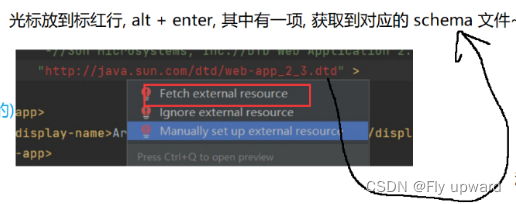
,如果在IDEA中,以下代码出现标红,进行以下操作即可。
2.4 编写代码
在 java 目录中创建一个类 HelloServlet, 代码如下
import javax.servlet.annotation.WebServlet;
import javax.servlet.ServletException;
import javax.servlet.http.HttpServlet;
import javax.servlet.http.HttpServletRequest;
import javax.servlet.http.HttpServletResponse;
import java.io.IOException;

@WebServlet("/hello")
public class HelloServlet extends HttpServlet {
    @Override
    protected void doGet(HttpServletRequest req, HttpServletResponse resp) throws ServletException, IOException {
        //这一行代码要注释掉,不能引用父类的 doGet
        //super.doGet(req, resp);

        //这个是让服务器在自己的控制台里打印
        System.out.println("hello world");
        //在页面上也能打印 hello world 字符串,放到 http 响应的 body 中. 浏览器就会把 body 的内容
        //显示到页面上
        //如果不给响应对象中设置任何内容, 这个时候就会出现 空白页面
        resp.getWriter().write("hello world" + System.currentTimeMillis());
    }
}
在上述代码中:
a) 创建的类需要继承自 HttpServletb) 这个类需要使用 @WebServlet 注解关联上一个 HTTP 的路径c) 这个类需要实现 doXXX 方法
2.5 打包程序
当前的代码,是不能单独运行的(没有main方法) 当前的代码,是不能单独运行的(没有Main方法)
需要把当前的代码,打包,然后部署到Tomcat.上, 由Tomcat来进行调用, 需要把当前的代码,打包,然后部署到Tomcat.上,由Tomcat来进行调用。
在打包前,先在 pom.xml 里面增加一个 <packaging>war</packaging> ,因为我们打包的是war 包,如果不写的话,会默认 jar 包。
jar 和 war 都是 java 发布程序用的压缩包格式。war 算是给 Tomcat 专门搞的。这里不光会包含一些 .class,还可以包含配置文件,以及依赖的第3三方的jar ,还有html, Css, js....
添加位置如下


当控制台出现 BUILD SUCCESS,并且目录列表出现servlet_hello.war 就表明打包成功

2.6 部署程序

打开之后把 war 包拷贝到 Tomcat 的 webapps 目录下。然后启动 Tomcat , Tomcat 就会自动把 war 包解压缩。

2.7 验证程序
通过浏览器输入直接部署的网址,就可以得到响应 http://127.0.0.1:8080/servlet_hello/hello,如下

注意: URL 中的 PATH 分成两个部分, 其中 servlet_hello 为 Context Path, hello 为 Servlet Path

2.8 总结
上述这七个步骤,这是针对一个新的项目,项目创建好之后,后续修改代码,前三个步骤就不必重复了.直接从4—7进行操作即可。
3.更便捷的部署
3.1 安装 Smart Tomcat 插件

3.2 配置 Smart Tomcat 插件
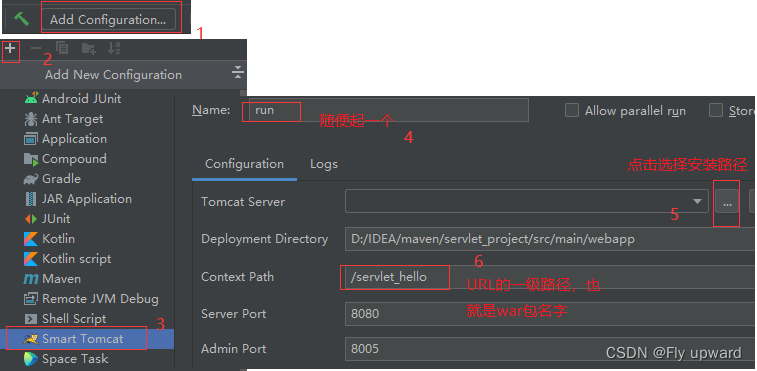
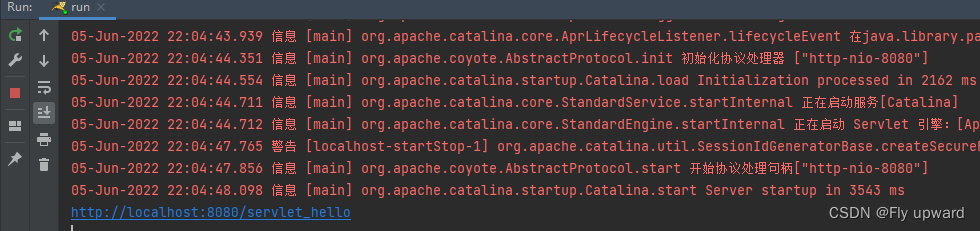
点击绿色的三角号, IDEA就会自动进行编译,部署

启动Tomcat的过程,其中字体就是红色的,不是出错才显红色。
4.常见出错问题
4.1 出现 404

2)少写了 Servlet Path 即 hello

3)Servlet Path 写的和 URL 不匹

错误如下

4)web.xml 写错了
4.2 出现 405
@WebServlet("/hello")
public class HelloServlet extends HttpServlet {
//被注释掉,所以没有实现doGet 方法
  //@Override
    //protected void doGet(HttpServletRequest req, HttpServletResponse resp) throws ServletException, IOException { }
}
4.3 出现 500
@WebServlet("/hello")
public class HelloServlet extends HttpServlet {
    @Override
    protected void doGet(HttpServlet Requestreq, HttpServlet Responseresp) throws Servlet Exception, IOException {
        String s = null;
        resp.getWriter().write(s.length());
    }
}
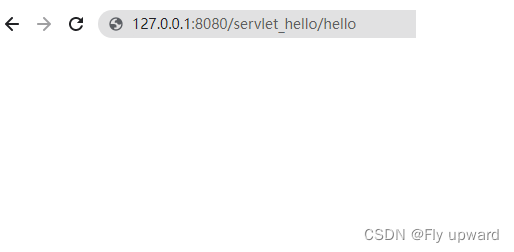
4.4 出现 "空白页面"
@WebServlet("/hello")
public class HelloServlet extends HttpServlet {
    @Override
    protected void doGet(HttpServletRequest req, HttpServletResponse resp) throws ServletException, IOException {
        //这一行代码要注释掉,不能引用父类的 doGet
        //super.doGet(req, resp);

        //这个是让服务器在自己的控制台里打印
        System.out.println("hello world");
        //在页面上也能打印 hello world 字符串,放到 http 响应的 body 中. 浏览器就会把 body 的内容
        //显示到页面上
        //如果不给响应对象中设置任何内容, 这个时候就会出现 空白页面
        //resp.getWriter().write("hello world" + System.currentTimeMillis());
    }
}
4.5 出现 "无法访问此网站"
//把
@WebServlet("/hello")
//写成了,就是少了个 /
@WebServlet("hello")
5. 总结
边栏推荐
猜你喜欢

Don't use redis list to implement message queue. Stream is designed for queues

【Objective-C】‘NSAutoreleasePool‘ is unavailable: not available in automatic reference counting mode

Method (common method), method execution memory analysis, method overloading mechanism, method recursion

ORACLE RAC中连接ScanIP报错ORA-12545的问题解决

Ecological co construction | 2021 streamnational excellent partner of the year comes out!
Tenthousand words thoroughly learn heap and binary tree

ESP8266_通过MQTT协议连接阿里云
MSF SMB based information collection

Interview questions: REM layout, flex layout, etc

Oracle XDB组件的重建
随机推荐
Rebuilding Oracle XdB components
What is WSGI?
go连接数据库报错 wsarecv: An existing connection was forcibly closed by the remote host.
js基础--Array对象
ESP8266_通过MQTT协议连接阿里云
FPGA基础架构【参考ug998】
PD chip ga670-10 for OTG while charging
JS foundation -- Date object
ORACLE DG物理备库使用别名数据文件改变路径到OMF路径
The ins-30131 installer failed to verify the required initial settings
Document object
RAC单独修改scanip到不同网段时会报错
[TiO websocket] III. The TiO websocket server can send messages to users anywhere
Video review pulsar summit Asia 2021, cases, operation and maintenance, ecological dry goods
ESP8266_GET请求天气预报、json解析
「INS-30131」 安装程序验证所需的初始设置失败
【音视频】SEI简介
P4147 "jade toad Palace"
js基础--关于DOM
C+每日练题(15)