当前位置:网站首页>ESP8266_GET请求天气预报、json解析
ESP8266_GET请求天气预报、json解析
2022-06-11 09:14:00 【小老虎_IOT】
1、用网络调试助手GET天气预报
看到一篇文章教获取天气预报Esp8266学习之旅⑤ 8266原生乐鑫SDK高级使用之封装Post与Get请求云端,拿到“天气预报信息”。(带Demo)_半颗心脏的博客-CSDN博客_乐鑫esp8266,所以想试试看,看了郑老师计算机网络的课程总得实操一下,先用网络调试助手与服务器建立TCP连接,然后发送GET请求,看一下效果,再用ESP8266实现域名解析、TCP连接、发送HTTP请求的GET报文,打印数据,最后解析json;
1.1、设置域名和端口,建立TCP连接
域名:pi.seniverse.com,端口:80

1.2、GET请求
1.2.1、先了解下HTTP请求报文格式

1.2.2、分析下这个GET请求
- 第一行:请求行
- GET URL链接 HTTP协议版本
- 第二、三、四、五行:请求头
- 冒号前面是头部键,冒号后面是值,然后回车换行到下一行
- 第六、七行:空行
- Connection行末尾有回车换行,然后一个回车换行
GET /v3/weather/daily.json?key=rrpd2zmqkpwlsckt&location=guangzhou&language=en&unit=c&start=0&days=3 HTTP/1.1
Content-Type: text/html;charset=utf-8
Accept: */*
Host: api.seniverse.com
Connection: Keep-Alive
1.3、收到HTTP的响应
1.3.1、先看HTTP响应报文格式

1.3.2、实际收到的HTTP响应报文

2、心知天气、API的说明
上面的HTTP响应报文,人眼看是没问题,但是这收到的是json数据,我复制到一些在线解析json的网站都解析不成功,好几个地方少了大括号;不知道是不是GET的格式不对,所以自己去心知天气网站注册了账号,看看有没有什么文档说明,而且毕竟上面的GET格式我也不知道他是哪里来的,自己研究下了。
2.1、注册账号,选择免费的版本
2.2、进入文档,选择“天气预报”,可以看到右边有API接口

2.3、查看API接口、参数说明、返回数据说明
这个接口示例就是我们用GET请求中需要的,密钥在“控制台”→“我的产品”→“免费版”,点进去,有显示公钥、私钥;
language改成en,英文显示,因为esp8266又不能解析中文;最后day指的是查询的天数,花钱可以查15天,否则最多3天,我只想只要今天而已,day=1,只查今天的就好了;


3、关于JSON格式的错误的解决
3.1、换一个网络调试工具
对比了,与之前的GET请求格式并无不同,利用这个接口和自己的密钥再试试,果然,返回的json格式还是不对;
可能是这个网络调试助手不行,可是为什么就只有大括号没有呢,好几个大括号,而且还是在数据的中间部分,也并不是开头结尾呀,莫名其妙的,不管怎么说算换一个试试,还真就是......

3.2、在线解析json
这下没问题了,可以开始下一步在ESP8266上发送GET请求并接收数据了,唉,折腾,13:31了,看看之前那个调试工具收到的HTTP响应报文还是11:44,煮饭去,肚子痛;

4、用ESP8266发送GET请求、打印HTTP响应报文
调试助手里,GET请求这么写;
GET https://api.seniverse.com/v3/weather/daily.json?key=SJo8p9FiiIu6gDNz4&location=guangzhou&language=en&unit=c&start=0&days=1 HTTP/1.1
Content-Type: text/html;charset=utf-8
Accept: */*
Host: api.seniverse.com
Connection: Keep-Alive
但是作为espconn_send发送的字符串,GET请求按调试助手这么写肯定不行呀,首先要手动加入\r\n,这个HTTP请求报文写成一个宏,不然直接放在函数里,肯定不好看,一开始我是这么写的,嗯,不行,一个""括起来了是一个字符串,可是我还要换行呢,这样宏的换行就在字符串里面了,不换行看着又不清晰,百度下宏定义字符串怎么换行,没百度到不过看到有字符串里直接写\换行的,试一下先,返回HTTP/1.1 400 Bad Request,也就是请求的格式错误.....
#define GET_TODAY_WEATHER		"GET https://api.seniverse.com/v3/weather/daily.json?key=SJo8p9FiiIu6gDNz4&location=guangzhou&language=en&unit=c&start=0&days=1 HTTP/1.1\r\n\
								Content-Type: text/html;charset=utf-8\r\n			\
								Accept: */*\r\n									\
								Host: api.seniverse.com\r\n						\
Connection: Keep-Alive\r\n\r\n"继续查找资料吧,有发现,当字符串过长的时候,直接写多个字符串就可以了,中间以空白、制表符、换行符隔开,这个换行符就符合现在我的需要;

于是,GET请求这样写,每一行呢都加""好似一个单独的字符串,行末加换行符,果然可以了;
#define GET_TODAY_WEATHER		"GET https://api.seniverse.com/v3/weather/daily.json?key=SJo8p9FiiIu6gDNz4&location=guangzhou&language=en&unit=c&start=0&days=1 HTTP/1.1\r\n"\
								"Content-Type: text/html;charset=utf-8\r\n"			\
								"Accept: */*\r\n"									\
								"Host: api.seniverse.com\r\n"						\
								"Connection: Keep-Alive\r\n\r\n"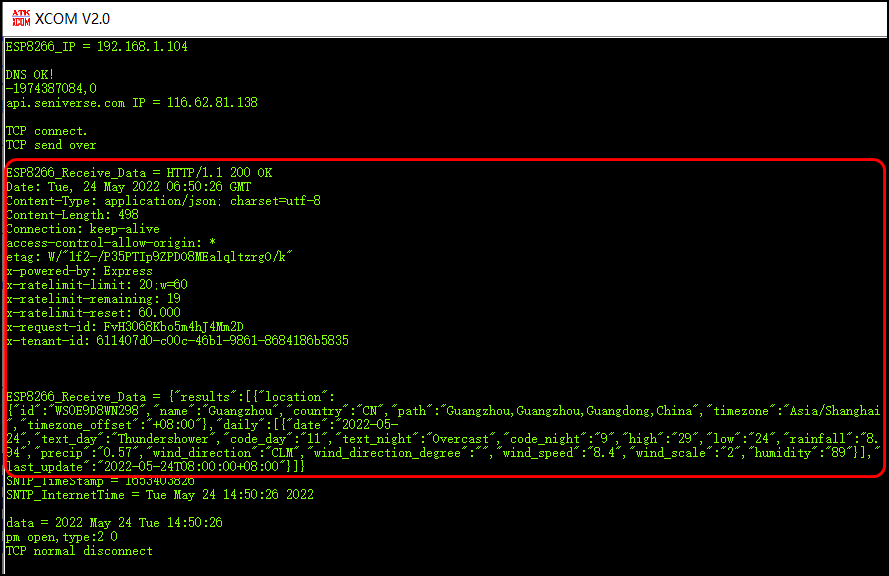
5、json解析
Esp8266 --深入分析官方json解析源码及如何使用json接口解析心知天气_wangjl~的博客-CSDN博客_esp8266 json解析
先放链接为敬,分析得很深入,讲解清晰,注意其中一段代码从下往上看跟着理解,博主也很细心标注了顺序,很有帮助;
因为之前没有理解过json这个东西,所以这里记录初学粗浅的一些想法。看完上面的链接之后就可以顺利解析json了;
5.1、总结下json的格式
json是一种特定的字符串格式,本质是一个对象。
对象由大括号{}表示,所以最外层是大括号括起来的。
对象由一个或多个键值对组成,键值对之间用逗号,分隔,除最后一个键值对;
键值对的格式为:"键":值,即键的名字是字符串,用冒号:分隔键与值,值可以是字符串、数字、对象、数组、null、布尔值;
数组用中括号[]括起来,数组中元素可以是字符串、数字、对象、数组、null、布尔值,数组中元素用逗号分隔除最后一个;
5.2、代码及结果
代码其实并不多,而且我只解析其中需要的一些数据,比如"location"中有"id","name","country","path","timezone","timezone_offset",我只保留了"name"和"country",只需要这些信息而且看着也清晰;
逻辑上,就是用JSONTREE_OBJECT相关的宏创建一个json树,最终键值对"值"的位置指向了一个回调函数,这样在解析到这个键值对的时候就会调用这个回调函数,由于多个键值对指向同一个回调函数,所以在回调函数内部要判断当前是哪一个分支;
记得添加user_json.c和user_json.h,并#include "user_json.h";
5.2.1、创建json树
省略了一些信息,更详细的内容请见上面的链接,还有比如"daily"如果查3日数据是要弄个数组的;
LOCAL struct jsontree_callback seniverse_handle_callback =
    JSONTREE_CALLBACK(NULL, seniverse_info_set);

//seniverse_location_tree里面关于"name""country"的回调函数
JSONTREE_OBJECT(seniverse_location_tree,
		 JSONTREE_PAIR("name", &seniverse_handle_callback),
		 JSONTREE_PAIR("country", &seniverse_handle_callback)
		 );

//seniverse_daily_par_tree里面关于"data""text_day"等的回调函数
JSONTREE_OBJECT(seniverse_daily_tree,
		 JSONTREE_PAIR("date", &seniverse_handle_callback),
		 JSONTREE_PAIR("text_day", &seniverse_handle_callback),
		 JSONTREE_PAIR("text_night", &seniverse_handle_callback),
		 JSONTREE_PAIR("high", &seniverse_handle_callback),
		 JSONTREE_PAIR("low", &seniverse_handle_callback)
		 );

JSONTREE_OBJECT(seniverse_info_tree,
                JSONTREE_PAIR("location", &seniverse_location_tree),
				JSONTREE_PAIR("daily", &seniverse_daily_tree),
				JSONTREE_PAIR("last_update", &seniverse_handle_callback)
				);
5.2.2、回调函数
解析json树的时候,在"name"处,这两个判断都是成立的,也就是说jsonparse_strcmp_value还可以知道自己的上一级;
if(jsonparse_strcmp_value(parser, "location") == 0)
if (jsonparse_strcmp_value(parser, "name") == 0)
每次查到具体的键之后,都会有两个jsonparse_next,是为了跳过冒号和双引号;
jsonparse_next(parser); jsonparse_next(parser);
/******************************************************************************
 * FunctionName : seniverse_info_set
 * Description  : 将一个json格式解析成心知天气的参数
 * Parameters   : js_ctx -- 一个指向JSON设置的指针
 *                parser -- 指向JSON解析器状态的指针
 * Returns      : result
*******************************************************************************/
LOCAL int ICACHE_FLASH_ATTR
seniverse_info_set(struct jsontree_context *js_ctx, struct jsonparse_state *parser)
{
    int type;
    uint8 seniverse_tree=0;
    //解析 JSON 格式下⼀个元素
    while ((type = jsonparse_next(parser)) != 0){

        if (type == JSON_TYPE_PAIR_NAME) {

            char buffer[64];
            os_bzero(buffer, 64);		//buffer数组清零

			//比较解析 JSON 数据与特定字符串
            if(jsonparse_strcmp_value(parser, "location") == 0){			//location对象
            	seniverse_tree = 1;
            }else if (jsonparse_strcmp_value(parser, "daily") == 0){		//daily对象
            	seniverse_tree = 2;
            }else if (jsonparse_strcmp_value(parser, "last_update") == 0){	//last_update对象
				 jsonparse_next(parser);	jsonparse_next(parser);
				 jsonparse_copy_value(parser, buffer, sizeof(buffer));
				 os_printf("last_update:%s\n",buffer);		//数据更新时间
            }
            if(seniverse_tree == 1){						//解析location里面的信息
            	 if (jsonparse_strcmp_value(parser, "name") == 0){
                     jsonparse_next(parser);	jsonparse_next(parser);
            		 jsonparse_copy_value(parser, buffer, sizeof(buffer));
           		 os_printf("address:%s\n",buffer);		//地名:广州
            	 }else if (jsonparse_strcmp_value(parser, "country") == 0){
                     jsonparse_next(parser);	jsonparse_next(parser);
            		 jsonparse_copy_value(parser, buffer, sizeof(buffer));
            		 os_printf("country:%s\n",buffer);		//国家
            	 }
            }else if(seniverse_tree == 2){					//解析daily里面的信息
            	if (jsonparse_strcmp_value(parser, "date") == 0){
					 jsonparse_next(parser);	jsonparse_next(parser);
					 jsonparse_copy_value(parser, buffer, sizeof(buffer));
					 os_printf("date:%s\n",buffer);			//date:日期,比如2022-05-24
				 }else if (jsonparse_strcmp_value(parser, "text_day") == 0){
					 jsonparse_next(parser);	jsonparse_next(parser);
					 jsonparse_copy_value(parser, buffer, sizeof(buffer));
					 os_printf("day:%s\n",buffer);			//白天天气
				 }else if (jsonparse_strcmp_value(parser, "text_night") == 0){
					 jsonparse_next(parser);	jsonparse_next(parser);
					 jsonparse_copy_value(parser, buffer, sizeof(buffer));
					 os_printf("night:%s\n",buffer);		//夜晚天气
				 }else if (jsonparse_strcmp_value(parser, "high") == 0){
					 jsonparse_next(parser);	jsonparse_next(parser);
					 jsonparse_copy_value(parser, buffer, sizeof(buffer));
					 os_printf("high:%s\n",buffer);			//最高温度
				 }else if (jsonparse_strcmp_value(parser, "low") == 0){
					 jsonparse_next(parser);	jsonparse_next(parser);
					 jsonparse_copy_value(parser, buffer, sizeof(buffer));
					 os_printf("low:%s\n",buffer);			//最低温度
				 }
            }
        }
    }
    return 0;
}
5.2.3、TCP通信收到数据后的处理
void ICACHE_FLASH_ATTR TCP_recv_callback(void * arg, char * pdata, unsigned short len)
{
	struct espconn * T_arg = arg;		            // 缓存网络连接结构体指针
	char * pParse_json=NULL;

	os_printf("\nESP8266_Receive_Data = %s\n",pdata);// 串口打印接收到的数据

    //找到要解析的json字符串开头
    pParse_json=(char *)os_strstr(pdata, "{");		//指向"{"
    if(NULL ==  pParse_json){						//找不到"{"
    	return;
    }else{
		struct jsontree_context js;
		jsontree_setup(&js, (struct jsontree_value *)&seniverse_info_tree, json_putchar);
		json_parse(&js, pParse_json);
    }
}
5.2.4、结果
首先打印的是收到的HTTP响应报文,然后是解析完json后的数据;
- address:Guangzhou 广州
- country:CN 中国
- date:2022-05-24 2022年5月24日的天气
- day:Cloudy 白天多云
- night:Thundershower 夜晚雷阵雨,雷阵雨原来是thundershower,看到shower只能想到洗澡~
- high:30 最高气温30℃
- low:24 最低气温24℃
- last_update:2022-05-24T08:00+08:00 天气更新时间:2022年5月24日16:00

开荒;
可以参考学习的链接:
Esp8266学习之旅⑤ 8266原生乐鑫SDK高级使用之封装Post与Get请求云端,拿到“天气预报信息”。(带Demo)_半颗心脏的博客-CSDN博客_乐鑫esp8266
Esp8266 --深入分析官方json解析源码及如何使用json接口解析心知天气_wangjl~的博客-CSDN博客_esp8266 json解析
【ESP8266】使用ESP8266 NONOS SDK的JSON API_阏男秀的博客-CSDN博客_esp json
边栏推荐
- Flask (IV) -- URL construction
- Day39 content summary
- Day 47 how to query a table
- Don't use redis list to implement message queue. Stream is designed for queues
- Openstack explanation (XXIII) -- other configurations, database initialization and service startup of neutron
- js基础--Date对象
- affair
- [share] how do enterprises carry out implementation planning?
- Day39 process object and other method mutexes
- A summary of the problem type and method for proving the limit of sequence in postgraduate entrance examination
猜你喜欢

Before applying data warehouse ODBC, you need to understand these problems first

Day39 process object and other method mutexes

Openstack explanation (22) -- neutron plug-in configuration
![[TiO websocket] v. TiO websocket server counts the number of online people](/img/05/77f890a0f535ff955dffe8ca404442.jpg)
[TiO websocket] v. TiO websocket server counts the number of online people

OpenCV CEO教你用OAK(四):创建复杂的管道

ESP8266_通过MQTT协议连接阿里云

Console you don't know

Openstack explanation (21) -- installation and configuration of neutron components

Technical practice of dolphin dispatching in kubernetes system

Talk about how to customize data desensitization
随机推荐
MSF adds back door to normal program
P4147 "jade toad Palace"
[software] ERP model selection method for large enterprises
[TiO websocket] IV. the TiO websocket server implements the custom cluster mode
1854. the most populous year
Openstack explanation (22) -- neutron plug-in configuration
ESP8266_ SmartConfig
报错RuntimeError: BlobReader error: The version of imported blob doesn‘t match graph_transformer
[intelligent development] scheme design and hardware development of sphygmomanometer
Remote office related issues to be considered by enterprises
OpenSSL usage
PD chip ga670-10 for OTG while charging
1493. 删掉一个元素以后全为 1 的最长子数组
Flask (IV) -- URL construction
js中的事件
When the enterprise makes a decision, which part should lead the ERP project?
Development of PCBA circuit board for small oxygen generator
Control statement if switch for while while break continue
Use of MSF evaluation module
2161. divide the array according to the given number