当前位置:网站首页>[MySQL 12] MySQL 8.0.18 reinitialization
[MySQL 12] MySQL 8.0.18 reinitialization
2022-07-03 07:43:00 【Rusty well began】
1、 Backup MySQL database
Reinitialize mysql. Simply reset ,“ Restore factory settings ”. After reset , All data will be cleared and lost , So be sure to back up important databases , Namely data The database files under the directory
2、 Out of Service
Before modifying the configuration , Please put mysql Service stopped . Execute the following command :
systemctl stop mysqld.service
3、 Delete error log
For easy viewing mysql Error log for , You can put /var/log/mysqld.log Delete . The order is as follows :
rm /var/log/mysqld.log
4、 Delete the system database and user database
take mysql The system database and user database in the database are deleted , Execute the following command :
(1) see /var/lib/mysql Below the table of contents
[[email protected] mysql]# ls
auto.cnf       binlog.000003  binlog.000006  binlog.000009  ca.pem           ib_buffer_pool  ib_logfile1   mysql               phoenix          server-cert.pem  undo_001
binlog.000001  binlog.000004  binlog.000007  binlog.index   client-cert.pem  ibdata1         ib_logfile2   mysql.ibd           private_key.pem  server-key.pem   undo_002
binlog.000002  binlog.000005  binlog.000008  ca-key.pem     client-key.pem   ib_logfile0     #innodb_temp  performance_schema  public_key.pem   sys

(2) Recursive delete /var/lib/mysql Below the table of contents
[[email protected] mysql]# rm -rf *
5、 Create database directory
Above will be the existing database directory /var/lib/mysql Delete , Next, you will manually create an empty directory and authorize . The order is as follows :
(1) Manually create a mysql Catalog , That is, the one just deleted above mysql Catalog
[[email protected] lib]# mkdir mysql
[[email protected] lib]# ls
alternatives  dbus      games      logrotate  misc   mysql-files    NetworkManager  plymouth  postfix  rpm-state  stateless  tuned   yum
authconfig    dhclient  initramfs  machines   mysql  mysql-keyring  os-prober       polkit-1  rpm      rsyslog    systemd    vmware
(2) by /var/lib/mysql Directory authorization , Set the user and group of the directory
[[email protected] lib]# chown -R mysql:mysql mysql
(3) View catalog details , Authorized success
[[email protected] lib]# ll|grep mysql
drwxr-xr-x. 2 mysql   mysql     6 Jul  1 17:01 mysql
drwxr-x---. 2 mysql   mysql     6 Sep 20  2019 mysql-files
drwxr-x---. 2 mysql   mysql     6 Sep 20  2019 mysql-keyring
6、 To configure my.cnf file
If you need to be case sensitive , Need to be in my.cnf Add
lower_case_table_names

Use vim Editor Editor /etc/my.cnf file , as follows :
[[email protected] lib]# vim /etc/my.cnf
Save configuration information .
7、 initialization MySql
Execute the following command initialization mysql database :
[[email protected] /]# mysqld --defaults-file=/etc/my.cnf --initialize --user=mysql --basedir=/var/lib/mysql --datadir=/var/lib/mysql
Tips: Be careful my.cnf Is the file path correct
8、 start-up MySql service
systemctl start mysqld.service
9、 Sign in MySql
Because the above implementation MySql Initialization operation , The old password is no longer usable .MySQL A temporary password will be created during initialization , Temporary passwords are stored in /var/log/mysql/error.log in .
(1) Find temporary password
Use cat and grep Command matching search , The order is as follows :
cat /var/log/mysql/mysqld.log |grep temp
Tips: If you are unsure of the path , have access to find Command find mysqld.log file 
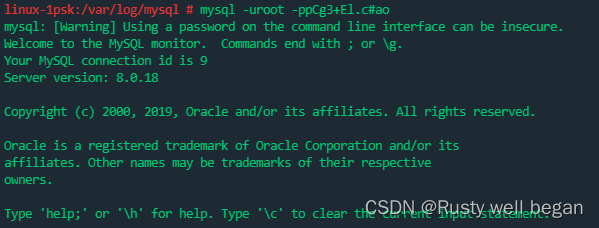
(2) Sign in with a temporary password MySQL
mysql -uroot -ppCg3+El.c#ao
(3) modify root User password
ALTER USER 'root'@'localhost' IDENTIFIED WITH mysql_native_password BY ' password ';
Here may be a hint Your password does not satisfy the current policy requirements, Your password does not meet the requirements of the current regulations , You can either make your password a little more complicated , Or lower the password verification rules .
stay Linux Installation on MySQL A plug-in for verifying passwords will be installed automatically , The default password checking policy requires that the password must contain : Case letters 、 Numbers and special symbols , And the length cannot be less than 8 position . Whether the new password conforms to the current policy when changing the password , If you are not satisfied, you will be prompted ERROR;
So you can set this limit to a smaller number of digits , Lower the complexity type
#  Adjust password complexity check to simple type
set global validate_password.policy = 0;
#  Set the minimum number of digits of password to  9  position
set global validate_password.length = 9;
You can set a simpler password .
10、 Create user and permission assignment
(1) default root Users can only the current node localhost visit , Is not remotely accessible 
Create user commands :
Grammar format :CREATE USER < user name > [ IDENTIFIED ] BY [ PASSWORD ] < password >
# mysql 8.0  following
create user 'siteweb'@'%' IDENTIFIED BY 'siteweb1!';
create user 'siteweb'@'%' identified by 'siteweb1!'; # grant root Remote permissions
# mysql 8.0
create user 'siteweb'@'%' IDENTIFIED WITH mysql_native_password BY 'siteweb1!';
Tips: mysql8.0 The default password authentication for is no longer password . So when you create a user ,create user ‘username’@‘%’ identified by ‘password’; The client cannot connect to the service , So when creating users, you need to add WITH mysql_native_password
(2) After you create a user, you need to assign permissions to the user
grant all privileges on *.* to 'siteweb'@'%';  # to root The user grants remote permission
flush privileges; # Refresh the permissions
mysql> grant all privileges on *.* to 'siteweb'@'%';
Query OK, 0 rows affected (0.00 sec)

mysql> grant all privileges on *.* to 'root'@'%';
Query OK, 0 rows affected (0.00 sec)

mysql> flush privileges;
Query OK, 0 rows affected (0.00 sec)

mysql> select host,user from user;
+-----------+------------------+
| host      | user             |
+-----------+------------------+
| %         | root             |
| %         | siteweb          |
| localhost | mysql.infoschema |
| localhost | mysql.session    |
| localhost | mysql.sys        |
| localhost | root             |
+-----------+------------------+
6 rows in set (0.00 sec)
11、MySQL 8.0.18 Whether the case sensitive problem is effective
If the MySQL 8.0.18 Case sensitive words , You can check whether the configuration is effective at this time
mysql> show global variables like '%lower_case%';
+------------------------+-------+
| Variable_name          | Value |
+------------------------+-------+
| lower_case_file_system | OFF   |
| lower_case_table_names | 1     |
+------------------------+-------+
2 rows in set (0.00 sec)
边栏推荐
- Go language foundation ----- 11 ----- regular expression
- Hisat2 - stringtie - deseq2 pipeline for bulk RNA seq
- 【LeetCode】3. Merge Two Sorted Lists·合并两个有序链表
- Partage de l'expérience du projet: mise en œuvre d'un pass optimisé pour la fusion IR de la couche mindstore
- Industrial resilience
- PDO and SDO concepts
- Image recognition and detection -- Notes
- Lucene hnsw merge optimization
- 技术干货|昇思MindSpore NLP模型迁移之Bert模型—文本匹配任务(二):训练和评估
- s7700设备如何清除console密码
猜你喜欢

Analysis of the problems of the 11th Blue Bridge Cup single chip microcomputer provincial competition
Iterm2设置

Pat grade a 1027 colors in Mars

Technical dry goods Shengsi mindspire operator parallel + heterogeneous parallel, enabling 32 card training 242 billion parameter model

Professor Zhang Yang of the University of Michigan is employed as a visiting professor of Shanghai Jiaotong University, China (picture)

技术干货 | AlphaFold/ RoseTTAFold开源复现(2)—AlphaFold流程分析和训练构建

技术干货|利用昇思MindSpore复现ICCV2021 Best Paper Swin Transformer
Pat class a 1028 list sorting
![[coppeliasim4.3] C calls UR5 in the remoteapi control scenario](/img/ca/2f72ea3590c358a6c9884aaa1a1c33.png)
[coppeliasim4.3] C calls UR5 in the remoteapi control scenario

Analysis of the problems of the 7th Blue Bridge Cup single chip microcomputer provincial competition
随机推荐
技术干货|昇思MindSpore Lite1.5 特性发布,带来全新端侧AI体验
项目经验分享:基于昇思MindSpore,使用DFCNN和CTC损失函数的声学模型实现
Redis配置文件
技术干货|昇思MindSpore NLP模型迁移之Roberta ——情感分析任务
tp3.2和tp5.0的区别
Go language foundation ----- 11 ----- regular expression
Technology dry goods | luxe model for the migration of mindspore NLP model -- reading comprehension task
项目经验分享:基于昇思MindSpore实现手写汉字识别
HCIA notes
Hello world of vertx
An overview of IfM Engage
Rabbit MQ message sending of vertx
【MySQL 14】使用DBeaver工具远程备份及恢复MySQL数据库(Linux 环境)
微软安全响应中心
JUnit unit test of vertx
Project experience sharing: Based on mindspore, the acoustic model is realized by using dfcnn and CTC loss function
技术干货|关于AI Architecture未来的一些思考
输入三次猜一个数字
Grpc message sending of vertx
Go language foundation ----- 05 ----- structure