当前位置:网站首页>OpenGL draws colored triangles
OpenGL draws colored triangles
2022-07-03 12:00:00 【wb175208】
Use openGL Drawing graphics requires three steps :
1. Create a VBO, Make the data in memory , Save to the graphics card cache ;VBO Our task is this one thing ;
2. Create a VAO, That is, the array of attributes , Be responsible for putting the existing data , Binding properties , Specify the rules for using data , Make the shader understand that those data are colors , Those are coordinates ;
3. Shader program , Running on the GPU in , Be responsible for putting the existing data , Calculate and render the image ;
Draw a triangle with different vertex colors , You need to set a color for every vertex of the triangle , This also requires some color data . We can define vertex data and color data separately .
    GLfloat ver[] = {

		// If there are two triangles , Conventional drawing method , Define the position points of two triangles
		// The first triangle
		0.0f,  0.5f, 0.0f,
		-0.5f, -0.5f, 0.0f,
		0.5f, -0.5f, 0.0f,
	};

	GLfloat verColor[] = {

		1.0f,  0.0f, 0.0f, 1.0f,
		0.0f,  1.0f, 0.0f, 1.0f,
		0.0f,  0.0f, 1.0f, 1.0f,
	};
Take a look at the painting effect :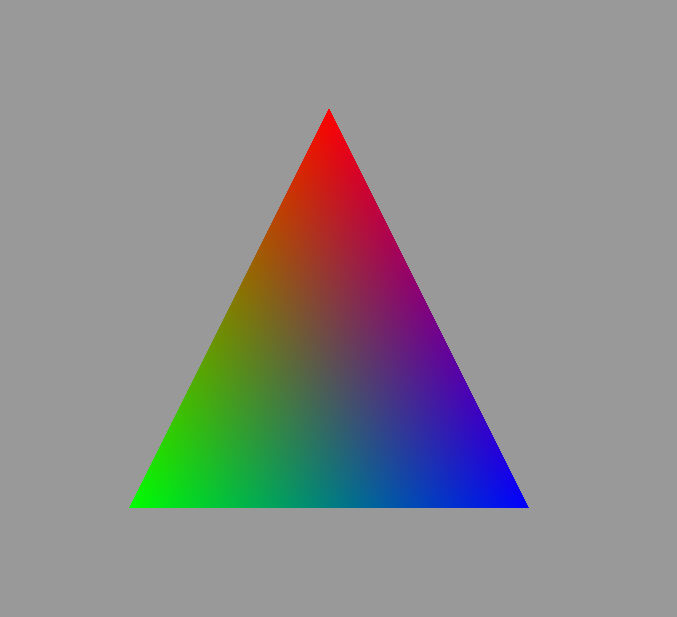
#pragma once
#include <QOpenGLWindow>
#include <QOpenGLShader>
#include <QOpenGLShaderProgram>
class QOpenGLFunctions_3_3_Core;

class HelloShaderSelf : public QOpenGLWindow {

	Q_OBJECT

public:
	HelloShaderSelf();
	~HelloShaderSelf();

private:
	void initializeGL();
	void resizeGL(int w, int h);
	void paintGL();

private:
	QOpenGLFunctions_3_3_Core* _openGLCore;
	GLuint _VBO;// Vertex Position VBO
	GLuint _VBOColor;// Vertex color VBO
	GLuint _VAO;
	QOpenGLShaderProgram _shaderProgram;// Shader program , All shaders in the system
};
#include <QOpenGLFunctions_3_3_Core>
#include <QVector4D>
#include <QMath.h>
#include "HelloShaderSelf.h"

HelloShaderSelf::HelloShaderSelf() {

}

HelloShaderSelf::~HelloShaderSelf() {

}

void HelloShaderSelf::initializeGL() {

	_openGLCore = QOpenGLContext::currentContext()->versionFunctions<QOpenGLFunctions_3_3_Core>();

	GLfloat ver[] = {

		// If there are two triangles , Conventional drawing method , Define the position points of two triangles
		// The first triangle
		0.0f,  0.5f, 0.0f,
		-0.5f, -0.5f, 0.0f,
		0.5f, -0.5f, 0.0f,
	};

	GLfloat verColor[] = {

		1.0f,  0.0f, 0.0f, 1.0f,
		0.0f,  1.0f, 0.0f, 1.0f,
		0.0f,  0.0f, 1.0f, 1.0f,
	};

	_openGLCore->glGenBuffers(1, &_VAO);
	_openGLCore->glGenBuffers(1, &_VBO);
	_openGLCore->glGenBuffers(1, &_VBOColor);

	_openGLCore->glBindVertexArray(_VAO);

	// Write the location data into the graphics card cache
	_openGLCore->glBindBuffer(GL_ARRAY_BUFFER, _VBO);
	_openGLCore->glBufferData(GL_ARRAY_BUFFER, sizeof(ver), ver, GL_STATIC_DRAW);
	_openGLCore->glVertexAttribPointer(0, 3, GL_FLOAT, GL_FALSE, 3 * sizeof(GLfloat), (void*)0);
	_openGLCore->glEnableVertexAttribArray(0);

	// Write vertex color data to the graphics card cache
	_openGLCore->glBindBuffer(GL_ARRAY_BUFFER, _VBOColor);
	_openGLCore->glBufferData(GL_ARRAY_BUFFER, sizeof(verColor), verColor, GL_STATIC_DRAW);
	_openGLCore->glVertexAttribPointer(1, 4, GL_FLOAT, GL_FALSE, 4 * sizeof(GLfloat), (void*)0);
	_openGLCore->glEnableVertexAttribArray(1);

	_openGLCore->glBindVertexArray(0);

	QOpenGLShader vertexShager(QOpenGLShader::Vertex);// Vertex shader
	vertexShager.compileSourceFile("E:/Projects/QtGuiTest/OPenGLApp/shader/HelloShaderSelf.vert");
	QOpenGLShader fragmentShager(QOpenGLShader::Fragment);// Fragment Shader
	fragmentShager.compileSourceFile("E:/Projects/QtGuiTest/OPenGLApp/shader/HelloShaderSelf.frag");
	_shaderProgram.addShader(&vertexShager);
	_shaderProgram.addShader(&fragmentShager);

	_shaderProgram.link();
}

void HelloShaderSelf::resizeGL(int w, int h) {


}

void HelloShaderSelf::paintGL() {

	_openGLCore->glClearColor(0.6f, 0.6f, 0.6f, 1.0);
	_openGLCore->glClear(GL_COLOR_BUFFER_BIT);

	_shaderProgram.bind();


	_openGLCore->glBindVertexArray(_VAO);


	_openGLCore->glDrawArrays(GL_TRIANGLES, 0, 3);

	update();
}
Vertex shader :
#version 330 core
layout (location = 0) in vec3 aPos;
layout (location = 1) in vec4 aColor;
out vec4 outColor;
void main(){

	gl_Position = vec4(aPos.x, aPos.y, aPos.z, 1.0);
	outColor = aColor;
}
Chip shader :
#version 330 core
out vec4 fragColor;
in vec4 outColor;// Color passed from vertex shader

void main(){

	fragColor = outColor;
}
aaa
边栏推荐
猜你喜欢
MCDF实验1

vulnhub之momentum
Php Export word method (One MHT)

Solution to the second weekly test of ACM intensive training of Hunan Institute of technology in 2022
Visual Studio 2022下载及配置OpenCV4.5.5

OpenGL 索引缓存对象EBO和线宽模式
Kubernetes three dozen probes and probe mode
![[MySQL special] read lock and write lock](/img/ac/e01c26882cc664ea2e5e731c5a8bab.png)
[MySQL special] read lock and write lock
【mysql专项】读锁和写锁
vulnhub之GeminiInc
随机推荐
DNS multi-point deployment IP anycast+bgp actual combat analysis
Deploying WordPress instance tutorial under coreos
STL教程8-map
vulnhub之GeminiInc v2
Ripper of vulnhub
Go language to realize static server
Uniapp implementation Click to load more
Solve msvcp120d DLL and msvcr120d DLL missing
vulnhub之narak
小鹏 P7 撞护栏安全气囊未弹出,官方回应称撞击力度未达到弹出要求
OpenGL 绘制彩色的三角形
网络通讯之Socket-Tcp(一)
R language uses grid of gridextra package The array function combines multiple visual images of the lattice package horizontally, and the ncol parameter defines the number of columns of the combined g
Visual Studio 2022下载及配置OpenCV4.5.5
Vulnhub pyexp
Test classification in openstack
Vulnhub narak
vulnhub之Nagini
R language ggplot2 visualization: gganimate package creates dynamic line graph animation (GIF) and uses transition_ The reveal function displays data step by step along a given dimension in the animat
Optimize interface performance