当前位置:网站首页>CLR via C reading notes - loading and AppDomain
CLR via C reading notes - loading and AppDomain
2022-06-29 10:31:00 【zlbcdn】
### scene
The company has a project , need TeamA And TeamB Work together ( Or two companies decide to develop a program together ), Both are developed according to the agreed interface .TeamA Your program needs to be loaded TeamB Development methods , In this way, the whole software can be completed . in addition ,TeamA The program needs to be set TeamB Security permissions and other basic settings of the plug-in , avoid TeamB The plug-in of is broken TeamA Developed programs . As shown in the figure below :
namely , Both need you , But I have to limit you !
### Solution :
stay C# You can use AppDomain Form a safe area , take TeamB To isolate the plug-ins . And then use C# Loading function , Load the plug-in , Then run the methods in the plug-in ! Security and isolation are realized !
### Code
Define interface first . The interface documents are as follows :
#### Interface definition
using System;
using System.Collections.Generic;
using System.Linq;
using System.Text;
using System.Threading.Tasks;

namespace HostSDK
{
    public interface IAddIn
    {
        string DoSometing(int x);
    }
}
A simple interface agreed by both parties . Here is TeamB The concrete realization of :
#### Plug in implementation
using System;
using System.Collections.Generic;
using System.Linq;
using System.Text;
using System.Threading.Tasks;
using HostSDK;

namespace AddInType
{
    public class PlugInTeamB: MarshalByRefObject, IAddIn
    {
        public string DoSometing(int x)
        {
            return "B Add in method :" + 2 * x + "\n DoSomething The method is AppDomain by :" + AppDomain.CurrentDomain.FriendlyName;
        }
    }
}
A very simple implementation , But be careful , At this point, the plug-in inherits MarshalByRefObject Base class .
#### The actual call
using System;
using System.Collections.Generic;
using System.IO;
using System.Reflection;
using HostSDK;

namespace ReflectionDemo
{
    class Program
    {
        public static void Main(string[] args)
        {
            // Get the path of the add in
            string AddInDir = Path.GetDirectoryName(Assembly.GetEntryAssembly().Location);

            // Show the current AppDomain
            Console.WriteLine(" At present AppDomain by :"+ AppDomain.CurrentDomain.FriendlyName);

            // First step (1): Under a certain path , Find all of them first DLL, Then filter according to the conditions
            string[] AddInAssemblies = Directory.GetFiles(AddInDir, "*.dll");

            foreach (string item in AddInAssemblies)
            {
                Console.WriteLine(" Name of the add in to be found :{0}",item);
            }

            // First step (2): Filter by criteria
            List<Type> AddInType = new List<Type>();
            List<string> assemblyList = new List<string>();
            foreach (string item in AddInAssemblies)
            {
                Assembly AddInAssembly = Assembly.LoadFrom(item);

                foreach (Type t in AddInAssembly.GetExportedTypes())
                {
                    if (t.IsClass && typeof(IAddIn).IsAssignableFrom(t))
                    {
                        AddInType.Add(t);
                        assemblyList.Add(AddInAssembly.FullName);
                    }
                }
            }

            // First step (3): Show what has been found DLL Related information
            Console.WriteLine(" After finding , Already found :"+ assemblyList.Count+", As follows :");
            foreach (string item in assemblyList)
            {
                Console.WriteLine("      What has been found assembly Information name :"+item);
            }


            // The second step : Create a new AppDomain, And in the new AppDomain Create instance in , And call related methods
            AppDomain sandBoxAppDomain = AppDomain.CreateDomain("SandBoxAppDomain", null, null);
            // new AppDomain Create instance in , And call related methods
            IAddIn addInB=(IAddIn)sandBoxAppDomain.CreateInstanceAndUnwrap(assemblyList[0], "AddInType.PlugInTeamB");
            Console.WriteLine(" call TeamB Methods , The return information of the method is as follows :"+addInB.DoSometing(2));


            // The third step : uninstall AppDomain
            AppDomain.Unload(sandBoxAppDomain);


            Console.Read();
        }
    }
}
#### Actual output 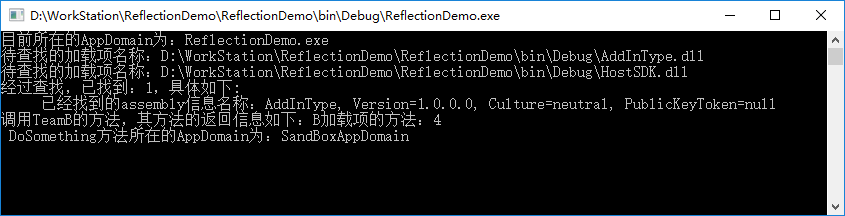
#### The code download
Link later -Mark
### explain
stay “ Plug in implementation ” in , The code is :
public class PlugInTeamB: MarshalByRefObject, IAddIn
    {
        public string DoSometing(int x)
        .....
    }
It does MarshalByRefObject Base class , So the final output is :“DoSomething The method is AppDomain by :SandBoxAppDomain”
If the base class is removed , Then add Serializable Of Attribute, The output will be :“DoSomething The method is AppDomain by :ReflectionDemo.exe”
This involves passing by value or by reference
#### summary
Use the small... Above demo, You can create a small “ Hot plug ” Isolation procedure for . More to the point , Third parties can be specified DLL The path to load
边栏推荐
- Wandering --- 最后的编程挑战
- std::unique_ PTR < T> and boost:: scoped_ Particularity of PTR < t >
- 在VMware workstation中安装WMware ESXi 6.5.0并进行配置
- Common usage of LINQ in C #
- BUUCTF--reverse1
- HDU 4578 transformation (segment tree + skillful lazy tag placement)
- Learn spark computing framework in practice (00)
- 在实践中学习Spark计算框架(00)
- Bug的描述、定级、生命周期
- September 23, 2020 left and right values reference std:: move()
猜你喜欢

这个开源项目超哇塞,手写照片在线生成

1146 topological order (25 points)
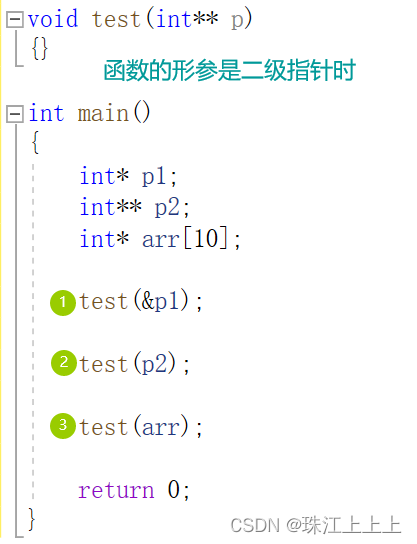
指针数组、数组指针和传参的相关问题
Related problems of pointer array, array pointer and parameter passing

查看CSDN的博客排名

Download control 1 of custom control (downloadview1)
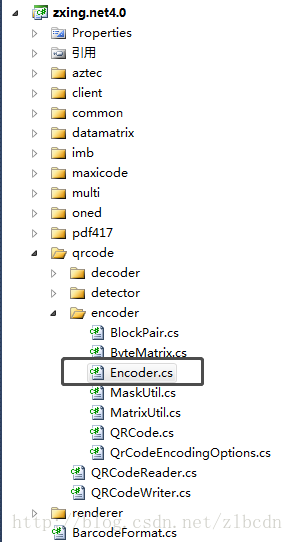
解决zxing的QR码包含中文时乱码的问题

How to quickly complete disk partitioning

HDU 6778 car (group enumeration -- > shape pressure DP)

Installing and configuring wmware esxi 6.5.0 in VMware Workstation
随机推荐
September 29, 2020 non commodity templating code level rapidjson Library
BUUCTF--reverse2
Basic operations during dev use
这个开源项目超哇塞,手写照片在线生成
1098 insertion or heap sort (25 points)
Analysis on the specific execution process of an insert statement in MySQL 8.0 (3)
2020-9-14 introduction to advertising system
這個開源項目超哇塞,手寫照片在線生成
2019.10.23 training summary
攻防世界-Re-insfsay
在实践中学习Spark计算框架(00)
2019-11-10 training summary
winform使用zxing生成二维码
在实践中学习Spark计算框架(01)
C#中Linq常用用法
Downloading and installing VMware (basic idea + detailed process)
1146 Topological Order (25 分)
HDU 4578 transformation (segment tree + skillful lazy tag placement)
Picture verification code control
云主机端口扫描