当前位置:网站首页>解决 Win10 Wsl2 IP 变化问题
解决 Win10 Wsl2 IP 变化问题
2022-06-27 06:28:00 【二十一克阳光!】
当前 Win10 用户添加修改 hosts 文件的权限
打开C:\Windows\System32\drivers\etc文件夹找到hosts文件,右键选择属性,找到安全选项卡;
点击编辑找到当前用户组,为其添加完全控制权限;

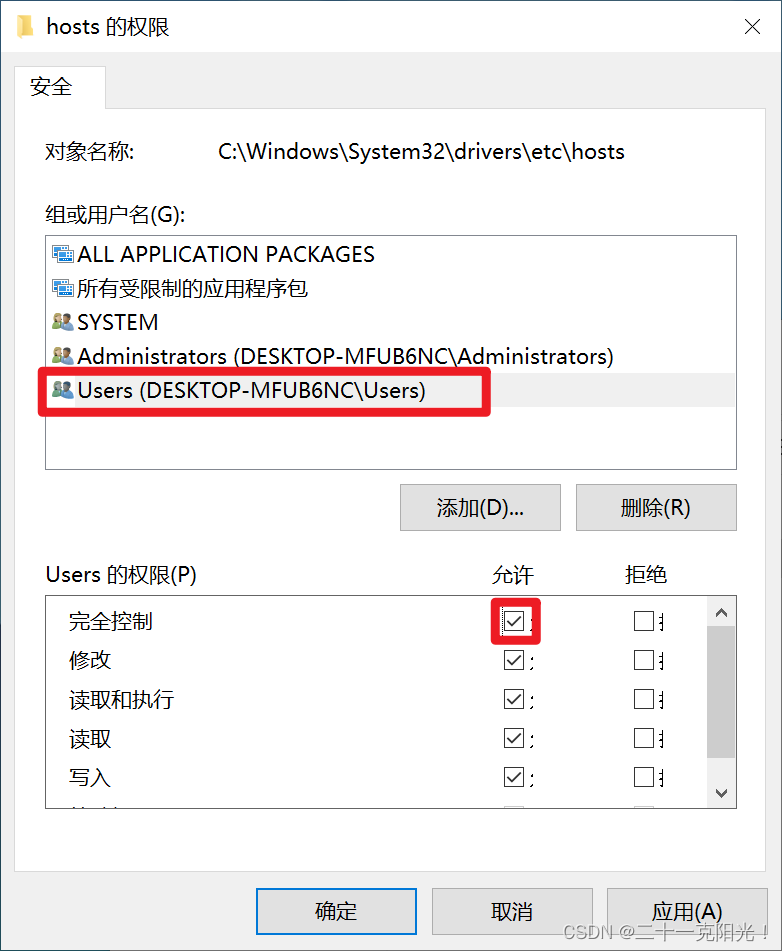
点击确定,在弹出的提示框中选择是;
此时当前用户应该可以直接修改 hosts 文件了。
编写脚本
#!/usr/bin/bash
# 启动ssh服务
/etc/init.d/ssh start
# 启动mysql服务
/etc/init.d/mysql start
# 启动docker服务
/etc/init.d/docker start
# set wsl host for Windows
# win hosts file path
win_hosts_path="/mnt/c/Windows/System32/drivers/etc/hosts"
# 为 wsl2 设置的域名
wsl_domain="ubuntu"
# 获取 wsl2 的 ip
wsl_ip=$(ifconfig eth0 | grep -w inet | awk '{print $2}')
# 判断是否已存在 wsl2 的域名,如果存在则修改,否则追加
if grep -wq "$wsl_domain" $win_hosts_path
then
    # 此处因为权限问题没有直接用 sed 修改 hosts 文件
    win_hosts=$(sed -s "s/.* $wsl_domain/$wsl_ip $wsl_domain/g" $win_hosts_path)
    echo "Windows系统中 wsl域名存在,重新设置映射"
    echo "$win_hosts" > $win_hosts_path
else
    echo "Windows系统中 wsl域名不存在,直接添加${wsl_ip} ${wsl_domain}"
    echo "$wsl_ip $wsl_domain" >> $win_hosts_path
fi

# 为 wsl 设置 win host
wsl_hosts_path="/etc/hosts"
win_domain="win"
win_ip=$(cat /etc/resolv.conf | grep "nameserver" | awk '{print $2}')
if grep -wq "$win_domain" $wsl_hosts_path
then
    wsl_hosts=$(sed -s "s/.* $win_domain/$win_ip $win_domain/g" $wsl_hosts_path)
    echo "Linux系统中 windows域名存在,重新设置映射"
    echo $wsl_hosts > $wsl_hosts_path
else
    echo "Linux系统中 windows域名不存在,直接添加${win_ip} ${win_domain}"
    echo "$win_ip $win_domain" >> $wsl_hosts_path
fi
开机启动配置
常规做法
通常在Linux中开机启动可以通过
1.编辑/etc/rc.loacl
2.在/etc/init.d/ 下添加启动脚本
3.配置systemd
但这几种方式在子系统中无法使用,我们可以通过Windows 间接的启动子系统中的服务。
设置可执行
sudo chmod +x /etc/init.sh
在Windows中创建脚本
在Windows下 输入快捷键 WIN+R 打开运行窗口
输入 shell:startup
打开Windows 启动脚本目录
在该目录下新建 linux-start.vbs
内容如下
Set ws = WScript.CreateObject("WScript.Shell")
ws.run "wsl -d Ubuntu-18.04 -u root /etc/init.wsl"
上面脚本中的 wsl -d 后面的参数是你所安装的子系统的版本 可以通过wsl -l查看
边栏推荐
- Cloud-Native Database Systems at Alibaba: Opportunities and Challenges
- On gpu: historical development and structure
- 426-二叉树(513.找树左下角的值、112. 路径总和、106.从中序与后序遍历序列构造二叉树、654. 最大二叉树)
- Proxy-Reflect使用详解
- JVM garbage collection mechanism
- The fourth question of the 299th weekly match 6103 Minimum fraction of edges removed from the tree
- Matlab GUI interface simulation DC motor and AC motor speed simulation
- 可扩展哈希
- When there are multiple El select, the selected value is filtered by El select, and the last selected value is filtered by the second El select
- 路由器和交换机的区别
猜你喜欢

线程间等待与唤醒机制、单例模式、阻塞队列、定时器

Program ape learning Tiktok short video production

Matlab GUI interface simulation DC motor and AC motor speed simulation

Proxy reflect usage details

thrift

G1 and ZGC garbage collector

Run opcua protocol demo on raspberry pie 4B to access kubeedge

Yaml file encryption

美摄云服务方案:专为轻量化视频制作场景打造
浅谈GPU:历史发展,架构
随机推荐
Thesis reading skills
693. alternate bit binary number
论文阅读技巧
[QT notes] basic use of qregularexpression in QT
Altium designer 19 device silk screen label position shall be placed uniformly in batches
Yaml file encryption
分数阶PID控制
extendible hashing
Gaussian distribution, linear regression, logistic regression
winow10安装Nexus nexus-3.20.1-01
Convolution neural network -- Application of CNN model (ore prospecting prediction)
[QT notes] simple understanding of QT meta object system
Keep 2 decimal places after multiplying SQLSEVER fields
Block level elements & inline elements
观测电机转速转矩
信息系统项目管理师---第七章 项目成本管理
Download CUDA and cudnn
Openresty usage document
426 binary tree (513. find the value in the lower left corner of the tree, 112. sum of paths, 106. construct a binary tree from the middle order and post order traversal sequence, 654. maximum binary
G1和ZGC垃圾收集器