当前位置:网站首页>【数据库和SQL学习笔记】7.SQL中的插入(INSERT)、删除(DELETE)、更新(UPDATE)
【数据库和SQL学习笔记】7.SQL中的插入(INSERT)、删除(DELETE)、更新(UPDATE)
2022-08-05 05:15:00 【takedachia】
工具:SQL Server 2019 Express
操作系统:Windows 10
讲完SELECT,本节讲SQL语言中的 插入(INSERT)、删除(DELETE)、更新(UPDATE)。
用到的数据库备份: teaching.bak
回顾一下表结构:
t_student (S#, Sname, Sex, Age, Major)
t_teacher (T#, Tname, Age, Title)
t_course (C#, Cname, T#)
t_student_course (S#, C#, Score)
插入:INSERT INTO
包括插入单条记录、插入多条记录、查询结果的插入。
插入单条记录
语法:
INSERT INTO 基本表名 [(列名表)] VALUES(列值表)
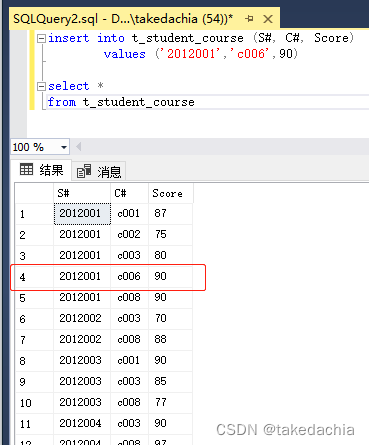
例:对 t_student_course 表插入一条内容:
insert into t_student_course (S#, C#, Score)
		values ('2012001','c006',90)
因为我们插入的是一条完整的信息(列齐全,顺序一致),可直接写成:
insert into t_student_course
		values ('2012001','c006',90)
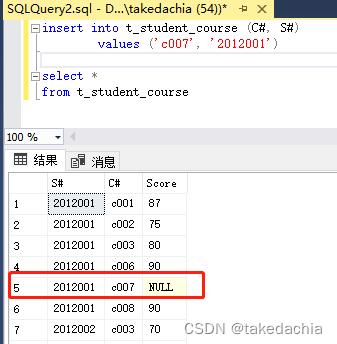
当然,插入的顺序可以换(前面列名对应上就可以),并且可以不插全(没填充的内容自动填NULL):
insert into t_student_course (C#, S#)
		values ('c007', '2012001')
插入多条记录
多条同单条,语法:
INSERT INTO 基本表名 [(列名表)]
VALUES(列值表),
(列值表),
(列值表),
...
查询结果的插入
例:统计男学生平均成绩大于80分的记录,并将学号和平均成绩插入到表S_SCORE中。
先创建表:create table S_SCORE(S# char(10), AVG_SCORE smallint)做插入时可以直接传入一个select到的表结果(INSERT INTO + SELECT),所以:
insert into S_SCORE(S#, AVG_SCORE)
select S#, AVG(Score)
from t_student_course
where S# in (select S# from t_student where Sex='男')
group by S#
having AVG(Score)>80
删除:DELETE FROM
语法:
DELETE FROM 基本表名 [WHERE 条件表达式]
例1:从 t_student_course 中删除S#为2012001,C#为c007的记录:
delete from t_student_course
where S#='2012001' and C#='c007'
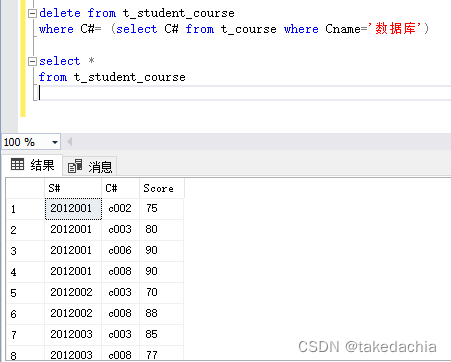
例2:从选课表中删除数据库课程的选课记录:
delete from t_student_course
where C#= (select C# from t_course where Cname='数据库')
可以看到代号为c001的记录被删了。
例3:把c001课程中成绩低于该课程平均成绩的选课记录从t_student_course中删除:
delete from t_student_course
where C#='c001'
		and Score< (select avg(Score)
							from t_student_course
							where C#='c001')
更新 / 修改:UPDATE SET
语法:
UPDATE 基本表名
SET 列名=值表达式[, 列名=值表达式...]
[WHERE 条件表达式]
例1:把2012001号学生的年龄修改为20岁,专业修改为机械电子。
update t_student
set Age=20, Major='机械电子'
where S#='2012001'
例2:将所有女学生的成绩提高10%。
update t_student_course
set Score = Score * 1.1
where S# in (select S#
			 from t_student
			 where Sex='女')
例3:当c008课程的考试成绩低于该课程的平均成绩时,将成绩提高5%。
update t_student_course
set Score = Score * 1.05
where C#='c008'
		and Score<(select avg(Score)
				   from t_student_course
				   where C#='c008')
边栏推荐
猜你喜欢

随机推荐
Flink Broadcast 广播变量
02.01-----The role of parameter reference "&"
第二讲 Linear Model 线性模型
将照片形式的纸质公章转化为电子公章(不需要下载ps)
Xiaobai, you big bulls are lightly abused
What are the characteristics of the interface of the physical layer?What does each contain?
【过一下7】全连接神经网络视频第一节的笔记
Flink Distributed Cache 分布式缓存
第四讲 back propagation 反向传播
Day1:用原生JS把你的设备变成一台架子鼓!
Lecture 3 Gradient Tutorial Gradient Descent and Stochastic Gradient Descent
redis persistence
Matplotlib(一)—— 基础
BroadCast Receiver(广播)详解
如何编写一个优雅的Shell脚本(三)
鼠标放上去变成销售效果
[Go through 10] sklearn usage record
Map、WeakMap
基于Flink CDC实现实时数据采集(三)-Function接口实现
Flink Oracle CDC写入到HDFS