当前位置:网站首页>RT thread learning notes (V) -- edit, download and debug programs
RT thread learning notes (V) -- edit, download and debug programs
2022-07-26 10:43:00 【aping_ cs_ dn】
Software environment :Win7,Keil MDK 4.72a, IAR EWARM 7.2, GCC 4.2,Python 2.7 ,SCons 2.3.2
Hardware environment :Armfly STM32F103ZE-EK v3.0 Development board
Continued , When the program is compiled , You can connect JLINK Or other debugging tools to download and debug .
【1】 Development environment settings
(1) Modification use scons --taget=mdk4 -s Command generated keilMDK engineering Options->Output Page Brows information There is no selection problem by default
Use Notepad++ Open... Under the development branch directory template.uvproj file , Locate the 52 Near the line , Can make <BrowseInfromation> label , Repair as follows :
<DebugInformation>1</DebugInformation>
<BrowseInformation>1</BrowseInformation>
<ListingPath>.\build\</ListingPath>
Save and close the file after modification .
(2) Two points need to be explained ( in the light of MDK4 development environment ):
First of all , If you change the path of the source file , It needs to be reused scons --tartget=mdk4 -s Generate once , To update the file path .
second , Need to be in MDK Reset the location of the object code in the environment , Here's the picture 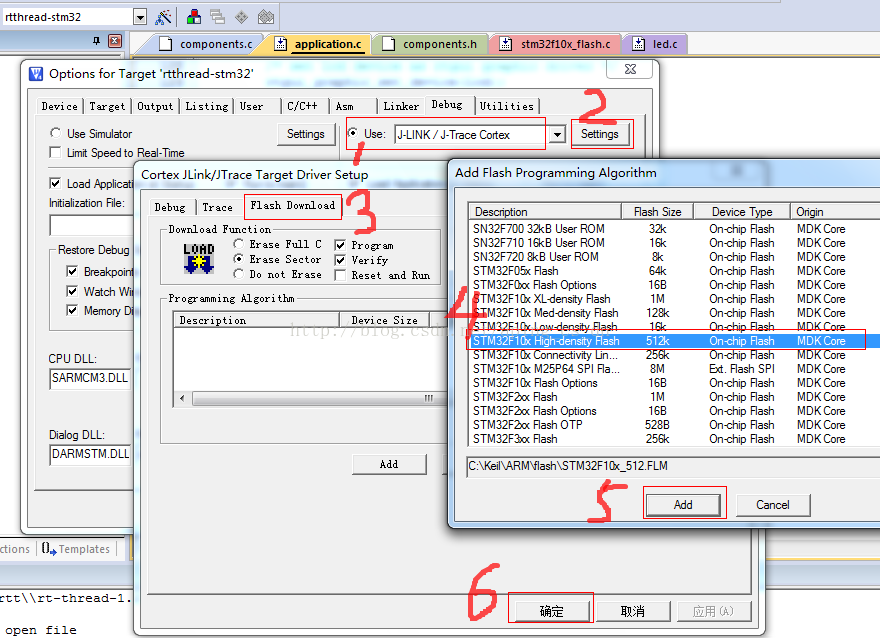
After setting up , Click on KeilMDK IDE Interface Download Button , Start downloading code , The results are as follows .

Press... On the development board Reset Button , You can see the following information on the serial port terminal :

If you can't see the above information , Please look at the terminal COM Is the mouth connected .
If everything is right , Press down Debug Button to enter the debugging interface .
【2】 Solve the problem of using Scons Compile and use KeilMDK The compilation output directory is inconsistent
It was found during the test that , Use at the command terminal Scons Compile time , Intermediate files are output to Build Catalog , Here's the picture

rtthread-stm32.bin and rtthread-stm32.axf The file is output to the root directory of the created Branch , But in KeilMDK When downloading in the environment ,KeilMDK The default location output directory is Build, This will lead to the use of KeilMDK During compilation, the intermediate file will be output to the root directory of the branch , It looks messy . No solution was found online , After some research on the compiled script , A solution has been found .
open rt-rthread-1.2.2/tools/building.py, Locate the 196 That's ok , You can see the following code :
# board build script
objs = SConscript('SConscript', variant_dir='build', duplicate=0)
Repository(Rtt_Root)
# include kernel
Compiled build The catalogue comes from here , So you only need to Sconstruct File first 13 Change the line to the following code :
TARGET = 'build/rtthread-stm32.' + rtconfig.TARGET_EXT
The red words on the top line are only added. Note that the slash can linux The style is consistent , It's not a backslash , Then save , use scons -c Clear previous compilation results , Rerun scons compile , give the result as follows :

Browse again in the manager , Here's the picture .

rtthread-stm32.axf The file was generated in build Under the catalogue , This solves the above problems .
【3】, Light up the LED The lamp
On the development board LED1 and LED2 The hardware interface corresponds to PF6 and PF7 Pin , open stm32f103ze-ek/diriver/led.c, Locate the 29 That's ok , Revised as follows :
#else
#define led1_rcc RCC_APB2Periph_GPIOF
#define led1_gpio GPIOF
#define led1_pin (GPIO_Pin_6)
#define led2_rcc RCC_APB2Periph_GPIOF
#define led2_gpio GPIOF
#define led2_pin (GPIO_Pin_7)
#endif // led define #ifdef STM32_SIMULATOR
Then save , use scons Command compilation , Download to the development board , Then press the reset button ,OK,LED1 Flashing ,LED2 Changliang .
【4】rtconfig.h About... In the configuration file FINSH_USING_MSH Compilation options problem
By default ,FINSH_USING_MSH The compilation option is not turned on , When you want to use msh Command line style , You need to open this option for reference RT-Thread Programming Guide .
(1) open rtconfig.h, Locate the 80 Near the line , Code Revised as follows :
/* SECTION: finsh, a C-Express shell */
#define RT_USING_FINSH
/*Support MSH style*/
#define FINSH_USING_MSH
/*Support MSH style only,not support C-Express*/
//#define FINSH_USING_MSH_ONLY
/*Support work dictionary,when use MSH style shell,suggest open this option*/
#define DFS_USING_WORKDIR
/*Support historical retrospect*/
#define FINSH_USING_HISTORY
/* Using symbol table */
#define FINSH_USING_SYMTAB
#define FINSH_USING_DESCRIPTION
(2) take msh Relevant codes are added to the project
msh The function code is msh.c and msh_cmd.c In file , file components/finsh Under the table of contents , Add it to the project , Here's the picture .

(3) Repair the Sconscript Script , Make sure that the componets/finsh Under the table of contents Sconscript Of documents 24 Line adds the following code :
msh_src = Split('''
msh_cmd.c
msh.c
''')
The above code has been added by default , In general, there is no need to modify .
Then save the compilation , Download to the development board ,
finsh />list()
--Function List:
led -- set led[0 - 1] on[1] or off[0].
fs_test -- file system R/W test. e.g: fs_test(3)
list_mem -- list memory usage information
mkfs -- make a file system
df -- get disk free
ls -- list directory contents
rm -- remove files or directories
cat -- print file
copy -- copy file or dir
mkdir -- create a directory
cd -- change current working directory
hello -- say hello world
version -- show RT-Thread version information
list_thread -- list thread
list_sem -- list semaphone in system
list_event -- list event in system
list_mutex -- list mutex in system
list_mailbox -- list mail box in system
list_msgqueue -- list message queue in system
list_mempool -- list memory pool in system
list_timer -- list timer in system
list_device -- list device in system
list -- list all symbol in system
msh -- use module shell
--Variable List:
dummy -- dummy variable for finsh
0, 0x00000000
finsh />msh()
0, 0x00000000
msh />
You can see that the command prompt has changed to msh 了
msh />help
RT-Thread shell commands:
version - show RT-Thread version information
list_thread - list thread
list_sem - list semaphore in system
list_event - list event in system
list_mutex - list mutex in system
list_mailbox - list mail box in system
list_msgqueue - list message queue in system
list_mempool - list memory pool in system
list_timer - list timer in system
list_device - list device in system
ls - List information about the FILEs.
cp - Copy SOURCE to DEST.
mv - Rename SOURCE to DEST.
cat - Concatenate FILE(s)
rm - Remove (unlink) the FILE(s).
cd - Change the shell working directory.
pwd - Print the name of the current working directory.
mkdir - Create the DIRECTORY.
ps - List threads in the system.
time - Execute command with time.
free - Show the memory usage in the system.
exit - return to RT-Thread shell mode.
help - RT-Thread shell help.
msh />
边栏推荐
- 【机器学习小记】【人脸识别】deeplearning.ai course4 4th week programming
- 12 don't forget every component when copying an object
- 剑指Offer(十):矩形覆盖
- toolstrip 去边框
- flutter 背景变灰效果,如何透明度,灰色蒙板遮罩
- Pengge C language lesson 4 (3)
- [leetcode daily question 2021/2/13]448. Find all the missing numbers in the array
- 鹏哥C语言——扫雷2021-08-16
- 1748.唯一元素的和
- 7-25 0-1背包 (50分)
猜你喜欢

Phase 4: one of College Students' vocational skills preparation in advance

解决:无法加载文件 C:\Users\user\AppData\Roaming\npm\npx.ps1,因为在此系统上禁止运行脚本 。

Redis docker instance and data structure

RT thread learning notes (I) -- configure RT thread development environment

2021-08-12函数递归_和鹏哥学习C语言

工厂模式详解

Anaconda is used on vscode (the environment has been configured)

oracle 启动不了 tnslistener服务启动不了

在神州IV开发板上为STemWin 5.22加入触屏驱动

RT-Thread 学习笔记(六)--- 开启基于SPI Flash的elmfat文件系统(上)
随机推荐
SuperMap IClient for Leaflet 加载高斯克吕格投影三度分带CGCS2000大地坐标系WMTS服务
.net operation redis sorted set ordered set
第4期:大学生提前职业技能准备之一
如何实现临时的图形要素现实
[leetcode daily question 2021/2/18] [detailed explanation] minimum number of turns of 995. K continuous bits
344.反转字符串
Codepoint 58880 not found in font, aborting. flutter build apk时报错
按二进制数中1的个数分类
Oracle cannot start tnslistener service cannot start
20210807#1 C语言程序结构
11 handle "self assignment" in operator=
json_ object_ put: Assertion `jso->_ ref_ count > 0‘ failed. Aborted (core dumped)
Issue 5: the second essential skill for College Students
Oracle创建索引
STM32 Alibaba cloud mqtt esp8266 at command
第7期:内卷和躺平,你怎么选
list升序和降序
Sql Server 数据库之初学体验
抽象工厂及其改进示例
点击el-dropdown-item/@click.native