当前位置:网站首页>zabbix auto-discovery and auto-registration
zabbix auto-discovery and auto-registration
2022-08-02 06:45:00 【Palm nine】
Article table of contents
Configure zabbix auto-discovery and auto-registration.
I. Automatic discovery
1. Configure Network Discovery Rules
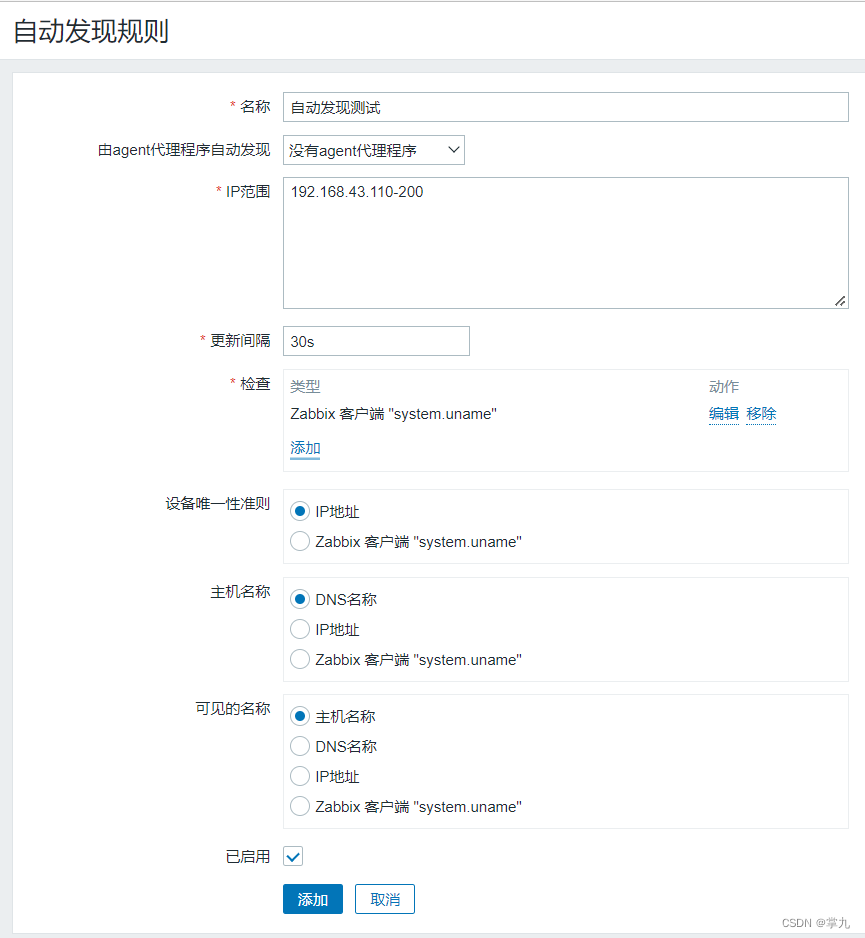
Configure Action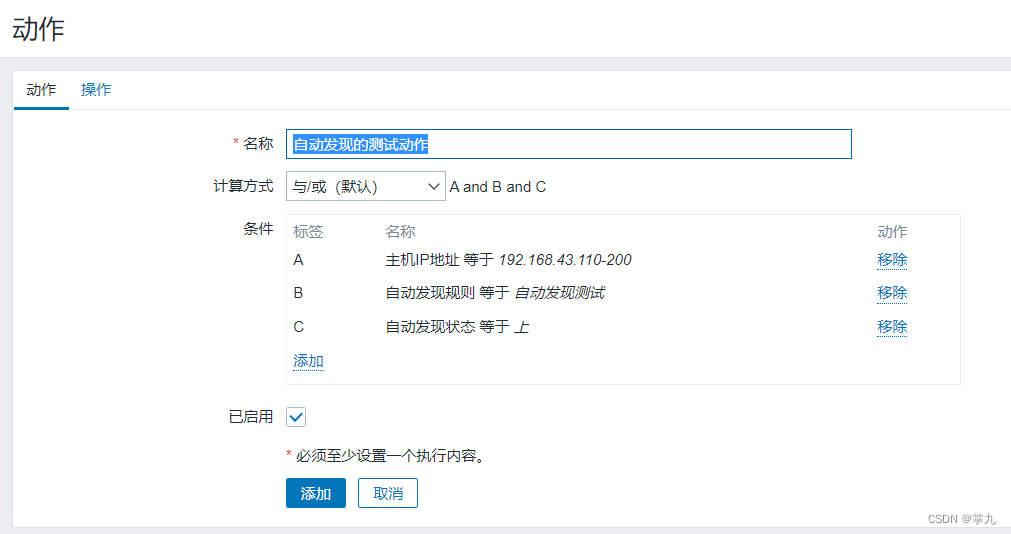
Configuration Action



2. Configure agent
Modify three parameters[[email protected] ~]# vim /etc/zabbix/zabbix_agent2.conf### Option: ServerServer=192.168.43.116##### Active checks relatedServerActive=192.168.43.116### Option: HostnameHostname=node23. Verify Autodiscover
Note: Solve the problem that the host name is the IP address after zabbix automatically discovers the host
Solution: dns support, or configure hosts resolution, otherwise the default is the IP address.

Configure host resolution
[[email protected] ~]# cat /etc/hosts127.0.0.1 localhost localhost.localdomain localhost4 localhost4.localdomain4::1 localhost localhost.localdomain localhost6 localhost6.localdomain6192.168.43.112 node2192.168.43.116 zabbix[[email protected] ~]# cat /etc/hosts127.0.0.1 localhost localhost.localdomain localhost4 localhost4.localdomain4::1 localhost localhost.localdomain localhost6 localhost6.localdomain6192.168.43.112 node2192.168.43.116 zabbixDelete the discovered host; server, client restart
[[email protected] ~]# systemctl restart zabbix-server.service[[email protected] ~]# systemctl restart zabbix-agent2.service
Second, automatic detection
Pause auto discovery first to prevent interference (on the same network segment)
Configure agent
[[email protected] ~]# yum install https://mirrors.aliyun.com/zabbix/zabbix/5.4/rhel/7/x86_64/zabbix-agent2-5.4.0-8.el7.x86_64.rpm[[email protected] ~]# vim /etc/zabbix/zabbix_agent2.conf### Option: ServerServer=192.168.43.116##### Active checks relatedServerActive=192.168.43.116### Option: HostnameHostname=node3[[email protected] ~]# systemctl enable --now zabbix-agent2.serviceCreated symlink from /etc/systemd/system/multi-user.target.wants/zabbix-agent2.service to/usr/lib/systemd/system/zabbix-agent2.service.1. Configure automatic registration
Configure>Action>Autoregistraion action



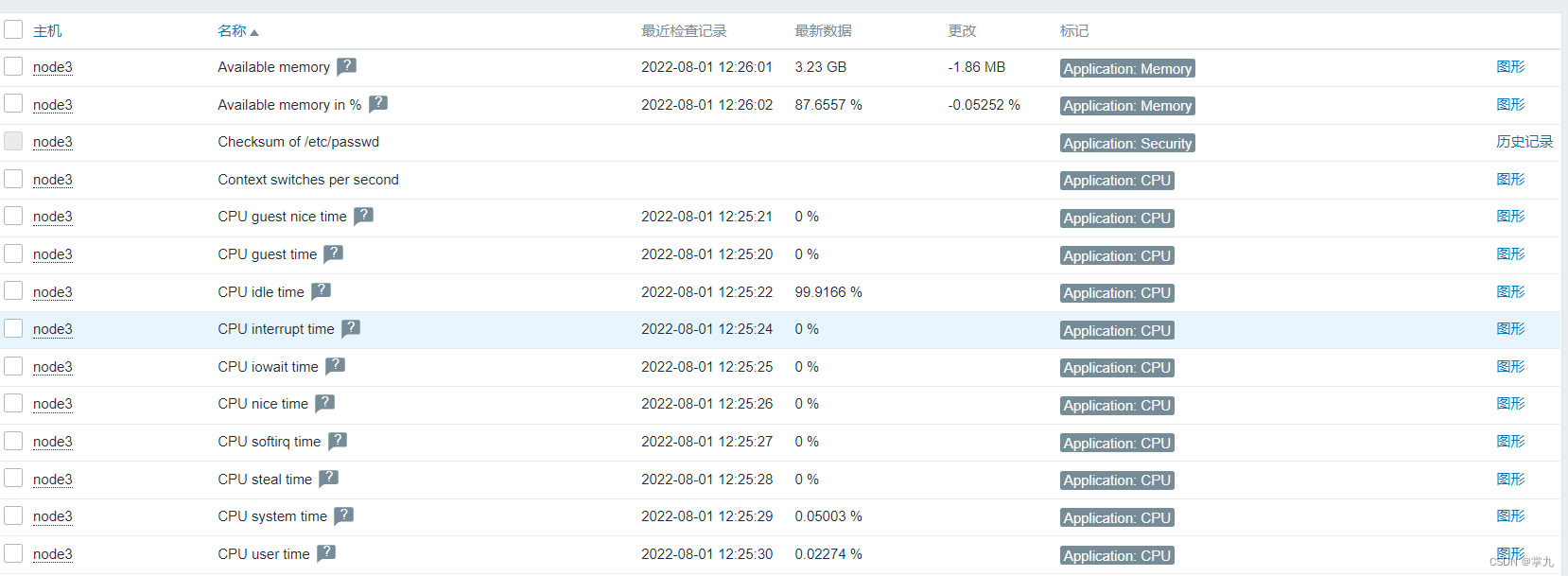
Restart server and client, quick test

边栏推荐
- Practice on optimizing startup performance of VS Code
- Block elements, inline elements (elements, span elements)
- flex布局(弹性布局)
- Point Density-Aware Voxels for LiDAR 3D Object Detection Paper Notes
- npm 和 yarn的区别
- 洛谷小游戏大全(用洛谷的人都得知道)
- View source and switch mirrors in two ways: npm and nrm
- 如何进行并发数计算(稳定性测试和压力测试)?
- Nacos客户端启动出现9848端口错误分析(非版本升级问题)
- HCIP BGP综合实验 建立对等体、路由反射器、联邦、路由宣告及聚合
猜你喜欢
随机推荐
How to perform concurrent calculation (stability test and stress test)?
MySQL(3)
分布式文件存储服务器之Minio对象存储技术参考指南
How to install the specified version package with NPM and view the version number
The virtual reality real estate display system foresees the future decoration effect in advance
flex layout (flexible layout)
25K test old bird's 6-year experience in interviews, four types of companies, four types of questions...
排雷小游戏(C语言)
OAuth 授权协议 | 都云原生时代了,我们应该多懂一点OAuth ?
机器学习——支持向量机原理
点云旋转到参考坐标系方向(最小方向包围盒方法)
虚拟现实房产展示系统提前预见未来装修效果
Alluxio为Presto赋能跨云的自助服务能力
npm 无法将“npm”项识别为 cmdlet、函数、脚本文件或可运行程序的名称。请检查名称的拼写,如果包括路径,请确保路径正确,然后再试一次。
Luogu mini game Daquan (everyone who uses Luogu must know)
zabbix邮件报警和微信报警
npm does not recognize the "npm" item as the name of a cmdlet, function, script file, or runnable program.Please check the spelling of the name, and if the path is included, make sure the path is corr
DNS的解析流程
VMTK环境配置记录
代码编世界 科技创未来