当前位置:网站首页>WIN10环境下配置pytorch
WIN10环境下配置pytorch
2022-06-25 12:19:00 【辞树 LingTree】
利用Anaconda配置pytorch。
一,配置cuda以及cudnn(gpu加速)
(如果不没有nvidia显卡的话,只能用CPU,可忽略这一步)
在官网上下载好cuda以及cudnn后,开始配置cuda环境。
参考博客:win10下CUDA和CUDNN的安装(超详细)!亲测有效!_没有人喜欢一个人的博客-CSDN博客_安装cuda和cudnn
二,安装Anaconda
2.1 在官网下载并安装 Anaconda。
开始菜单中打开Anaconda中的Anaconda Prompt,出现(base),即安装成功,如下:

(配置失败请见文章末尾踩坑记录)
2.2 配置环境
安装成功后,停留在上面 Anaconda Prompt 页面上,输入
conda create -n pytorch python=3.8再接着输入y。将所需要的包安装完。
接着,我们输入:
conda activate pytorch可以看到
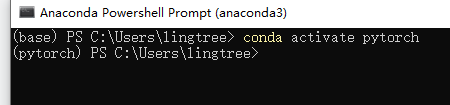
最左边的base,变成了pytorch。就进入了pytorch的编译环境。
2.3 pytorch的安装
在pytorch官网的对应部分选择我们对应的环境。

Pytorch Build:一般选择Stable(稳定版)。
Your OS:PC的操作系统。
Package:我们是在anaconda上安装,所以选Conda。
Language:选择Python。
Compute Platform:这里我们要根据我们在步骤一中配置的cuda的版本来选择。
win+r,输入cmd调出命令行窗口。输入
nvcc -V
nvidia-smi
都可查看当前cuda版本。

在最下面一行(Run this Command)后复制对应的命令。
对于上图即:
conda install pytorch torchvision torchaudio cudatoolkit=11.1 -c pytorch -c conda-forge完成之后,我们在Anaconda Powershell prompt 窗口中复制上述命令。
再接着输入y。等待即可安装成功。
(速度慢、失败见踩坑记录)
2.4 验证环境安装
关闭Anaconda Powershell prompt,再重新打开,再次通过命令conda activate pytorch 进入pytorch环境。
依次输入:
python 
import torch
torch.cuda.is_available()
可见,返回Ture,说明cuda安装成功,否则pytorch只能用cpu运行。
三,踩坑记录
3.1 上文2.1部分踩坑
这里如果产生类似报错:

请检查系统环境变量中,Path路径。所有的变量必须分条写,不能用“;”写在一条里。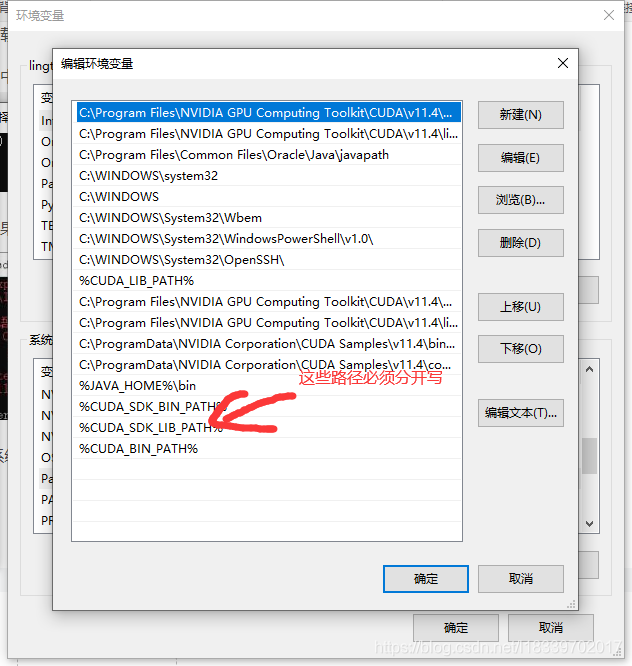
3.2 上文2.3中遇到的安装失败、速度太慢等问题。
(1)看了很多博客建议用清华镜像,但是我试了很多遍都失败了。第一次很快的安装上了CPU版本的,导致电脑重装从头再来。这里还是建议就在官网下载,我是晚上放着,早上起来就装好了。多试几次。
(2) 安装的时候不要挂VPN,必然失败,或者报错。我因为这个浪费了一个下午。
(3)更新conda 命令。
3.3 torch.cuda.is_available()返回false可能的原因
(1)检查是否有GPU。
(2)检查CUDA以及CUDNN环境、系统Path变量配置。
(3)检查显卡驱动是不是最新的。
边栏推荐
- node. JS architecture optimization: reverse proxy and cache service
- Figure explanation of fiborache sequence
- [Visio]平行四边形在Word中模糊问题解决
- JS SMS countdown implementation (simple code)
- A half search method for sequential tables
- MySQL and excel tables importing database data (Excel for MySQL)
- 模块五(微博评论)
- Initialize the project using the express framework
- 浏览器的5种观察器
- Reload cuda/cudnn/pytorch
猜你喜欢


随机推荐
laravel 9
(4) Pyqt5 tutorial -- > Custom signal and slot (super winding...)
node. JS architecture optimization: reverse proxy and cache service
Reload cuda/cudnn/pytorch
[visio] solving the fuzzy problem of parallelogram in word
PPT绘论文图之导出分辨率
mysql FIND_ IN_ Set function
Oral English - continuous reading
CUDA error: unspecified launch failure
2021-10-21
CUDA error: unspecified launch failure
Optimal solution for cold start
Command line garbled
Methods of strings in JS charat(), charcodeat(), fromcharcode(), concat(), indexof(), split(), slice(), substring()
Negative sample image used in yolov5 training
微信全文搜索技术优化
初识CANOpen
Laravel echart statistical chart line chart
Flutter automatically disappears after receiving push
list. replace, str.append