1. Realize user module jump
1.1 Requirement specification
explain : When the user clicks login / When the register button Need to jump to the specified page .
url Address 1.:http://www.jt.com/user/regist...
url Address 2: http://www.jt.com/user/login....
1.2 edit UserController
`package com.jt.controller;

import org.springframework.stereotype.Controller;
import org.springframework.web.bind.annotation.PathVariable;
import org.springframework.web.bind.annotation.RequestMapping;
import org.springframework.web.bind.annotation.RestController;

@Controller     // Page Jump is required
@RequestMapping("/user")
public class UserController {

    /**
     *  Realize user module page Jump
     * url1: http://www.jt.com/user/login.html      page :login.jsp
     * url2: http://www.jt.com/user/register.html   page :register.jsp
     *  requirement : Realize general page Jump
     * restFul The way : 1. Get dynamic url Parameters in , After that, the general jump is implemented .
     */
    @RequestMapping("/{moduleName}")
    public String module(@PathVariable String moduleName){

        return moduleName;
    }

}`
1.3 Page effect display

2 JT-SSO Project creation
2.1 Create project

2.2 Add inheritance / rely on / plug-in unit
`<?xml version="1.0" encoding="UTF-8"?>
<project xmlns="http://maven.apache.org/POM/4.0.0"
         xmlns:xsi="http://www.w3.org/2001/XMLSchema-instance"
         xsi:schemaLocation="http://maven.apache.org/POM/4.0.0 http://maven.apache.org/xsd/maven-4.0.0.xsd">
    <modelVersion>4.0.0</modelVersion>
    <artifactId>jt-sso</artifactId>
    <!-- The default packaging method is jar   It doesn't matter if you don't write -->
    <packaging>jar</packaging>

    <parent>
        <artifactId>jt</artifactId>
        <groupId>com.jt</groupId>
        <version>1.0-SNAPSHOT</version>
    </parent>

    <!--2. Add dependency information -->
    <dependencies>
        <!-- What depends essentially on is jar Package file -->
        <dependency>
            <groupId>com.jt</groupId>
            <artifactId>jt-common</artifactId>
            <version>1.0-SNAPSHOT</version>
        </dependency>
    </dependencies>

    <!--3. Add the plug-in -->
    <build>
        <plugins>
            <plugin>
                <groupId>org.springframework.boot</groupId>
                <artifactId>spring-boot-maven-plugin</artifactId>
            </plugin>
        </plugins>
    </build>

</project>`
2.3 edit User Of POJO object
`@TableName("tb_user")
@Data
@Accessors(chain = true)
public class User extends BasePojo{

    @TableId(type = IdType.AUTO)// Set the primary key auto increment
    private Long id;            // user ID Number
    private String username;    // user name
    private String password;    // password   need md5 encryption
    private String phone;       // Phone number
    private String email;       // Temporarily use the phone instead of email

}`
2.4 test JT-SSO project
User pass sso.jt.com/findUserAll obtain user Information in the table json return
The code structure is as follows :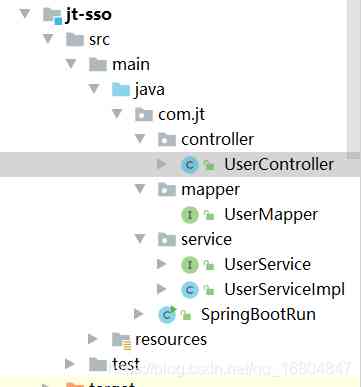
2.4.1 edit UserController
`package com.jt.controller;

import com.jt.pojo.User;
import com.jt.service.UserService;
import org.springframework.beans.factory.annotation.Autowired;
import org.springframework.web.bind.annotation.RequestMapping;
import org.springframework.web.bind.annotation.RestController;

import java.util.List;

@RestController
public class UserController {

    @Autowired
    private UserService userService;

    /**
     *  Complete test button
     * 1.url Address  :findUserAll
     * 2. parameter information : null
     * 3. Return value result : List<User>
     *
     */
    @RequestMapping("/findUserAll")
    public List<User> findUserAll(){

        return userService.findUserAll();
    }
}`
2.4.2 edit UserService
`package com.jt.service;

import com.jt.mapper.UserMapper;
import com.jt.pojo.User;
import org.springframework.beans.factory.annotation.Autowired;
import org.springframework.stereotype.Service;

import java.util.List;

@Service
public class UserServiceImpl implements UserService{

    @Autowired
    private UserMapper userMapper;

    @Override
    public List<User> findUserAll() {

        return userMapper.selectList(null);
    }
}`
2.4.3 modify nginx To configure

- Cross domain implementation ( important )
============
3.1 Cross domain access testing
3.1.1 Co domain testing
analysis :
1. Browser address : http://manage.jt.com/test.html
2.ajax Request address : http://manage.jt.com/test.json
Conclusion :
When the browser address and ajax Requested address ( agreement :// domain name : port ) In the same case, normal business calls can be realized .
`<script type="text/javascript" src="http://manage.jt.com/js/jquery-easyui-1.4.1/jquery.min.js"></script>
    <!-- After introducing the class library , perform js Code -->
<script type="text/javascript">
    <!-- Let the entire page load after the execution js-->
    $(function(){
        $.get("http://manage.jt.com/test.json",function(data){
            alert(data.name);
        })
    })
</script>`

3.1.2 Cross domain testing
analysis :
1. Browser address : http://www.jt.com/test.html
2.ajax Request address : http://manage.jt.com/test.json
Conclusion :
If the address is requested ( agreement :// domain name : port ) If not, the request call fails
3.2 browser - The homology strategy states
explain : Browser rules launch ajax when If Request protocol / domain name / Port number If 3 There is an address different from the current browser , Is in violation of The same-origin policy The provisions of the . The browser will not parse the return value .
Cross-domain problem : Violation of the same origin policy is cross domain request .
3.3 Cross domain 1-JSONP
3.3.1 JSONP Cross domain principle
- utilize javascrpit Medium src Property to implement cross domain requests .
- Custom callback functions function callback(xxxx);
- Encapsulate the result of return value in special format callback(json);
- Due to the use of src Property to call therefore Can only support get Request type .
Encapsulate the return value :
`hello({"id":"1","name":"tom"})`
page js edit
`<!DOCTYPE html>
<html>
<head>
<meta charset="UTF-8">
<title> test JSON Cross-domain problem </title>
    <script type="text/javascript">
        /*JS Is the language of interpretation and execution   */
        /* Define callback function   */
        function hello(data){
            alert(data.name);
        }
    </script>
    <!-- The json Save it to the browser and wait for it to be called , But you can't call without a function name   -->
    <script type="text/javascript" src="http://manage.jt.com/test.json"></script>
    <script type="text/javascript" src="http://manage.jt.com/js/jquery-easyui-1.4.1/jquery.min.js"></script>
</head>
<body>
    <h1>JS Cross-domain problem </h1>
</body>
</html>`

3.3.2 JSONP
JSONP(JSON with Padding) yes JSON A kind of “ Usage mode ”, It can be used to solve the problem of cross-domain data access in major browsers . Because of the homology strategy , Generally speaking, it is located in server1.example.com The web page can't and isn't server1.example.com Server communication , and HTML Of
3.3.3 JSONP Optimize
`<!DOCTYPE html>
<html>
<head>
<meta charset="UTF-8">
<title>JSONP test </title>
<script type="text/javascript" src="http://manage.jt.com/js/jquery-easyui-1.4.1/jquery.min.js"></script>
<script type="text/javascript">
    $(function(){
        alert(" Test access begins !!!!!")
        $.ajax({
            url:"http://manage.jt.com/web/testJSONP",
            type:"get",                //jsonp Can only support get request
            dataType:"jsonp",       //dataType Represents the return value type
            jsonp: "callback",    // Specify the parameter name
            jsonpCallback: "hello",  // Specify the callback function name
            success:function (data){   //data after jQuery Encapsulation return is json strand
                console.log(data);
            }
        });
    })
</script>
</head>
<body>
    <h1>JSON Cross domain request testing </h1>
</body>
</html>`
3.3.4 Edit back end Controller
`package com.jt.web.controller;

import com.jt.pojo.ItemDesc;
import com.jt.util.ObjectMapperUtil;
import jdk.nashorn.internal.runtime.regexp.JoniRegExp;
import org.springframework.web.bind.annotation.RequestMapping;
import org.springframework.web.bind.annotation.RestController;

@RestController
public class JSONPController {

    /**
     *  Realization JSONP Cross-domain request
     * url Address : http://manage.jt.com/web/testJSONP?callback=xxxxxx
     *  Parameters :     There is no need not to take
     *  Return value :  callback(JSON);
     */
     @RequestMapping("/web/testJSONP")
     public String testJSONP(String callback){
         ItemDesc itemDesc = new ItemDesc();
         itemDesc.setItemId(1000L).setItemDesc("JSONP test !!!");
         String json = ObjectMapperUtil.toJSON(itemDesc);
         return callback+"("+json+")";
     }

}`
3.3.5 Console output

3.3.6 JSONPObject explain
 `@RequestMapping("/web/testJSONP")
    public JSONPObject testJSONP(String callback){
        ItemDesc itemDesc = new ItemDesc();
        itemDesc.setItemId(1000L).setItemDesc("JSONP test !!!");
        return new JSONPObject(callback, itemDesc);
    }`
3.4 cors Cross domain approach
3.4.1 cors Call principle

3.4.2 Realization cors call
`package com.jt.config;

import org.springframework.context.annotation.Configuration;
import org.springframework.web.servlet.config.annotation.CorsRegistry;
import org.springframework.web.servlet.config.annotation.WebMvcConfigurer;
@Configuration  // I am a configuration class
public class CorsConfig implements WebMvcConfigurer {

    // On the back end   To configure cors Policies that allow access
    @Override
    public void addCorsMappings(CorsRegistry registry) {
        registry.addMapping("/**")
                .allowedMethods("GET","POST") // Define request types that allow cross domain
                .allowedOrigins("*")           // Any website can be accessed
                .allowCredentials(true) // Is it allowed to carry cookie
                .maxAge(1800);                 // Set request long link timeout .
    }
}`
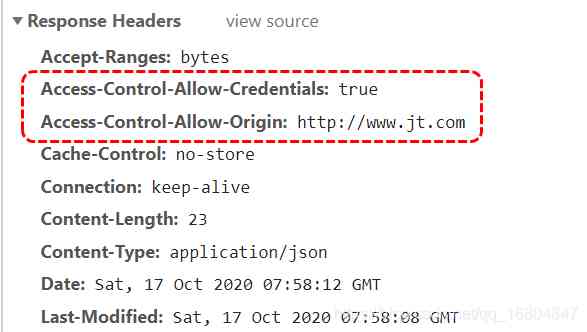
3.4.3 cors Call response header parsing
3.4.4 cors Cross domain testing

JSON data format 
3.5 Summary of cross domain
1.jsonp
jsonp Nature uses javaScript Medium src Attribute get Cross domain of request implementation .
The return value must be encapsulated in a special format .
2.cors
Add information to the response header . Specify which servers are allowed access to .
4 Realize user data verification
4.1 Business needs
When a user is registering , If you enter a user name , It should be directed to jt-sso A single sign on system initiates a request , Verify the existence of user data .
If it exists, the user will be prompted .
4.2 Business interface document description
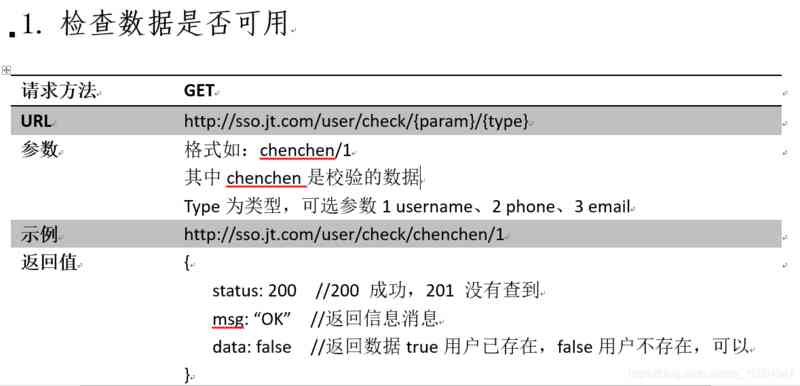
4.3 front end JS analysis
1.url analysis 
2. retrieval JS Code 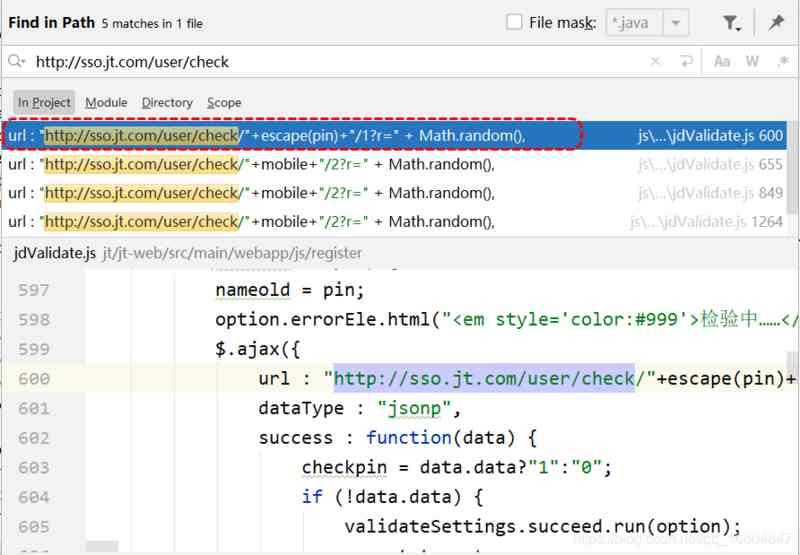
- JS analysis
 `$.ajax({
                url : "http://sso.jt.com/user/check/"+escape(pin)+"/1?r=" + Math.random(),
                dataType : "jsonp",
                success : function(data) {
                    checkpin = data.data?"1":"0";
                    if(data.status == 200){
                         if (!data.data) {
                            validateSettings.succeed.run(option);
                            namestate = true;
                         }else {
                            validateSettings.error.run(option, " The user name is already occupied !");
                            namestate = false;
                         }
                    }else{
                          validateSettings.error.run(option, " The server is busy , Please later !");
                          namestate = false;
                    }

                }
            });`
4.4 edit JT-SSO UserController
 `/**
     *  Business description : jt-web Server acquisition jt-sso data  JSONP Cross-domain request
     * url Address : http://sso.jt.com/user/check/{param}/{type}
     *  Parameters :    param:  Data to be verified    type: The type of verification
     *  Return value :  SysResult object
     *  The actual return value : callback(SysResult Of JSON)
     */
    @RequestMapping("/check/{param}/{type}")
    public JSONPObject checkUser(@PathVariable String param,
                                 @PathVariable Integer type,
                                 String callback){
        //true  Indicates that the data exists      false  Indicates that data can be used
        boolean flag = userService.checkUser(param,type);
        SysResult.success(flag);
        return new JSONPObject(callback, SysResult.success(flag));
    }`
4.5 edit JT-SSO UserService
 `/**
     *  The basis of judgment :   Query according to user name   If it turns out >0  The user already exists .
     * @param param
     * @param type
     * @return
     */
    @Override
    public boolean checkUser(String param, Integer type) {
        //1. Need to put type Type into   Specific field information   1=username  2=phone  3=email
        String column = columnMap.get(type);
        QueryWrapper<User> queryWrapper = new QueryWrapper<>();
        queryWrapper.eq(column, param);
        Integer count = userMapper.selectCount(queryWrapper);
        return  count > 0 ? true :false;
    }`
4.6 Page effect display