当前位置:网站首页>Image segmentation using pixellib
Image segmentation using pixellib
2022-07-02 21:42:00 【Xiaobai learns vision】
Click on the above “ Xiaobai studies vision ”, Optional plus " Star standard " or “ Roof placement ”
Heavy dry goods , First time delivery 
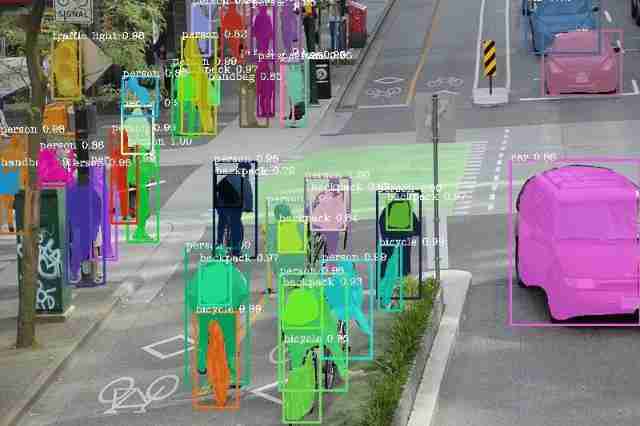
In recent years , The rapid development of computer vision . At present, the popular computer vision technology, such as image classification 、 Target detection has been widely used to solve many computer vision problems . In image classification , Classify the whole image . In target detection , Image classification is extended by detecting the position of a single target in the image .
Image segmentation
Some computer vision problems need to make the computer have a deeper understanding of the image content . Classification and target detection may not be suitable for solving these problems , We need an effective technology to solve this kind of computer vision problem , Image segmentation technology came into being .
Each image consists of a set of pixel values . Image segmentation is the task of classifying images at the pixel level . The machine can divide the image into different segments according to the class assigned to each pixel value in the image , So as to analyze the image more effectively .
The unique technology used in image segmentation makes it suitable for solving some computer vision problems . These problems require detailed information about the objects appearing in the image , Details cannot be provided by classifying the entire image or by providing bounding boxes for objects present in the image . Some main applications of image segmentation include :
Help the driverless vehicle vision system to effectively understand the road scene .
Medical image segmentation : Provide segmentation of body parts for performing diagnostic tests .
Satellite image analysis .
There are two main types of image segmentation :
Semantic segmentation : Objects that use the same category are segmented using the same color mapping .
Instance segmentation : It is different from semantic segmentation , It will segment different instances of the same object with different color mappings .
The following three pictures help you understand semantic segmentation and instance segmentation .
Original picture :

Semantic segmentation :

Instance segmentation :

PixelLib: It is a library built to make it easier to realize image segmentation in real life .PixelLib It's a flexible Library , It can be integrated into software solutions that need to apply image segmentation .
Semantic segmentation and instance segmentation can be implemented in five lines of code .
install PixelLib And its dependencies :
Install the latest version tensorflow(tensorflow 2.0), Use :
pip3 install tensorflow
Use the following command to install opencv python:
pip3 install opencv-python
Use the following command to install scikit image :
pip3 install scikit-image
install Pillow :
pip3 install pillow
install Pixellib:
pip3 install pixellib
use PixelLib Achieve semantic segmentation :
stay pascal voc Training on data sets deeplabv3+ Model to achieve semantic segmentation of code .
import pixellib
from pixellib.semantic import semantic_segmentation


segment_image = semantic_segmentation()
segment_image.load_pascalvoc_model("deeplabv3_xception_tf_dim_ordering_tf_kernels.h5")
segment_image.segmentAsPascalvoc("path_to_image", output_image_name = "path_to_output_image")
Let's look at each line of code :
import pixellib
from pixellib.semantic import semantic_segmentation
segment_image = semantic_segmentation()
The classes that perform semantic segmentation are from pixelLib Imported , We created an instance of this class .
segment_image.load_pascalvoc_model(“deeplabv3_xception_tf_dim_ordering_tf_kernels.h5”)In the code above , We loaded in pascal voc For segmenting objects trained on xception Model . The model can be downloaded from here .
https://github.com/ayoolaolafenwa/PixelLib/releases/download/1.1/deeplabv3_xception_tf_dim_ordering_tf_kernels.h5
segment_image.segmentAsPascalvoc(“path_to_image”, output_image_name = “path_to_output_image)We load this function to segment the image . This function has two arguments …
path_to_image: This is the image path to be segmented .
output_image_name: This is the path to save the segmented image . It will be saved in the current working directory .
sample1.jpg:

import pixellib
from pixellib.semantic import semantic_segmentation


segment_image = semantic_segmentation()
segment_image.load_pascalvoc_model("deeplabv3_xception_tf_dim_ordering_tf_kernels.h5")
segment_image.segmentAsPascalvoc("sample1.jpg", output_image_name = "image_new.jpg")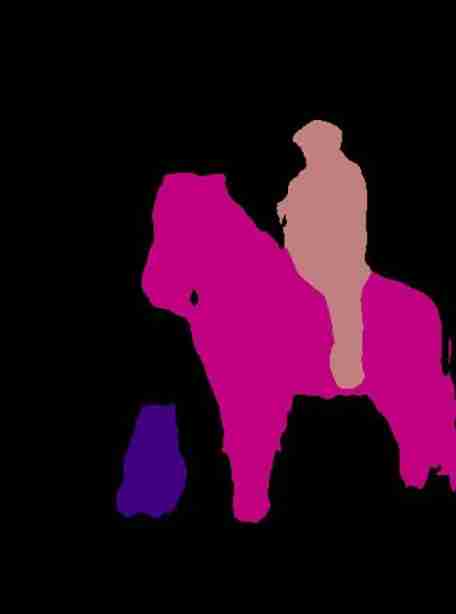
Segment the objects in the image and save the results . if necessary , Overlay segmentation can be applied to the image .
segment_image.segmentAsPascalvoc("sample1.jpg", output_image_name = "image_new.jpg", overlay = True)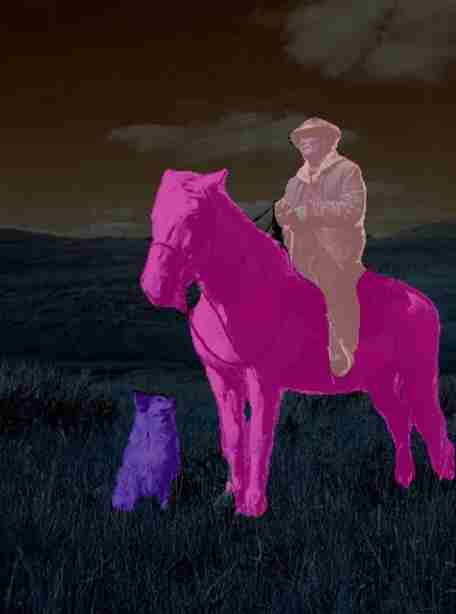
We added additional parameters overlay And set it to true, We get an image with covering segmentation on an object .
By modifying the following code , You can check the time required to perform the split .
import pixellib
from pixellib.semantic import semantic_segmentation
import time


segment_image = semantic_segmentation()
segment_image.load_pascalvoc_model("pascal.h5")


start = time.time()
segment_image.segmentAsPascalvoc("sample1.jpg", output_image_name= "image_new.jpg")


end = time.time()
print(f"Inference Time: {end-start:.2f}seconds")
Inference Time: 7.38secondsSemantic segmentation of images requires 7.38 second .
The model is in pascal voc Trained on the dataset , This dataset has 20 Object categories .
Object and its corresponding color mapping :
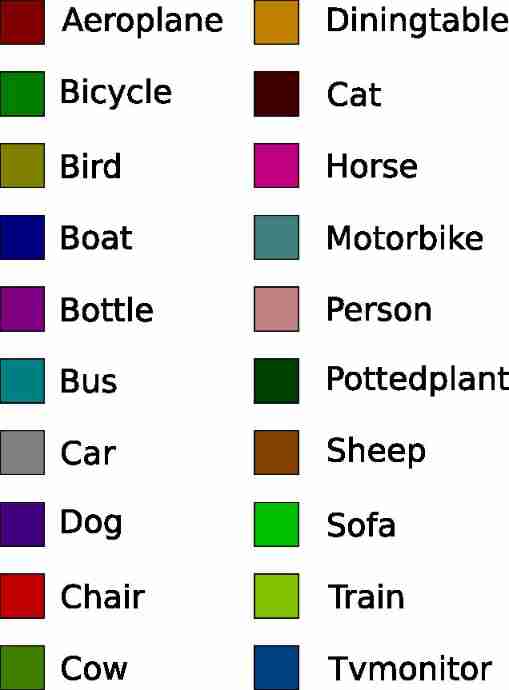
PixelLib It is also an array that can return split output :
Use this code to get the array of split output ,
output, segmap = segment_image.segmentAsPascalvoc()By modifying the following semantic segmentation code , You can test the code to get the array and print out the output shape .
import pixellib
from pixellib.semantic import semantic_segmentation
import cv2


segment_image = semantic_segmentation()
segment_image.load_pascalvoc_model("pascal.h5")
output, segmap = segment_image.segmentAsPascalvoc("sample1.jpg")
cv2.imwrite("img.jpg", output)
print(output.shape)
Use this code to get the output and overlay split array ,
segmap, segoverlay = segment_image.segmentAsPascalvoc(overlay = True)import pixellibfrom pixellib.semantic import semantic_segmentationimport cv2segment_image = semantic_segmentation()segment_image.load_pascalvoc_model("pascal.h5")segmap, segoverlay = segment_image.segmentAsPascalvoc("sample1.jpg", overlay= True)cv2.imwrite("img.jpg", segoverlay)print(segoverlay.shape)Use PIXELLIB Instance segmentation :
be based on Mask R-CNN Framework of the PixelLib Instance segmentation .
Code for instance segmentation :
import pixellib
from pixellib.instance import instance_segmentation


segment_image = instance_segmentation()
segment_image.load_model("mask_rcnn_coco.h5")
segment_image.segmentImage("path_to_image", output_image_name = "output_image_path")
Look at each line of code
import pixellib
from pixellib.instance import instance_segmentation
segment_image = instance_segmentation()
Import the class that performs instance segmentation , We created an instance of this class .
segment_image.load_model("mask_rcnn_coco.h5")This is loading mask r-cnn Code for model execution instance segmentation . Download... From here mask r-cnn Model .
https://github.com/ayoolaolafenwa/PixelLib/releases/download/1.2/mask_rcnn_coco.h5
segment_image.segmentImage("path_to_image", output_image_name = "output_image_path")This is the code that performs instance segmentation on the image , It requires two parameters :
path_to_image: The image path to be predicted by the model .
output_image_path: The path to save the segmentation results . It will be saved in the current working directory .
sample2.jpg:
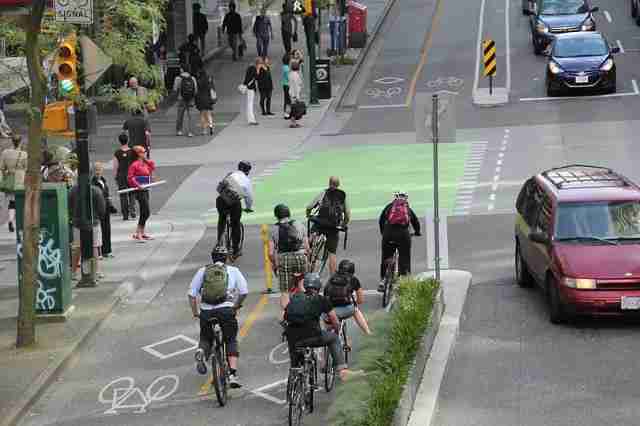
import pixellib
from pixellib.instance import instance_segmentation


segment_image = instance_segmentation()
segment_image.load_model("mask_rcnn_coco.h5")
segment_image.segmentImage("sample2.jpg", output_image_name = "image_new.jpg")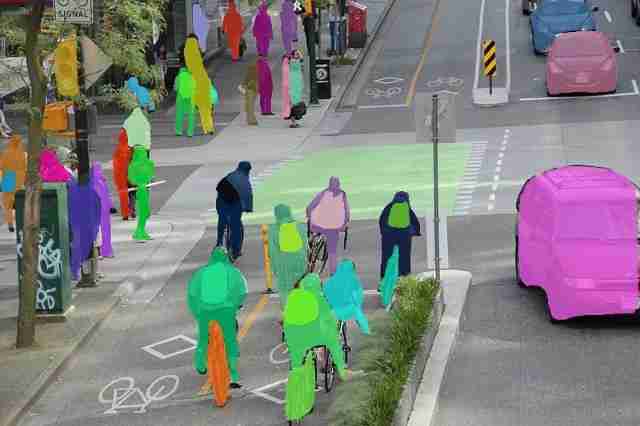
This is the image saved in the current working directory .
You can use bounding boxes to achieve segmentation . This can be achieved by modifying the code .
segment_image.segmentImage("path_to_image", output_image_name = "output_image_path", show_bboxes = True)We added an additional parameter show_bboxes And set it to true, The split mask is generated by the bounding box .
By modifying the following code , You can check the time required to perform the split .
import pixellib
from pixellib.instance import instance_segmentation
import time


segment_image = instance_segmentation()
segment_image.load_model("mask_rcnn_coco.h5")


start = time.time()
segment_image.segmentImage("former.jpg", output_image_name= "image_new.jpg")


end = time.time()
print(f"Inference Time: {end-start:.2f}seconds")
Inference Time: 12.87secondsRunning instance segmentation on an image requires 12.87 second .
Mask Rúu CNN The model is in microsoftco Trained on the dataset , The dataset has 80 A public object category . The model can segment these object categories .
Coco List of object categories in the dataset :
[‘BG’, ‘person’, ‘bicycle’, ‘car’, ‘motorcycle’, ‘airplane’, ‘bus’, ‘train’, ‘truck’, ‘boat’, ‘traffic light’, ‘fire hydrant’, ‘stop sign’, ‘parking meter’, ‘bench’, ‘bird’, ‘cat’, ‘dog’, ‘horse’, ‘sheep’, ‘cow’, ‘elephant’, ‘bear’, ‘zebra’, ‘giraffe’, ‘backpack’, ‘umbrella’, ‘handbag’, ‘tie’, ‘suitcase’, ‘frisbee’, ‘skis’, ‘snowboard’, ‘sports ball’, ‘kite’, ‘baseball bat’, ‘baseball glove’, ‘skateboard’, ‘surfboard’, ‘tennis racket’, ‘bottle’, ‘wine glass’, ‘cup’, ‘fork’, ‘knife’, ‘spoon’, ‘bowl’, ‘banana’, ‘apple’, ‘sandwich’, ‘orange’, ‘broccoli’, ‘carrot’, ‘hot dog’, ‘pizza’, ‘donut’, ‘cake’, ‘chair’, ‘couch’, ‘potted plant’, ‘bed’, ‘dining table’, ‘toilet’, ‘tv’, ‘laptop’, ‘mouse’, ‘remote’, ‘keyboard’, ‘cell phone’, ‘microwave’, ‘oven’, ‘toaster’, ‘sink’, ‘refrigerator’, ‘book’, ‘clock’, ‘vase’, ‘scissors’, ‘teddy bear’, ‘hair drier’, ‘toothbrush’]
PixelLib There are many professional uses of , For example, segmentation .
Get the following array :
Array of detected objects
Object corresponds to id Array
Split mask array
Output array
Use this code
segmask, output = segment_image.segmentImage()Split the code by modifying the following example , You can test the code to get the array and print out the output shape .
import pixellib
from pixellib.instance import instance_segmentation
import cv2


instance_seg = instance_segmentation()
instance_seg.load_model("mask_rcnn_coco.h5")
segmask, output = instance_seg.segmentImage("sample2.jpg")
cv2.imwrite("img.jpg", output)
print(output.shape)
By including parameters show_bboxes, Get the split array with bounding box .
segmask, output = segment_image.segmentImage(show_bboxes = True)import pixellib
from pixellib.instance import instance_segmentation
import cv2
instance_seg = instance_segmentation()
instance_seg.load_model("mask_rcnn_coco.h5")
segmask, output = instance_seg.segmentImage("sample2.jpg", show_bboxes= True)
cv2.imwrite("img.jpg", output)
print(output.shape)install PixelLib And test it with your image .
visit PixelLib The official github The repository .
https://github.com/ayoolaolafenwa/PixelLib
visit PixelLib Official documents of
https://pixellib.readthedocs.io/en/latest/
Reference link :https://towardsdatascience.com/image-segmentation-with-six-lines-0f-code-acb870a462e8
download 1:OpenCV-Contrib Chinese version of extension module
stay 「 Xiaobai studies vision 」 Official account back office reply : Extension module Chinese course , You can download the first copy of the whole network OpenCV Extension module tutorial Chinese version , cover Expansion module installation 、SFM Algorithm 、 Stereo vision 、 Target tracking 、 Biological vision 、 Super resolution processing And more than 20 chapters .
download 2:Python Visual combat project 52 speak
stay 「 Xiaobai studies vision 」 Official account back office reply :Python Visual combat project , You can download the Image segmentation 、 Mask detection 、 Lane line detection 、 Vehicle count 、 Add Eyeliner 、 License plate recognition 、 Character recognition 、 Emotional tests 、 Text content extraction 、 face recognition etc. 31 A visual combat project , Help fast school computer vision .
download 3:OpenCV Actual project 20 speak
stay 「 Xiaobai studies vision 」 Official account back office reply :OpenCV Actual project 20 speak , You can download the 20 Based on OpenCV Realization 20 individual Actual project , Realization OpenCV Learn advanced .
Communication group
Welcome to join the official account reader group to communicate with your colleagues , There are SLAM、 3 d visual 、 sensor 、 Autopilot 、 Computational photography 、 testing 、 Division 、 distinguish 、 Medical imaging 、GAN、 Wechat groups such as algorithm competition ( It will be subdivided gradually in the future ), Please scan the following micro signal clustering , remarks :” nickname + School / company + Research direction “, for example :” Zhang San + Shanghai Jiaotong University + Vision SLAM“. Please note... According to the format , Otherwise, it will not pass . After successful addition, they will be invited to relevant wechat groups according to the research direction . Do not Send ads within the group , Or you'll be invited out , Thanks for your understanding ~

边栏推荐
- China's crude oil heater market trend report, technological innovation and market forecast
- MySQL learning record (4)
- China's noise meter market trend report, technical dynamic innovation and market forecast
- 关于测试用例
- 【零基础一】Navicat下载链接
- Accounting regulations and professional ethics [17]
- Analysis of enterprise financial statements [1]
- 【剑指 Offer】57. 和为s的两个数字
- China plastic bottle and container market trend report, technological innovation and market forecast
- Check the confession items of 6 yyds
猜你喜欢
Unexpectedly, there are such sand sculpture code comments! I laughed

Investment strategy analysis of China's electronic information manufacturing industry and forecast report on the demand outlook of the 14th five year plan 2022-2028 Edition
读博士吧,研究奶牛的那种!鲁汶大学 Livestock Technology 组博士招生,牛奶质量监测...
Off chip ADC commissioning record
![[shutter] statefulwidget component (create statefulwidget component | materialapp component | scaffold component)](/img/04/4070d51ce8b7718db609ef2fc8bcd7.jpg)
[shutter] statefulwidget component (create statefulwidget component | materialapp component | scaffold component)
Find objects you can't see! Nankai & Wuhan University & eth proposed sinet for camouflage target detection, and the code has been open source

*C language final course design * -- address book management system (complete project + source code + detailed notes)

基本IO接口技术——微机第七章笔记
![[Yu Yue education] reference materials of analog electronic technology of Nanjing Institute of information technology](/img/2f/bb99836bb3ad725483f30531ff4d53.jpg)
[Yu Yue education] reference materials of analog electronic technology of Nanjing Institute of information technology
![[shutter] shutter layout component (physicalmodel component)](/img/6a/f8161fb7c8e9012456622f1920da64.gif)
[shutter] shutter layout component (physicalmodel component)
随机推荐
One week dynamics of dragon lizard community | 2.07-2.13
Basic knowledge of tree and binary tree (detailed illustration)
Go language learning summary (5) -- Summary of go learning notes
Redis -- three special data types
Get weekday / day of week for datetime column of dataframe - get weekday / day of week for datetime column of dataframe
CVPR论文解读 | 弱监督的高保真服饰模特生成
Import a large amount of data to redis in shell mode
Research Report on market supply and demand and strategy of China's right-hand outward rotation entry door industry
MySQL learning record (5)
ctf-HCTF-Final-Misc200
[shutter] shutter page Jump (route | navigator | page close)
[shutter] shutter layout component (opacity component | clipprect component | padding component)
Go web programming practice (2) -- process control statement
MySQL inserts Chinese data and reports an error. Set the default collation
MySQL installation failed -gpg verification failed
Market trend report, technical innovation and market forecast of China's Micro pliers
[shutter] statefulwidget component (image component | textfield component)
Cloud computing technology [2]
[dynamic planning] p1220: interval DP: turn off the street lights
Detailed explanation of OSI seven layer model