#!/bin/bash
#  A key to install mysql5.7.35

# Installation package download directory
MYSQL_DOWNLOAD_DIR=/data/software/
# Package directory
MYSQL_INSTALL_DIR=/data/modules/

# database information
info_mysql(){
    echo "======> MYSQL Installation information  <======";
    echo "Mysql edition :5.7.35 ";
    echo " Download directory :/data/software/ ";
    echo " The installation directory :/data/modules/ ";
}

# Old edition mysql
uninstall_mysql(){
    echo "\n======> MYSQL Installation preparation  <======";
    echo " Residual Mysql testing ......."
    echo " Uninstall the old version mysql......."
    echo [+] Uninstall Mysql
    yum remove mysql* -y
    yum remove mariadb* -y
    if [ -f "/etc/my.cnf" ];then
        rm -rf /etc/my.cnf
    fi

    if [ -f "/root/.mysql_sercret" ];then
        rm -rf /root/.mysql_sercret
    fi

    if [ -d "/var/lib/mysql" ];then
        rm -rf /var/lib/mysql
    fi

    if [ -d "/usr/lib64/mysql" ];then
        rm -rf /usr/lib64/mysql
    fi

    if [ -d "/usr/share/mysql" ];then
        rm -rf /usr/share/mysql
    fi
    echo " Uninstall completed !"
}

# download mysql
IS_CINTINUE='y';
download_mysql(){
    echo " Installation directory detection ......."
    if [ ! -d "/data/software" ]; then
        echo " Create download directory ......."
        mkdir -p /data/software/
    fi
    if [ ! -d "/data/modules/mysql/" ]; then
        echo " Create a data directory ......."
        mkdir -p /data/modules/
    fi
    echo "  Catalog ready  !";
    echo "======> MYSQL setup script  <======";
    cd /data/software/
    read -p "  Confirm the installation ?【y/n】" IS_CINTINUE
    if [[ $IS_CINTINUE == 'y' ]]; then
        echo " One moment please , About need 20 minute , Downloading MYSQL.......";
        cd /data/software/
        file="/data/software/mysql-boost-5.7.35.tar.gz"
        if [ ! -f $file ]; then
            echo "File not found!"
            yum install -y wget && wget -c https://cdn.mysql.com/archives/mysql-5.7/mysql-boost-5.7.35.tar.gz;
            echo " Download complete , Decompressing .......";
            tar -zxvf mysql-boost-5.7.35.tar.gz -C /data/modules/
            cd /data/modules/
            mv /data/modules/mysql-5.7.35/ mysql
            exit 0
        fi
        echo " Unzip complete , Execution and installation .......";

        #yum install -y wget && wget -c https://cdn.mysql.com/archives/mysql-5.7/mysql-5.7.35-el7-x86_64.tar.gz;
    else
        echo " Please download the installation package by yourself !";
        exit;
    fi

}

# install mysql
install_mysql(){
    echo "======>  install mysql rely on ....... <======";
    yum -y install gcc gcc-devel gcc-c++ gcc-c++-devel autoconf* automake* zlib* libxmlncurses-devel ncurses libgcrypt libtool* cmake openssl openssl-devel bisonbison-devel perl-Data-Dumper boost boost-doc boost-devel
    yum -y install gcc make cmake ncurses-devel libxml2-devel libtool-ltdl-devel gcc-c++ autoconf automake bison zlib-devel
    echo "======>  Settings before installation  <======";
    sleep 2s
    cd /data/modules/mysql/
    mkdir data
    sleep 2s
    cmake -DCMAKE_INSTALL_PREFIX=/data/modules/mysql/ \
    -DMYSQL_DATADIR=/data/modules/mysql/data \
    -DSYSCONFDIR=/etc \
    -DWITH_MYISAM_STORAGE_ENGINE=1 \
    -DWITH_INNOBASE_STORAGE_ENGINE=1 \
    -DWITH_MEMORY_STORAGE_ENGINE=1 \
    -DWITH_READLINE=1 \
    -DMYSQL_UNIX_ADDR=/tmp/mysqld.sock \
    -DMYSQL_TCP_PORT=3306 \
    -DWITH_BOOST=/data/modules/mysql/boost \
    -DENABLED_LOCAL_INFILE=1 \
    -DWITH_PARTITION_STORAGE_ENGINE=1 \
    -DEXTRA_CHARSETS=all \
    -DDEFAULT_CHARSET=utf8 \
    -DDEFAULT_COLLATION=utf8_general_ci
    echo "======>  establish mysql Users and groups  <======";
    cd /data/modules/mysql/
    sleep 2s
    make && make install
    groupadd mysql && useradd mysql -g mysql -M -s /sbin/nologin && chown mysql:mysql /data/modules/mysql/
    # if [ $? -eq 0 ];then
    #         echo "======>  Set up the success ! Start compilation and installation , About need 20 minute , Wait patiently ...<======";
    #         sleep 2s
    #         make && make install
    #         if [ $? -eq 0 ]; then
    #             cd ~
    #             echo "======>  Compile successfully ! Start setting up groups and users ! <======";
    #             sleep 2s
    #             groupadd mysql && useradd mysql -g mysql -M -s /sbin/nologin && chown mysql:mysql /data/modules/mysql/
    #         else
    #             echo "======>  Compile failed ! <======";
    #             exit;
    #         fi
    #     else
    #             echo "======>  Setup failed ! <======";
    #             exit;
    # fi
    echo "======>  installation is complete ! <======";
}

# To configure Mysql
configuration_mysql(){

echo "======>  To configure mysql <======";
cd /data/modules/mysql/
touch mysql.pid
echo "10254" > /data/modules/mysql/mysql.pid
touch mysql.err
touch mysqld.sock
chown mysql:mysql /data/modules/mysql/mysql.pid
chown mysql:mysql /data/modules/mysql/mysql.err
chown mysql:mysql /data/modules/mysql/data/mysqld.sock
cat > /etc/my.cnf<<EOF
[client]
port            = 3306
socket          = /data/modules/mysql/data/mysqld.sock
[mysqld]
#server-id  = 6878                           # function ID
bind-address=0.0.0.0                        # Bind address to run remote connection
port=3306                                   #Mysql Open port
user=mysql                                  # Database login user
basedir=/data/modules/mysql/                #Mysql The absolute path of the installation
datadir=/data/modules/mysql/data            #Mysql The absolute path of data storage
socket=/data/modules/mysql/data/mysqld.sock # Socket file
log-error=/data/modules/mysql/mysql.err     #mysql The path where the generated error log is stored
pid-file=/data/modules/mysql/mysql.pid      # by mysqld The program specifies a storage process ID The file of
character_set_server=utf8                   # Database character coding
symbolic-links=0                            # Whether to turn on the link symbol
explicit_defaults_for_timestamp=true        # database timestamp Columns of type are automatically updated
EOF


sleep 2s
echo " initialization mysql.......";
cd /data/modules/mysql/bin
./mysqld --defaults-file=/etc/my.cnf --basedir=/data/modules/mysql/ --datadir=/data/modules/mysql/data/ --user=mysql --initialize
ln -s  /data/modules/mysql/bin/mysql    /usr/bin
}

# take mysql Set as service startup
service_mysql(){
    echo "======>  The production service starts  <======";
    cd /data/modules/mysql
    /bin/cp -rf support-files/mysql.server /etc/init.d/mysqld
    chmod a+wrx /etc/init.d/mysqld
    if [ $? -eq 0 ]; then
        echo "======>  Service setup succeeded ! <======";
        cd ~
        service mysqld start
        sleep 2s
        service mysqld stop
        sleep 2s
    else
        echo "======>  Service setting failed ! <======";
    fi

    echo "======>  Add to boot entry ! <======";
    chkconfig --add mysqld
    if [ $? -eq 0 ]; then
        echo "======>  Set the startup item successfully ! <======";
    else
        echo "======>  Failed to set boot entry ! <======";
    fi
    service mysqld stop
    echo "======>  Configure environment variables  <======";
    echo "export PATH=$PATH:/data/modules/mysql/bin/" >>/etc/profile
    source /etc/profile
    echo " start-up mysql service ....... ";
    service mysqld start
    echo "Mysql Has been launched ....... ";
}


# Start the database and set the password
# mysql_password='123456'
# up_mysql(){
#     cd /data/modules/mysql/
#     echo "======>  Please enter the database password : <======";
#     read -p " Input password :" -s mysql_password echo
#     echo password read, is "$mysql_password"
#     # read -p "  Confirm the installation ?【y/n】" IS_CINTINUE
#     # ./bin/mysqladmin -u root password "123456"
#     if [ $? -eq 0 ];then
#         echo " Set up root The password succeeded !";
#     else
#         echo " Set up root Password failed !";
#     fi
#     source /etc/profile
# }

# End installation
end_mysql(){
    echo " Operation port : 3306"
    echo " Database users : mysql"
    echo " database root password ([email protected] Back ):"
    cat /data/modules/mysql/mysql.err | grep [email protected]:
    echo " Database installation path : /data/modules/mysql/  "
    echo " Database data path : /data/modules/mysql/data  "
    mysql -uroot -p
}

# The installation process
mysql(){
    # database information
    info_mysql
    # Uninstall the old database
    uninstall_mysql
    # Download Database
    download_mysql
    # mount this database
    install_mysql
    # Configuration database
    configuration_mysql
    # The database starts as a service
    service_mysql
    # start-up MySQL Set the password
    # Display database information
    info_mysql
    end_mysql

}
mysql当前位置:网站首页>One click compilation and deployment of MySQL
One click compilation and deployment of MySQL
2022-07-04 04:19:00 【KentBryce】
边栏推荐
- Distributed system: what, why, how
- Pointer array and array pointer
- User defined path and file name of Baidu editor in laravel admin
- “软硬皆施”,助力建成新型云计算数据中心
- Cesiumjs 2022^ source code interpretation [0] - article directory and source code engineering structure
- Mitsubishi M70 macro variable reading Mitsubishi M80 public variable acquisition Mitsubishi CNC variable reading acquisition Mitsubishi CNC remote tool compensation Mitsubishi machine tool online tool
- Katalon框架测试web(二十一)获取元素属性断言
- 支持首次触发的 Go Ticker
- Msgraphmailbag - search only driveitems of file types
- Understand the principle of bytecode enhancement technology through the jvm-sandbox source code
猜你喜欢

The three-year revenue is 3.531 billion, and this Jiangxi old watch is going to IPO
Two commonly used graphics can easily realize data display
Idea modify body color
Introduction to asynchronous task capability of function calculation - task trigger de duplication
Tcpclientdemo for TCP protocol interaction

软件测试是干什么的 发现缺陷错误,提高软件的质量

图解网络:什么是热备份路由器协议HSRP?
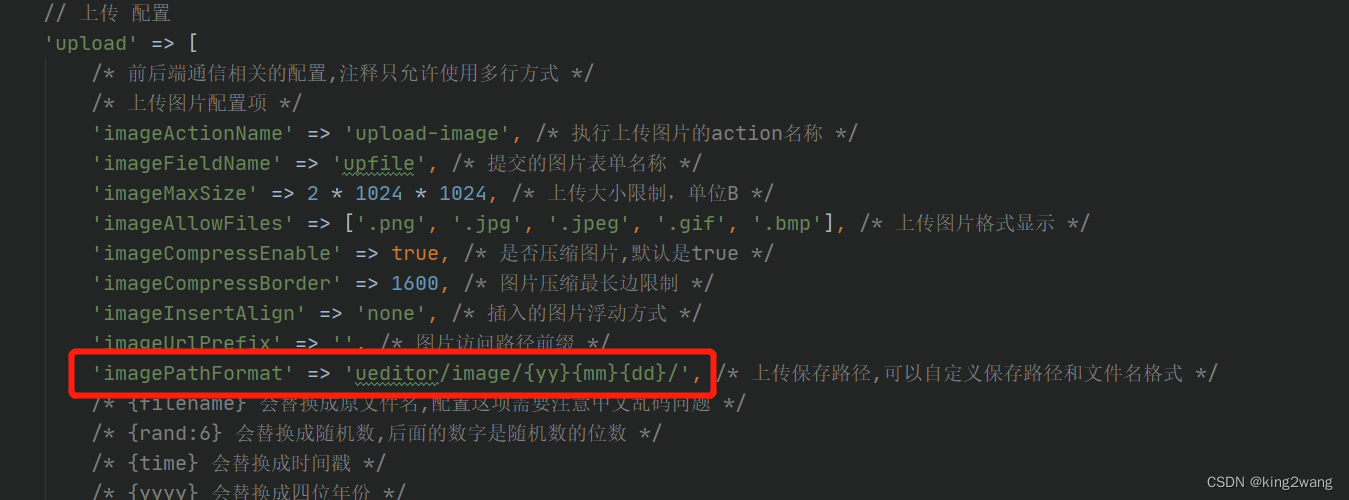
laravel admin里百度编辑器自定义路径和文件名

How to telecommute more efficiently | community essay solicitation

Graduation project: design seckill e-commerce system
随机推荐
Database SQL statement summary, continuous update
[csrf-01] basic principle and attack and defense of Cross Site Request Forgery vulnerability
Is it safe to buy insurance for your children online? Do you want to buy a million dollar medical insurance for your children?
华为云鲲鹏工程师培训(广西大学)
Confession code collection, who says program apes don't understand romance
02 specific implementation of LS command
[paddleseg source code reading] paddleseg calculates Miou
[webrtc] M98 Ninja build and compile instructions
LNK2038 检测到“RuntimeLibrary”的不匹配项: 值“MD_DynamicRelease”不匹配值“MDd_DynamicDebug”(main.obj 中)
Brief explanation of depth first search (with basic questions)
【读书会第十三期】视频文件的封装格式
Graduation project: design seckill e-commerce system
拼夕夕二面:说说布隆过滤器与布谷鸟过滤器?应用场景?我懵了。。
支持首次触发的 Go Ticker
Why is the probability of pod increasing after IPtable
Common methods of threads
CesiumJS 2022^ 源码解读[0] - 文章目录与源码工程结构
Go 语言入门很简单:Go 实现凯撒密码
Illustrated network: what is the hot backup router protocol HSRP?
Exercices de renforcement des déclarations SQL (MySQL 8.0 par exemple)