当前位置:网站首页>Yushenle's learning record: the first project of SOC FPGA -hello world
Yushenle's learning record: the first project of SOC FPGA -hello world
2022-07-26 15:56:00 【YuKaguraNe】
List of articles
One 、Soc Environment configuration
1. Image burning
1) format TF card :
First the TF card format For a volume
2) Using tools : Win32DiskImager
Will be prepared in advance linux Simple image burn TF In the memory card 
3) Start and use serial port debugging
1、 First, connect the serial port connection , Then turn on the computer Device manager .
as follows :
Generally, it can be in port Found at , If in Other equipment Found in ( Usually with yellow exclamation point ) It means there is a problem with the drive , Update can .
2、 Use MobaXterm Connecting boards
Session Set as follows :
3、 Press... On the board after the connection is completed RST Key , You can see the loading as follows :
4、 Just log in as a user 
Here we are SoC Of linux The environment has been set up .
Two 、Soc The golden project
1. Introduction to gold project
What is? Soc What about the golden project , In fact, it is done for a specific board Formwork works , Relevant Peripherals and HPS Etc. are configured in the project , Pin Also bind the completed project accordingly .
2. The benefits of using gold Engineering
Use the golden project , It can greatly reduce the burden of novice developers SoC Difficulty of project establishment , There is no need to write related top-level files , Developers only need to work in the golden project , On demand Discard or add the peripherals or interfaces you want .
3、 ... and 、Soc And hello world
1.SSH To configure
Get into ssh The configuration directory
cd /etc/ssh/

To configure ssh Set up
vi sshd_config

Will be the first 44 The row is configured as PermitRootLogin yes
So far SSH Configuration complete
2. The network configuration
To configure Soc Board static address
Enter the network configuration folder
cd /etc/network

modify interfacces The configuration file
vi interfaces
as follows :
Here, the address of the board can be configured arbitrarily
After the configuration is completed, you can use the restart command to restart the board
reboot
After the restart is completed, enter
ifconfig
Check if the configuration is successful 
You can see that the configuration is complete
Configure computer network address

Modify network settings 
The address here can also be configured at will , But the main thing is Need to be on a network among .
This is related to the network Network configuration completed
3. Software coding
Code writing
Open up Quartus Directory embedded/ds-5/bin Medium eclipse
In the previous gold project app Folder Store software projects 
On the eclipse New China C project 
Add source files to the project hello_world.c
Write code
#include<stdio.h>
int main(){

	while(1)
	{

		printf("Hello World\n");
		//sleep(1);
	}
}
Environment configuration

The files to be configured are as follows :
hps_0.h
Put hps_0.h Just copy it into the project 
rest include To configure 
Project — Properties

Select settings select C++ routine , Click the right side. add Add the path as shown in the figure
4. Code compilation and running
Compile code
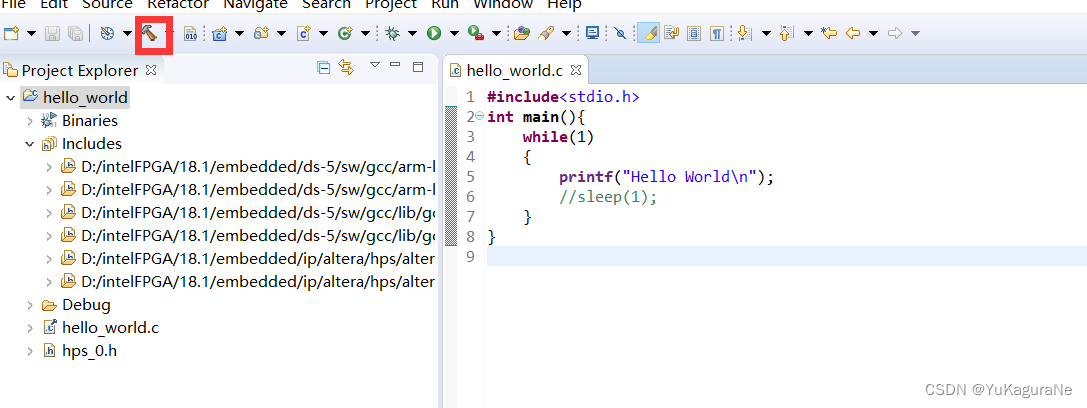
After compilation, the following will appear Binary 
If an error is reported , Note that after the code is written Pay attention to saving the file ,eclipse Code will not be saved automatically
function
Use eclipse Remote SSH Connect to the board 
Open the window shown above 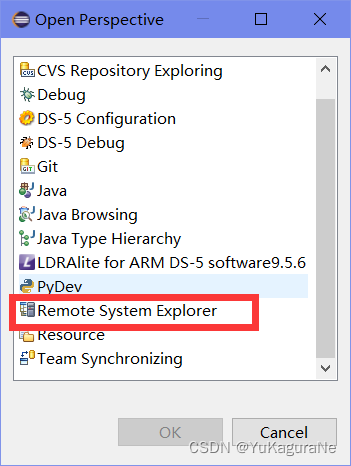
choice Remote System Explorer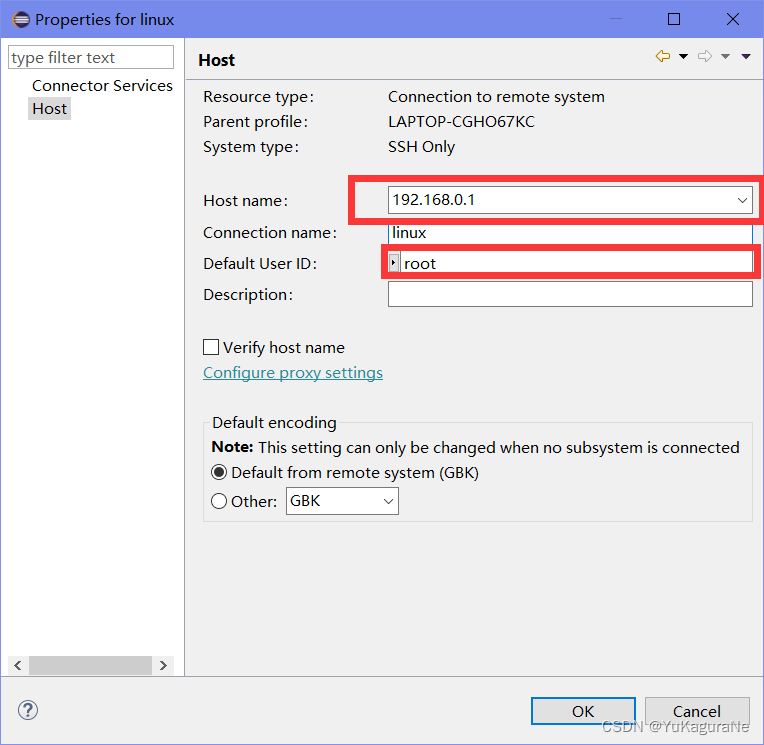
Note that the address in the red box is Board configuration ip Address ,eclipse visit linux, The host to linux.
Input Login username and password that will do
Then the binary file generated by the previous compilation hello_world Copied to the 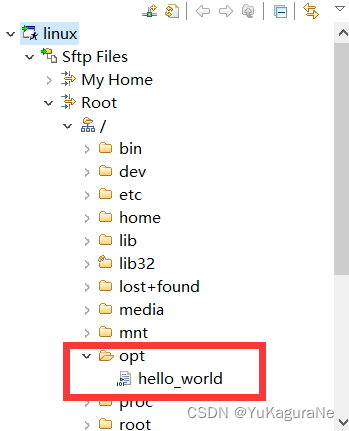
Root directory opt Under the document
Open the terminal in this directory
chmod +x hello_world

Modify the executable permissions of the file
./hello_world
Can run 
边栏推荐
- 什么是传输层协议TCP/UDP???
- OSPF comprehensive experiment
- 泰山OFFICE技术讲座:WORD的缩放比例与显示略有差异
- 中金财富炒股安全吗 手续费最便宜的证券公司
- 信用卡数字识别(opencv,代码分析)
- Creation and traversal of binary tree
- 【五分钟Paper】基于参数化动作空间的强化学习
- PS + PL heterogeneous multicore case development manual for Ti C6000 tms320c6678 DSP + zynq-7045 (4)
- Understand │ XSS attack, SQL injection, CSRF attack, DDoS attack, DNS hijacking
- TI C6000 TMS320C6678 DSP+ Zynq-7045的PS + PL异构多核案例开发手册(3)
猜你喜欢
bucher齿轮泵QX81-400R301

教大模型自己跳过“无用”层,推理速度×3性能不变,谷歌MIT这个新方法火了...
TI C6000 TMS320C6678 DSP+ Zynq-7045的ZYNQ PS + PL异构多核案例开发手册(1)

Research and application of the whole configuration of large humanoid robot

SAP ABAP 守护进程的实现方式

parker电磁阀D1VW020DNYPZ5
PS + PL heterogeneous multicore case development manual for Ti C6000 tms320c6678 DSP + zynq-7045 (2)

Interview with data center and Bi business (IV) -- look at the essence of ten questions

Deep packet inspection using cuckoo filter paper summary

Credit card number recognition (openCV, code analysis)
随机推荐
教大模型自己跳过“无用”层,推理速度×3性能不变,谷歌MIT这个新方法火了...
We were tossed all night by a Kong performance bug
开发日常小结(11):文件上传功能改进:中文字符检测与文本内容处理
MYSQL 命令大全
【C】 Flexible array
桌面应用布局图
How to convert planning map into vector data with longitude and latitude geojson
Pytorch installation CUDA corresponding
如何通过ETL调度工具 TASKCTL 使用作业插件类型调用 kettle作业?
换把人体工学椅,缓解久坐写代码的老腰吧~
我们被一个 kong 的性能 bug 折腾了一个通宵
理解卷积神经网络中的权值共享
工具技能学习(一):前置技能-makfile、make、.mk
阿里巴巴一面 :十道经典面试题解析
教程篇(7.0) 05. 通过FortiClient EMS发放FortiClient * FortiClient EMS * Fortinet 网络安全专家 NSE 5
潘多拉 IOT 开发板学习(RT-Thread)—— 实验17 ESP8266 实验(学习笔记)
How much help does solid state disk have for game operation
My brother created his own AI anti procrastination system, and he was "blinded" when playing with his mobile phone | reddit was hot
德国emg电动执行器EB800-60II
TI C6000 TMS320C6678 DSP+ Zynq-7045的PS + PL异构多核案例开发手册(4)