当前位置:网站首页>程序员女友给我做了一个疲劳驾驶检测
程序员女友给我做了一个疲劳驾驶检测
2022-06-30 18:07:00 【InfoQ】

开发背景

算法原理


ModelBox 介绍
易于开发
AI推理业务可视化编排开发,功能模块化,丰富组件库;c++,python多语言支持。

易于集成
集成云上对接的组件,云上对接更容易。

高性能,高可靠
pipeline并发运行,数据计算智能调度,资源管理调度精细化,业务运行更高效。

软硬件异构
CPU,GPU,NPU多异构硬件支持,资源利用更便捷高效。

全场景
视频,语音,文本,NLP全场景,专为服务化定制,云上集成更容易,端边云数据无缝交换。

易于维护
服务运行状态可视化,应用,组件性能实时监控,优化更容易。
模型训练

模型转换

开发环境部署

应用开发
创建工程
[email protected]:~/yourpath/v1.0.8.21$ sudo ./create.py -h

Usage: Create ModelBox project and flowunit

NOTE : you must firstly use bellow cmd to create a project in workspace
 create.py -t server -n your_proj_name {option: -s name, create this project from a solution}, support hilens deployment
 or create.py -t project -n your_proj_name {option: -s name, create this project from a solution}, generally not use
AND : use bellow cmd to create [c++|python|infer] flowunit in this project
 create.py -t c++ -n your_flowunit_name -p your_proj_name
AND : call workspace/your_proj_name/build_project.sh to build your project, call bin/main.sh[bat] to run
FINAL: create.py -t rpm -n your_proj_name to package your project (the same folder with create.py) if upload to hilens

NOTE: create.py -t editor {option: -i ip or ip:port to start editor server in your config ip:port}
NOTE: create.py -t demo to create solutions to runnable demo

for ex: create.py -t server -n my_det -s car_det

-h or --help:show help
-t or --template [c++|python|infer|yolo|project|server|rpm|editor|demo] create a template or package to rpm ...
-n or --name [your template name]
-p or --project [your project name when create c++|python|infer|yolo]
-s or --solution [the solution name when create project] create a project from solution
-c or --cfg [flowunit configure json, it's used by UI, you can use it too, but too complicated]
-v or --version:show sdk version


创建推理功能流单元


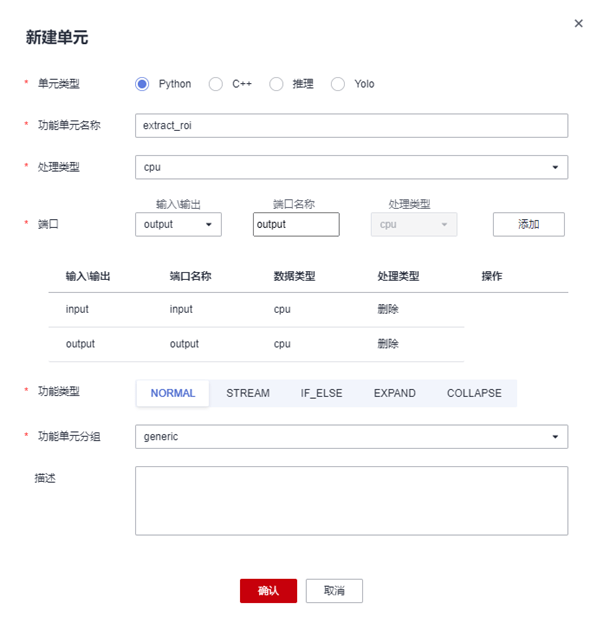
创建后处理功能单元


流程图编排


代码补全

`video_decoder [ type=flowunit flowunit=video_decoder device=rknpu deviceid="0" pix_fmt=bgr label="{{<in_video_packet> in_video_packet}|video_decoder|{<out_video_frame> out_video_frame}}" ]`
**推理单元**[flowunit-name]
|---[flowunit-name].toml #推理功能单元配置
|---[model].rknn #模型文件
|---[infer-plugin].so #推理自定义插件
[FlowUnitName]
 |---[FlowUnitName].toml
 |---[FlowUnitName].py
 |---xxx.py
# Copyright (c) Huawei Technologies Co., Ltd. 2022. All rights reserved.

#!/usr/bin/env python
# -*- coding: utf-8 -*-
import _flowunit as modelbox

class face_detect_postFlowUnit(modelbox.FlowUnit):
 # Derived from modelbox.FlowUnit
 def __init__(self):
 super().__init__()

 def open(self, config):
 # Open the flowunit to obtain configuration information
 return modelbox.Status.StatusCode.STATUS_SUCCESS

 def process(self, data_context):
 # Process the data
 in_data = data_context.input("in_1")
 out_data = data_context.output("out_1")

 # yolox_post process code.
 # Remove the following code and add your own code here.
 for buffer in in_data:
 response = "Hello World " + buffer.as_object()
 result = response.encode('utf-8').strip()
 add_buffer = modelbox.Buffer(self.get_bind_device(), result)
 out_data.push_back(add_buffer)

 return modelbox.Status.StatusCode.STATUS_SUCCESS

 def close(self):
 # Close the flowunit
 return modelbox.Status()

 def data_pre(self, data_context):
 # Before streaming data starts
 return modelbox.Status()

 def data_post(self, data_context):
 # After streaming data ends
 return modelbox.Status()

 def data_group_pre(self, data_context):
 # Before all streaming data starts
 return modelbox.Status()

 def data_group_post(self, data_context):
 # After all streaming data ends
return modelbox.Status()def process(self, data_context):
# Process the data
in_image = data_context.input("image")
in_feat = data_context.input("in_feat")
in_score = data_context.input("in_score")
has_face = data_context.output("has_face")
no_face = data_context.output("no_face")
# face_detect_post process code.
# Remove the following code and add your own code here.
for buffer_img, buffer_feat, buffer_score in zip(in_image, in_feat, in_score):
width = buffer_img.get('width')
height = buffer_img.get('height')
channel = buffer_img.get('channel')
img_data = np.array(buffer_img.as_object(), copy=False)
img_data = img_data.reshape((height, width, channel))
feat_data = np.array(buffer_feat.as_object(), copy=False)
feat_data = feat_data.reshape(896,16)
feat_score = np.array(buffer_score.as_object(), copy=False)
feat_score = feat_score.reshape(896,1)
dets = process_cpu(feat_data, feat_score, self.anchors)
if dets.shape[0] > 0:
box = [int(dets[0]*width), int(dets[1]*height),int(dets[2]*width),int(dets[3]*height)]
box = self.expend(box, height, width)
buffer_img.set("bboxes", box)
has_face.push_back(buffer_img)
else:
img_buffer = modelbox.Buffer(self.get_bind_device(), img_data)
img_buffer.copy_meta(buffer_img)
no_face.push_back(img_buffer)
return modelbox.Status.StatusCode.STATUS_SUCCESS
# 用于本地mock文件读取任务,脚本中已经配置了IVA_SVC_CONFIG环境变量, 添加了此文件路径
########### 请确定使用linux的路径类型,比如在windows上要用 D:/xxx/xxx 不能用D:\xxx\xxx ###########
# 任务的参数为一个压缩并转义后的json字符串
# 直接写需要转义双引号, 也可以用 content_file 添加一个json文件,如果content和content_file都存在content会被覆盖
# content_file支持绝对路径或者相对路径,不支持解析环境变量(包括${HILENS_APP_ROOT}、${HILENS_DATA_DIR}等)
[common]
content = "{\"param_str\":\"string param\",\"param_int\":10,\"param_float\":10.5}"

# 任务输入,mock模拟目前仅支持一路rtsp或者本地url
# rtsp摄像头,type = "rtsp", url里面写入rtsp地址
# 其它用"url",比如可以是本地文件地址, 或者httpserver的地址,(摄像头 url = "0")
[input]
type = "url"
url = "../data/fatigue.mp4"

# 任务输出,目前仅支持"webhook", 和本地输出"local"(输出到屏幕,url="0", 输出到rtsp,填写rtsp地址)
# (local 还可以输出到本地文件,这个时候注意,文件可以是相对路径,是相对这个mock_task.toml文件本身)
[output]
type = "local"
url = "../hilens_data_dir/fatigue.mp4"[email protected]:~/yourpath/v1.0.8.21/workspace/fatigue_detect$ sudo ./build_project.sh
./build_project.sh: line 26: dos2unix: command not found
./build_project.sh: line 26: dos2unix: command not found
./build_project.sh: line 26: dos2unix: command not found
./build_project.sh: line 26: dos2unix: command not found
./build_project.sh: line 26: dos2unix: command not found
./build_project.sh: line 26: dos2unix: command not found
./build_project.sh: line 26: dos2unix: command not found
./build_project.sh: line 26: dos2unix: command not found
build success: you can run main.sh in ./bin folder复制[email protected]:~/yourpath/v1.0.8.21/workspace/fatigue_detect$ sudo ./bin/main.sh复制

边栏推荐
- Is it safe to open an account for goucai? Is it reliable?
- Practice and Thinking on the architecture of a set of 100000 TPS im integrated message system
- Browser window switch activation event visibilitychange
- Develop those things: how to add text watermarks to videos?
- 年复一年,为什么打破数据孤岛还是企业发展的首要任务
- 全栈代码测试覆盖率及用例发现系统的建设和实践
- Cloud Native Landing Practice Using rainbond for extension dimension information
- torch stack() meshgrid()
- Rust 如何实现依赖注入?
- 屏幕显示技术进化史
猜你喜欢

How to seamlessly transition from traditional microservice framework to service grid ASM

Cobbler is easy to use

Pyth-Solana链上联通现实的桥梁

Reading notes of "high EQ means being able to talk"

TCP packet sticking problem

不同制造工艺对PCB上的焊盘的影响和要求
TCP粘包问题

Nodejs 安装与介绍

联想YOGA 27 2022,超强配置全面升级

Year after year, why is breaking the data island still the primary task of enterprise development
随机推荐
Iris, the web framework of go
Four tips tell you how to use SMS to promote business sales?
VMware16安装Win11虚拟机(最全步骤+踩坑)
Personally test the size of flutter after packaging APK, quite satisfied
20220607跌破建议零售价,GPU市场正全面走向供过于求...
Swin-transformer --relative positional Bias
The cloud native landing practice of using rainbow for Tuowei information
小小笔记-整型提升(C语言)
Practice and Thinking on the architecture of a set of 100000 TPS im integrated message system
开发那些事儿:如何在视频中添加文字水印?
CTF流量分析常见题型(二)-USB流量
Pytorch learning (III)
NBI可视化平台快速入门教程(五)编辑器功能操作介绍
Some interesting modules
法国A+ 法国VOC标签最高环保级别
How to improve the three passive situations in data analysis
服务器之间传文件夹,文件夹内容为空
Rust 如何实现依赖注入?
如何使用物联网低代码平台进行服务管理?
Sqlserver SQL Server Management Studio and transact SQL create accounts and create read-only users to access the specified database