当前位置:网站首页>TCL:在Quartus中使用tcl脚本语言进行管脚约束
TCL:在Quartus中使用tcl脚本语言进行管脚约束
2022-08-01 23:59:00 【刘颜儿】
前言
使用Quartus进行管脚约束时,管脚很多时,使用图像化界面去配置就会很麻烦 ,这种情况下可以采用tcl脚本语言进行管脚约束
正文
注意:导出文件之前,可以自己手动将管脚的Location全选,然后随便设置上管脚,这样才能确保导出的文件有管脚,导出后在这基础上修改即可 (可以同时选中多个一起操作哟,我今晚才发现的这个操作)
一、导出tcl
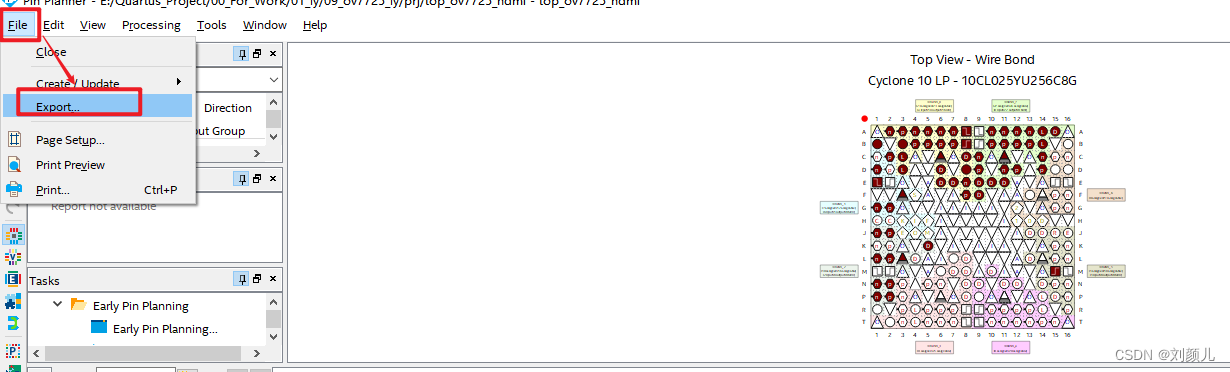
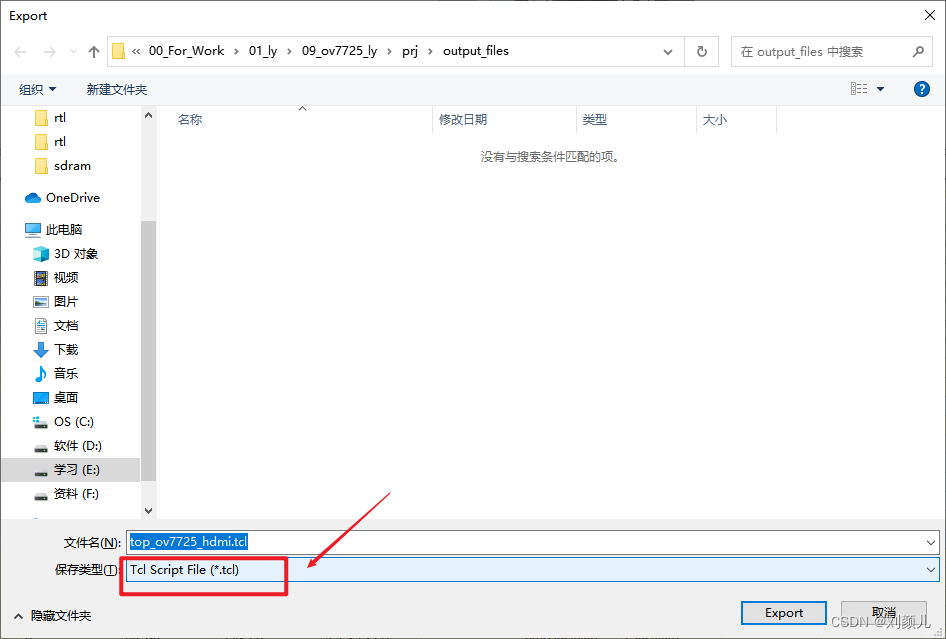
按照你自己管脚要求进行配置,我是对ov7725_hdmi的工程进行管脚约束
# Copyright (C) 2017 Intel Corporation. All rights reserved.
# Your use of Intel Corporation's design tools, logic functions
# and other software and tools, and its AMPP partner logic
# functions, and any output files from any of the foregoing
# (including device programming or simulation files), and any
# associated documentation or information are expressly subject
# to the terms and conditions of the Intel Program License
# Subscription Agreement, the Intel Quartus Prime License Agreement,
# the Intel FPGA IP License Agreement, or other applicable license
# agreement, including, without limitation, that your use is for
# the sole purpose of programming logic devices manufactured by
# Intel and sold by Intel or its authorized distributors. Please
# refer to the applicable agreement for further details.

# Quartus Prime Version 17.1.0 Build 590 10/25/2017 SJ Standard Edition
# File: C:\Users\Administrator\Desktop\top_odmi.tcl
# Generated on: Mon Aug 01 21:55:28 2022

package require ::quartus::project

set_location_assignment PIN_L1 -to hdmi_b_n
set_location_assignment PIN_L2 -to hdmi_b_p
set_location_assignment PIN_J1 -to hdmi_clk_n
set_location_assignment PIN_J2 -to hdmi_clk_p
set_location_assignment PIN_N1 -to hdmi_g_n
set_location_assignment PIN_N2 -to hdmi_g_p
set_location_assignment PIN_P1 -to hdmi_r_n
set_location_assignment PIN_P2 -to hdmi_r_p
set_location_assignment PIN_B3 -to i2c_scl
set_location_assignment PIN_A3 -to i2c_sda
set_location_assignment PIN_D1 -to ov7725_data[7]
set_location_assignment PIN_C3 -to ov7725_data[6]
set_location_assignment PIN_L3 -to ov7725_data[5]
set_location_assignment PIN_G2 -to ov7725_data[4]
set_location_assignment PIN_C2 -to ov7725_data[3]
set_location_assignment PIN_B1 -to ov7725_data[2]
set_location_assignment PIN_K5 -to ov7725_data[1]
set_location_assignment PIN_G1 -to ov7725_data[0]
set_location_assignment PIN_E6 -to ov7725_href
set_location_assignment PIN_B8 -to ov7725_pclk
set_location_assignment PIN_A8 -to ov7725_vsync
set_location_assignment PIN_F9 -to sdram_addr[12]
set_location_assignment PIN_F8 -to sdram_addr[11]
set_location_assignment PIN_A5 -to sdram_addr[10]
set_location_assignment PIN_E8 -to sdram_addr[9]
set_location_assignment PIN_C8 -to sdram_addr[8]
set_location_assignment PIN_D8 -to sdram_addr[7]
set_location_assignment PIN_E7 -to sdram_addr[6]
set_location_assignment PIN_C6 -to sdram_addr[5]
set_location_assignment PIN_D6 -to sdram_addr[4]
set_location_assignment PIN_A2 -to sdram_addr[3]
set_location_assignment PIN_B4 -to sdram_addr[2]
set_location_assignment PIN_A4 -to sdram_addr[1]
set_location_assignment PIN_B5 -to sdram_addr[0]
set_location_assignment PIN_B6 -to sdram_bank[1]
set_location_assignment PIN_A6 -to sdram_bank[0]
set_location_assignment PIN_C9 -to sdram_cke
set_location_assignment PIN_D3 -to sdram_clk
set_location_assignment PIN_A7 -to sdram_cs_n
set_location_assignment PIN_D14 -to sdram_dq[15]
set_location_assignment PIN_E11 -to sdram_dq[14]
set_location_assignment PIN_C14 -to sdram_dq[13]
set_location_assignment PIN_D12 -to sdram_dq[12]
set_location_assignment PIN_D11 -to sdram_dq[11]
set_location_assignment PIN_E10 -to sdram_dq[10]
set_location_assignment PIN_C11 -to sdram_dq[9]
set_location_assignment PIN_E9  -to sdram_dq[8]
set_location_assignment PIN_B11 -to sdram_dq[7]
set_location_assignment PIN_A12 -to sdram_dq[6]
set_location_assignment PIN_B12 -to sdram_dq[5]
set_location_assignment PIN_A13 -to sdram_dq[4]
set_location_assignment PIN_B13 -to sdram_dq[3]
set_location_assignment PIN_A14 -to sdram_dq[2]
set_location_assignment PIN_B14 -to sdram_dq[1]
set_location_assignment PIN_A15 -to sdram_dq[0]
set_location_assignment PIN_D9  -to sdram_dqm[1]
set_location_assignment PIN_A11 -to sdram_dqm[0]
set_location_assignment PIN_B7 -to sdram_ras_n
set_location_assignment PIN_B10 -to sdram_cas_n
set_location_assignment PIN_A10 -to sdram_we_n
set_location_assignment PIN_E1 -to sys_clk
set_location_assignment PIN_M15 -to sys_rst_n
set_location_assignment PIN_F3 -to xclk

set_instance_assignment -name IO_STANDARD "3.3-V LVTTL" -to hdmi_b_n
set_instance_assignment -name IO_STANDARD "3.3-V LVTTL" -to hdmi_b_p
set_instance_assignment -name IO_STANDARD "3.3-V LVTTL" -to hdmi_clk_n
set_instance_assignment -name IO_STANDARD "3.3-V LVTTL" -to hdmi_clk_p
set_instance_assignment -name IO_STANDARD "3.3-V LVTTL" -to hdmi_g_n
set_instance_assignment -name IO_STANDARD "3.3-V LVTTL" -to hdmi_g_p
set_instance_assignment -name IO_STANDARD "3.3-V LVTTL" -to hdmi_r_p
set_instance_assignment -name IO_STANDARD "3.3-V LVTTL" -to i2c_scl
set_instance_assignment -name IO_STANDARD "3.3-V LVTTL" -to hdmi_r_n
set_instance_assignment -name IO_STANDARD "3.3-V LVTTL" -to i2c_sda
set_instance_assignment -name IO_STANDARD "3.3-V LVTTL" -to ov7725_data[7]
set_instance_assignment -name IO_STANDARD "3.3-V LVTTL" -to ov7725_data[6]
set_instance_assignment -name IO_STANDARD "3.3-V LVTTL" -to ov7725_data[5]
set_instance_assignment -name IO_STANDARD "3.3-V LVTTL" -to ov7725_data[3]
set_instance_assignment -name IO_STANDARD "3.3-V LVTTL" -to ov7725_data[2]
set_instance_assignment -name IO_STANDARD "3.3-V LVTTL" -to ov7725_data[4]
set_instance_assignment -name IO_STANDARD "3.3-V LVTTL" -to ov7725_data[1]
set_instance_assignment -name IO_STANDARD "3.3-V LVTTL" -to ov7725_data[0]
set_instance_assignment -name IO_STANDARD "3.3-V LVTTL" -to ov7725_href
set_instance_assignment -name IO_STANDARD "3.3-V LVTTL" -to ov7725_pclk
set_instance_assignment -name IO_STANDARD "3.3-V LVTTL" -to ov7725_vsync
set_instance_assignment -name IO_STANDARD "3.3-V LVTTL" -to sdram_addr[12]
set_instance_assignment -name IO_STANDARD "3.3-V LVTTL" -to sdram_addr[11]
set_instance_assignment -name IO_STANDARD "3.3-V LVTTL" -to sdram_addr[10]
set_instance_assignment -name IO_STANDARD "3.3-V LVTTL" -to sdram_addr[9]
set_instance_assignment -name IO_STANDARD "3.3-V LVTTL" -to sdram_addr[8]
set_instance_assignment -name IO_STANDARD "3.3-V LVTTL" -to sdram_addr[7]
set_instance_assignment -name IO_STANDARD "3.3-V LVTTL" -to sdram_addr[6]
set_instance_assignment -name IO_STANDARD "3.3-V LVTTL" -to sdram_addr[5]
set_instance_assignment -name IO_STANDARD "3.3-V LVTTL" -to sdram_addr[4]
set_instance_assignment -name IO_STANDARD "3.3-V LVTTL" -to sdram_addr[3]
set_instance_assignment -name IO_STANDARD "3.3-V LVTTL" -to sdram_addr[2]
set_instance_assignment -name IO_STANDARD "3.3-V LVTTL" -to sdram_addr[1]
set_instance_assignment -name IO_STANDARD "3.3-V LVTTL" -to sdram_addr[0]
set_instance_assignment -name IO_STANDARD "3.3-V LVTTL" -to sdram_bank[1]
set_instance_assignment -name IO_STANDARD "3.3-V LVTTL" -to sdram_bank[0]
set_instance_assignment -name IO_STANDARD "3.3-V LVTTL" -to sdram_cke
set_instance_assignment -name IO_STANDARD "3.3-V LVTTL" -to sdram_clk
set_instance_assignment -name IO_STANDARD "3.3-V LVTTL" -to sdram_cs_n
set_instance_assignment -name IO_STANDARD "3.3-V LVTTL" -to sdram_dq[15]
set_instance_assignment -name IO_STANDARD "3.3-V LVTTL" -to sdram_dq[14]
set_instance_assignment -name IO_STANDARD "3.3-V LVTTL" -to sdram_dq[13]
set_instance_assignment -name IO_STANDARD "3.3-V LVTTL" -to sdram_dq[12]
set_instance_assignment -name IO_STANDARD "3.3-V LVTTL" -to sdram_dq[11]
set_instance_assignment -name IO_STANDARD "3.3-V LVTTL" -to sdram_dq[10]
set_instance_assignment -name IO_STANDARD "3.3-V LVTTL" -to sdram_dq[9]
set_instance_assignment -name IO_STANDARD "3.3-V LVTTL" -to sdram_dq[8]
set_instance_assignment -name IO_STANDARD "3.3-V LVTTL" -to sdram_dq[7]
set_instance_assignment -name IO_STANDARD "3.3-V LVTTL" -to sdram_dq[6]
set_instance_assignment -name IO_STANDARD "3.3-V LVTTL" -to sdram_dq[5]
set_instance_assignment -name IO_STANDARD "3.3-V LVTTL" -to sdram_dq[4]
set_instance_assignment -name IO_STANDARD "3.3-V LVTTL" -to sdram_dq[3]
set_instance_assignment -name IO_STANDARD "3.3-V LVTTL" -to sdram_dq[2]
set_instance_assignment -name IO_STANDARD "3.3-V LVTTL" -to sdram_dq[1]
set_instance_assignment -name IO_STANDARD "3.3-V LVTTL" -to sdram_dq[0]
set_instance_assignment -name IO_STANDARD "3.3-V LVTTL" -to sdram_dqm[1]
set_instance_assignment -name IO_STANDARD "3.3-V LVTTL" -to sdram_dqm[0]
set_instance_assignment -name IO_STANDARD "3.3-V LVTTL" -to sdram_ras_n
set_instance_assignment -name IO_STANDARD "3.3-V LVTTL" -to sdram_cas_n
set_instance_assignment -name IO_STANDARD "3.3-V LVTTL" -to sdram_we_n
set_instance_assignment -name IO_STANDARD "3.3-V LVTTL" -to sys_clk
set_instance_assignment -name IO_STANDARD "3.3-V LVTTL" -to sys_rst_n
set_instance_assignment -name IO_STANDARD "3.3-V LVTTL" -to xclk
set_instance_assignment -name CURRENT_STRENGTH_NEW "MAXIMUM CURRENT" -to sdram_addr[12]
set_instance_assignment -name CURRENT_STRENGTH_NEW "MAXIMUM CURRENT" -to sdram_addr[10]
set_instance_assignment -name CURRENT_STRENGTH_NEW "MAXIMUM CURRENT" -to sdram_addr[9]
set_instance_assignment -name CURRENT_STRENGTH_NEW "MAXIMUM CURRENT" -to sdram_addr[8]
set_instance_assignment -name CURRENT_STRENGTH_NEW "MAXIMUM CURRENT" -to sdram_addr[7]
set_instance_assignment -name CURRENT_STRENGTH_NEW "MAXIMUM CURRENT" -to sdram_addr[6]
set_instance_assignment -name CURRENT_STRENGTH_NEW "MAXIMUM CURRENT" -to sdram_addr[5]
set_instance_assignment -name CURRENT_STRENGTH_NEW "MAXIMUM CURRENT" -to sdram_addr[4]
set_instance_assignment -name CURRENT_STRENGTH_NEW "MAXIMUM CURRENT" -to sdram_addr[3]
set_instance_assignment -name CURRENT_STRENGTH_NEW "MAXIMUM CURRENT" -to sdram_addr[2]
set_instance_assignment -name CURRENT_STRENGTH_NEW "MAXIMUM CURRENT" -to sdram_addr[1]
set_instance_assignment -name CURRENT_STRENGTH_NEW "MAXIMUM CURRENT" -to sdram_addr[0]
set_instance_assignment -name CURRENT_STRENGTH_NEW "MAXIMUM CURRENT" -to sdram_bank[1]
set_instance_assignment -name CURRENT_STRENGTH_NEW "MAXIMUM CURRENT" -to sdram_bank[0]
set_instance_assignment -name CURRENT_STRENGTH_NEW "MAXIMUM CURRENT" -to sdram_cke
set_instance_assignment -name CURRENT_STRENGTH_NEW "MAXIMUM CURRENT" -to sdram_clk
set_instance_assignment -name CURRENT_STRENGTH_NEW "MAXIMUM CURRENT" -to sdram_cs_n
set_instance_assignment -name CURRENT_STRENGTH_NEW "MAXIMUM CURRENT" -to sdram_dq[15]
set_instance_assignment -name CURRENT_STRENGTH_NEW "MAXIMUM CURRENT" -to sdram_dq[14]
set_instance_assignment -name CURRENT_STRENGTH_NEW "MAXIMUM CURRENT" -to sdram_dq[8]
set_instance_assignment -name CURRENT_STRENGTH_NEW "MAXIMUM CURRENT" -to sdram_dq[9]
set_instance_assignment -name CURRENT_STRENGTH_NEW "MAXIMUM CURRENT" -to sdram_dq[6]
set_instance_assignment -name CURRENT_STRENGTH_NEW "MAXIMUM CURRENT" -to sdram_dq[5]
set_instance_assignment -name CURRENT_STRENGTH_NEW "MAXIMUM CURRENT" -to sdram_dq[4]
set_instance_assignment -name CURRENT_STRENGTH_NEW "MAXIMUM CURRENT" -to sdram_dq[3]
set_instance_assignment -name CURRENT_STRENGTH_NEW "MAXIMUM CURRENT" -to sdram_dq[2]
set_instance_assignment -name CURRENT_STRENGTH_NEW "MAXIMUM CURRENT" -to sdram_dq[1]
set_instance_assignment -name CURRENT_STRENGTH_NEW "MAXIMUM CURRENT" -to sdram_dq[0]
set_instance_assignment -name CURRENT_STRENGTH_NEW "MAXIMUM CURRENT" -to sdram_dq[7]
set_instance_assignment -name CURRENT_STRENGTH_NEW "MAXIMUM CURRENT" -to sdram_dqm[1]
set_instance_assignment -name CURRENT_STRENGTH_NEW "MAXIMUM CURRENT" -to sdram_dqm[0]
set_instance_assignment -name CURRENT_STRENGTH_NEW "MAXIMUM CURRENT" -to sdram_ras_n
set_instance_assignment -name CURRENT_STRENGTH_NEW "MAXIMUM CURRENT" -to sdram_we_n
set_instance_assignment -name CURRENT_STRENGTH_NEW "MAXIMUM CURRENT" -to sdram_dq[10]
set_instance_assignment -name CURRENT_STRENGTH_NEW "MAXIMUM CURRENT" -to sdram_dq[11]
set_instance_assignment -name CURRENT_STRENGTH_NEW "MAXIMUM CURRENT" -to sdram_dq[12]
set_instance_assignment -name CURRENT_STRENGTH_NEW "MAXIMUM CURRENT" -to sdram_dq[13]
二、导入tcl到工程
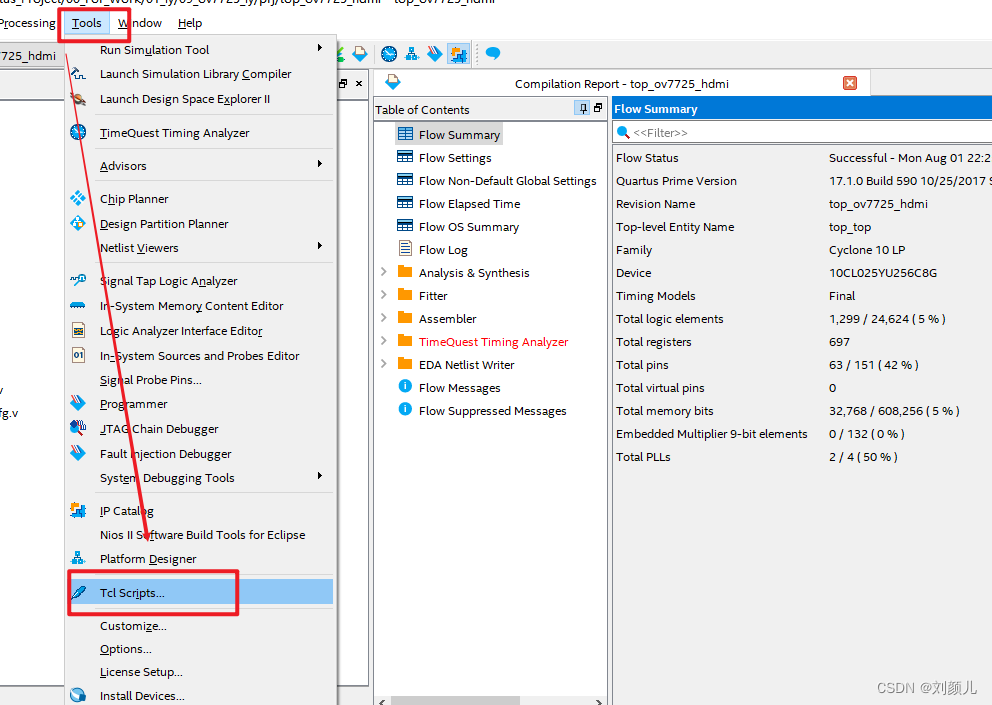
将刚刚配置好的文件导入进来

点击 run 后,回到管脚配置界面,即可看到所有管脚均已配置完成

边栏推荐
- How to reinstall Win11?One-click method to reinstall Win11
- Several interview questions about golang concurrency
- 软件测试之移动APP安全测试简析,北京第三方软件检测机构分享
- [Three sons] C language implements simple three sons
- With a monthly salary of 12K, the butterfly changed to a new one and moved forward bravely - she doubled her monthly salary through the career change test~
- 技术分享 | 接口测试中如何使用Json 来进行数据交互 ?
- security CSRF Vulnerability Protection
- 单片机遥控开关系统设计(结构原理、电路、程序)
- 经典文献阅读之--DLO
- DOM 事件及事件委托
猜你喜欢

工作5年,测试用例都设计不好?来看看大厂的用例设计总结

Use Jenkins for continuous integration, this knowledge point must be mastered
OpenCV DNN blogFromImage() detailed explanation

Wincc报表教程(SQL数据库的建立,wincc在数据库中保存和查询数据,调用Excel模板把数据保存到指定的位置和打印功能)
【MySQL系列】MySQL数据库基础

security CSRF Vulnerability Protection
UI自动化测试框架搭建-标记性能较差用例
Thymeleaf简介

Excel表格数据导入MySQL数据库

cdh6 opens oozieWeb page, Oozie web console is disabled.
随机推荐
12306抢票,极限并发带来的思考?
background-image使用
20220725 Information update
在linux下MySQL的常用操作命令
Convert LocalDateTime to Date type
Spark Sql之union
在CentOS下安装MySQL
@WebServlet注解(Servlet注解)
oozie startup error on cdh's hue, Cannot allocate containers as requested resource is greater than maximum allowed
Quartus 使用 tcl 文件快速配置管脚
Appears in oozie on CDH's hue, error submitting Coordinator My Schedule
尚硅谷MySQL学习笔记
控制电机的几种控制电路原理图
【MySQL系列】MySQL数据库基础
检查 Oracle 版本的 7 种方法
Thymeleaf简介
Share an interface test project (very worth practicing)
Enterprise firewall management, what firewall management tools are there?
月薪12K,蝶变向新,勇往直前—她通过转行测试实现月薪翻倍~
WEB安全基础 - - - XRAY使用