当前位置:网站首页>如何访问kubernetes API?
如何访问kubernetes API?
2022-07-02 21:32:00 【MyySophia】
什么是kube-apiserver
k8s API Server提供了k8s各类资源对象(pod,RC,Service等)的增删改查及watch等HTTP Rest接口,是整个系统的数据总线和数据中心。
kubernetes API Server的功能:
提供了集群管理的REST API接口(包括认证授权、数据校验以及集群状态变更);
提供其他模块之间的数据交互和通信的枢纽(其他模块通过API Server查询或修改数据,只有API Server才直接操作etcd);
是资源配额控制的入口;
拥有完备的集群安全机制.
如何访问kubernetes API
大多数K8S API资源类型是“objects”,代表群集上的概念的具体实例,如pod或namespace。少数API资源类型是virtual,通常表示操作而不是对象,例如权限检查。所有对象都将具有唯一的名称以允许幂等创建和检索,但如果virtual资源类型不可检索或不依赖于幂等,则virtual资源类型可能不具有唯一名称。
1.使用kubectl proxy访问
1.1.本地监听
启动kubectl proxy,不带任何参数只在本地监听,使用的是http协议,无需提供任何凭证就可以访问。
只能在本地监听。
kubectl proxy
Starting to serve on 127.0.0.1:8001
验证api访问
[[email protected] /etc/kubernetes]#curl http://127.0.0.1:8001/version
{

  "major": "1",
  "minor": "23",
  "gitVersion": "v1.23.8",
  "gitCommit": "a12b886b1da059e0190c54d09c5eab5219dd7acf",
  "gitTreeState": "clean",
  "buildDate": "2022-06-16T05:51:36Z",
  "goVersion": "go1.17.11",
  "compiler": "gc",
  "platform": "linux/amd64"
}
1.2.网络监听
启动kubectl proxy,使用网卡IP,从其他机器访问, --accept-hosts=‘^*$’ 表示接受所有源IP,否则会显示不被授权。
此种方式可以用于集群内部的操作,比如开发需要调用pod的时候可以使用这种方式。
[[email protected] ~]#kubectl proxy --address='10.50.10.32' --accept-hosts='^*$' --port=8001
Starting to serve on 10.50.10.32:8001


[[email protected] /spkshare1/Virtualbox VMS]#curl http://10.50.10.32:8001/version
{

  "major": "1",
  "minor": "23",
  "gitVersion": "v1.23.8",
  "gitCommit": "a12b886b1da059e0190c54d09c5eab5219dd7acf",
  "gitTreeState": "clean",
  "buildDate": "2022-06-16T05:51:36Z",
  "goVersion": "go1.17.11",
  "compiler": "gc",
  "platform": "linux/amd64"
}
只要能访问到10.50.10.32 的机器都可以访问:
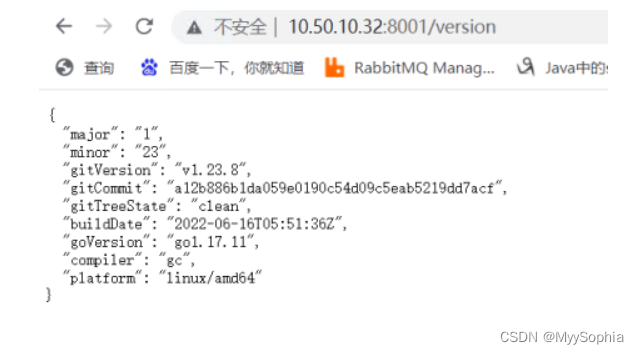
有很多rest API供你调用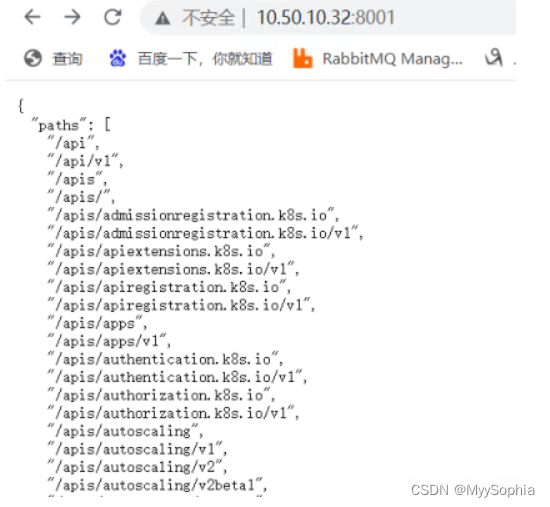
访问一个pod也是没有问题的

当然这些方式都是非安全方式的,更安全的方式是认证访问.
2.直接访问api
2.1.获取集群名称和api地址
[[email protected] /var/log/containers]#kubectl config view -o jsonpath='{"Cluster name\tServer\n"}{range .clusters[*]}{.name}{"\t"}{.cluster.server}{"\n"}{end}'
Cluster name	Server
kubernetes	https://10.50.10.108:6443

# 将其使用变量导出,可以定义到环境变量,方面调试
export CLUSTER_NAME="kubernetes"
APISERVER=$(kubectl config view -o jsonpath="{.clusters[?(@.name==\"$CLUSTER_NAME\")].cluster.server}")
2.2.使用serviceaccount来访问
Service Account:kubernetes管理的账号,用于为Pod中的服务进程在访问Kubernetes时提供身份标识。
创建serviceaccount并绑定集群角色cluster-admin
kubectl create serviceaccount  sa-chot
kubectl create clusterrolebinding   sa-chot-cluster-admin --clusterrole='cluster-admin' --serviceaccount=default:sa-chot
获取serviceaccount sa-chot 的secret token
token也可以export到环境变量,方便调试
TOKEN=$(kubectl get secrets -o jsonpath="{.items[?(@.metadata.annotations['kubernetes\.io/service-account\.name']=='sa-chot')].data.token}"|base64 -d)
使用token访问api
curl --header "Authorization: Bearer $TOKEN" --insecure  -X GET $APISERVER/api/v1/namespaces/dev/pods?limit=1
curl --header "Authorization: Bearer $TOKEN" --insecure  -X GET $APISERVER/api/v1/namespaces/default/pods?limit=1
curl --header "Authorization: Bearer $TOKEN" --insecure  -X GET $APISERVER/api/v1/namespaces/kube-system/pods?limit=1
serviceaccount虽然是区分namespace的,但是不影响使用这个token访问所有namespace的资源。
2.3.使用useraccount来访问
- 一般是独立于kubernetes之外的其他服务管理的用户账号。
创建user chot的证书
openssl genrsa -out chot.key 2048
openssl req -new -key chot.key -out chot.csr -subj "/CN=chot"
openssl x509 -req -in chot.csr -out chot.crt -sha1 -CA ca.crt -CAkey ca.key  -CAcreateserial -days 3650
创建角色getpods,创建角色绑定user chot和role getpods
kubectl create role getpods --verb=get --verb=list --resource=pods
kubectl create rolebinding chot-getpods --role=getpods --user=chot --namespace=default
验证访问是否正常
curl --cert /etc/kubernetes/pki/chot.crt -X GET $APISERVER/api/v1/namespaces/default/pods?limit=1 --key /etc/kubernetes/pki/chot.key --insecure
验证用户chot不具备访问namespace kube-system的权限
curl --cert /etc/kubernetes/pki/chot.crt   -X GET $APISERVER/api/v1/namespaces/kube-system/pods?limit=1 --key /etc/kubernetes/pki/chot.key  --insecure
{

  "kind": "Status",
  "apiVersion": "v1",
  "metadata": {


  },
  "status": "Failure",
  "message": "pods is forbidden: User \"chot\" cannot list resource \"pods\" in API group \"\" in the namespace \"kube-system\"",
  "reason": "Forbidden",
  "details": {

    "kind": "pods"
  },
  "code": 403
}
3.常用api资源
以下为常用资源的URL路径,将/apis/GROUP/VERSION/替换为/api/v1/,则表示基础API组
/apis/GROUP/VERSION/RESOURCETYPE
/apis/GROUP/VERSION/RESOURCETYPE/NAME
/apis/GROUP/VERSION/namespaces/NAMESPACE/RESOURCETYPE
/apis/GROUP/VERSION/namespaces/NAMESPACE/RESOURCETYPE/NAME
/apis/GROUP/VERSION/RESOURCETYPE/NAME/SUBRESOURCE
/apis/GROUP/VERSION/namespaces/NAMESPACE/RESOURCETYPE/NAME/SUBRESOURCE
查看扩展api里的资源deployments
curl http://127.0.0.1:8001/apis/extensions/v1beta1/namespaces/kube-system/deployments
查看基础api里的资源pods
curl http://127.0.0.1:8001/api/v1/namespaces/kube-system/pods/
3.1.使用watch持续监控资源的变化
curl  http://127.0.0.1:8001/api/v1/namespaces/test/pods
"resourceVersion": "2563046"
curl  http://127.0.0.1:8001/api/v1/namespaces/test/pods?watch=1&resourceVersion=2563046
3.2.查看前n个资源
curl  http://127.0.0.1:8001/api/v1/namespaces/kube-system/pods?limit=1
"continue": "eyJ2IjoibWV0YS5rOHMuaW8vdjEiLCJydiI6MjU2NDk2Mywic3RhcnQiOiJjYWxpY28tbm9kZS1jejZrOVx1MDAwMCJ9"
使用continue token查看下n个资源
curl 'http://127.0.0.1:8001/api/v1/namespaces/kube-system/pods?limit=1&continue=eyJ2IjoibWV0YS5rOHMuaW8vdjEiLCJydiI6MjU3MTYxMSwic3RhcnQiOiJjYWxpY28ta3ViZS1jb250cm9sbGVycy01Y2JjY2NjODg1LWt2bGRyXHUwMDAwIn0'
4.资源的类型
资源分类:Workloads,Discovery & LB ,Config & Storage,Cluster,Metadata
资源对象:Resource ObjectMeta,ResourceSpec,ResourceStatus
资源操作:create,update(replace&patch),read(get&list&watch),delete,rollback,read/write scale,read/write status
5.Workloads的操作
如果要开发一款类似于kuboard的工具,这些REST API将非常有用.
以pod为例,介绍workloads apis,以下为pod的yaml文件
apiVersion: v1
kind: Pod
metadata:
  name: pod-example
spec:
  containers:
  - name: ubuntu
    image: ubuntu:trusty
    command: ["echo"]
    args: ["Hello World"]
5.1. 创建pod
POST /api/v1/namespaces/{namespace}/pods
查看当前pods
# kubectl -n test get pods
NAME       READY   STATUS             RESTARTS   AGE
使用api创建pod
curl --request POST http://127.0.0.1:8001/api/v1/namespaces/test/pods -s -w "状态码是:%{http_code}\n" -o /dev/null -H 'Content-Type: application/yaml' --data 'apiVersion: v1 kind: Pod metadata: name: pod-example spec: containers: - name: ubuntu image: ubuntu:trusty command: ["echo"] args: ["Hello World"]'
状态码是:201
查看当前pods
#kubectl -n test get pods
NAME          READY   STATUS              RESTARTS   AGE
pod-example   0/1     ContainerCreating   0          4s
状态码
200 Ok
201 Created
202 Accepted
5.2.删除pod
DELETE /api/v1/namespaces/{namespace}/pods/{name}
查看当前pods
kubectl get pods -n test --show-labels
NAME          READY   STATUS             RESTARTS   AGE     LABELS
pod-example   0/1     CrashLoopBackOff   1          15s     <none>
删除pod pod-example
curl --request DELETE http://127.0.0.1:8001/api/v1/namespaces/test/pods/pod-example -o /dev/null  -s -w "状态码是:%{http_code}\n"
状态码是:200
查看当前pods
kubectl get pods -n test --show-labels
NAME          READY   STATUS             RESTARTS   AGE     LABELS
pod-example   0/1     Terminating        2          28s     <none>
状态码
200 Ok
202 Accepted
边栏推荐
- Redis distributed lock failure, I can't help but want to burst
- ctf-HCTF-Final-Misc200
- Research Report on market supply and demand and strategy of microplate instrument industry in China
- 5 environment construction spark on yarn
- Research Report on minimally invasive medical robot industry - market status analysis and development prospect prediction
- Gbase 8s database basic syntax
- Share the easy-to-use fastadmin open source system - Installation
- The neo4j skill tree was officially released to help you easily master the neo4j map database
- Cardinality sorting (detailed illustration)
- Construction and maintenance of business website [3]
猜你喜欢
Basic knowledge of tree and binary tree (detailed illustration)
![[error record] the command line creates an error pub get failed (server unavailable) -- attempting retry 1 in 1 second](/img/6e/c82ff02a249b5d275a4589120a197a.jpg)
[error record] the command line creates an error pub get failed (server unavailable) -- attempting retry 1 in 1 second
MySQL learning record (9)
MySQL learning record (4)
Find objects you can't see! Nankai & Wuhan University & eth proposed sinet for camouflage target detection, and the code has been open source
How does esrally perform simple custom performance tests?
![[zero foundation I] Navicat download link](/img/23/e7808884152eeaf186fe756d6adac6.png)
[zero foundation I] Navicat download link

Spend more time with your computer on this special holiday, HHH
![[shutter] statefulwidget component (floatingactionbutton component | refreshindicator component)](/img/17/b5889ec263687aeacf19214785ea8a.jpg)
[shutter] statefulwidget component (floatingactionbutton component | refreshindicator component)
MySQL learning record (3)
随机推荐
Redis distributed lock failure, I can't help but want to burst
How does esrally perform simple custom performance tests?
Research Report on crude oil tanker industry - market status analysis and development prospect forecast
Record the problems encountered by nodejs asynchronism
Cardinality sorting (detailed illustration)
Research Report on market supply and demand and strategy of China's Plastic Geogrid industry
Analysis of enterprise financial statements [4]
I drew a Gu ailing with characters!
China's log saw blade market trend report, technological innovation and market forecast
[shutter] shutter layout component (wrap component | expanded component)
[hands on deep learning]02 softmax regression
Go cache of go cache series
Analyze comp-206 advanced UNIX utils
Construction and maintenance of business websites [4]
Construction and maintenance of business websites [7]
Basic IO interface technology - microcomputer Chapter 7 Notes
[12] the water of the waves is clear, which can wash my tassel. The water of the waves is muddy, which can wash my feet
System (hierarchical) clustering method and SPSS implementation
rwctf2022_ QLaaS
Chinese Indian seasoning market trend report, technical dynamic innovation and market forecast