当前位置:网站首页>UE4 animation redirection
UE4 animation redirection
2022-06-29 09:29:00 【Deveuper】
UE4 in , Use animation redirection , Modify the imported humanoid bones , And apply the existing animation in the engine .
One . Available animation models
UE4 By default there is a basic set of humanoid bones ( Same as Unity), commonly UE4 Mall animation uses Humanoid Rig.
If the mall is being introduced , There is “Rigged to Epic skeleton Yes”, You can use Epic Animation resources provided .

Two . Specific operation
1. Open panel
windows - Retarget Manager panel - Choose to use Rig manipulation .

2. Compare using animated bone modifications
Open the original animated bones , Compare with the imported new model bones .
If the bones of the original animation are selected Rig yes Humanoid, The skeleton of the new model is also Humanoid.

3. Turn on the bone display
Display bones in the interface

4. Adjust the new model bones to the same pose as the animation bones
View two bone models , Based on the original animation model bones , Adjust the position of the new model bones 、 angle 、 The zoom , Find the difference .
Select the different bones , stay Detail The palette , Modify the original animation model .

Modified to complete . As shown in the figure below .

5. Apply the modified bone
stay Retarget Manager Lower right corner of panel , Click on Modify Pose, Choose Use CurrentPose.

At the same time to modify Preview Model , And save .

6. Create a retargeted backward animation
Find the original model animation file , Right click after selection - Retarget Anim Assets -- Duplicate Anim Assets and Retarget
Be careful : This method can be used in animation files 、 Animation blending 、 Animation montage and other resources , Right click to select .

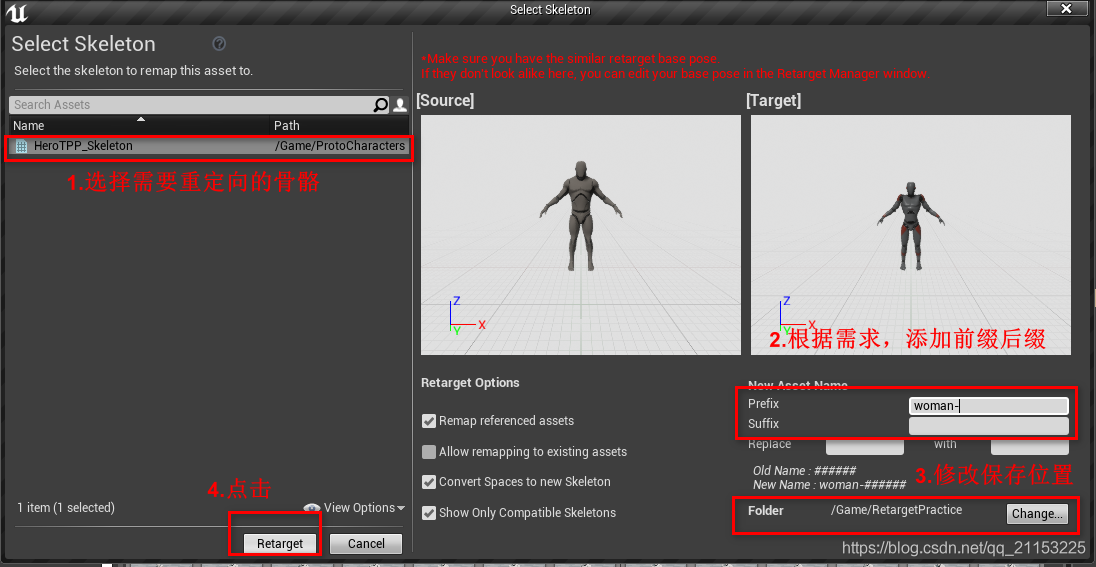
In the panel that appears , Select redirect bones , Check whether the pose of the two models is the same in the right interface .
Add pre suffixes as needed 、 Modify the saved path . Click on Retarget To complete the operation .
7. Adjust again
Locate the retargeted backward animation resource in the save path , If the action does not match the target , You need to enter the bone panel of the new model , Adjust again .
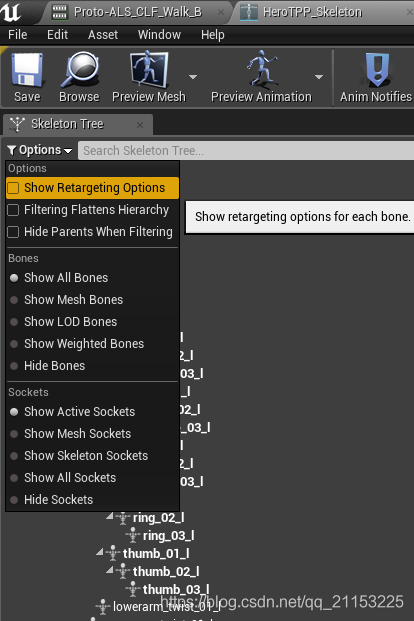
stay SkeletonTree in , Click on Option - Show Retargeting Options , Turn on redirection options .
Select the base for the bone motion . In this example, the animation is all set to Based on bones
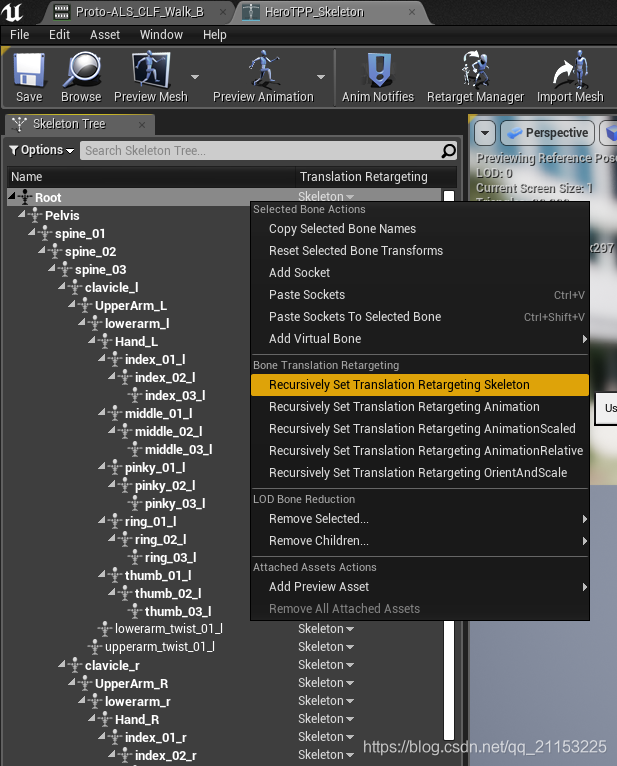
After modification , Repeat step... Again 6 Step by step . See if the animation is correct . Complete animation redirection .

边栏推荐
- Write down some written test questions
- Remember to customize the top navigation bar of wechat applet
- 微信小程序子组件向页面传值(父子组件间的通信)带源码
- train_ on_ Batch save the image of the loss function change
- UE4 动画重定向
- Understanding of singleton mode
- 1.4 机器学习方法之回归问题
- UE4 材质UV纹理不随模型缩放拉伸
- Wechat applet sharing page, sharing to the circle of friends
- Simple use of promise method
猜你喜欢

Open3d farthest point sampling (FPS)
基于区域注意的通用目标检测
What exactly does Devops mean?

微信小程序底部导航栏中间突出

Laravel 8 enables the order table to be divided by month level

Write down some written test questions

Augfpn: amélioration de l'apprentissage des caractéristiques à plusieurs échelles pour la détection des cibles
GD32F4xx 以太网芯片(enc28j60)驱动移植

1.4 机器学习方法之回归问题

What is hyperfusion? What is the difference with traditional architecture
随机推荐
(transfer) mysql: error 1071 (42000): specified key was too long; max key length is 767 bytes
Wechat applet project: wechat applet page layout
pytorch总结—TENSOR ON GPU
网络安全问题
3DMax 卡死、白屏、渲染死机问题总结
Mysql database and table splitting strategy and application scenarios
Keras to tf Vgg19 input in keras_ shape
Twinmotion beginner tutorial
Twinmotion 初学者教程
UE4 材质UV纹理不随模型缩放拉伸
ServerApp. iopub
Jar package and war package
AugFPN:改进多尺度特征学习用于目标检测
爱快安装或重置后,PC或手机端获取不到ip
GPU训练云平台记录
NPM common commands
如何将谷歌浏览器设置为默认浏览器
UE4 display 3D editable points in Viewport
Written test question "arrange version numbers from large to small"
(转)MySQL: ERROR 1071 (42000): Specified key was too long; max key length is 767 bytes