当前位置:网站首页>基于OpenCV的轮廓检测(2)
基于OpenCV的轮廓检测(2)
2022-07-27 01:54:00 【求则得之,舍则失之】
在本章中,我们将学习
- 一些常用的属性,如Solidity,等效直径,掩模图像,平均强度等。
- 质心(Centroid)、面积(Area)、周长(Perimeter)等也属于这一类,但我们在上一篇已经学习过
- 凸度缺陷及如何找到它们。
- 最短距离:从一个点到一个多边形的最短距离
- 匹配不同的形状
import cv2 as cv
import numpy as np

img = cv.imread('star.jpg', 0)
ret2, thresh = cv.threshold(img, 127, 255, cv.THRESH_BINARY_INV)
contours, hierarchy2 = cv.findContours(thresh, 1, 2)
# contours, hierarchy = cv.findContours(thresh, cv.RETR_TREE, cv.CHAIN_APPROX_SIMPLE)
cnt = contours[1]
1. 横纵比

# 它是物体的边界矩形的宽度与高度之比。
x, y, w, h = cv.boundingRect(cnt)
aspect_ratio = float(w) / h
2.Extent

# Extent是等轮廓面积与边界矩形面积的比值。
area = cv.contourArea(cnt)
x, y, w, h = cv.boundingRect(cnt)
rect_area = w * h
extent = float(area) / rect_area
3.Solidity
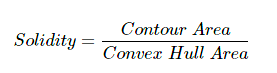
# Solidity是轮廓面积与其凸包面积之比。
area = cv.contourArea(cnt)
hull = cv.convexHull(cnt)
hull_area = cv.contourArea(hull)
solidity = float(area) / hull_area
4.等效直径

# 等效直径是指面积与轮廓面积相等的圆的直径。
area = cv.contourArea(cnt)
equi_diameter = np.sqrt(4 * area / np.pi)
5.方向
# 方向是物体所指向的角度。下面的方法也给出了长轴和短轴的长度。
(x, y), (MA, ma), angle = cv.fitEllipse(cnt)
6. 掩模和像素点
# 在某些情况下,我们可能需要包含该对象的所有点。可以这样做:
mask = np.zeros(img.shape, np.uint8)
cv.drawContours(mask, [cnt], 0, 255, -1)
pixelpoints = np.transpose(np.nonzero(mask))  # 转置
# pixelpoints = cv.findNonZero(mask)
# 这里给出了两个方法,一个使用Numpy函数,另一个使用OpenCV函数(最后一个注释行)来完成相同的操作。结果也是相同的,但略有不同。
# Numpy给出了**(row, column)**格式的坐标,而OpenCV给出了**(x,y)**格式的坐标。所以基本上答案会互换。注意,row = y, column = x。
7.最大值最小值以及对应的位置
# 我们可以通过掩膜图像找到这些参数。
min_val, max_val, min_loc, max_loc = cv.minMaxLoc(img, mask=mask)
8.平均颜色或平均强度
# 在这里,我们可以找到一个物体的平均颜色。也可以是灰度模式下物体的平均强度。我们再次使用相同的掩膜来完成。
mean_val = cv.mean(img, mask=mask)
9.极值点
# 极值点是指物体的最上方、最下方、最右边和最左边的点。
leftmost = tuple(cnt[cnt[:, :, 0].argmin()][0])
rightmost = tuple(cnt[cnt[:, :, 0].argmax()][0])
topmost = tuple(cnt[cnt[:, :, 1].argmin()][0])
bottommost = tuple(cnt[cnt[:, :, 1].argmax()][0])

10.凸缺陷
# 物体与凸包的任何偏差都可以被认为是凸缺陷。
# OpenCV提供了一个现成的函数,cv.convexitydefects()。基本的函数调用如下所示:
hull = cv.convexHull(cnt, returnPoints=False)
defects = cv.convexityDefects(cnt, hull)
# 记住,为了找到凸缺陷,我们必须传递returnPoints = False。
# 它返回一个数组,其中每一行包含这些值—[起始点、结束点、最远点、到最远点的近似距离]。我们可以使用一个可视化图像。
# 我们从开始点到结束点画一条线,然后在最远的点上画一个圆。记住,返回的前三个值是cnt的索引。所以我们必须从cnt中引入这些值。
img = cv.imread('star.jpg')
img_gray = cv.cvtColor(img, cv.COLOR_BGR2GRAY)
ret, thresh = cv.threshold(img_gray, 127, 255, cv.THRESH_BINARY_INV)
contours, hierarchy = cv.findContours(thresh, 2, 1)
cnt = contours[0]
hull = cv.convexHull(cnt, returnPoints=False)
defects2 = cv.convexityDefects(cnt, hull)
for i in range(defects2.shape[0]):
    s, e, f, d = defects2[i, 0]
    start = tuple(cnt[s][0])
    end = tuple(cnt[e][0])
    far = tuple(cnt[f][0])
    cv.line(img, start, end, [0, 255, 0], 2)
    cv.circle(img, far, 5, [0, 0, 255], -1)
cv.imshow('img', img)
cv.waitKey(0)
cv.destroyAllWindows()

11.点多边形测试
这个函数查找图像中一个点和轮廓线之间的最短距离。它返回距离,当点在轮廓外时为负,当点在轮廓内时为正,如果点在轮廓上则为零。
# 例如,我们可以这样检查点(50,50):
dist = cv.pointPolygonTest(cnt, (50, 50), True)
在函数中,第三个参数是measureDist。如果它为真,它会找到带符号的距离。如果为False,它会查找点是在轮廓线内还是在轮廓线外(分别返回+1,-1,0)。
如果你不想求距离,请确保第三个参数为False,因为这是一个耗时的过程。因此,将其设置为False将提供2-3倍的加速。
12.形状匹配
OpenCV附带了一个函数cv.matchShapes(),它使我们能够比较两个形状或两个轮廓,并返回一个显示相似性的指标。结果越低,说明匹配得越好。它是根据Hu矩计算的。文档中解释了不同的测量方法。
img1 = cv.imread('star.jpg', 0)
img2 = cv.imread('star2.jpg', 0)
ret2, thresh = cv.threshold(img1, 127, 255, cv.THRESH_BINARY_INV)
ret3, thresh2 = cv.threshold(img2, 127, 255, 0)
contours, hierarchy = cv.findContours(thresh, 2, 1)
cnt1 = contours[0]
contours, hierarchy2 = cv.findContours(thresh2, 2, 1)
cnt2 = contours[0]
ret = cv.matchShapes(cnt1, cnt2, 1, 0.0)
print(ret)
# 我尝试匹配不同的形状,如下所示:
# 我得到了以下结果:
# 匹配图像A与自身= 0.0
# 匹配图像A与图像B = 0.001946
# 匹配图像A与图像C = 0.326911
# 甚至图像旋转不影响结果
参考目录
https://docs.opencv.org/4.x/d5/d45/tutorial_py_contours_more_functions.html
边栏推荐
- [learn FPGA programming from scratch -54]: high level chapter - FPGA development based on IP core - principle and configuration of PLL PLL IP core (Altera)
- Explain
- Code practice when the queue reaches the maximum length
- [learning notes, dog learning C] string + memory function
- Post responsibilities of safety officer and environmental protection officer
- Idea 中添加支持@Data 插件
- 二叉树(北京邮电大学机试题)(DAY 85)
- Data Lake (20): Flink is compatible with iceberg, which is currently insufficient, and iceberg is compared with Hudi
- 图解 SQL,这也太形象了吧!
- A new paradigm of distributed deep learning programming: Global tensor
猜你喜欢

Explain tool actual operation

Spark Learning Notes (IV) -- spark core programming RDD
Graphic SQL, this is too vivid!

vector 转 svg 方法

Customer cases | pay attention to the elderly user experience, and the transformation of bank app to adapt to aging should avoid falsehood and be practical

30 minutes to thoroughly understand the synchronized lock upgrade process

impala 执行计划详解
Explain工具实际操作

spark:地区广告点击量排行统计(小案例)
【学习笔记之菜Dog学C】字符串+内存函数
随机推荐
Submodule cache cache failure
spark学习笔记(五)——sparkcore核心编程-RDD转换算子
How to uniquely identify a user SQL in Youxuan database cluster
Worthington果胶酶的特性及测定方案
积分发放带给商家的两个帮助
pip3 设置阿里云
最大连续子序列(DAY 77)
[从零开始学习FPGA编程-54]:高阶篇 - 基于IP核的FPGA开发-PLL锁相环IP核的原理与配置(Altera)
Spark: ranking statistics of regional advertising hits (small case)
如何进行 360 评估
redis入门练习
【常用搜索问题】111
[common search questions] 111
easyui中textbox在光标位置插入内容
30分钟彻底弄懂 synchronized 锁升级过程
“date: write error: No space left on device”解决
[learning notes, dog learning C] string + memory function
196. Delete duplicate email addresses
[understanding of opportunity -52]: the depth of communication varies from person to person
客户案例 | 关注老年用户体验,银行APP适老化改造要避虚就实